

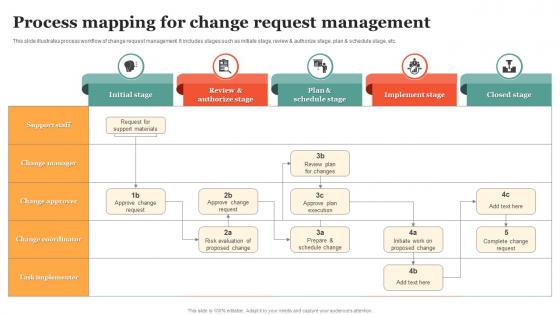
Process Mapping For Change Request Management




Try Before you Buy Download Free Sample Product
 Impress Your
 Audience
 100%
100% Editable
 Save Hours
 of Time


This slide illustrates process workflow of change request management. It includes stages such as initiate stage, review and authorize stage, plan and schedule stage, etc.
People who downloaded this PowerPoint presentation also viewed the following :
Process Mapping For Change Request Management with all 6 slides:
Use our Process Mapping For Change Request Management to effectively help you save your valuable time. They are readymade to fit into any presentation structure.





FAQs for Process Mapping For
So process mapping is basically like putting on glasses for the first time - suddenly you see how work actually moves around instead of how you assumed it did. You'll catch all those annoying bottlenecks and duplicate steps that eat up time. Honestly, mapping out something you've done forever can be pretty shocking. Training new hires becomes way less painful too since everything's already documented. But here's the real kicker: you stop guessing where problems are and know exactly what needs fixing. Oh, and definitely start with whatever process makes you want to scream first.
Dude, process mapping is basically like drawing out your workflow so everyone knows what's happening. No more "wait, who's doing this?" confusion. You can actually see where things get stuck or handed off weirdly. Way better than trying to explain everything in some long email that nobody reads anyway. Honestly, the visual part makes such a difference – you'll spot problems you didn't even know existed. Try sketching it out with your team next time before jumping into a project. Trust me, you'll save yourself so many headaches later.
So for process mapping tools, I'd say start with whatever your company already pays for - no point fighting IT for new software. Lucidchart and Visio are the go-to options, super easy with built-in templates. Want free? Try diagrams.net (used to be draw.io) - bit ugly but works great once you get used to it. Miro's awesome if your team loves that collaborative sticky note chaos. PowerPoint actually works too if you're desperate, though don't quote me on that lol. The tool honestly matters less than just making something people will actually use.
Here's the thing - when you map out your process visually, bottlenecks just jump out at you. You can see exactly where stuff gets backed up or stuck waiting around. Maybe everything lands on one person's desk, or there's some approval step that kills momentum every time. It's honestly way easier than trying to figure it out while you're in the middle of the chaos. Plus you start noticing weird patterns, like how that one system always seems to crash right when you need it. Once it's all laid out, you can actually fix the problems instead of just being frustrated by them.
Yeah, definitely works for both! Manufacturing is pretty straightforward - you're just tracking stuff moving through production lines, quality checks, that whole assembly thing. Service industries are honestly way more annoying to map out. You're dealing with customer interactions, support tickets bouncing between people, loan applications sitting in someone's inbox for who knows how long. More human drama basically. I'd figure out your main processes first, then pick whatever mapping style makes sense. The physical stuff is easier to visualize, but service workflows... there's just more chaos involved.
Don't go crazy with details from day one - that's where most people mess up. You'll spend forever on tiny steps and never get the big picture done. Walk through the actual process with whoever's doing the work instead of guessing what happens. I can't tell you how many gorgeous maps I've seen that are completely wrong because someone just assumed stuff. Grab some sticky notes first, forget the fancy software for now. Start broad, then zoom in on the messy parts. Way easier to make it look pretty once you know it actually works.
Honestly, process mapping is a game-changer because it shows you exactly what's broken. Map out your worst process first - the one that makes everyone groan. You'll spot bottlenecks and redundant steps immediately. It's weird how obvious problems become when they're visual. The whole team can see where people are waiting around or doing duplicate work. We did this at my last job and found three people were approving the same thing (total waste). Once you've got that visual map, gather everyone and brainstorm fixes together. Way better than guessing what needs improvement.
Honestly? You HAVE to get the actual people doing the work involved. They're the ones who know about all the messy workarounds and weird situations that never show up in official procedures. Management thinks they know how things work, but they really don't. When people help build the process map themselves, they'll actually care about whatever changes come next. I've watched so many of these mapping projects fail because nobody bothered asking the frontline staff. Get input from everyone - doesn't matter if they're entry-level or executives. Just make sure you double-check the final version with them first.
You basically pick the tool that fits what you're trying to figure out. Flowcharts are my go-to like 80% of the time - they're perfect for showing decision points and step-by-step stuff, especially if you're training people. SIPOC gives you the bird's eye view of suppliers, inputs, processes, outputs, customers. Super helpful when you need to understand who's involved and what the scope actually is. Value stream maps are awesome for spotting waste in manufacturing (or really any process). I'd start with your end goal though - big picture overview? SIPOC's your friend. Need all the nitty-gritty details? Go with a flowchart.
Process maps are like visual cheat sheets for new hires - they show the whole workflow from A to Z. Walk them through each step so they can see who handles what and where things usually get stuck. Way better than trying to explain everything out loud (we both know that's a disaster waiting to happen). New people get something they can actually reference later, plus you can catch gaps when they walk through it themselves. Honestly, pick your most basic process first and map it with your next hire. They'll probably notice stuff you don't even think about anymore.
Honestly, once a year is the bare minimum but that's kinda pointless if your actual process changed months ago. I'd do quarterly check-ins asking "does this still match what we actually do?" Monthly if things move fast where you are. The real trick is updating whenever something actually changes - new software, different team members, policy shifts, whatever. I've watched teams update maps religiously while their real work looked totally different lol. Just set a calendar reminder now for your most important maps. Keep them alive, not collecting dust.
Start with the big picture, then zoom into details - otherwise people get totally lost. Walk through each step instead of just showing static slides. Make your symbols and colors consistent so nobody's sitting there trying to decode what everything means (seriously, I've watched entire rooms check out when maps look like modern art). Focus on the pain points since that's what everyone actually cares about. Don't forget printed copies either - people always want to scribble notes during meetings. Oh, and keep it simple. You're telling a story, not creating a technical manual.
Just build the process maps right into your sprints, honestly. Map out where you're at during planning, then update it when you hit roadblocks or find better ways to do things in retros. I've watched teams get way too hung up on making these perfect - total waste of time. Keep it simple and focus on what's actually broken. Use them in standups to show blockers visually. Demo them to stakeholders too - they love seeing workflow improvements. The trick is getting everyone involved so it doesn't become another doc that sits there gathering dust.
So with process maps, cycle time is your bread and butter - track how long each step takes plus the whole thing end-to-end. Wait times between steps matter too, along with error rates and how maxed out your team/systems are getting. Cost per transaction is clutch when you need to sell improvements to management. Honestly though, don't go crazy with the metrics or you'll drown in data. Pick maybe 3-4 that actually connect to what your team's trying to achieve. Oh, and grab your baseline numbers first before changing anything - you'll thank me later when you can show the actual ROI.
Dude, process mapping is a lifesaver for compliance stuff. You get this clear picture of how everything actually works, which is clutch when auditors show up. They can see your step-by-step workflows and know you're not just winging it. I've caught so many missing approval steps this way - would've been screwed otherwise. It makes training new people way less painful too. Everyone stays on the same page across different teams. Oh, and start with whatever processes get you in the most regulatory trouble first. That's where you'll see the biggest impact right away.
-
Great designs, Easily Editable.
-
Wide collection of templates available. SlideTeam has made it easier to create presentations in just a few minutes.