Product Capability Mapping Powerpoint Ppt Template Bundles

Rating:
80%
Product Capability Mapping Powerpoint Ppt Template Bundles
Slide 1 of 17
Favourites Favourites

Try Before you Buy Download Free Sample Product

Audience Impress Your
Audience
Editable 100%
Editable
Time Save Hours
of Time
The Biggest Sale is ending soon in
0
0
:
0
0
:
0
0
Rating:
80%
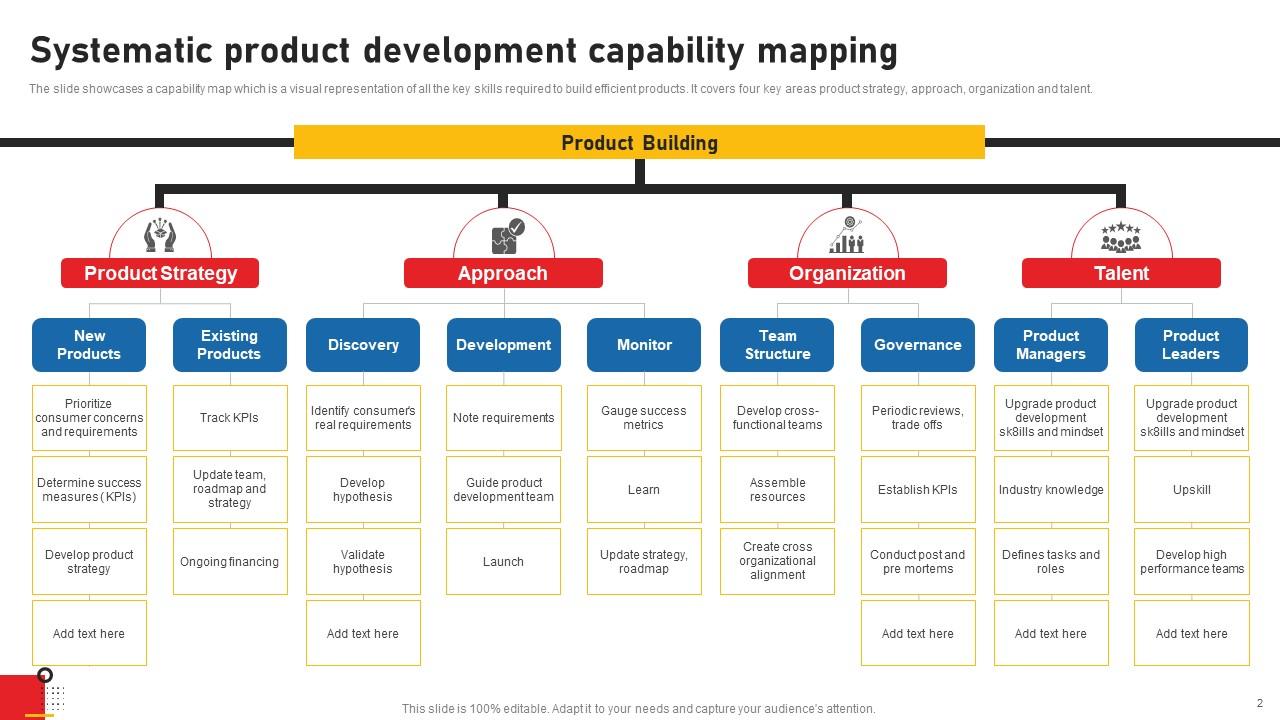
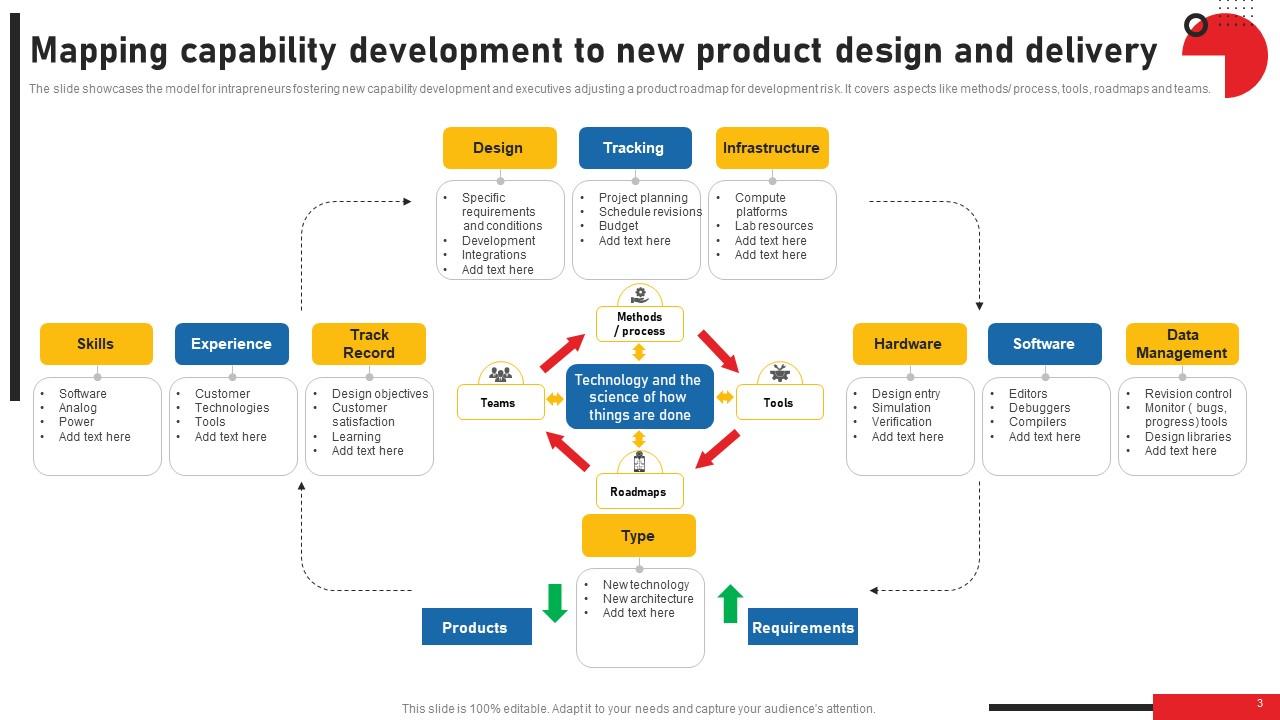
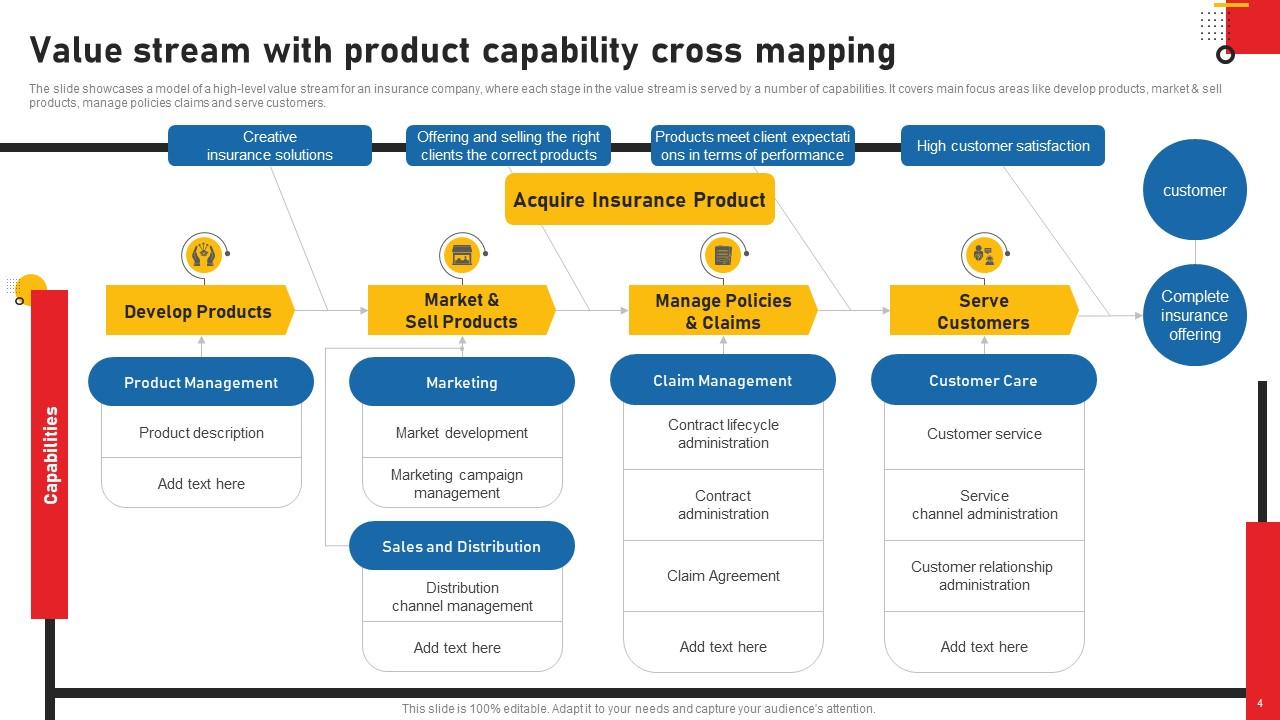
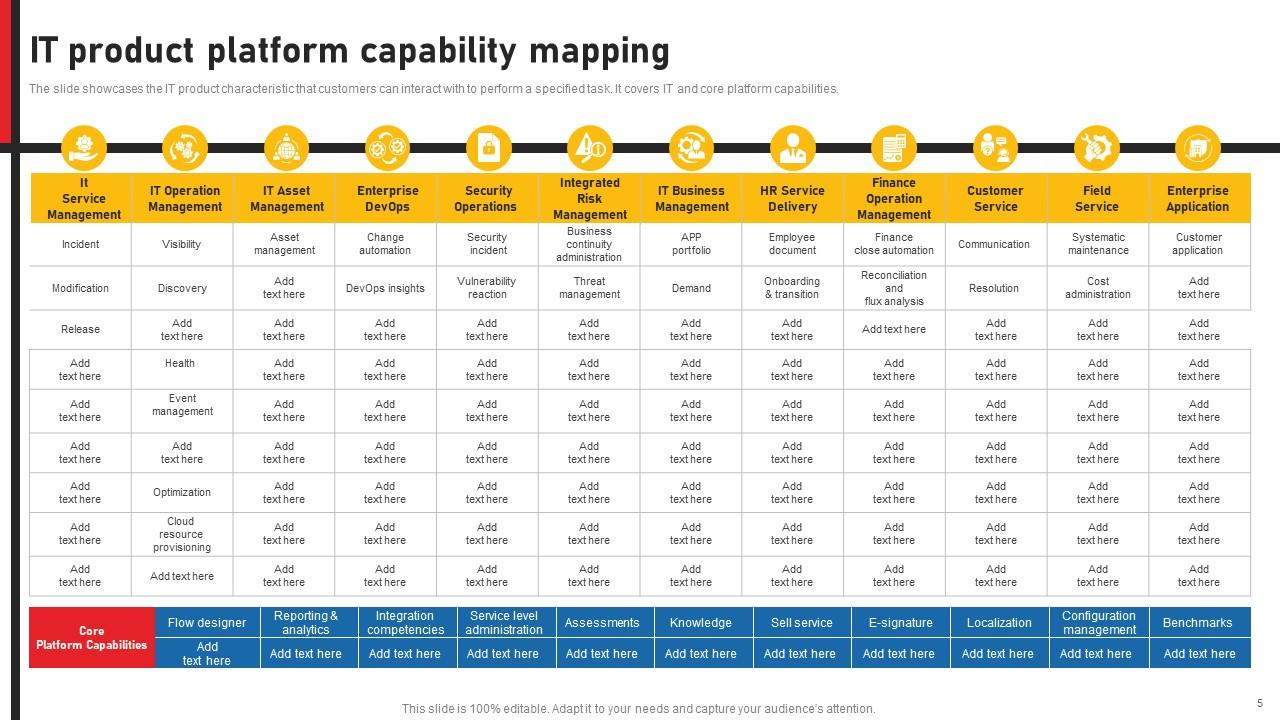
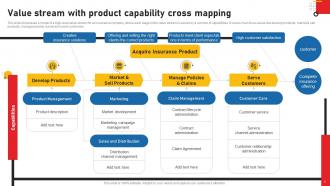
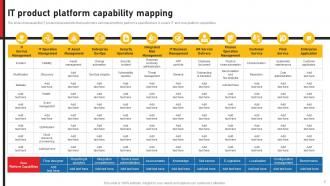
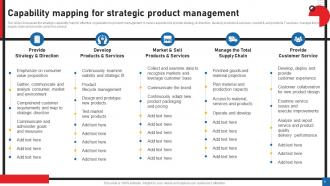
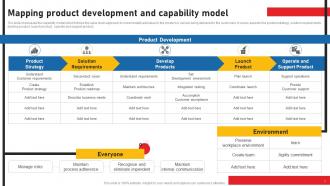
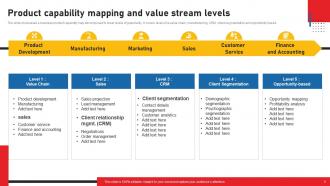
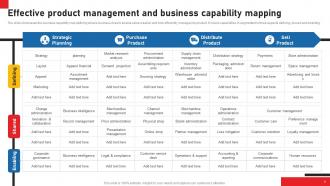
Deliver a lucid presentation by utilizing this Product Capability Mapping Powerpoint Ppt Template Bundles. Use it to present an overview of the topic with the right visuals, themes, shapes, and graphics. This is an expertly designed complete deck that reinforces positive thoughts and actions. Use it to provide visual cues to your audience and help them make informed decisions. A wide variety of discussion topics can be covered with this creative bundle such as Private Cloud, Operations, Services, Open Cloud, Integration, Automation. All the Twelve slides are available for immediate download and use. They can be edited and modified to add a personal touch to the presentation. This helps in creating a unique presentation every time. Not only that, with a host of editable features, this presentation can be used by any industry or business vertical depending on their needs and requirements. The compatibility with Google Slides is another feature to look out for in the PPT slideshow.

FAQs for Product Capability Mapping Powerpoint

So you basically map out what your products actually do against what the market wants. It's like auditing your whole portfolio to see strengths and gaps. Super important step because you can't fix what you don't understand first. The mapping shows where you're wasting money on features customers don't care about - or worse, missing stuff your competitors are crushing. Just list your main product functions and rate them against what customers actually prioritize. Honestly, most companies are shocked by what they find. You'll probably discover some uncomfortable truths about where you're falling short.

Honestly, product capability mapping is one of those things that sounds boring but actually saves your ass. You get this clear picture of what your product can really do vs what everyone *thinks* it can do. The gaps you'll find are wild - I always discover stuff that makes me go "oh shit, we promised that client something we literally can't deliver." It helps you prioritize features that actually matter instead of just building random stuff. Plus resource allocation becomes way less of a headache. Just map what you currently have against your roadmap first - the misalignments will probably shock you.

So you'll want three main buckets for your capability map. Start with business capabilities - stuff like "process payments" or "manage user accounts." Basically what value you're actually giving customers. Technical capabilities come next (infrastructure, APIs, data management, all that fun stuff). Then supporting capabilities like security and monitoring that keep everything running smoothly. Honestly, I'd tackle business capabilities first since they drive everything else. Work backwards from there to figure out what technical and supporting pieces you need to make it all happen. Way easier than trying to do it all at once.

So normal product management is all about features and deadlines, right? But capability mapping flips that - you're asking what your product can actually *do* for people instead of just "we need Feature X by Q3." Way more strategic than I thought it'd be, honestly. You end up mapping the core abilities that power multiple features rather than random one-offs. Makes your product way more cohesive since you're building foundational stuff. Oh and this might sound obvious but start with what your product needs to accomplish, not what features you think it needs. Trust me on this one.

So I'd probably go with Miro first - super easy for everyone to jump in and edit stuff. Mural's another good one, both have templates you can mess around with. Lucidchart's more polished if you want everything looking crisp and professional. Honestly though, I've seen people throw together decent maps in PowerPoint when they're rushed (collaboration sucks but whatever). Oh and if you're dealing with enterprise-level complexity, Ardoq or LeanIX might be worth checking out. Start simple with Miro though - your stakeholders won't hate you for it.

Don't just create your capability maps and call it a day - they need constant updates. I'd say quarterly reviews work pretty well, but honestly, you can't just wait around for those scheduled check-ins. Any time there's a big business change, new tech rollout, or restructuring? Update immediately. The real trick is getting feedback from the people actually doing the work, not just the C-suite folks. Oh, and assign different teams to own specific capability areas. That way someone's always watching for changes and can give you a heads up when stuff shifts.

Customer feedback is super important for keeping your capability map on point. There's always a disconnect between what you think users want and what they actually need - learned that one the hard way! Feedback shows you missing capabilities, helps reprioritize what you're building, and flags stuff that's just not working. You'll want to feed those insights back into your map regularly to adjust priorities and ditch capabilities that aren't adding value. I'd set up quarterly reviews to stay on top of it systematically.

Look, capability mapping is basically plotting out what your product does vs what users actually need. Just list your main user journeys first, then see which features you have for each step. The gaps become super obvious right away – like, embarrassingly obvious sometimes. It shows you where competitors are crushing it and where customers keep bugging you for missing stuff. I mean, the visual part is key because you can literally see your blind spots laid out. Plus you might realize you've been overdoing certain features while ignoring others. It's honestly the fastest way to figure out what's broken in your product strategy.

Honestly, the worst part is scope creep - everyone wants to map literally everything right away. Big mistake. Plus getting different departments to actually share decent data? Good luck with that. Stakeholders never agree on what matters either, which is super frustrating. Oh and don't even get me started on keeping everything updated when business priorities shift every other week. My advice? Pick one area, get some wins under your belt first. Way better than trying to document your entire org from day one. Just focus on stuff that actually moves the needle on your main goals.

Honestly, just get everyone in the same room first - product, engineering, sales, marketing, ops, whoever deals with customers. Run workshops where each team maps their current capabilities and spots gaps from their angle. The interesting part is when you layer these different perspectives together because engineering might think something's solid while sales sees it as a total headache. Build a visual map everyone can add to and update. Oh, and make sure you're all defining capabilities the same way upfront - saves so much confusion later. Then assign owners for each area so the map doesn't go stale.

Track how much your teams actually use the thing - are they pulling it up during planning sessions and budget talks? I've watched so many gorgeous capability maps just sit there looking pretty while everyone ignores them. Also measure the real outcomes: Are capability gaps shrinking? Teams collaborating better? Less money wasted on duplicate features? The whole point is helping people decide what to build and where to spend their resources. If teams aren't making smarter choices because of your map, then honestly it's just expensive wall art.

So capability mapping basically shows you what your product can actually do right now versus what it should do. First, audit everything you've got today. Then compare that against where you want to go - you'll see the gaps pretty quickly. Honestly, the visual part is huge because stakeholders finally get it when they can see the trade-offs laid out. You can prioritize what to build next based on real business impact instead of just guessing. Plus you might find capabilities that work across multiple features (always nice when that happens). It's way better than flying blind with your roadmap.

So capability mapping basically shows you where you're strong and where you suck. Map out what you can actually do right now, then compare it to what customers want - boom, those empty spots are your innovation goldmine. I know it sounds obvious but most companies skip this step. You'll spot where to throw money at new tech or figure out which partnerships actually make sense. Sometimes you'll even find capabilities you forgot you had that could work for something totally different. Just overlay your current state with future market trends and you'll see exactly where to focus.

Look, a decent capability map basically shows you where you're strong and where you're totally screwed. No more wasting money on random stuff - you can actually see what needs attention and what you're overspending on for zero reason. Honestly, it's like putting on glasses when you didn't know you were blind. Everything just clicks into place! You'll catch team overlaps and figure out when to build something yourself versus just buying it or partnering up. Oh, and definitely start by comparing your current spending to what actually matters. The big mismatches will jump out at you first.

So you'll want to think about all the regulatory stuff first - healthcare needs HIPAA compliance, financial services have SOX requirements and audit trails (honestly such a pain). Manufacturing usually means dealing with ancient legacy systems and supply chain integrations. Each industry has its own buying process too. Like who makes decisions and what metrics they actually care about. The trick is really understanding what keeps your specific industry up at night - then build features that solve those exact headaches they deal with every single day.

Ratings and Reviews

80% of 100
Review Form
Write a review
Most Relevant Reviews
  1. 80%

    by Dion Dunn

    The slides come with appealing color schemes and relevant content that helped me deliver a stunning presentation without any hassle!
  2. 80%

    by Darron Hunter

    The information is visually stunning and easy to understand, making it perfect for any business person. So I would highly recommend you purchase this PPT design now!

2 Item(s)

per page: