

Product Feature Comparison Checklist With Customer Reviews




Try Before you Buy Download Free Sample Product
 Impress Your
 Audience
 100%
100% Editable
 Save Hours
 of Time


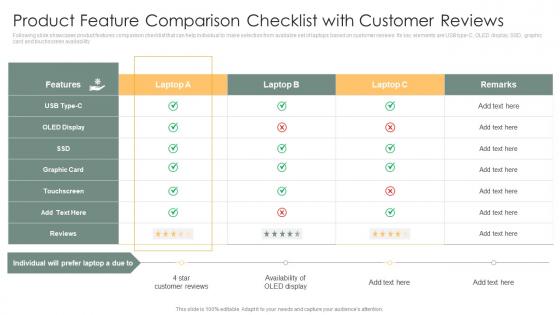
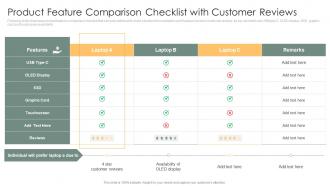
Following slide showcases product features comparison checklist that can help individual to make selection from available set of laptops based on customer reviews. Its key elements are USB type-C, OLED display, SSD, graphic card and touchscreen availability.
People who downloaded this PowerPoint presentation also viewed the following :
Product Feature Comparison Checklist With Customer Reviews with all 6 slides:
Use our Product Feature Comparison Checklist With Customer Reviews to effectively help you save your valuable time. They are readymade to fit into any presentation structure.





FAQs for Product Feature Comparison Checklist
When choosing a presentation template for data visualization, look for customizable chart types, clean layouts with ample white space, consistent color schemes, responsive design elements, and compatibility with your data sources. These features streamline the presentation creation process by enhancing readability, maintaining visual consistency, and enabling seamless data integration, ultimately delivering more impactful presentations that communicate insights effectively to stakeholders.
Customizable design elements significantly enhance presentation template effectiveness by enabling brand alignment, audience-specific messaging, visual hierarchy optimization, and content personalization. These features streamline the design process while maintaining professional consistency, with many organizations finding that tailored templates improve audience engagement, reinforce brand identity, and ultimately deliver more compelling presentations that drive better business outcomes.
Educational presentations benefit from templates with clear hierarchical layouts, visual learning elements, step-by-step progressions, and interactive components that enhance knowledge retention. Corporate presentations require professional templates emphasizing data visualization, executive summaries, strategic frameworks, and brand consistency that convey authority and drive decision-making, with many organizations finding that matching template style to audience expectations significantly improves engagement and presentation outcomes.
Easy-to-use templates significantly reduce presentation creation time by providing pre-designed layouts, consistent formatting, and intuitive navigation structures that minimize design decisions. Through streamlined workflows and ready-made elements, professionals can focus on content rather than aesthetics, with many organizations finding that well-designed templates cut preparation time by 60-70%, ultimately delivering faster project turnarounds.
Mobile-friendliness plays a crucial role in template selection, ensuring presentations display properly across smartphones, tablets, and desktop devices with responsive design, optimized layouts, and touch-friendly navigation. With remote work increasingly common, templates that seamlessly adapt to various screen sizes enable presenters to deliver professional experiences regardless of device, ultimately enhancing accessibility and audience engagement.
Integration with software tools enhances presentation templates by enabling dynamic data connections, automated content updates, real-time collaboration features, and seamless workflow management. Through cloud-based platforms and API connections, organizations streamline their presentation processes, reduce manual formatting time, and ensure consistent branding across teams, ultimately delivering more efficient content creation and improved stakeholder engagement.
Best practices for comparing template features include evaluating design variety, customization flexibility, industry-specific options, collaboration capabilities, and integration compatibility across platforms. Through systematic assessment of animation quality, mobile responsiveness, and brand alignment tools, organizations streamline their presentation workflows, enhance visual consistency, and ultimately deliver more impactful communications, with many finding that comprehensive feature analysis significantly reduces long-term operational costs.
Color schemes and typography choices significantly impact audience engagement by enhancing readability, establishing emotional connections, and reinforcing brand identity through strategic visual hierarchy. Effective combinations streamline information processing and maintain attention, with many organizations finding that consistent, accessible design choices deliver improved comprehension rates, stronger audience retention, and ultimately more persuasive presentations across diverse business contexts.
Key metrics for evaluating presentation template performance include design consistency, content adaptability, visual clarity, audience engagement rates, and time-to-completion efficiency. These assessment criteria help organizations streamline their presentation workflows by measuring template versatility across departments, reducing design inconsistencies, and accelerating content creation processes, ultimately delivering more impactful communications and improved stakeholder experiences.
User reviews and ratings significantly influence template purchasing decisions by providing social proof, highlighting practical usability insights, and revealing potential design limitations or technical issues. Through authentic user feedback, buyers can assess template quality, customization flexibility, and professional appearance across different industries, with many organizations finding that high-rated templates with detailed reviews deliver better ROI and reduced design time, ultimately enabling faster presentation development and enhanced stakeholder engagement.
Industry-specific templates offer targeted functionality, relevant design elements, pre-built workflows, compliance frameworks, and sector-appropriate content structures that generic templates cannot match. These specialized solutions streamline implementation by addressing unique industry challenges, regulatory requirements, and operational needs, with organizations in healthcare, finance, and manufacturing finding significantly faster deployment and better user adoption rates.
Template support and documentation significantly enhance user experience by providing clear guidance, reducing learning curves, and enabling faster implementation across organizations. Comprehensive resources streamline onboarding processes, minimize user frustration, and accelerate productivity, with many businesses finding that robust documentation delivers higher adoption rates, improved satisfaction scores, and ultimately stronger competitive advantage.
When using presentation templates, consider usage rights, commercial restrictions, attribution requirements, modification permissions, and redistribution limitations outlined in licensing agreements. These legal considerations streamline compliance by ensuring proper usage, protecting intellectual property, and avoiding costly violations, with many organizations finding that understanding licensing terms ultimately delivers creative freedom while maintaining legal protection.
Template features cater to accessibility through high-contrast color schemes, readable font options, screen reader compatibility, keyboard navigation support, and alternative text capabilities. These design elements streamline inclusive communication by accommodating visual impairments, motor disabilities, and cognitive differences, with many organizations finding that accessible templates enhance user engagement and ensure regulatory compliance while expanding their audience reach.
Animations and transitions enhance presentation effectiveness by guiding audience attention, creating smooth content flow, and reinforcing key messages, while excessive or inappropriate animations can distract from core content and appear unprofessional. Strategic use in corporate presentations, training modules, and sales pitches delivers improved engagement and information retention, with many organizations finding that subtle, purposeful animations ultimately strengthen message delivery and audience focus.
-
“Superb. What a great finding. Thankful for SlideTeam. We were paying people to make slides which went all in vain. We are so happy to have found you.”
-
I faced no difficulty while searching for the slide I wanted. Honestly, the website’s interface is easy to use and can be navigated easily!