

Programming Language Powerpoint Ppt Template Bundles





Try Before you Buy Download Free Sample Product
 Impress Your
 Audience
 100%
100% Editable
 Save Hours
 of Time


Embark on a journey into the heart of software mastery with our dynamic PPT on Programming Language. Unveil the intricate world of coding languages and discover the power of diverse programming frameworks. Dive into the versatility of scripting languages, essential for seamless software development. Navigate through the landscape of web development languages, essential for creating engaging and interactive online experiences. This presentation is your gateway to understanding the nuances of software development languages, equipping you with insights for efficient and robust coding practices. Whether you are a seasoned developer or a novice enthusiast, this PPT serves as a comprehensive guide to the diverse ecosystem of programming languages, providing a holistic view of their roles in shaping the digital landscape.
People who downloaded this PowerPoint presentation also viewed the following :
Programming Language Powerpoint Ppt Template Bundles with all 22 slides:
Use our Programming Language Powerpoint Ppt Template Bundles to effectively help you save your valuable time. They are readymade to fit into any presentation structure.

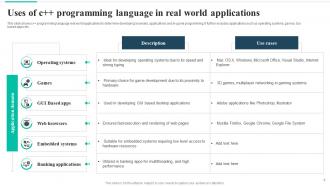
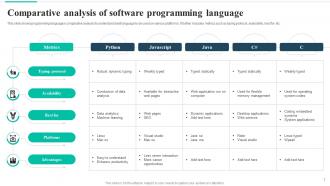
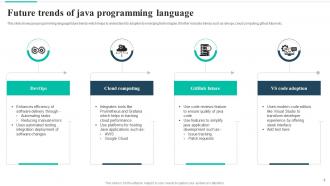
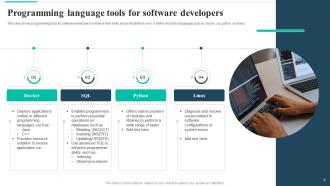









FAQs for Programming Language Powerpoint
A programming language PowerPoint template should include syntax highlighting capabilities, multiple code block layouts, dark and light theme options, language-specific formatting, and interactive elements for demonstrations. These features streamline technical presentations by enhancing code readability, supporting various programming languages, and enabling seamless transitions between concepts, ultimately delivering clearer communication and more engaging developer presentations.
Visual elements enhance programming concept communication by transforming abstract code structures into digestible diagrams, flowcharts, infographics, and interactive demonstrations that audiences can quickly grasp. Through strategic use of color coding, hierarchical layouts, and step-by-step visual breakdowns, presenters streamline complex algorithms and data structures, while reducing cognitive load and increasing retention, ultimately delivering more engaging presentations that accelerate audience understanding across technical and non-technical stakeholders.
Dark themes with syntax highlighting colors like blue, green, and orange work best for programming language presentations, alongside high-contrast combinations such as dark backgrounds with bright accent colors. These schemes mirror familiar coding environments that resonate with developers and tech professionals, while clean palettes with blues and grays enhance readability and maintain professional credibility, ultimately delivering better audience engagement.
High-level programming concept slides emphasize conceptual frameworks, flowcharts, architectural diagrams, and strategic overviews that illustrate relationships and methodologies, while low-level code explanation slides focus on detailed syntax, step-by-step implementations, and granular technical specifications. These differentiated layouts enable educators and developers to seamlessly transition between strategic programming understanding and practical coding execution, ultimately delivering comprehensive technical education.
**INPUT**: What best practices should be followed when integrating diagrams or flowcharts into a programming language presentation? **OUTPUT**: Best practices include maintaining consistent visual hierarchy, using clear labeling with programming terminology, aligning colors with your overall template design, and ensuring logical flow progression. These approaches enhance audience comprehension by simplifying complex algorithms, illustrating data structures effectively, and demonstrating code relationships visually, ultimately delivering more engaging presentations that help developers and stakeholders better understand technical concepts.
Animations in programming language presentations enhance engagement by highlighting code syntax progressively, demonstrating step-by-step execution flows, creating visual transitions between concepts, and emphasizing key programming principles through motion. These techniques help audiences follow complex logic structures, with many educators and technical presenters finding that strategic animations reduce cognitive overload while maintaining focus on critical coding elements.
**INPUT**: What types of fonts and typography are recommended for clarity and readability in technical presentations? **OUTPUT**: Recommended fonts for technical presentations include sans-serif typefaces like Arial, Calibri, Helvetica, Open Sans, and Roboto, which enhance readability across different screen sizes. These typography choices streamline information delivery by minimizing visual distractions, ensuring consistent legibility, and maintaining professional appearance, with many organizations finding that clean font selections ultimately improve audience comprehension and engagement.
Speakers can use programming language templates to showcase authentic coding experiences by incorporating real project screenshots, actual code snippets, personal debugging challenges, and lessons learned from specific development cycles. These templates enable developers to structure their narratives around genuine technical obstacles, successful implementations, and career evolution, while maintaining visual consistency that enhances credibility, ultimately delivering more relatable and impactful presentations to technical audiences.
Consistency in design creates visual cohesion across programming language presentations through standardized layouts, color schemes, typography, and formatting structures. This unified approach enhances audience comprehension, establishes professional credibility, and streamlines content development, with many organizations finding that consistent design templates significantly reduce preparation time while delivering more polished, memorable presentations that reinforce their technical expertise.
A programming language template accommodates diverse expertise levels through layered content structures, progressive concept building, modular sections for different skill depths, and flexible visual hierarchies that allow selective focus. These design elements enable presenters to emphasize foundational concepts for beginners while including advanced technical details, ultimately delivering comprehensive coverage that scales with audience needs and enhances learning outcomes across all proficiency levels.
Presenters can leverage stock photo platforms like Unsplash and Pexels, icon libraries such as Flaticon and Icons8, programming-specific resources like GitHub repositories, and SlideTeam's curated collections of tech-themed visuals. These resources streamline slide creation by providing consistent, professional imagery that enhances technical presentations, with many developers finding that cohesive visual elements significantly improve audience engagement and comprehension.
A presenter can structure content by organizing concepts hierarchically like code modules, using logical flow patterns that mirror programming sequences, and incorporating visual elements that demonstrate step-by-step processes. Programming language templates enhance presentations by providing clear syntax-like organization, enabling systematic information delivery, and creating familiar frameworks for technical audiences, with many technology companies finding that structured, code-inspired narratives improve audience comprehension and engagement.
Coding challenges can be integrated through interactive polls asking audiences to predict code outputs, live coding demonstrations with step-by-step reveals, and collaborative debugging exercises where participants identify errors together. These approaches enhance engagement by encouraging active participation, enabling real-time problem-solving discussions, and creating memorable learning experiences, with many educators and corporate trainers finding that interactive elements significantly improve knowledge retention and audience connection.
Data visualization techniques enhance programming language presentations by incorporating interactive code demos, real-time output displays, syntax highlighting, flowcharts, and performance comparison charts. These methods streamline complex concept explanation through visual storytelling, with many technical teams finding that combining live coding demonstrations with structured visual frameworks ultimately delivers clearer audience comprehension and stronger engagement outcomes.
**INPUT**: What are the common pitfalls to avoid when creating a PowerPoint presentation using a programming language template? **OUTPUT**: Common pitfalls include overloading slides with excessive code snippets, using inconsistent formatting across technical elements, neglecting audience expertise levels, and failing to balance visual appeal with technical accuracy. These challenges can be streamlined by maintaining clean code displays, ensuring readability through proper syntax highlighting, and adapting complexity to audience needs, ultimately delivering presentations that enhance comprehension while maintaining professional credibility. **Word count: 60 words**
-
I've been looking for a good template source for some time. I'm happy that I discovered SlideTeam. Excellent presentations must try!
-
Great product with effective design. Helped a lot in our corporate presentations. Easy to edit and stunning visuals.