

Project business improvement dashboard software process improvement




Try Before you Buy Download Free Sample Product
 Impress Your
 Audience
 100%
100% Editable
 Save Hours
 of Time


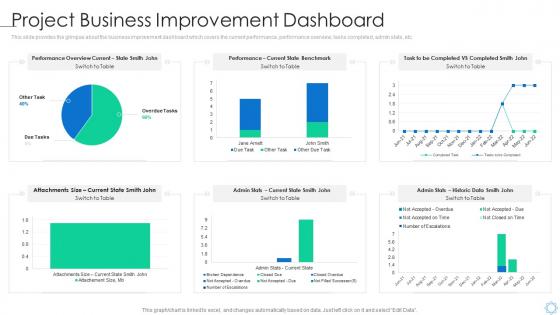
This slide provides the glimpse about the business improvement dashboard which covers the current performance, performance overview, tasks completed, admin stats, etc.
People who downloaded this PowerPoint presentation also viewed the following :
Project business improvement dashboard software process improvement with all 7 slides:
Use our Project Business Improvement Dashboard Software Process Improvement to effectively help you save your valuable time. They are readymade to fit into any presentation structure.





FAQs for Project business improvement dashboard
Key performance indicators for project business improvement dashboards include cost reduction percentages, process efficiency metrics, timeline adherence rates, resource utilization levels, and ROI measurements. These KPIs enable organizations to track operational improvements, identify bottlenecks, and measure strategic outcomes, with many companies finding that comprehensive dashboards deliver enhanced decision-making capabilities and accelerated business transformation results.
Project timelines can be visualized through Gantt charts, milestone markers, progress bars, dependency maps, and interactive dashboards that show real-time status updates. These visual tools enhance stakeholder understanding by transforming complex scheduling data into intuitive formats, enabling faster decision-making and clearer communication, with many organizations finding that visual timeline presentations reduce project confusion and improve alignment.
Real-time data transforms business improvement dashboards from static reporting tools into dynamic decision-making platforms by providing instant visibility into performance metrics, operational bottlenecks, and emerging trends. This immediate access enables organizations to respond quickly to issues, optimize processes as they happen, and make data-driven adjustments that enhance operational efficiency and competitive advantage.
Project management dashboards facilitate better decision-making by providing real-time visibility into key metrics, budget variances, resource allocation, and timeline progress through centralized data visualization. These platforms enable project managers to identify bottlenecks quickly, reallocate resources strategically, and make data-driven adjustments, with many organizations finding that streamlined reporting ultimately delivers faster project delivery and improved stakeholder communication.
Effective project progress visualizations include Gantt charts, milestone timelines, progress bars, burndown charts, and status dashboards with KPI indicators. These visual tools streamline project monitoring by displaying task dependencies, resource allocation, and completion percentages, enabling project managers in construction, software development, and consulting to identify bottlenecks quickly, ultimately delivering faster decision-making and improved project outcomes.
Business improvement dashboards should be updated in real-time for critical metrics, daily for operational data, and weekly or monthly for strategic KPIs, depending on data velocity and decision-making needs. Through automated data integration, organizations streamline reporting cycles, enhance decision accuracy, and maintain competitive advantage, with many finding that frequent updates enable faster responses to market changes and operational challenges.
Best practices for designing an intuitive dashboard interface include clear visual hierarchy, consistent navigation patterns, strategic use of white space, responsive design principles, and prominent data visualization elements. These design approaches enhance user experience by reducing cognitive load, minimizing learning curves, and enabling faster decision-making, with many organizations finding that well-designed dashboards increase user adoption rates and improve operational efficiency significantly.
Dashboards can be customized through role-based access controls, personalized metrics displays, adjustable visualization formats, and stakeholder-specific KPI selections. These customization features enable executives to focus on strategic outcomes, managers to track operational efficiency, and team members to monitor daily performance indicators, ultimately delivering relevant insights that enhance decision-making across organizational levels.
**INPUT**: What tools or software are most recommended for creating a project business improvement dashboard? **OUTPUT**: Recommended dashboard tools include Tableau, Power BI, Qlik Sense, Google Data Studio, and specialized platforms like Klipfolio or Sisense. These technologies streamline project monitoring by consolidating multiple data sources, automating real-time reporting, and delivering intuitive visualizations, with many organizations finding that integrated dashboards enhance decision-making speed and operational transparency.
A dashboard helps identify bottlenecks by providing real-time visibility into task completion rates, resource allocation delays, and workflow dependencies across project phases. Through interactive visualizations, project managers can quickly spot where work accumulates, monitor team capacity constraints, and track milestone deviations, ultimately enabling faster resolution and improved project delivery timelines.
Common pitfalls include overloading dashboards with excessive metrics, selecting vanity metrics over actionable KPIs, poor data integration across systems, inadequate user training, and lack of stakeholder input during design. These issues often result in dashboards that overwhelm rather than inform, with many organizations finding that focusing on 5-7 critical metrics and ensuring real-time data accuracy delivers better decision-making outcomes.
Measuring dashboard impact involves tracking key performance indicators like project completion rates, decision-making speed, resource utilization efficiency, and team collaboration metrics before and after implementation. Through comprehensive analytics and feedback surveys, organizations can quantify improvements in operational transparency, faster issue resolution, and enhanced strategic alignment, with many teams finding that data-driven visibility ultimately delivers measurable productivity gains and competitive advantage.
Essential security measures include multi-factor authentication, role-based access controls, data encryption, regular security audits, and secure hosting environments. These protocols work together by restricting unauthorized access, protecting data transmission, and ensuring compliance standards, with many organizations finding that layered security approaches ultimately deliver both data protection and stakeholder confidence.
User feedback can be incorporated through regular surveys, usage analytics, focus groups, and feedback portals to identify pain points and feature requests. Organizations can implement iterative updates based on this input, with many finding that quarterly reviews and A/B testing of new features significantly enhance user adoption, data accuracy, and overall dashboard effectiveness.
Several case studies highlight dashboard success in project management, including Microsoft's resource optimization reducing project delays by 25%, IBM's real-time tracking improving delivery timelines by 30%, and Salesforce's integrated dashboards enhancing team collaboration across global projects. These implementations demonstrate how visual project intelligence streamlines decision-making, accelerates problem resolution, and ultimately delivers improved project outcomes and stakeholder satisfaction.
-
Perfect template with attractive color combination.
-
Excellent products for quick understanding.