

Project management dashboard tool ahead ppt powerpoint presentation icon gridlines




Try Before you Buy Download Free Sample Product
 Impress Your
 Audience
 100%
100% Editable
 Save Hours
 of Time


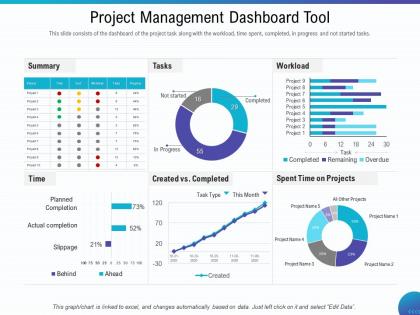
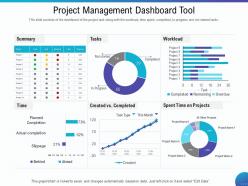
This slide consists of the dashboard of the project task along with the workload, time spent, completed, in progress and not started tasks.
People who downloaded this PowerPoint presentation also viewed the following :
Project management dashboard tool ahead ppt powerpoint presentation icon gridlines with all 2 slides:
Use our Project Management Dashboard Tool Ahead Ppt Powerpoint Presentation Icon Gridlines to effectively help you save your valuable time. They are readymade to fit into any presentation structure.
FAQs for Project management dashboard tool ahead ppt powerpoint
Definitely start with timeline/milestones and budget tracking - those are non-negotiables. Task completion rates and resource allocation are huge too. I'd throw in some risk indicators because honestly, projects go sideways fast when you're not watching for red flags. Team workload is another big one - burnout hits harder than people think. Quality stuff like defect rates or client satisfaction scores matter depending on what you're working on. Don't overcomplicate it though. Pick maybe 5-7 metrics you'll actually check daily instead of building some monster dashboard nobody uses.
Honestly, good visual design is what separates dashboards people actually use from ones that just sit there looking pretty. Keep your colors and fonts consistent so people aren't confused. Don't pack everything together - white space makes things way easier to scan. I always group related stuff visually and use color coding for different statuses. Your most important metrics should be the biggest and most prominent, obviously. People need to grab the key info in like 2 seconds without playing hide-and-seek with the data. Start by looking at your current setup and see where your eyes go first.
Honestly, stakeholder input makes or breaks your dashboard. I learned this the hard way after building something gorgeous that nobody used lol. Talk to your key people first - find out what decisions they're actually making and what data would help. Executives want the big picture stuff while team leads need nitty-gritty details. Map out your users, then grab 15 minutes with each group. Ask about their daily workflow and pain points. You'll avoid that trap of creating something pretty but useless. Different people care about totally different metrics anyway.
So for agile stuff, you'll want sprint burndowns, velocity tracking, story points - basically anything showing those iteration cycles. Waterfall's different though - think Gantt charts, milestones, phase completion percentages. The real difference? Agile dashboards are constantly updating while waterfall focuses on that long-term progress against your original timeline. Honestly, I'd start by figuring out what your stakeholders actually want to see first. Then just match the widgets to whatever methodology rhythm you're using. Makes the whole thing way less overwhelming.
APIs that push data automatically are your best friend here - way better than constantly polling. Trust me on this one. Set up solid error handling because real-time feeds love to break at the worst times (speaking from experience lol). Only update the parts of your dashboard that actually changed instead of redrawing everything. Websockets work great for live updates, and definitely cache your popular data to keep things snappy. Oh, and start small with your most important metrics first. You can always pile on more data sources later once everything's running smooth.
Honestly, it's a game changer for keeping everyone on the same page. Your team gets one place to check progress, deadlines, who's doing what - all that stuff. Real-time updates mean no more awkward "oh wait, I thought you were handling that" conversations. Status meetings become way less painful too since people can just peek at the dashboard instead of asking a million questions. The tricky part? Actually getting your team to use it consistently. I've seen so many teams set these up and then... crickets. But when it works, it really works.
Honestly, I'd go with Power BI first - most companies already have Office 365 so you're probably halfway there. Tableau's got better visualizations but it's overkill unless you're doing crazy advanced stuff. Monday.com looks nice but gets expensive quick with bigger teams (learned that the hard way). Asana and Trello have basic dashboards built-in if you want something dead simple. Power BI's your best bet though - you could probably have something running by Friday. Just grab the free trial and see how it feels.
Dude, you'll love having real-time visibility into all your key metrics - especially when you're making those huge decisions. Bottlenecks and budget issues? You'll catch them way before they mess up your timeline. The visual stuff is clutch for comparing scenarios too, like adding people vs. pushing deadlines. Way better than scrolling through a million status reports while your boss is asking for updates every five minutes. When things get crazy, that instant snapshot saves you. Oh, and definitely set up alerts for your critical stuff - trust me on this one. Issues pop up immediately instead of hiding until it's too late.
Don't cram everything onto one screen - that's like the
-
Presentation Design is very nice, good work with the content as well.
-
Use of icon with content is very relateable, informative and appealing.
-
Appreciate the research and its presentable format.