

Project Management Dashboard With Weekly




Try Before you Buy Download Free Sample Product
 Impress Your
 Audience
 100%
100% Editable
 Save Hours
 of Time


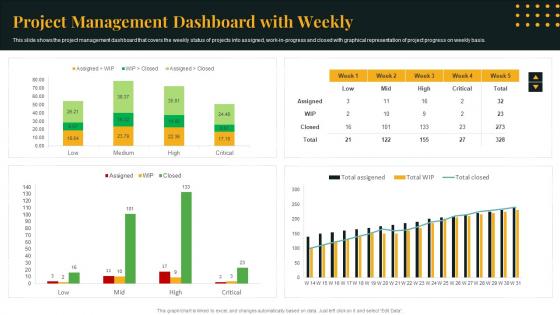
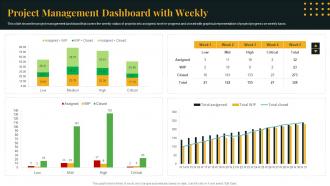
This slide shows the project management dashboard that covers the weekly status of projects into assigned, work in progress and closed with graphical representation of project progress on weekly basis.
People who downloaded this PowerPoint presentation also viewed the following :
Project Management Dashboard With Weekly with all 7 slides:
Use our Project Management Dashboard With Weekly to effectively help you save your valuable time. They are readymade to fit into any presentation structure.





FAQs for Project Management
Key components of an effective project management dashboard include project timeline visualization, resource allocation tracking, budget monitoring, task progress indicators, and team performance metrics. These elements work together by providing real-time visibility into project health, enabling faster decision-making, and streamlining communication across teams, ultimately delivering improved project outcomes and enhanced operational efficiency.
Project management dashboards enhance team collaboration and communication by providing real-time visibility into project progress, centralizing task assignments and deadlines, and enabling transparent resource allocation across team members. Through shared visual interfaces, teams streamline information sharing, reduce email overload, and facilitate faster decision-making, while managers gain comprehensive oversight capabilities, ultimately delivering improved coordination and project outcomes.
**INPUT**: What metrics should be prioritized on a project management dashboard for monitoring progress? **OUTPUT**: Priority metrics include task completion rates, budget variance, timeline adherence, resource utilization, and milestone achievement status. These indicators streamline project oversight by enabling real-time adjustments, identifying bottlenecks early, and maintaining stakeholder alignment, with many organizations finding that focused dashboards ultimately deliver improved project success rates and enhanced team accountability.
Visual design principles enhance project management dashboard usability by implementing clear information hierarchy, consistent color coding, intuitive navigation flows, and strategic white space utilization. These design elements streamline data interpretation and reduce cognitive load, with many project teams finding that well-designed dashboards accelerate decision-making, minimize training time, and ultimately deliver improved project oversight and stakeholder communication.
Tools for creating customizable project management dashboards include Microsoft Project, Asana, Trello, Smartsheet, and Monday.com, along with business intelligence platforms like Tableau and Power BI. These solutions streamline project tracking by enabling real-time progress monitoring, resource allocation visibility, and stakeholder reporting, with many organizations finding that integrated dashboards ultimately deliver enhanced operational efficiency and faster decision-making capabilities.
Real-time data integration enhances project management decision-making by providing instant visibility into project progress, resource utilization, budget status, and potential bottlenecks across all initiatives. This immediate access enables project managers to quickly identify risks, reallocate resources strategically, and make data-driven adjustments, ultimately delivering faster project completion and improved operational efficiency.
Stakeholder feedback plays a crucial role in designing effective project management dashboards by identifying specific metrics, preferred visualization formats, and reporting frequencies that align with diverse user needs. Through collaborative input sessions, organizations can create dashboards that serve executives seeking high-level overviews, project managers requiring detailed task tracking, and team members needing progress transparency, ultimately delivering enhanced decision-making capabilities and stakeholder engagement.
Project management dashboards adapt through customizable metrics, industry-specific KPIs, flexible reporting structures, and scalable workflow configurations that align with sector requirements. Construction projects emphasize timeline milestones and resource allocation, while software development focuses on sprint progress and bug tracking, with healthcare and financial services finding that compliance-focused dashboards streamline regulatory oversight and ultimately deliver enhanced project visibility.
Common challenges in implementing a project management dashboard include data integration complexities, user adoption resistance, customization requirements, real-time accuracy maintenance, and stakeholder alignment on key metrics. While these obstacles present initial hurdles, organizations across industries find that strategic planning, comprehensive training, and phased rollouts ultimately streamline implementation, delivering enhanced visibility and improved project outcomes.
Alerts and notifications can be effectively incorporated through real-time status updates, milestone reminders, budget threshold warnings, resource conflict alerts, and deadline notifications. These automated systems enhance project oversight by delivering immediate stakeholder communication, preventing costly delays, and enabling proactive decision-making, with many organizations finding that strategic notification management significantly improves project delivery rates and team accountability.
Best practices for maintaining data accuracy in project management dashboards include establishing automated data feeds, implementing regular validation checkpoints, defining clear data ownership roles, setting standardized input protocols, and conducting periodic audits. These approaches streamline accuracy by minimizing manual entry errors, ensuring consistent updates, and enabling real-time verification, with many organizations finding that systematic data governance ultimately delivers enhanced decision-making and improved project outcomes.
Project management dashboards assist in risk management by providing real-time visibility into potential issues, tracking risk indicators through automated alerts, and centralizing risk data for faster decision-making. These platforms enable project managers to identify bottlenecks, monitor budget variances, and assess timeline deviations early, with many organizations finding that proactive risk visualization significantly reduces project failures and cost overruns.
Mobile accessibility significantly enhances project management dashboard effectiveness by enabling real-time decision-making, increasing team responsiveness, and ensuring continuous project oversight regardless of location. With remote work increasingly common, mobile-optimized dashboards allow project managers and stakeholders to monitor progress, approve critical decisions, and address issues instantly, ultimately delivering faster project completion and improved team collaboration across distributed organizations.
Historical data visualization enables project forecasting by revealing trends in timelines, resource utilization, budget performance, and risk patterns from past projects. Through predictive analytics and trend analysis, project managers can anticipate potential delays, budget overruns, and resource bottlenecks, while benchmarking against similar historical projects, ultimately delivering more accurate forecasting and strategic planning capabilities.
Project management dashboards facilitate agile methodologies by providing real-time sprint tracking, backlog visibility, and team velocity metrics in centralized interfaces. These platforms streamline daily standups, retrospectives, and sprint planning through automated reporting, burndown charts, and collaboration tools, with software development teams and marketing agencies finding that dashboard integration ultimately enhances transparency and accelerates delivery cycles.
-
The templates are the best in class. Very clear and innovative graphics! I am excited to explore and download more presentations.
-
Unique and attractive product design.