

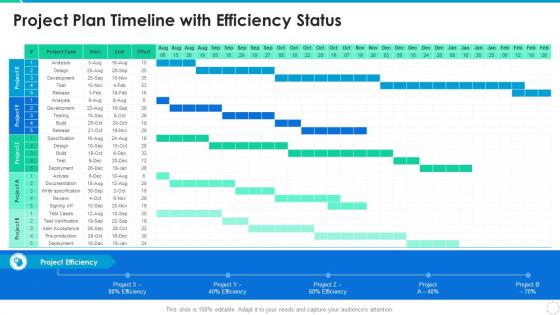
Project Plan Timeline With Efficiency Status




Try Before you Buy Download Free Sample Product
 Impress Your
 Audience
 100%
100% Editable
 Save Hours
 of Time


Our Project Plan Timeline With Efficiency Status are topically designed to provide an attractive backdrop to any subject. Use them to look like a presentation pro.
People who downloaded this PowerPoint presentation also viewed the following :
Project Plan Timeline With Efficiency Status with all 6 slides:
Use our Project Plan Timeline With Efficiency Status to effectively help you save your valuable time. They are readymade to fit into any presentation structure.





FAQs for Project Plan Timeline
Honestly, it comes down to a few key things. Map out your dependencies first - trust me, this will save your sanity later. Make sure you've got realistic timelines and the right people actually available when you need them. Dependencies between tasks are what usually kill projects. Check in weekly, not monthly - way better for catching issues early. Your stakeholders need to make decisions fast, and you absolutely need buffer time because something always goes sideways. Oh, and identify your critical path upfront so you know where the real bottlenecks might hit you.
Honestly, Gantt charts are pretty clutch for project management. You get this bird's-eye view of everything happening at once - when stuff's due, how tasks link together, all that. Super helpful for catching problems early before they snowball. I mean, you can see your critical path instantly and figure out where you've got some breathing room if things get messy. The best part? Your boss or client won't hate you for sending another confusing spreadsheet. Just start with your big deadlines first, then work backwards and fill in the smaller tasks underneath.
Honestly, I'd go with Asana, Monday.com, or Notion first - most teams I know actually stick with these. Microsoft Project is super powerful but way too much unless you're dealing with huge, complex stuff. Trello's perfect for simple projects. TeamGantt and Smartsheet are solid if your team's obsessed with those timeline charts (some people really are lol). But here's the thing - whatever tool everyone will actually use beats the "best" one that just sits there collecting digital dust. Try free trials of like 2-3 options and see what feels right for your team.
Ugh, scope changes are the worst for timelines. Even tiny additions mess everything up downstream. Your team has to stop what they're doing and switch gears, which kills productivity. New requirements usually mean going back and fixing stuff you already finished - super annoying. Here's what actually works: set up a proper change control process where you look at timeline impact before agreeing to anything. Oh, and always tell people upfront what these "quick changes" will actually cost you time-wise. Try batching changes together when you can.
Honestly, just bake extra time into everything from the start - like 20% padding on big milestones. Weekly check-ins are your friend for catching problems before they explode. Make sure people actually know what they're waiting on from others, because nothing's worse than sitting around twiddling your thumbs. Oh and those risk register things? They sound incredibly dull but they'll save your butt when stuff inevitably goes sideways. Track how fast you're moving on tasks now so you can see the patterns. Way better to adjust expectations early than scramble later when you're already screwed.
Look, good stakeholder engagement literally makes or breaks your deadlines. Get them involved early and you'll see faster approvals, way fewer scope changes, and people actually answering your emails for once. Skip this step though? You're screwed. Endless revisions, delayed sign-offs, and those brutal "wait, this isn't what we wanted" meetings that push everything back weeks. I learned this the hard way on my last project - what a mess that was. Start mapping out your key players now and build regular check-ins into your timeline. Trust me on this one.
Okay so basically if you don't have the right people free when you need them, your whole timeline gets messed up. I've watched teams put their best resources on random small tasks while the critical stuff sits there waiting. Bad move. Then you get bottlenecks when you don't assign enough people to key activities. The tricky part? Most team members work on multiple projects, so you're constantly dealing with scheduling conflicts. My advice is to map out who you need and when pretty early on. Oh, and always pad your timeline a bit - trust me on this one, resource conflicts will happen.
Think of risk management as your project's safety net. You'll want to spot potential problems early and pad your timeline with buffer time - because something *always* goes wrong, even on the smoothest projects. I learned this the hard way! Map out what could blow up during planning, then create backup plans so you can adapt fast. The smart move? Write down your top 3-5 risks and build extra time around those specific areas. Way better than panicking when deadlines start slipping and you're scrambling to catch up.
Honestly, just pick a day and stick to it - I always do Friday updates because nobody expects much on Fridays anyway. Send quick status emails covering what's done, what's stuck, and any problems coming up. Seriously, your stakeholders would rather hear bad news early than get blindsided later. Skip the long paragraphs though. Simple stuff works better - timeline graphics, red/yellow/green status colors, whatever keeps it visual. Oh, and set up some kind of shared board where people can peek at progress without constantly asking "how's it going?" Trust me, consistency beats perfection every time.
Track your schedule variance first - basically planned vs actual dates. Critical path stuff and milestone hit rates matter too. Resource utilization is huge since that's where most projects crash and burn, honestly. SPI from earned value gives you hard numbers (under 1.0 = you're screwed). But don't drown in spreadsheets - I've seen that happen too many times. Weekly milestone tracking works better than obsessing over every metric. Just measure how often you actually hit your original estimates. Those basics will show you exactly where your timeline planning sucks.
Dude, start tracking how long stuff actually takes vs what you planned - it's like having a time machine for future projects. Your team probably has consistent blind spots (mine always underestimated testing by like 30%). Once you see the patterns, you can pad estimates in the right spots instead of just randomly adding time everywhere. Yeah it's boring to log everything at first, but honestly? Best habit I ever picked up. Even something simple in a spreadsheet works. You'll stop getting burned by the same delays over and over.
Try the MoSCoW method - it'll save your sanity. Break everything into Must have, Should have, Could have, Won't have. Figure out what depends on what first, then weigh effort against impact. Honestly, most people overthink this part. Set a timer for your planning meetings or you'll debate forever. I use a basic scoring system: business value, how urgent it actually is, and whether we even have people to do it. Your stakeholders will stop bugging you once they see clear priorities. You can always shuffle things around during sprint reviews anyway.
Honestly, Agile is a game-changer for timelines. You break everything into these short 1-2 week sprints instead of planning out some massive months-long thing that'll probably go wrong anyway. When priorities shift (and they always do), you can pivot fast. Daily check-ins catch problems early - way better than discovering disasters later. Your stakeholders actually see stuff happening and can course-correct before you build the wrong thing entirely. I'd just pick one project to try it on first. The responsiveness is pretty amazing once you get the hang of it.
Ugh, the worst thing you can do is lowball how long stuff takes. I always add like 20% buffer time because something always goes wrong. Also talk to whoever's actually doing the work before you commit to dates - managers love promising the moon without asking if it's realistic. Dependencies will bite you in the ass too, like when Task B can't start until Task A is done but nobody mapped that out. Oh and don't pile three "urgent" projects on one person, I've watched that disaster unfold so many times. Factor in holidays and PTO or you'll be scrambling later.
Honestly, good teamwork can make or break your timeline. When everyone's actually talking to each other and sharing info, you won't waste time doing the same work twice. Catching problems early is huge - way better than dealing with major disasters later. I've seen teams where people genuinely want to help each other out, and those projects just flow better. But when collaboration sucks? You get missed deadlines, confused expectations, and everyone working in their own little bubble. Set up your communication stuff early and do regular check-ins. Trust me on this one.
-
“One of the best experiences with SlideTeam for my presentation.Everything on time, communication is efficient and price is reasonable. All good in one place.”
-
I loved the hassle-free signup process. A few minutes and, I had this giant collection of beautiful designs.