

Project priority assessment model powerpoint presentation slides




Try Before you Buy Download Free Sample Product
 Impress Your
 Audience
 100%
100% Editable
 Save Hours
 of Time


Balance the volume of your company’s project with the capability to deliver those projects with this Project Priority Assessment Model PowerPoint Presentation Slides. This scoring model PPT template captures the problem area of the firm for the project like success rate, low return on investment, and resource allocation. Showcase the project prioritization PowerPoint slideshow for improving project success rate after implementing the process to align them properly. You can also capture the roles & responsibilities of the project team with respect to all the project deliverables, representing the tasks performed with the help of a gantt chart, and project cost estimate with this requirement PPT design. The company can solve its major area of concern by covering the broad summary of the entire project to highlight the competition level, its priority, and the cost associated with this card using our priority matrix PowerPoint graphic. With our scoring dashboard PPT graphic, create a graphical presentation of overall task status, budget, and pending items to analyze the budget as well as the timelines of the project.
People who downloaded this PowerPoint presentation also viewed the following :
Content of this Powerpoint Presentation
Slide 1: This title slide introduces the Project Priority Assessment Model. Add the name of your company here.
Slide 2: This slide presents the Agenda for Prioritization Scoring Model. It includes - Aligning projects with our strategy, Quantify which projects are adding value and which don’t, etc.
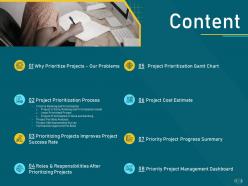
Slide 3: This slide contains the Content. It includes - Why Prioritize Projects - Our Problems, Project Prioritization Process, etc.
Slide 4: This is a table of content slide showing Why Prioritize Projects - Our Problems.
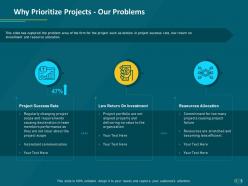
Slide 5: This slide presents Why Prioritize Projects - Our Problems. It captures the problem area of the firm for the project such as a decline in project success rate, low return on investment, and resource allocation.
Slide 6: This is a table of content slide showing the Project Prioritization Process. It includes - Criteria Ranking and Prioritization, Project Portfolio Analysis, Project Self-Assessment Survey, and Formulation Approved Portfolio.
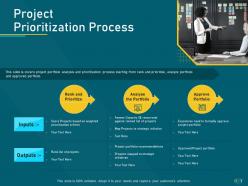
Slide 7: This slide presents the Project Prioritization Process. It covers the project portfolio analysis and prioritization process starting from the rank and prioritize, analyze portfolio and approved portfolio.
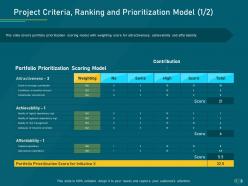
Slide 8: This slide presents the Project Criteria, Ranking, and Prioritization Model (1/2). It covers the portfolio prioritization scoring model with a weighting score for attractiveness, achievability, and affordability.
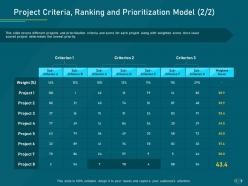
Slide 9: This slide presents the Project Criteria, Ranking, and Prioritization Model (2/2). It covers different projects and prioritization criteria and scores for each project along with the weighted scores.
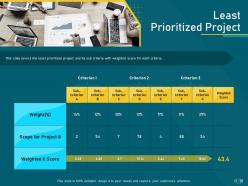
Slide 10: This slide presents the Least Prioritized Project. It covers the least prioritized project and its sub-criteria with the weighted score for each criterion.
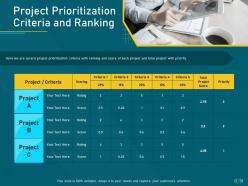
Slide 11: This slide presents the Project Prioritization Criteria and Ranking. Here we are cover project prioritization criteria with ranking and score of each project and total project with priority.
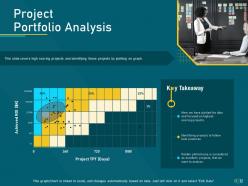
Slide 12: This slide presents the Project Portfolio Analysis. It covers high-scoring projects and identifying those projects by plotting them on the graph.
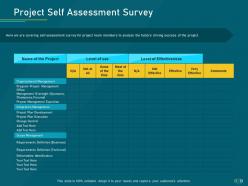
Slide 13: This slide presents the Project Self-Assessment Survey. It covers a self-assessment survey for project team members to analyze the factors driving the success of the project.
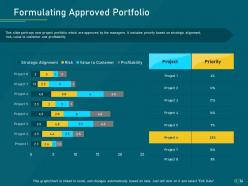
Slide 14: This slide presents the Formulating Approved Portfolio. It portrays new project portfolios which are approved by the managers. It includes priority based on strategic alignment, risk, value to the customer, and profitability.
Slide 15: This is a table of content slide showing Prioritizing Projects Improves Project Success Rate
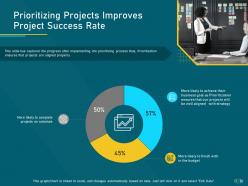
Slide 16: This slide presents the Prioritizing Projects Improves Project Success Rate. It has captured the progress after implementing the prioritizing process thus, Prioritization ensures that projects are aligned properly.
Slide 17: This is a table of content slide showing Roles & Responsibilities After Prioritizing Projects.
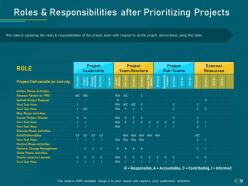
Slide 18: This slide presents the Roles & Responsibilities after Prioritizing Projects. It captures the roles & responsibilities of the project team with respect to all the project deliverables using this table.
Slide 19: This is a table of content slide showing the Project Prioritization Gantt Chart.
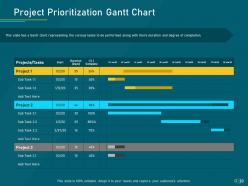
Slide 20: This slide presents the Project Prioritization Gantt Chart. It has a Gantt chart representing the various tasks to be performed along with their duration and degree of completion.
Slide 21: This is a table of content slide showing Project Cost Estimate.
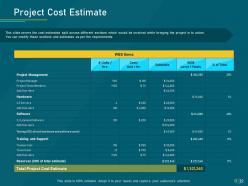
Slide 22: This slide presents the Project Cost Estimate. It covers the cost estimates split across different sections which would be involved while bringing the project into action.
Slide 23: This is a table of content slide showing Priority Project Progress Summary.
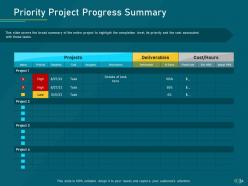
Slide 24: This slide presents the Priority Project Progress Summary. It covers the broad summary of the entire project to highlight the completion level, its priority, and the cost associated with these tasks.
Slide 25: This is a table of content slide showing the Priority Project Management Dashboard.
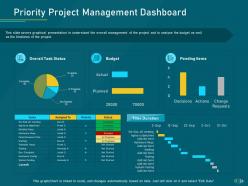
Slide 26: This slide presents the Priority Project Management Dashboard. It covers graphical presentation to understand the overall management of the project and to analyze the budget as well as the timelines of the project.
Slide 27: This is the Project Priority Assessment Model Icons Slide.
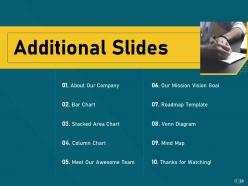
Slide 28: This slide introduces the Additional Slides. It includes - About Our Company, Bar Chart, Stacked Area Chart, Column Chart, Meet Our Awesome Team, Our Mission Vision Goal, Roadmap Template, Venn Diagram, Mind Map, and Thanks for Watching!
Slide 29: This slide contains the information about the company aka the ‘About Us’ section. This includes the Value Clients, We are Creative, and Preferred by Many.
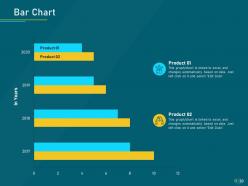
Slide 30: This slide shows a Bar Chart that compares 2 products’ data over a timeline of years.
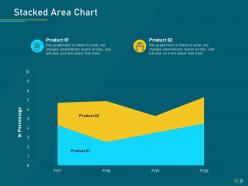
Slide 31: This slide shows a Stacked Area Chart that compares 2 products’ data over a timeline of financial years.
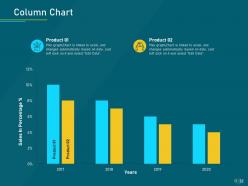
Slide 32: This slide shows a Column Chart that compares 2 products’ sales data over a timeline of years.
Slide 33: This slide shows the members of the company team with their name, designation, and photo.
Slide 34: This slide provides the Mission for the entire company. This includes the vision, the mission, and the goal.
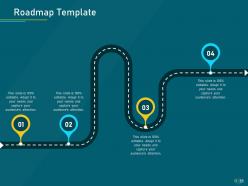
Slide 35: This slide is a Roadmap template to showcase the stages of a project, for example.
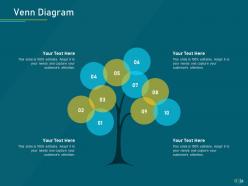
Slide 36: This slide provides a Venn diagram that can be used to show interconnectedness and overlap between various departments, projects, etc.
Slide 37: This is the Mind Map slide to brainstorm ideas with.
Slide 38: This is a Thank You slide where details such as the address, contact number, email address are added.
Project priority assessment model powerpoint presentation slides with all 38 slides:
Use our Project Priority Assessment Model Powerpoint Presentation Slides to effectively help you save your valuable time. They are readymade to fit into any presentation structure.




FAQs for Project priority assessment model
Honestly, I'd break it down into three things: does it actually fit your company's strategy, what's the money situation (ROI or savings), and can you realistically do it with your current team? I've watched so many companies get distracted by flashy projects that go nowhere. Quick wins sometimes beat those huge long-term bets - depends on your situation though. Make a simple scoring sheet with these categories and rate everything. Trust me, it cuts through all the office politics when you've got actual numbers to point to instead of just opinions flying around.
Dude, this stuff is actually huge for hitting your business goals. Bad prioritization means you'll crush your project deadlines but still miss quarterly targets - I've watched it happen so many times. You end up doing busy work while the important stuff sits there. Smart prioritization? That's when your resources go toward projects that actually move revenue, expand markets, or make operations smoother. Honestly, I think most teams just pick whatever seems urgent instead of strategic. Here's what works: tie every single project decision back to your top 3 business objectives. Otherwise you're just spinning wheels.
Dude, you absolutely need stakeholder input for prioritization - learned that one the hard way when I went purely off technical stuff once, big mistake. Talk to leadership, users, customers, your team... they all see different pieces of the puzzle. Without their perspective you're basically flying blind on what actually matters vs what just seems important. Business impact, resources, dependencies - there's so much you'll miss otherwise. Oh and document what they tell you clearly, because people will definitely change their minds later and you'll want that paper trail. Ask good questions upfront though.
Start with the hard numbers - ROI, costs, timelines. That stuff gives you something concrete to compare. Numbers don't tell the whole story though. You've also gotta factor in things like how well it fits your strategy, what it'll do to team morale, customer impact. I typically score everything on the same scale, then hash it out with stakeholders about the trade-offs. Honestly, the scoring system matters way less than just being upfront about what you're prioritizing and why. That way nobody's confused about how you landed on the decision.
Ugh, the worst thing is when people prioritize based on who screams the loudest rather than what actually moves the business forward. Also avoid that "everything is critical" nonsense - if it's all urgent, then nothing really is. Make sure you're realistic about what your team can handle and how projects depend on each other. Otherwise you'll build this gorgeous roadmap that's totally impossible to execute. Oh, and don't chase every shiny new idea that pops up. Set your criteria early, stick with them, and only review quarterly unless something truly major happens.
Honestly, project management software is a game-changer for this stuff. Instead of juggling everything in your head, you get one spot to see all your projects with their deadlines, budgets, and ROI laid out. I used to just wing it based on whatever felt urgent that day - terrible idea. Most tools let you create scoring systems so you're ranking things objectively rather than randomly. The visual dashboards are pretty sweet too, like color-coding priorities. When new projects come up (and they always do), you can quickly reshuffle everything. Just dump all your current projects into whatever tool you're using and start assigning priority scores. You'll instantly see what deserves your attention first.
There's a bunch of ways to tackle this. MoSCoW is probably the easiest starting point - just bucket everything into Must have, Should have, Could have, Won't have. Simple but effective. If you need something more sophisticated, the Eisenhower Matrix splits things by urgent vs important, which honestly saves me from overthinking stuff. Weighted scoring gets into the weeds with ROI and risk factors, while RICE works well if you're doing product work. But here's the thing - whatever framework you pick, your team actually has to use it consistently or it's pointless. I'd honestly just start with MoSCoW and see what breaks.
Honestly, I'd start by auditing what you're doing now - figure out where the subjective stuff creeps in. Set up clear metrics everyone agrees on upfront: ROI, strategic fit, resources needed, risk levels. The key is actually sticking to them though. I've watched so many teams create "strategic exceptions" that basically trash the whole system. Don't just stack your decision committee with senior people either. Get different perspectives in there. Document why you picked or passed on projects, then share that reasoning. Oh, and do regular check-ins to catch when bias starts sneaking back in. It always does.
Ugh, mid-project priority changes are the worst. Your timeline gets wrecked, budget goes haywire, and honestly? Team morale just tanks. Scope creep becomes inevitable. Resources need reshuffling. Stakeholders get confused about what they're even getting anymore. Your team feels like crap when their hard work suddenly doesn't matter - I've watched that happen and it's brutal. The real killer is losing all that momentum while half-finished stuff just sits there collecting dust. If you can't avoid the shift, at least explain WHY to everyone. Document what's paused vs. what's dead. Reset those delivery dates. Don't just drop the bomb without context.
Look, resource constraints basically force your hand on project priority - doesn't matter how amazing that big initiative looks on paper. Got a small dev team or tight budget? You're stuck picking what actually fits. I learned this the hard way when we tried to do everything at once (spoiler: disaster). Map out your team's bandwidth first, then see what each project actually demands. Sometimes the "perfect" project has to wait because you literally can't staff it right now. Better to nail a smaller win than crash and burn on something too ambitious. The fancy strategy stuff comes after you know what's actually doable.
Honestly, you gotta get everyone on the same page about what matters first. Set up criteria like revenue impact, how much it aligns with strategy, resources needed - that stuff. Make a scoring system so you're not just throwing opinions around (trust me, I've been in those endless debates). Rate each project against your criteria, then talk through the results. Oh and schedule regular check-ins because priorities shift constantly. The trick is getting buy-in on the framework before you start picking projects. When people start arguing, just point back to what you all agreed on originally.
Honestly, I'd focus on ROI, time-to-value, and goal completion rate - those three will tell you if you're actually making smart choices. Resource utilization is huge too because nothing sucks more than blowing your whole budget on the wrong project (been there). If customers are involved, definitely track satisfaction scores. The trick is measuring both money impact and speed of results. That combo shows whether your prioritization logic was actually good or just looked good on paper. But seriously, stick to 2-3 metrics max. You don't want to spend more time tracking stuff than actually getting work done.
Honestly, I'd go with like a 70/30 split - more weight on long-term stuff. But here's the thing: if you're literally putting out fires right now, flip that ratio temporarily. Quick wins can buy you breathing room to tackle the bigger projects later. Don't get addicted to the easy victories though - I've watched teams do that and they never build anything meaningful. Score your projects on both timelines, then mix and match. The long-term bets almost always pay off way better anyway. Just make sure you explain your logic to everyone so they don't think you're ignoring urgent stuff.
Dude, risk assessment is basically your sanity check before diving into projects. Look at what could go wrong AND how badly it'd hurt if it does. Some projects seem incredible but have massive technical risks that'll totally wreck you. Others are boring but won't tank your whole operation - honestly, those might be smarter picks sometimes. You gotta balance the exciting high-reward stuff against what you can actually handle going south. Write down what you're assuming about risks too, because I guarantee you'll need to look back at this stuff when everything changes later.
Don't just prioritize once and forget about it - check in quarterly to see what actually panned out. Those "must-have" projects that died after two weeks? Learn from them. Track which predictions were spot-on versus total misses, then tweak your approach. Get honest feedback from your teams while memories are still fresh (trust me, wait six months and nobody remembers why that initiative seemed brilliant). Honestly, most frameworks fail because people treat them like gospel instead of something that should grow with your company. Keep adjusting as you figure out what works.
-
Great product with highly impressive and engaging designs.
-
Designs have enough space to add content.
-
Easily Understandable slides.
-
Unique research projects to present in meeting.
-
Content of slide is easy to understand and edit.
-
Great experience, I would definitely use your services further.
-
Very well designed and informative templates.