

Project Progress Review With Change Request




Try Before you Buy Download Free Sample Product
 Impress Your
 Audience
 100%
100% Editable
 Save Hours
 of Time


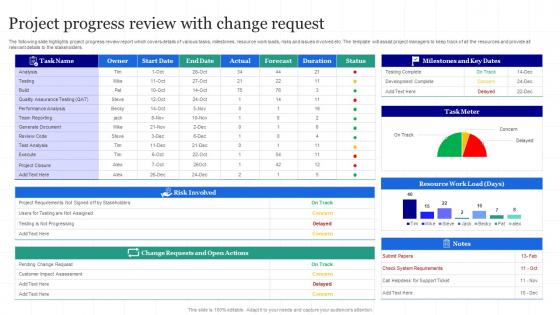
The following slide highlights project progress review report which covers details of various tasks, milestones, resource work loads, risks and issues involved etc. The template will assist project managers to keep track of all the resources and provide all relevant details to the stakeholders.
People who downloaded this PowerPoint presentation also viewed the following :
Project Progress Review With Change Request with all 6 slides:
Use our Project Progress Review With Change Request to effectively help you save your valuable time. They are readymade to fit into any presentation structure.





FAQs for Project Progress Review
Okay so there's basically five phases: initiation, planning, execution, monitoring, and closing. First you define scope and get everyone on board. Then comes planning - honestly this is make-or-break time. You're figuring out timelines, who's doing what, all that stuff. Execution is just the actual work happening. While that's going on, you're also monitoring (tracking progress, fixing issues). Closing is wrapping up loose ends and doing a post-mortem. Real talk though - most people rush through planning because it's boring, but that's where projects usually fall apart. Spend way more time here than you think you need.
Look, you've gotta weave risk management into everything from day one - don't just slap it on when stuff hits the fan. During planning, figure out what could go wrong. Then keep checking throughout the whole project. I've watched so many teams get blindsided because they ignored risks until it was too late (honestly, it's painful to watch). Set up weekly risk reviews and make sure everyone knows how to flag new problems fast. The trick is making it automatic - just build risk talk into your regular meetings. Once it becomes habit, you're golden.
Dude, communication with stakeholders will literally make or break your project. I can't stress this enough. Map out who needs updates and how often, then actually stick to it - don't get lazy halfway through. Regular check-ins and clear docs help you catch problems before they blow up. You'll avoid those nightmare moments where someone goes "this isn't what I asked for" after you've already built everything. Also scope creep is real and it's annoying. Keep everyone aligned on goals from day one. Oh, and listen when people talk - sounds obvious but you'd be surprised how many PMs just wait for their turn to speak.
Honestly, break that monster project into bite-sized pieces first. Three-point estimation is clutch - best case, worst case, most likely, then average those out. Always pad your timeline because Murphy's Law is real and stuff will go sideways. Story points work great for agile, regular time estimates for waterfall. Here's the thing though - don't just guess from your chair. Actually talk to whoever's doing the work since they know what's realistic. Oh, and use any similar projects you've done before as a baseline. Start small with your first deliverable and scale up.
Honestly, start with making people feel safe to actually speak up - nobody wants to get roasted for sharing ideas. Those formal status meetings can feel super interrogation-y, so try regular casual check-ins instead. Daily standups help, or even just coffee chats where people can brainstorm together. Oh and definitely connect everyone's work to the bigger goal - people work harder when they see the point. Give props when someone does good work too. Maybe start small this week? Like "win Wednesdays" where everyone shares what went well. It's amazing how much that stuff matters.
Honestly, just pick one solid PM tool first - Asana or Monday are great, Trello if you want something super simple. Gantt charts are kind of old school but I swear by them for timelines. Set up some basic tracking for your budget and milestones too, nothing fancy. Regular check-ins are clutch though - like actually talking to people instead of just staring at dashboards all day. Oh and don't go crazy adding tools right away. See what's actually missing first, then fill those gaps.
So waterfall is super linear - you finish requirements, then design, then dev, then testing. No going back. Works well when you know exactly what you want from day one. Agile does short sprints instead, maybe 2-3 weeks each. You can pivot based on feedback. Way more flexible when clients don't really know what they want yet (which is like... most of the time honestly). Most teams mix both approaches now. Waterfall's great for predictable stuff, but Agile saves you when requirements change constantly.
Honestly, start by tracking literally everything - even that random $3 app subscription you forgot about. I'd break it into categories and update weekly, but don't go crazy with some elaborate spreadsheet that'll just sit there unused. Always pad your budget with like 10-15% extra because trust me, weird stuff always comes up. Set alerts when you hit 75% of any category so you're not panicking later. The whole point is catching problems early when you can still fix them. Simple tools work way better than fancy ones nobody touches.
Look, lessons learned are basically your cheat sheet for not screwing up the same way twice. Document what bombed, what actually worked, and those random curveballs that hit you. We've all watched teams make identical scheduling mistakes because nobody bothered writing anything down the first time around. Don't just dump everything in some forgotten folder though - make it actually useful for future projects. Build templates from your wins, update risk lists with new nightmare scenarios you discovered. Honestly, the best part is just doing quick debriefs where everyone can trash-talk what sucked without sugarcoating it.
Honestly, you want to cover the big four: time, budget, scope, and quality. Schedule variance shows if you're on track. Budget variance tells you if you're bleeding money. Then track your scope completion percentage and some quality stuff like defect rates or how happy stakeholders actually are. Oh, and don't forget team velocity - I learned this the hard way, but a "successful" project that destroys your team is pretty worthless long-term. Just pick 3-5 metrics that matter to your stakeholders and stick with them throughout. Keep it simple.
Honestly, scope creep will kill your project if you're not careful about it. Start with a solid change process right from the beginning - document everything and get people to actually sign off on requirements. When someone comes asking for extras (which they will), don't just cave to make them happy. That's project suicide. Show them the trade-offs instead: "Sure, we can add that, but you're looking at two extra weeks or we drop something else." I learned this the hard way on my last project. Get any changes approved in writing before you touch anything.
Honestly, the right tech setup can totally change your project game. I'd grab something like Asana or Monday - beats drowning in email threads trying to track who's doing what. Real-time updates are clutch, especially with everyone working remotely now. The analytics stuff actually helps with figuring out where your resources should go, plus automated reports save you from those tedious weekly summaries (ugh). Just don't go overboard with features nobody will use. Pick something that fits how your team already works instead of making them learn some overly complicated system they'll hate.
Honestly, the biggest things are being straight with everyone about how the project's actually going - don't sugarcoat delays or problems. Make sure you're not playing favorites with resources and keep confidential stuff locked down. Avoid conflicts of interest obviously, and watch out for burning your team out (learned that one the hard way lol). Give credit where it belongs. Don't cut corners that'll bite users later. Oh, and set some ground rules early with your team so you can talk through the weird gray areas when they pop up. Trust me, they will.
Oh totally, leadership is huge for project success - probably top 3 factors honestly. When you don't have someone steering the ship, everything just falls apart even if the plan was solid. Someone has to make the hard calls and keep people motivated when stuff inevitably goes sideways (and it always does, lol). The best project leaders I've seen are directive but not dictators, you know? They set clear expectations from day one. Then they're constantly checking in to fix small problems before they become disasters. Your leadership style basically determines how your whole team communicates and handles obstacles.
Honestly, remote teams are a pain sometimes. Communication gets messy fast - no more popping over to ask quick questions or catching those little nonverbal cues. People end up confused about priorities. Time zones make everything worse too. You can't tell if someone's actually stuck or just avoiding work when they're not responding. Some folks start feeling super isolated, which tanks morale. I learned this the hard way last year. Schedule tons of check-ins and basically overcommunicate everything. Sounds annoying but it saves you later.
-
Presentation Design is very nice, good work with the content as well.
-
Delighted to see unique and eye-catching PowerPoint designs that are so easy to customize.