

Project status report powerpoint slide deck




Try Before you Buy Download Free Sample Product
 Impress Your
Audience
 100%
Editable
 Save Hours
of Time


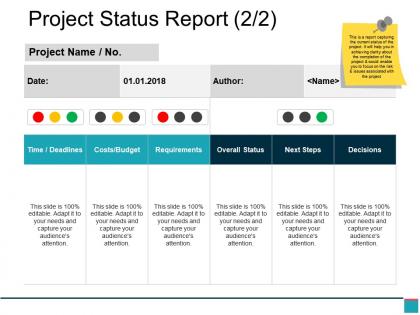
Lists out the priorities and remember to complete important tasks with our project status report PowerPoint slide deck. Our project plan template has been crafted by our professional team and this creates an effective project communications report for the management team. This slide can also be used to make strategy for your project team, sponsors or stakeholders. Our project management plan power point layout creates outline for stakeholders about the parameters of that project and plan of any actual work to take place. This project management status report PPT layout is useful for project managers to provide transparency into the progress toward milestones and helps to identify issues and risks so that correction can happen quickly. Our project report PowerPoint slideshow will help to keep your project on track with reports while it creates accountability and ownership within the team as it uncovers issues, mitigate risks, and to ensure you’re on track towards your project goals. Every aspect of our Project Status Report Powerpoint Slide Deck is designed to be high class. Excellence is integral to it.
People who downloaded this PowerPoint presentation also viewed the following :
Project status report powerpoint slide deck with all 5 slides:
Discourage indulgence in frivolous arguments with our Project Status Report Powerpoint Slide Deck. Handle any baseless controversies.


FAQs for Project status report
Honestly, just hit these five things: progress on milestones, blockers/risks, budget stuff, what's coming up next, and decisions you need from higher-ups. Don't skip the risks part like I used to - I thought it made me look incompetent but it's actually the opposite. Most people only read your summary anyway, so make it short. Throw in real numbers instead of saying "everything's fine." Oh, and stick to one page max or nobody will read it. Same day every week works best for consistency.
Honestly, weekly reports hit the sweet spot for most stuff. Daily ones will make everyone hate you pretty quickly. Monthly? That's way too long - problems just sit there getting worse. I'd stick with weekly unless you're in some crazy sprint mode, then maybe twice a week makes sense. For those big strategic projects that drag on forever, bi-weekly is totally fine. The main thing is just being consistent about it. Pick whatever schedule works and don't keep changing it up - your team needs to know when these things are coming. Trust me on this one.
Dude, go with progress bars and Gantt charts - they're clutch. Those red/yellow/green dashboards work amazing too because literally anyone can understand them at a glance. I'm obsessed with the traffic light thing honestly, even the most clueless exec gets it immediately. For budget stuff, just do simple bar charts showing what you planned vs what you actually spent. Oh, and timeline visuals are perfect when you need to show if you're behind or ahead of schedule. Don't overcomplicate it though - too much info on one chart makes people's eyes glaze over. Stick to 2-3 visuals max.
Dude, it's all about knowing your audience. Executives just want the big picture - budget, timeline, major issues. Don't bog them down with details. Your team needs the opposite though - they want blockers, resources, what's next. Clients? They only care about stuff that impacts them directly. I made this mistake for years, sending identical updates to everyone. No wonder half my stakeholders looked bored! Now I always think "what will this person actually DO with this info?" Makes writing way easier. Oh and honestly? Short emails get read, long ones get skimmed.
Honestly, the worst thing you can do is be super vague - stakeholders hate that "everything's fine" nonsense when they need real details. Don't bury the bad news either because that'll just bite you later. Keep it short though! Nobody's reading a five-page essay about project updates. I always use the same format so people know where to find stuff quickly. Oh, and make sure you're actually asking for the decisions you need - that's usually why you're writing the thing anyway. Bullet points are your friend. Always end with clear next steps.
Honestly, just let your PM tools do the heavy lifting here. Asana, Monday, Jira - they all pull data straight into reports automatically. Super time-saver. Set up dashboards for the stuff people actually want to see: milestones, budget burn, task percentages. Connect your tool's API to whatever you're using for reports - could be a basic spreadsheet or something like PowerBI if you're feeling fancy. Some tools will even spit out executive summaries for you (though those can be hit or miss). Figure out what metrics your stakeholders obsess over first, then configure everything to track those automatically. Way easier than doing it manually every week.
Honestly, stick to the basics first - budget vs actual spend, timeline stuff (like which milestones you hit or totally whiffed), and any scope changes. Resource utilization is pretty clutch too since bosses love knowing if you're burning through too much staff. I always throw in team velocity metrics if I'm tracking that kind of thing. Oh, and those cheesy red/yellow/green risk indicators? Executives genuinely love that visual stuff, even though it feels kinda elementary. Just don't go overboard - maybe 5-7 metrics tops or people's eyes will glaze over. Pick whatever directly connects to your success criteria and actually update them every time. That consistency thing matters more than you'd think.
Don't dance around problems - just say what's broken. When something's going sideways, tell them the actual issue, how it'll mess with your timeline or budget, and your game plan to fix it. Yeah, it's awkward calling out problems but they need to know what's really happening. For risks, get specific with numbers - like "there's a 30% chance our vendor screws up and delays launch by 2 weeks." Always come with solutions, not just complaints. Trust me, being upfront actually makes you look more competent, not less. Plus they can't help if they don't know what's wrong.
Honestly, feedback is what turns status reports from boring paperwork into something people actually read. Ask your stakeholders what they really need - there's always a disconnect between what we think matters and what they care about. Maybe your executives don't want all those technical details, or your timelines confuse people. Regular check-ins work best. Just ask "Does this report help you?" then actually change things based on what they say. Format, timing, detail level - adjust it all. I learned this the hard way when I kept sending these super detailed updates that nobody was reading!
Honestly, status reports work because they put everyone's work right out in the open. When you're tracking what people said they'd do vs what actually happened, it gets pretty obvious who's carrying their load. Trust me, nobody wants to be that person with red updates every single week! The whole transparency thing pushes people to either follow through or speak up about problems before they get worse. You'll want to track individual stuff alongside the bigger team goals - and definitely go over these reports where everyone can see each other's progress. Makes a huge difference.
Keep it short - max 2 pages or around 300-500 words. Nobody wants to read a novel about your project updates, trust me. Hit the main points: where you're at now, what's blocking you, what's next, and how the budget/timeline look. Your exec summary should be super tight - maybe 3 bullet points tops. I always make sure each section is easy to scan. Oh, and if it takes more than 5 minutes to present out loud, you've gone overboard. People's attention spans aren't what they used to be.
Honestly, status reports are like your safety net - they catch problems early before everything goes to hell. When you're upfront about what's working and what isn't, people can actually jump in and help instead of getting surprised later. Nobody wants to keep writing "made zero progress" every week, so it keeps your team moving. I've found they're also great for highlighting wins (which everyone forgets to do). The trick is treating them as strategy, not just paperwork you have to fill out. Quick course corrections beat massive pivots every time.
Put the "Decisions Needed" stuff right at the top - that's what actually gets people to pay attention. I used to write these super detailed reports that execs would just ignore completely. Now I lead with red flags and blockers, then list what I need from specific people with actual deadlines. Skip all the "here's what's going great" fluff unless it affects something they need to decide on. Each section should end with "here's exactly what I need from you" so there's no confusion. Trust me, once you start being this direct about what needs action, you'll get way better responses. The fancy status updates can go at the bottom where nobody reads them anyway.
Honestly, just be straight with them - professional but not stuffy. Share what happened, where things are now, and what's coming next. Skip the corporate speak that makes everyone zone out (you know what I mean). When there are issues, don't sugarcoat it. People actually respect honesty more than fluff anyway. Be specific instead of dancing around details. After each section, spell out the next steps clearly so nobody's left wondering what happens next. Your stakeholders will thank you for keeping it real instead of hiding behind fancy language.
Your old status reports are honestly pure gold for future projects. Pull up your last 3-4 and look for patterns - you'll spot the same bottlenecks popping up, see which risks were actually real vs the ones we stressed about for no reason. Timeline slips, budget issues, they're all there. Those weekly updates we always scrambled to finish? Turns out they're way more useful than I thought. You can build way better estimates from this stuff and even predict where things might go sideways next time. Trust me, the data's all sitting there waiting.
-
Innovative and attractive designs.
-
Nice and innovative design.