Project target with action program progress report

Rating:
80%
Project target with action program progress report
Slide 1 of 2
Favourites Favourites

Try Before you Buy Download Free Sample Product

Audience Impress Your
Audience
Editable 100%
Editable
Time Save Hours
of Time
The Biggest Sale is ending soon in
0
0
:
0
0
:
0
0
Rating:
80%
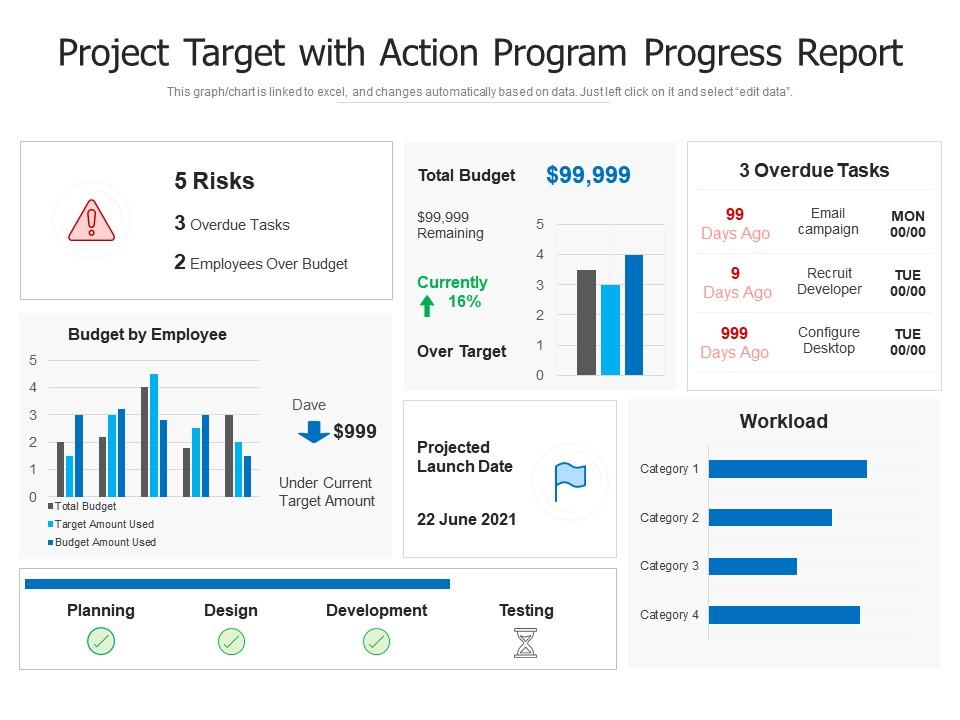
Deliver an outstanding presentation on the topic using this Project Target With Action Program Progress Report. Dispense information and present a thorough explanation of project budget, planning, testing, projected launch date using the slides given. This template can be altered and personalized to fit your needs. It is also available for immediate download. So grab it now.

People who downloaded this PowerPoint presentation also viewed the following :

FAQs for Project target with action

Okay so you'll want to hit five main things: where you stand against your milestones, what you've actually gotten done lately, any problems slowing you down, budget stuff, and what's coming next. Throw in some numbers if you can - bosses eat that up. Be honest about the messy parts too, don't just highlight the wins. Early heads-up on issues beats surprises later. Keep it short but detailed enough that someone can quickly figure out if your project's doing well or totally off track. Oh, and use the same format each time so people know where to look.

Weekly's usually your best bet for project reports. Daily ones? Only if something's seriously broken or you're in crunch mode - otherwise you'll exhaust everyone including yourself. Bi-weekly can work for those slower, long-term projects where not much changes week to week. I've watched teams get completely buried doing daily updates for routine stuff when nobody even reads them. Weekly catches problems before they spiral but doesn't turn you into a reporting machine. Honestly, just start there and see what your stakeholders actually want - some will ask for more, others less.

Honestly, I'd start with Asana or Monday.com - they're both solid and let everyone update stuff in real-time. Jira's great too if you're doing anything techy. The reports basically write themselves, which is clutch for those weekly check-ins nobody wants to prep for. Google Sheets works fine for smaller things though, don't overcomplicate it. Whatever you pick, just make sure your team will actually use the damn thing consistently. Maybe try the free trials first? I'd give it at least two weeks of religiously updating before deciding if it's working.

Honestly, pictures and charts are game-changers for progress reports. Most execs barely read the text anyway - they just want to glance at colorful dashboards and get it. You can throw in timeline charts, budget graphs, those red/yellow/green status things that take zero brainpower to understand. Way better than making people slog through paragraphs of updates. Plus visuals make your wins pop more and risks are super obvious. I'd swap out like half your written stuff for simple charts. Oh, and dashboards are clutch if you can swing it. Trust me, everyone will actually look at your reports for once.

Okay so track schedule performance first - like are you actually hitting deadlines? Budget variance is huge too, basically comparing what you're spending vs what you planned. Scope completion percentage and quality stuff like defect rates matter. But here's what most people miss - team velocity and resource utilization are goldmines. They show if you're burning people out or where bottlenecks are hiding. I'd honestly start with just 2-3 metrics your stakeholders actually care about. You can always add more later. Don't go crazy trying to measure everything right off the bat.

Honestly, just think about what each person actually gives a damn about. C-suite wants the big picture - budget, timeline, major issues. That's it. Middle managers need the tactical stuff like who's doing what and when. Your team? They want the detailed operational info and anything blocking their work. I made this mistake once - sent a super technical report to our CEO and he was like "just tell me if we're on track or not" lol. Now I create different versions of the same update. Map out what decisions each group makes, then write for that. Short version for execs, detailed breakdown for everyone else. Game changer.

Honestly, the biggest mistake is being super vague about what's actually happening. Don't bury the real problems under a bunch of fluff - stakeholders will be pissed if they get blindsided later. Skip the "everything's fine" BS when it's not. Focus on what you've actually delivered, not just busy work you've been doing. I've seen so many people obsess over making these things look perfect instead of, you know, actually useful? Be specific about what's blocking you and always include next steps with names attached. Trust me, you'll need that paper trail when someone inevitably asks "wait what happened with that thing?"

Just keep it super simple - status, what got done (or didn't), what's blocking you, what's next. That's literally it. I used to write these massive updates that went straight to people's trash folders, so now it's all bullet points, 2-3 lines each. Numbers and dates work way better than "things are going well" - nobody knows what that means anyway. Don't bother explaining background stuff since everyone already knows the project. Oh, and put the traffic light status right at the top. Green, yellow, red - whatever it is. People skim these things in like 10 seconds, so make the important stuff obvious.

Honestly, your team's feedback is everything for accurate reporting. They're actually doing the work, so they know what's really happening vs. what your fancy project plan claims. Bottlenecks, delays, emerging problems - they'll spot this stuff way before you will. I learned this the hard way on my last project, ha. Set up regular touchpoints like standups or quick one-on-ones. You don't want to be that PM who's totally out of touch when report time comes around. Those feedback loops will save you from looking clueless in front of stakeholders.

Honestly, just create a dedicated risks section and don't sugarcoat anything. Nobody likes surprises more than actual problems, trust me. List each risk with the impact and your plan to fix it. That red/yellow/green traffic light thing works great - executives eat that stuff up for some reason. Each challenge needs a mitigation plan and timeline too. Oh, and here's the key part: always come with solutions, not just a dump of problems. Being transparent early builds way more trust than trying to hide issues. They'll find out eventually anyway, so might as well show you're on top of it.

Slides are definitely the way to go for project updates. People's attention spans are basically nonexistent these days - they want to see charts, timelines, and roadblocks at a glance. Written reports just sit there unread (trust me, I've written plenty). If you're working on something super technical though, maybe do slides for the actual meeting and attach a detailed doc for anyone who wants to dive deeper later. I'd start simple with slides and see what questions come up. You can always add more detail if they're asking for it. Way better than overwhelming everyone upfront.

Honestly, I just track a few key things against my original plan. Are you hitting your milestones on time? How's the budget looking - over or under? Quality still good on deliverables? The trick is watching trends, not just one-off numbers. If you're constantly putting out fires, that tells you something. I usually set up maybe 4-5 metrics that actually matter to whoever's paying for this thing, then check them weekly. Quick tip - make sure you're delivering real value, not just checking boxes. Sometimes projects look "successful" on paper but don't actually move the needle, you know?

Definitely keep your timelines updated with real completion dates, not just wishful thinking. When stuff gets delayed, don't just tack on extra time to everything - actually look at each piece and figure out what's realistic now. I swear, half the project updates I see are people mindlessly adding two weeks to every single task! Dependencies are huge too - call out what's blocking what. And honestly? Just tell people why things changed. Nobody likes surprises, but they'll usually get it if you explain what happened. Makes the whole thing way less painful for everyone.

Honestly, progress reports are lifesavers for avoiding those cringe moments where everyone's like "wait, who's doing what now?" They create this regular check-in rhythm that actually works. Instead of people assuming stuff is getting done, you're documenting what's really happening. Blockers get spotted early, wins get shared (which feels good), and you can jump in before someone's totally overwhelmed. Oh, and don't make them boring status dumps - that's the worst. Have everyone share their main priority plus their biggest roadblock. Trust me, it naturally gets the right conversations going.

Look, just don't lie about stuff in your progress reports - that's where people get burned legally. Government contracts are especially strict about this. Public companies have SOX requirements too, which is a whole headache. Document everything honestly: delays, budget issues, risks. Safety problems? Flag them right away, no questions asked. Regulatory deadlines matter big time. I've seen project managers stress about the format when really it's just about being truthful. Keep decent records and you'll be fine. Don't try to sugarcoat major problems - that backfires every single time.

Ratings and Reviews

80% of 100
Write a review
Most Relevant Reviews
  1. 80%

    by Corey Patterson

    Unique research projects to present in meeting.
  2. 80%

    by Colby Coleman

    Use of icon with content is very relateable, informative and appealing.
  3. 80%

    by Delmar Wagner

    Great designs, Easily Editable.
  4. 80%

    by Charlie Jones

    Unique design & color.

4 Item(s)

per page: