

Project Time Plan Powerpoint Ppt Template Bundles





Try Before you Buy Download Free Sample Product
 Impress Your
 Audience
 100%
100% Editable
 Save Hours
 of Time


Our Project Time Plan Powerpoint Ppt Template Bundles are topically designed to provide an attractive backdrop to any subject. Use them to look like a presentation pro.
People who downloaded this PowerPoint presentation also viewed the following :
Project Time Plan Powerpoint Ppt Template Bundles with all 17 slides:
Use our Project Time Plan Powerpoint Ppt Template Bundles to effectively help you save your valuable time. They are readymade to fit into any presentation structure.







FAQs for Project Time Plan Powerpoint
Honestly, start with a super clear project scope - what exactly are you trying to do? Break everything down into actual tasks, then figure out how long each will realistically take. Map out which tasks depend on others finishing first. There's this thing called the critical path that shows your shortest possible timeline, but whatever you calculate, add buffer time because stuff always goes sideways. Oh, and assign people to each task obviously. Set milestone checkpoints so you're not flying blind. Keep that timeline somewhere everyone can see it and update it constantly - dead serious about that part.
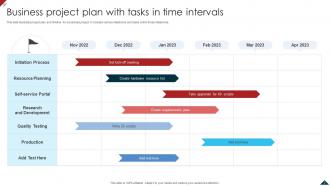
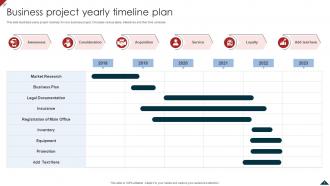
Okay so Gantt charts are basically visual timelines that show all your project tasks and how long they'll take. Super helpful for seeing dependencies too - like which tasks can't start until others finish. Honestly, they're lifesavers for catching scheduling disasters before they happen. I used to just wing it with spreadsheets but these are way clearer for tracking progress. Plus stakeholders actually understand them without needing a whole explanation. My advice? Map out your critical path first - that's where any delays will really mess you up. You'll know exactly where to focus your energy.
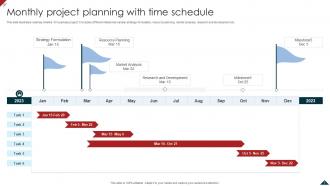
Honestly, I always start by mapping out dependencies first - makes the important points way more obvious. Break your project into major phases and find where things naturally end. Like when deliverables get handed off, clients need to approve stuff, or one team wraps up so another can jump in. External deadlines are huge too - regulatory stuff, seasonal constraints, whatever. Those basically create milestones for you. The trick is picking spots where you can actually measure real progress, not just random dates on a calendar. I'd list your major deliverables first, then work backwards from there. Way easier that way.
Honestly, those two things are super connected - you can't plan one without the other. Your timeline means nothing if you don't know who's actually available to do the work. Say your best dev could finish something in 2 days, but they're buried until next month? That changes everything. I'd start with figuring out your critical path first, then see where people are free. That way you'll catch the conflicts before they bite you. Resource planning is kinda tedious but it saves you from those "oh crap" moments later when everything's running behind.
Okay so risk assessment is basically your sanity check before setting deadlines. Figure out what could blow up, how likely that is, and how much extra time you'll need. Trust me, I got burned on this last month! What works is padding your riskiest tasks by like 20-30% right from the start. Also have backup plans for anything on your critical path. Honestly, projects never go as smoothly as you think they will - that's just life. Make a list of your biggest worries first, then work from there.
Honestly, start tracking your time right now - even messily. You'll be shocked at what actually eats your day. Those "quick syncs" probably steal 2+ hours daily (I learned this the hard way). But here's the real win: you'll spot your patterns. Debugging always takes me 50% longer than planned, every damn time. Once you have actual data instead of wild guesses, your future timelines get so much better. Track this current project and you'll have real numbers for next time instead of just hoping for the best.
Oh man, the classic mistake is being stupidly optimistic about timing. I always think something will take 2 hours and it's actually 6, you know? Plus people forget that Task A has to finish before Task B can even start. Never schedule things back-to-back either - there's always some random thing that pops up. Buffer time is your best friend, like 20% minimum. Don't go crazy planning every detail upfront though, you can figure that out later. Check with your team regularly and remember stuff like holidays will mess with your timeline too.
Oh man, agile is so different from the old-school way of doing things. Instead of planning your whole project timeline upfront, you work in these short sprints - like 1-4 weeks each. You estimate stuff using "story points" instead of hours, which feels super weird initially but actually works better. Every sprint you're basically reprioritizing and tweaking your timeline based on what you just learned. Deadlines get more flexible but somehow you end up delivering more predictably? It's kinda backwards but it works. Just figure out your MVP first and plan maybe your next 2-3 sprints max.
Break your project into smaller pieces with mini-deadlines - seriously, this saves so much stress. Build in buffer time because something always goes wrong (usually when you least expect it). Focus on the 80/20 rule first: tackle the 20% of tasks that'll give you 80% of your results. Don't wait to tell people about delays - I learned this the hard way. You think you'll catch up but honestly? You probably won't. Check your progress weekly and pivot if needed. Oh, and map out which tasks are absolutely critical this week. Those can't slip without messing up your whole timeline.
Talk to your stakeholders during planning, not after you've set everything in stone. I like doing workshops or quick interviews to figure out their constraints and what they can realistically deliver. Some will definitely try pushing crazy timelines on you - just document it and push back with actual data. Also grab their availability for reviews and approvals while you're at it. The whole point is baking their feedback into your estimates from the start instead of scrambling later. Oh, and keep a log of what input you've used. Trust me, you'll forget otherwise and someone will ask why their suggestion didn't make it in.
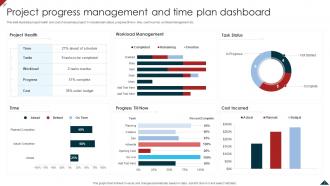
Focus on schedule variance first - are you hitting your planned dates? Also track milestone completion and how your critical path is doing. Resource utilization matters too since timeline problems usually come from there or budget issues. Don't get sucked into perfecting Gantt charts though - I've watched PMs waste hours on those. Team velocity is way more useful for spotting bottlenecks before they wreck everything. Weekly check-ins work better than monthly reports. You can actually fix stuff when you catch it early instead of just documenting the disaster later.
Dude, you gotta factor in cultural stuff from day one or it'll bite you later. Different teams handle deadlines completely differently - some see them as suggestions, others as gospel. Communication styles are all over the place too. I've worked with teams that need three meetings just to agree on lunch, while others make snap decisions. Oh, and holiday schedules will catch you off guard every time (learned that during Ramadan!). Map out these differences early. Build in extra time for various work styles and definitely clarify what "ASAP" means to everyone.
So buffer time is basically your backup plan for when stuff goes wrong - which it always does, trust me. I usually tack on about 15% extra time to the big milestones. Some people do 10-20% but I've found 15% hits that sweet spot where you're covered but not being crazy conservative. There's this thing called PERT that averages your best case, worst case, and realistic scenarios if you want to get fancy about it. The trick is baking it into your timeline from day one instead of panicking later when everything's behind schedule.
Honestly, the automation stuff is pretty cool once you get it set up. These tools pull your old project data to guess how long things will actually take - way better than my random estimates lol. When something runs late, they'll shift your whole timeline automatically. Microsoft Project does this really well, or Asana if you want something simpler. You can set notifications so your team knows what's next without you constantly bugging them. The resource assignment thing is clutch too - it'll distribute work based on who's available. Reports just generate themselves, which saves me tons of time each week.
Your team makeup will make or break your timeline - I've seen this happen so many times. Get the right skill mix and everything moves faster with way fewer do-overs. I usually aim for about 70% experienced people, 30% junior. Senior folks can tackle the hard stuff while mentoring newbies, plus you won't get stuck waiting for someone with the right expertise. But don't stack too many seniors or they'll argue about everything forever. And too many juniors? That's just painful for everyone. When you're setting deadlines, be realistic about who's actually doing the work, not who you wish you had.
-
I am extremely pleased with these PPT slides that we used for our event. They were easy to modify and came out great in all aspects!
-
Easily Editable.