

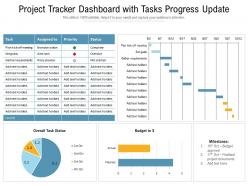
Project tracker dashboard with tasks progress update






Try Before you Buy Download Free Sample Product
 Impress Your
 Audience
 100%
100% Editable
 Save Hours
 of Time


Our Project Tracker Dashboard With Tasks Progress Update are topically designed to provide an attractive backdrop to any subject. Use them to look like a presentation pro.
People who downloaded this PowerPoint presentation also viewed the following :
Project tracker dashboard with tasks progress update with all 2 slides:
Use our Project Tracker Dashboard With Tasks Progress Update to effectively help you save your valuable time. They are readymade to fit into any presentation structure.
FAQs for Project tracker dashboard with
Key metrics for a project tracker dashboard include project completion percentage, budget variance, timeline adherence, resource utilization, milestone achievements, and risk indicators. These metrics enable project managers to identify bottlenecks, optimize resource allocation, and maintain stakeholder transparency, with many organizations finding that comprehensive dashboards ultimately deliver faster project delivery and enhanced operational efficiency.
Visualizations enhance data interpretation by transforming complex project metrics into intuitive charts, graphs, and progress bars that reveal patterns, bottlenecks, and trends instantly. Through interactive dashboards, project managers can identify resource allocation issues, track milestone progression, and communicate status updates effectively, with many organizations finding that visual data representation accelerates decision-making and improves stakeholder engagement significantly.
Top project tracker dashboard tools include Microsoft Project, Asana, Trello, Monday.com, Smartsheet, and Tableau for advanced analytics integration. These platforms streamline project oversight by automating progress tracking, centralizing team communications, and delivering real-time visibility into deadlines, with many organizations finding that integrated dashboards reduce project delays while enhancing resource allocation efficiency.
Project tracker dashboards should be updated daily or in real-time for optimal relevance, depending on project complexity, team size, and stakeholder requirements. Many organizations find that automated daily updates work well for most projects, while critical initiatives in sectors like software development, manufacturing, or healthcare benefit from real-time data synchronization, ultimately delivering enhanced visibility and faster decision-making capabilities.
User access and permissions are fundamental to dashboard design, determining what project data, features, and controls each user can view or modify based on their role and responsibilities. Through role-based permissions, project managers can restrict sensitive financial information while enabling team members to update task status and timelines, ultimately ensuring data security, maintaining project confidentiality, and streamlining workflows across organizations.
Stakeholders collaborate effectively through project tracker dashboards by accessing real-time project updates, sharing centralized communication threads, and maintaining transparent task ownership across teams. These platforms streamline coordination by enabling instant feedback loops, automated progress notifications, and shared resource visibility, with many organizations finding that centralized dashboards reduce meeting frequency while enhancing cross-functional alignment and accountability.
Common pitfalls include information overload, poor visual hierarchy, lack of real-time updates, inadequate filtering options, and misaligned metrics with stakeholder needs. These design flaws create confusion rather than clarity, with many project managers finding that overly complex dashboards reduce team productivity and decision-making speed, ultimately hindering project success.
A project tracker dashboard caters to different team roles by providing customizable views, role-based permissions, and relevant metrics for each position. Project managers access comprehensive overviews and resource allocation data, while developers focus on task assignments and deadlines, and stakeholders view progress summaries and milestone achievements, ultimately enabling seamless collaboration and accountability across organizational levels.
Data accuracy in project tracker dashboards can be ensured through automated data validation, real-time synchronization with project management systems, standardized input templates, regular auditing processes, and user access controls. These methods work together to minimize human error, maintain consistency across teams, and provide reliable project insights, with many organizations finding that combining automated checks with periodic manual reviews delivers the most comprehensive accuracy assurance.
Integration with other project management tools enhances a project tracker dashboard's functionality by centralizing data from multiple sources, automating workflow transitions, and providing comprehensive project visibility across platforms. These integrations streamline resource allocation, eliminate duplicate data entry, and enable real-time synchronization between tools like Slack, Jira, and Asana, ultimately delivering improved team collaboration and more accurate project insights.
User-friendly project tracker dashboards incorporate clean layouts, intuitive navigation, color-coded status indicators, customizable widgets, and clear progress visualizations. These elements streamline project oversight by reducing cognitive load, enabling quick status identification, and providing at-a-glance insights, with many organizations finding that well-designed dashboards significantly enhance team productivity and decision-making efficiency.
A project tracker dashboard assists in risk management by providing real-time visibility into project metrics, milestone progress, and resource allocation patterns that signal potential issues. Through automated alerts and visual indicators, project managers can identify budget overruns, schedule delays, and resource bottlenecks early, enabling proactive mitigation strategies that minimize project disruption and maintain delivery timelines.
Project tracker dashboards generate status reports, milestone reports, resource utilization reports, budget variance reports, and performance analytics reports. These reports enable project managers to monitor progress, identify bottlenecks, and optimize resource allocation, with many organizations finding that automated reporting streamlines decision-making and enhances stakeholder communication throughout project lifecycles.
Mobile compatibility enhances project tracker dashboard accessibility by enabling real-time updates, instant notifications, and location-independent access to critical project data. This flexibility allows team members to monitor progress, approve tasks, and respond to issues from anywhere, ultimately streamlining communication and accelerating decision-making processes across distributed teams.
Real-time data on project tracker dashboards delivers immediate visibility into project progress, resource allocation, budget status, milestone tracking, and team performance metrics. This enables project managers to identify bottlenecks quickly, make data-driven decisions, and course-correct before issues escalate, ultimately enhancing operational efficiency and project success rates across organizations.
-
Informative presentations that are easily editable.
-
Awesome use of colors and designs in product templates.
-
Innovative and attractive designs.
-
Easy to edit slides with easy to understand instructions.
-
Topic best represented with attractive design.