

Promoting on youtube channel powerpoint presentation slides




Try Before you Buy Download Free Sample Product
 Impress Your
 Audience
 100%
100% Editable
 Save Hours
 of Time


YouTube has a large and diverse audience that happily uses both YouTubes and Googles search engines to find the content the audience wants. It helps small businesses with improved marketing strategy by adding video content, promoting their products and services, and boosting audience engagement. Check out our competently designed template on Promoting on YouTube Channel that has focused on current state analysis, which covers the sales earned by the company, customer and market churn rate, internal barriers to client loyalty, and ratings of B2C solutions, etc. We have also outlined the challenges faced in promoting the video and audio material and the solutions. The main focus of this module is to understand the strategy, which covers different steps such as setting the goal, defining the audience, creating distribution strategy, and content scope and research. This insightful proposal focuses on developing YouTube campaigns and the ads costs, the impact of choosing such a channel, and various marketing analytics dashboards. Get this powerful template and entice your investors to invest in your firm. Join your hands with us and book a free demo with our expert team for customizing the template based on specific needs.
People who downloaded this PowerPoint presentation also viewed the following :
Content of this Powerpoint Presentation
Slide 1: This slide displays title i.e. 'Promoting on YouTube Channel' and your Company Name.
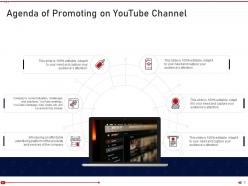
Slide 2: This slide presents agenda for promoting on youtube channel.
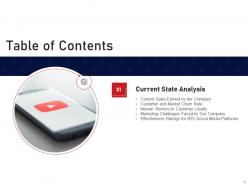
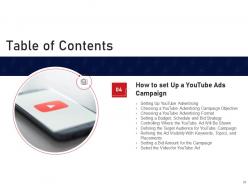
Slide 3: This slide exhibits table of contents.
Slide 4: This slide shows title for five topics that are to covered next in the template.
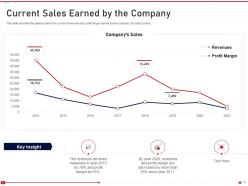
Slide 5: This slide provides the glimpse about the current revenues and profit margin earned by the company for past 8 years.
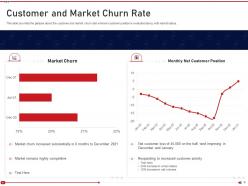
Slide 6: This slide provides the glimpse about the customer and market churn rate wherein customer position is evaluated along with market status.
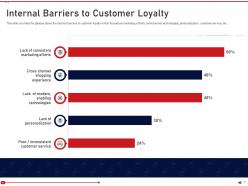
Slide 7: This slide provides the glimpse about the internal barriers to customer loyalty which focuses on marketing efforts, omnichannel, etc.
Slide 8: This slide provides the glimpse about the current marketing challenges faced by the company such as marketing knowledge, etc.
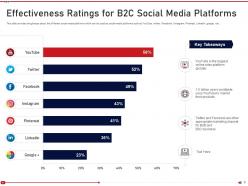
Slide 9: This slide provides the glimpse about the different social media platforms which can be used as social media platforms.
Slide 10: This slide depicts title for next three topics to be covered in the template.
Slide 11: This slide provides the glimpse about the YouTube business exposure to customers which focuses on customer communication, advertising, etc.
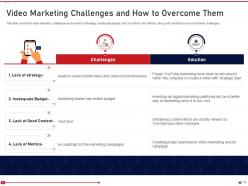
Slide 12: This slide covers the video marketing challenges such as lack of strategy, inadequate budget, lack of content, etc.
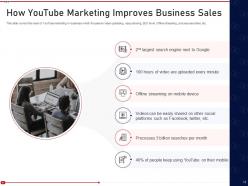
Slide 13: This slide covers the need of YouTube marketing in business which focuses on video uploading, easy sharing, etc.
Slide 14: This slide highlights title for next two topics to be covered.
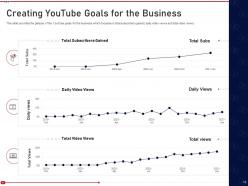
Slide 15: This slide provides the glimpse of the YouTube goals for the business which focuses on total subscribers gained, etc.
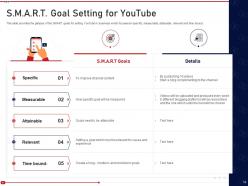
Slide 16: This slide provides the glimpse of the SMART goals for setting YouTube in business which focuses on specific, measurable, etc.
Slide 17: This slide illustrates title for next topic to be covered in the template.
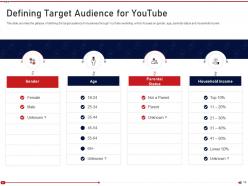
Slide 18: This slide provides the glimpse of defining the target audience for business through YouTube marketing which focuses on gender, age, etc.
Slide 19: This slide displays title for next one topic to be covered.
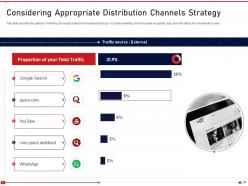
Slide 20: This slide provides the glimpse of defining the target audience for business through YouTube marketing which focuses on gender, age, etc.
Slide 21: This slide presents title for next one topic.
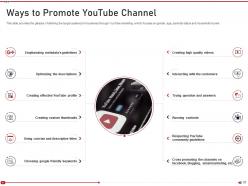
Slide 22: This slide exhibits ways to promote youtube channel using icons.
Slide 23: This slide shows title for next nine topics to be covered in the template.
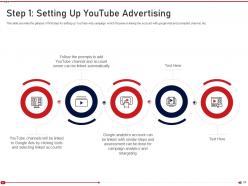
Slide 24: This slide provides the glimpse of first step for setting up YouTube Ads campaign which focuses on linking the account with google Ads, etc.
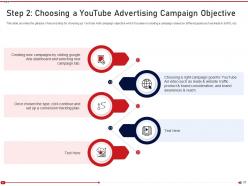
Slide 25: This slide provides the glimpse of second step for choosing up YouTube Ads campaign objective which focuses on creating a campaign.
Slide 26: This slide provides the glimpse of third step for choosing up YouTube Ads format which focuses on different Ad formats such as TrueView, etc.
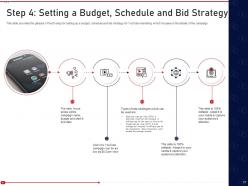
Slide 27: This slide provides the glimpse of fourth step for setting up a budget, schedule and bid strategy for YouTube marketing.
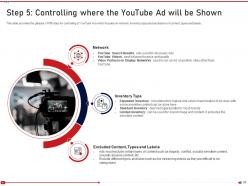
Slide 28: This slide provides the glimpse of fifth step for controlling of YouTube Ad which focuses on network, inventory type, etc.
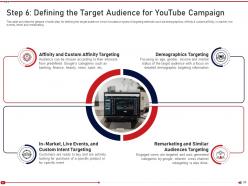
Slide 29: This slide provides the glimpse of sixth step for defining the target audience which focuses on types of targeting methods.
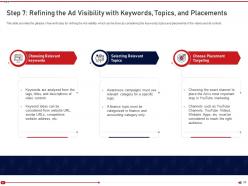
Slide 30: This slide provides the glimpse of seventh step for refining the Ad visibility which can be done by considering the keywords.
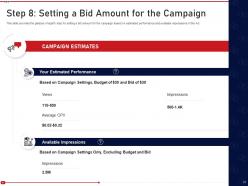
Slide 31: This slide provides the glimpse of eighth step for setting a bid amount for the campaign based on estimated performance.
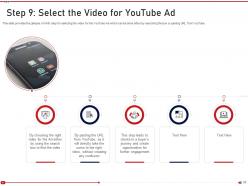
Slide 32: This slide provides the glimpse of ninth step for selecting the video for the YouTube Ad.
Slide 33: This slide highlights title for next three topics to be covered in the template.
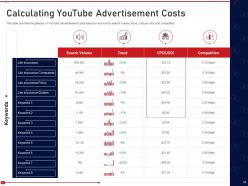
Slide 34: This slide provides the glimpse of YouTube advertisement costs based on keywords, search volume, etc.
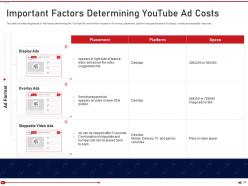
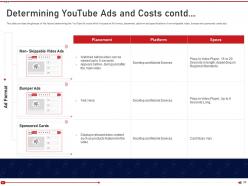
Slide 35: This slide provides the glimpse of the factors determining the YouTube Ad costs which focuses on Ad format, placement, etc.
Slide 36: This slide provides the glimpse of the factors determining the YouTube Ad costs which focuses on Ad format, placement, etc.
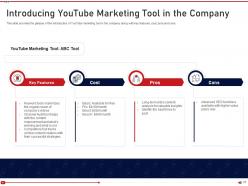
Slide 37: This slide provides the glimpse of the introduction of YouTube marketing tool in the company along with key features, cost, pros and cons.
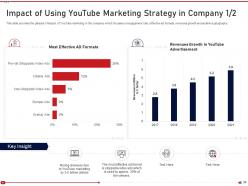
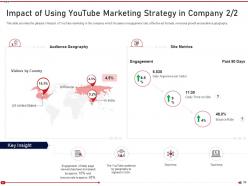
Slide 38: This slide provides the glimpse of impact of YouTube marketing in the company which focuses on engagement rate, effective ad formats, etc.
Slide 39: This slide displays continued content.
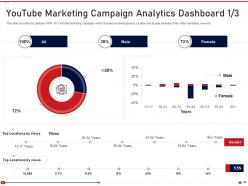
Slide 40: This slide provides the glimpse of KPI for YouTube marketing campaign which focuses on demographics, location, etc.
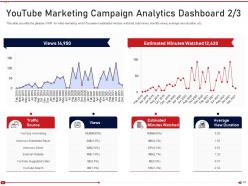
Slide 41: This slide provides the glimpse of KPI for video marketing which focuses on estimated minutes watched, total views, monthly views, etc.
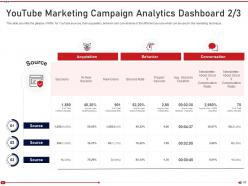
Slide 42: This slide provides the glimpse of KPIs for YouTube sources, their acquisition, behavior and conversions of the different sources.
Slide 43: This is the icons slide.
Slide 44: This slide presents title for additional slides.
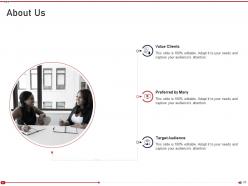
Slide 45: This slide shows about your company, target audience and its client's values.
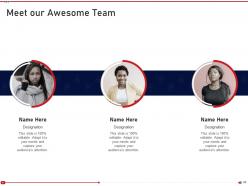
Slide 46: This slide shows details of team members like name, designation, etc.
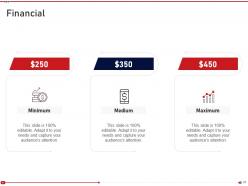
Slide 47: This slide showcases financials.
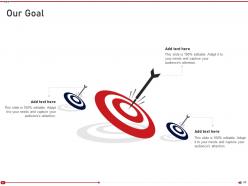
Slide 48: This slide presents goals.
Slide 49: This slide displays Venn.
Slide 50: This slide displays puzzle.
Slide 51: This slide depicts posts for past experiences of clients.
Slide 52: This slide shows roadmap.
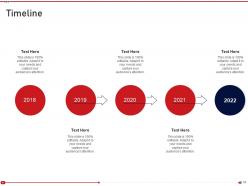
Slide 53: This slide exhibits yearly timeline.
Slide 54: This is thank you slide & contains contact details of company like office address, phone no., etc.
Promoting on youtube channel powerpoint presentation slides with all 54 slides:
Use our Promoting On YouTube Channel Powerpoint Presentation Slides to effectively help you save your valuable time. They are readymade to fit into any presentation structure.





FAQs for Promoting on youtube channel
Honestly, nail your titles and thumbnails first - that's where most people mess up. Be consistent with posting too, not just whenever you remember lol. I'd definitely jump on YouTube Shorts for getting discovered, it's working crazy well right now. Also engage with your comments! People notice when creators actually reply. Cross-promoting on TikTok helps too. Don't forget SEO stuff - just throw in keywords naturally in your descriptions. Oh and collabing with other YouTubers is huge. Pick one thing to focus on this week though, don't overwhelm yourself trying everything.
Okay so basically YouTube works like Google for videos - it looks at your title, description, and tags to figure out what your content's about. Then it matches that to what people are searching for. I always check trending keywords in my niche first (honestly takes like 5 minutes but makes a huge difference). Work those terms naturally into your title and description - don't just stuff them in randomly. Oh, and here's something most people miss: put your main keyword in the first 125 characters of your description since that's what actually shows up in search results. Without good keywords, people literally can't find your videos.
Think of thumbnails like movie posters - they decide if people click or keep scrolling. Even great videos get ignored with bad thumbnails, which honestly drives me crazy. High contrast is key, plus clear text if you use any. Faces work amazing since we're naturally drawn to looking at people. Go bold with bright colors over subtle designs - they just perform better in feeds. Oh, and here's what I'd do: make 3-4 different thumbnail options for each video. Test them out and see what your audience actually clicks on. You'll be surprised what works sometimes.
Honestly, stick to 1-3 videos per week instead of posting whenever you feel like it. Your viewers need to know when stuff's coming out. I made this mistake early on - tried posting every single day and completely crashed and burned lol. YouTube's algorithm loves predictable schedules too. If you're just starting, 1-2 quality videos weekly is perfect. Don't worry about cramming in extra uploads. Pick your days and actually stick to them. Consistency beats everything else, trust me on this one.
Dude, collabing is basically audience swapping - you get their viewers, they get yours. Super smart way to grow without just grinding solo content forever (which gets old fast tbh). The algorithm loves it too since people stay on YouTube longer watching back-and-forth content. You'll pick up new editing tricks just from seeing how other creators work. Here's the thing though - target people in your niche with similar sub counts. Don't bother messaging channels with like 500k subs when you have 2k. They won't even see your DM.
Think of social media like breadcrumbs leading back to your YouTube videos. Post short clips or behind-the-scenes stuff on Instagram and TikTok - their algorithms eat up video content. Twitter works too, but ugh, that character limit drives me nuts sometimes. Here's the thing though: don't just copy-paste the same content everywhere. Each platform has its own vibe, so you've got to adapt. Pick one or two places where your people actually spend time and focus there first. Way better than spreading yourself thin across everything.
Dude, replying to comments is honestly game-changing for growth. YouTube's algorithm loves seeing actual conversations happening - it pushes your videos to more people. When viewers see you responding, they'll hang around longer too. Makes the whole channel feel less... corporate? I get that it's exhausting when comments blow up, but you don't need to reply to everyone. Just heart some replies or respond to the good ones. Oh, and try jumping on right after you upload - those first 15 minutes are clutch for catching early commenters while they're still online.
YouTube ads are honestly a game-changer for getting your stuff seen. TrueView ads (the skippable ones) work great, but don't sleep on bumper ads for quick brand awareness. The targeting is wild - you can hit people based on interests, demographics, or retarget channel visitors. Those first 5 seconds are make-or-break though. Your thumbnail better be clickable as hell. Start small with your budget and test different formats. I'd probably focus on getting that hook perfect before anything else. Track your view-through rates and tweak from there. Display ads in search results help too if you've got extra budget.
Educational content crushes it for retention - people actually want to learn something so they'll stick around. Gaming and reaction videos work great too. Look, I know everyone's sick of listicles but honestly? "10 ways to..." still hooks viewers for some reason. Your first 15 seconds are make-or-break, so frontload the good stuff there. Quick cuts and visual changes every few seconds help tons too - keeps people's brains engaged. Oh, and definitely check your YouTube Analytics retention graphs. Shows you exactly when people bail so you can fix those spots.
Dude, playlists are honestly a game changer that most people sleep on. Your videos get way more watch time because people just keep going to the next one instead of clicking away. YouTube's algorithm eats that up - longer sessions make it happy. Plus they show up separately in search results, so you're basically getting double the exposure. I've watched channels explode just from organizing their stuff better. The binge factor is real too, like Netflix but for your content. Make 3-5 playlists around different themes using your best videos and don't forget decent titles with keywords people actually search for.
So I'd focus on the big three first: views, watch time, and how many subscribers you're gaining. Click-through rates are actually super important too - like, your thumbnail game can make or break a video. Engagement stuff like comments and likes matter because YouTube's algorithm eats that up. If you're making money from it, obviously track your revenue. Oh, and don't get too caught up analyzing every single video's performance. I learned this the hard way - looking at trends over weeks or months tells you way more than stressing about one random flop.
Dude, storytelling is literally everything for YouTube retention. The algorithm rewards videos that keep people watching, so you need that emotional hook right away. I always start with "Here's what happened when I..." instead of boring stuff like "Today I'm going to show you." Even tutorials work way better when you frame them around solving someone's actual problem. Structure matters too - tease the payoff early so people don't bail after 10 seconds. Make viewers feel invested in what's coming. It's honestly crazy how much difference this makes for watch time.
Don't buy fake subs or views - YouTube will absolutely destroy your channel for that. Clickbait titles that don't match your actual content? Also terrible. I see people spamming self-promo in random comments all the time and it never works. Your thumbnails matter way more than you'd think for getting clicks. Posting randomly whenever you feel like it kills your momentum since the algorithm loves consistency. Oh, and reply to comments within the first hour after uploading - it seriously boosts your reach. Just focus on making stuff people actually want to watch, then share it in communities where it makes sense.
Dude, email marketing is clutch for YouTube creators. Think about it - you get to hit up your most loyal fans directly when you drop new content, way before YouTube's algorithm decides to show it to people. That early engagement boost? Game changer for getting your videos pushed out more. Your email list is actually yours too, unlike YouTube subs which could disappear if the platform has issues (hopefully not lol). I'd throw a signup link in your video descriptions and maybe tease some behind-the-scenes stuff or old videos that still slap. Super easy way to build that connection outside of just YouTube.
Start with YouTube Studio - that's where all the good stuff lives. Watch time, click-through rates, audience retention... basically everything you need to see what's working. VidIQ and TubeBuddy are great for digging into keywords and seeing what competitors are doing. I'm weirdly addicted to checking Social Blade daily for growth tracking (probably not healthy lol). Google Trends is perfect when you want to jump on trending topics. Oh, and YouTube finally added built-in thumbnail A/B testing - took them long enough! Don't overwhelm yourself though. Master Studio's basics first, then add the fancy tools later.
-
Design layout is very impressive.
-
Great product with highly impressive and engaging designs.
-
Appreciate the research and its presentable format.
-
Professional and unique presentations.