


Proposal For Designing Mobile Screen Wireframes Powerpoint Presentation Slides




Try Before you Buy Download Free Sample Product
 Impress Your
 Audience
 100%
100% Editable
 Save Hours
 of Time


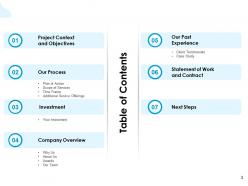
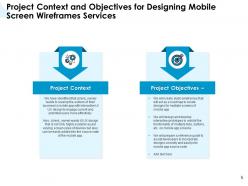
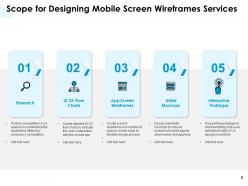
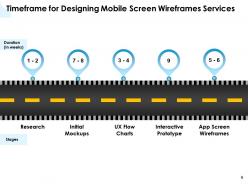
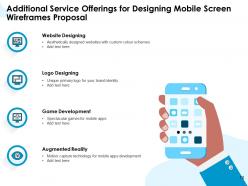
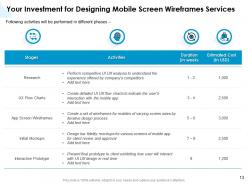
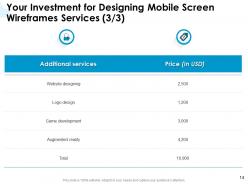
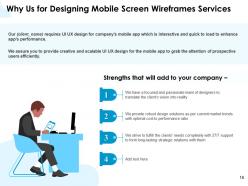
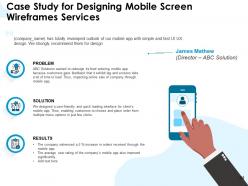
With the passage of time, technology is transforming rapidly, the old features are being replaced with new and efficient ones for improving the customer’s experience. Developing a mobile application is a multi-step and intricate process that requires professional assistance. Simply having a mind-blowing app idea won’t fetch you optimal results unless you have a proper structure and wireframe to decide where to start. Some companies have in-house IT professionals to help them create a user-friendly app, while others collaborate with IT companies. Therefore, SlideTeam presents our Proposal For Designing Mobile Screen Wireframes PowerPoint Presentation Slides to help you pitch your services mindfully and innovatively. Explain the importance of UI/UX design for creating a mobile app in the well-organized cover letter and successfully elucidate your key deliverables. Various sections of the proposal are displayed in the table of contents slide of this remarkable proposal. Understand the app requirements and details that your client wants to mention. Utilize our topic-specific mobile app template to describe the plan of action like project initiation, design, testing, and development support. Assist your clients in creating static wireframes and developing interactive prototypes to exhibit the functionality of multiple tabs with our visual guide PPT template. Take the assistance of our explicitly-designed smartphone app PPT graphic to highlight the scope of services including, research, UI/UX flow charts, app screen wireframes, initial mockups, and interactive prototypes. Dedicate the deadline to each service using our time frame slide. With the assistance of our schematic blueprint PPT template, depict the additional offerings rendered by your company like logo designing, website designing, game development, and augmented reality. Adopt our visual-guide PowerPoint layout to exhibit the investment and funds the client needs to deposit before beginning the process. Showcase your company overview and clients' testimonials by downloading this expertly-designed PPT presentation.
People who downloaded this PowerPoint presentation also viewed the following :
Proposal For Designing Mobile Screen Wireframes Powerpoint Presentation Slides with all 36 slides:
Use our Proposal For Designing Mobile Screen Wireframes Powerpoint Presentation Slides to effectively help you save your valuable time. They are readymade to fit into any presentation structure.







FAQs for Proposal For Designing Mobile Screen Wireframes
Mobile screen wireframes proposals should include user flow diagrams, detailed screen layouts, navigation structures, interactive element specifications, and responsive design considerations across different device sizes. These elements streamline the development process by providing clear visual guidance, reducing revision cycles, and ensuring consistent user experiences, with many development teams finding that comprehensive wireframes accelerate project timelines while minimizing costly design changes.
Wireframes enhance mobile user experience by establishing clear navigation paths, optimizing screen layouts for touch interactions, and identifying usability issues before development begins. Through strategic wireframing, app developers streamline user journeys, reduce cognitive load, and ensure intuitive interface designs, with many mobile teams finding that early wireframe testing significantly decreases post-launch user friction and development costs.
Popular wireframing tools include Sketch, Figma, Adobe XD, Balsamiq, and InVision, each offering unique features for mobile design workflows. These platforms streamline the design process by enabling rapid prototyping, real-time collaboration, and seamless handoffs to development teams, with many organizations finding that cloud-based solutions like Figma enhance team productivity and accelerate project timelines.
Common mistakes include inadequate touch target sizing, ignoring platform-specific design guidelines, overcrowding screens with excessive information, neglecting navigation flow consistency, and failing to consider various device screen sizes. These oversights compromise user experience by creating frustrating interactions, poor usability, and inconsistent brand presentation, with many mobile applications finding that addressing these wireframe fundamentals early significantly reduces development costs and enhances user adoption rates.
Mobile wireframes prioritize touch interactions, vertical scrolling, and simplified navigation due to smaller screen constraints, while web wireframes accommodate horizontal layouts, hover states, and complex multi-column designs. These mobile-focused approaches streamline user journeys through gesture-based controls, thumb-friendly interfaces, and progressive disclosure, with many app developers finding that mobile-first wireframing ultimately delivers more intuitive experiences and higher engagement rates.
User personas play a crucial role in mobile wireframe creation by informing navigation structure, content prioritization, feature placement, and interaction patterns that align with specific user behaviors and needs. These detailed user profiles enable designers to create more targeted mobile experiences, with many development teams finding that persona-driven wireframes significantly reduce revision cycles and enhance user satisfaction across different demographics.
User testing feedback informs mobile wireframes proposals by revealing navigation pain points, identifying confusing interface elements, and highlighting missing functionality users expect. This data enables designers to refine user flows, optimize button placement, and enhance information architecture before development, with many mobile app teams finding that early wireframe validation reduces costly revisions and delivers more intuitive user experiences.
Best practices for presenting mobile wireframes include creating clear user flow narratives, using consistent annotation systems, presenting wireframes in realistic device contexts, preparing interactive prototypes for stakeholder engagement, and organizing screens by feature functionality rather than chronological order. These approaches streamline stakeholder feedback sessions by enabling focused discussions on user experience decisions, reducing revision cycles, and ultimately delivering faster project approvals, with many design teams finding that structured presentations significantly enhance client understanding and project momentum.
Interactive wireframes enhance design communication by enabling stakeholders to experience user flows, test navigation paths, and understand functionality before development begins. Through clickable prototypes and simulated interactions, design teams streamline feedback cycles, reduce misunderstandings about user experience expectations, and demonstrate complex mobile interfaces more effectively, ultimately delivering faster approval processes and clearer project alignment across organizations.
Mobile wireframe accessibility considerations include touch target sizing, color contrast ratios, screen reader compatibility, font scalability, and navigation simplicity. These elements streamline user experiences by ensuring adequate spacing for motor impairments, readable text for visual disabilities, and intuitive flows for cognitive accessibility, with many organizations finding that inclusive design ultimately delivers broader market reach and enhanced user satisfaction.
Wireframes should be adapted through responsive design principles, flexible grid systems, scalable typography, and orientation-specific layouts that prioritize core content hierarchy. This approach enables designers to maintain consistent user experiences across devices, with many mobile development teams finding that adaptive wireframing significantly reduces development time and enhances cross-platform functionality.
Low-fidelity wireframes enable rapid iteration, cost-effective revisions, and focus on core functionality without visual distractions, while high-fidelity wireframes deliver detailed user experiences, precise stakeholder alignment, and comprehensive technical specifications. Many design teams find that combining both approaches strategically streamlines the proposal process, with low-fidelity wireframes accelerating initial concepts and high-fidelity versions ultimately securing client approval and developer clarity.
Effectively integrate branding elements into mobile wireframes by incorporating color schemes, typography guidelines, logo placement, iconography styles, and visual hierarchy principles early in the design process. This strategic approach enables designers to maintain brand consistency while optimizing user experience, with many mobile applications finding that early brand integration streamlines development timelines and ultimately delivers cohesive, recognizable customer experiences.
Mobile wireframe success metrics include user task completion rates, navigation efficiency scores, time-to-prototype ratios, stakeholder approval timelines, and development handoff accuracy. These measurements enable design teams to streamline iteration cycles, reduce costly revisions, and accelerate product launches, with many organizations finding that systematic wireframe evaluation ultimately delivers faster time-to-market and enhanced user experiences.
The iterative wireframe process enhances final products by enabling continuous refinement, user feedback integration, early problem identification, and design validation before development begins. Through successive iterations, design teams streamline user flows, optimize interface layouts, and minimize costly post-development changes, with many organizations finding that iterative wireframing reduces project timelines while delivering significantly improved user experiences.
-
Perfect template with attractive color combination.