

Quality Management System Dashboards ISO 9001 Certification Process Ppt Structure





Try Before you Buy Download Free Sample Product
 Impress Your
 Audience
 100%
100% Editable
 Save Hours
 of Time


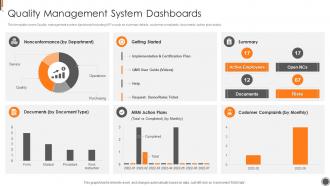
This template covers Quality management system dashboard including KPIs such as summary details, customer complaints, documents, action plan status.
People who downloaded this PowerPoint presentation also viewed the following :
Quality Management System Dashboards ISO 9001 Certification Process Ppt Structure with all 7 slides:
Use our Quality Management System Dashboards ISO 9001 Certification Process Ppt Structure to effectively help you save your valuable time. They are readymade to fit into any presentation structure.





FAQs for Quality Management System Dashboards ISO 9001 Certification
Honestly, just stick to the basics first - defect rates, customer complaints, and where you stand on corrective actions. Those tell the real story. Add in supplier scores and audit results, plus your Cpk numbers if you're tracking process capability. Management's always bugging about cycle times too, so throw in how long investigations and CAPAs take. But seriously, don't overwhelm yourself with like 20 different metrics. Start with maybe 6-8 that actually matter to your goals. You can always pile on more later once you get the hang of it.
Honestly, QMS dashboards are game-changers for catching problems fast. Real-time data shows you exactly where things slow down or break. Way easier than scrolling through endless spreadsheets – trust me on that one. You'll spot which steps create the most defects and where work gets stuck. Patterns become super obvious when everything's visual. Pick your top 3-4 metrics to watch first, then dig into whatever the dashboard flags as problematic. Comparing teams or products over time helps you find root causes quicker too.
Start with the big stuff - nonconformances, audit findings, corrective actions. Charts and color coding are your friends here. You'll spot problems way faster. Oh man, I can't tell you how many dashboards I've seen that are just complete disasters because they tried cramming everything in. Total information overload. Your executives need different views than quality managers, so organize by role. Real-time data is pretty much non-negotiable these days. Here's the thing though - test it with actual users first. What sounds brilliant on paper usually isn't once people start using it.
Look, real-time data visualization is a total game changer - you'll catch quality issues as they're happening instead of finding out weeks later from some useless report. The visual stuff makes patterns super obvious too. Like when defect rates go crazy during night shifts or with sketchy suppliers. Instead of waiting around for monthly spreadsheets that are already ancient history, you can actually make quick fixes to your processes. Honestly, I wish more companies would get on board with this. You'll make way better decisions because you're working with actual current data, not just guessing based on old numbers. Start small though - pick your most critical quality metrics first and build dashboards around those.
Honestly, if your QMS dashboard sucks to use, people just won't touch it. Period. I've watched so many companies build these fancy-looking things that nobody can actually figure out. Make the navigation brain-dead simple and show data that actually matters to whoever's looking at it. Short sentences work. Your team should be able to spot problems and trends without squinting at confusing charts or hunting through menus. The really good dashboards? You barely notice the interface because everything just makes sense. Oh, and if someone has to ask "where do I find X" more than once, you've probably overcomplicated it.
So a QMS dashboard shows you all your compliance stuff in real time - document status, training rates, corrective actions, performance metrics. Basically everything auditors care about. Instead of hunting through different systems (which is honestly the worst), it's all right there on one screen. Set up alerts when things go off track so your team can fix problems fast. I've seen people scramble during audits because they had no clue their metrics were tanking for months. Don't be that person - catch issues early and audit season won't completely destroy your soul.
Honestly, check if your QMS already has dashboard features first - way easier than building something new. Power BI and Tableau are solid if you've got the licenses, but they're kind of intense for basic stuff. Google Data Studio works great and it's free, which is nice. Excel pivot charts might be all you need if your data isn't huge. I'd probably just go with whatever your team knows best rather than learning something completely new from scratch. Make sure it plays nice with your current data sources though - that integration headache isn't worth it.
Honestly? Daily updates work for most quality stuff - defect rates, customer complaints, the usual suspects. Real-time makes sense if you're dealing with something that could blow up fast. For trend stuff like audit scores, weekly's totally fine. I worked with this one team that was refreshing their dashboards every hour like maniacs when once a day would've been plenty. Total overkill. Just match how often you update to how quickly you'd actually need to jump on a problem. Start daily, then tweak it based on what people actually look at.
Honestly, the biggest pain is gonna be your data quality - messy underlying data means a messy dashboard. People hate change too, so getting them to actually use it instead of their beloved spreadsheets is rough. Oh and don't even get me started on trying to pick which metrics to show without making it look like a NASA control panel. Integration between different systems is always a nightmare. My advice? Start with just a few people and focus on the cleanest data you can find first.
So you'll want to plug machine learning models into your QMS dashboards - they crunch historical quality data and spot potential problems before they blow up. Defect prediction, supplier risk scores, equipment failure warnings, that kind of thing. Your dashboard stops being reactive and starts getting ahead of issues. Feed these models clean data from inspections, audits, customer complaints - whatever you've already got running. Honestly, I'd start with something narrow but high-impact first. Maybe predict which batches might tank quality checks? Once that's working and people see the value, then you can branch out to other areas.
Look, customization matters because everyone needs totally different info from your QMS. A quality manager shouldn't see the same stuff as a production supervisor - that's just chaos. Build dashboards around what people actually do daily. Your compliance person needs audit prep data, while production folks want process metrics. It's like - why would I want my mom's Netflix recommendations, you know? Map out each role's real workflow first. Then match their dashboard to those specific tasks and KPIs. Way more useful than dumping everything on everyone.
So basically, you want different people looking at different stuff on your QMS dashboard. Executives need the big picture - high-level metrics and trends for strategic calls. Middle management should focus on their department's data to catch bottlenecks. Your front-line people? Give them real-time operational stuff they can actually fix (they're usually first to spot problems anyway). Quality managers need access to everything since they coordinate between teams. The trick is setting up role-based views so nobody gets overwhelmed with irrelevant data. Oh, and definitely train everyone on what metrics actually matter for their job - saves tons of confusion later.
Look, QMS dashboards basically tell you exactly where stuff's going wrong so you know what to tackle next. I honestly think of them like radar for finding problems. You can track if your fixes actually worked, spot patterns, and figure out which processes need help first. The data gives you real evidence for root cause analysis instead of just winging it. Without that visibility, you're shooting in the dark. Start with whatever metrics keep flashing red - those are your low-hanging fruit. Way better than guessing what needs fixing.
So QMS dashboards are actually great for training new people. Instead of boring PowerPoints, trainees can see real-time data and how everything connects. Show them the KPIs that actually matter, where things usually get stuck - way more engaging than theoretical stuff. The visual aspect really helps with complex quality concepts too. When they finish tasks, there's instant feedback which is nice. Oh and definitely customize the dashboard views by role - no point showing someone data they'll never use. Each person should see what they'll actually be monitoring daily. Makes the whole onboarding way smoother.
Honestly, customer feedback is like your cheat sheet for figuring out what metrics actually matter on your QMS dashboard. If people keep bitching about late deliveries, boom - that's what you need to track. Don't waste time on random internal stuff that doesn't bug your customers. Pull from complaints, surveys, support tickets - whatever shows you the real pain points. I'd probably do this review monthly, maybe over coffee when you're not rushing. The whole point is tracking what drives them crazy vs what just annoys your team internally.
-
The service is fast, and I could access any presentation after buying the subscription. I don’t think I’ll ever have to worry about a presentation in my life.
-
It saves your time and decrease your efforts in half.