

Real Time Incident Management Dashboard Security Incident Response Playbook




Try Before you Buy Download Free Sample Product
 Impress Your
 Audience
 100%
100% Editable
 Save Hours
 of Time


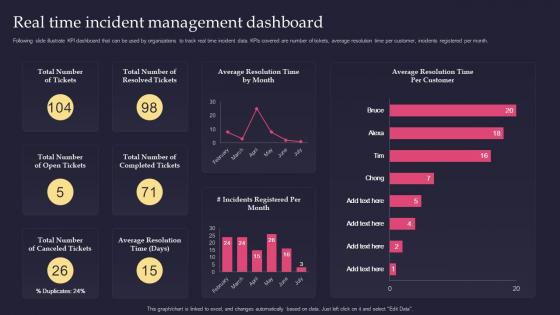
Following slide illustrate KPI dashboard that can be used by organizations to track real time incident data. KPIs covered are number of tickets, average resolution time per customer, incidents registered per month.
People who downloaded this PowerPoint presentation also viewed the following :
Real Time Incident Management Dashboard Security Incident Response Playbook with all 7 slides:
Use our Real Time Incident Management Dashboard Security Incident Response Playbook to effectively help you save your valuable time. They are readymade to fit into any presentation structure.






FAQs for Real Time Incident Management Dashboard Security
You'll need incident detection, response teams, communication protocols, and post-incident reviews. Clear escalation paths are crucial - nobody should be standing around during an outage wondering who's running the show. Define severity levels and document runbooks for common problems. Track everything from start to finish. Honestly, the post-mortems are where the real learning happens though. That's your goldmine for actually getting better at this stuff. Start by writing down whatever messy process you have now, then tackle the biggest gaps first. Don't overthink it initially.
Here's what I'd focus on if I were you - start with MTTD and MTTR (how fast you spot issues and actually fix them). Those two alone will tell you a ton. Track how often the same incidents keep popping up because honestly, dealing with repeat problems gets old fast. Customer satisfaction during outages is huge too. Oh, and definitely measure what percentage you're hitting within your SLA targets. Don't go crazy trying to track everything though - pick maybe 2-3 metrics that actually matter for your specific business goals. You'll get way more value that way.
Dude, communication literally saves your ass during incidents. Pick one person to handle all updates - otherwise you'll have chaos with mixed messages flying around. Set up your channels beforehand, not when everything's on fire. Templates are a lifesaver for quick status updates. Here's the thing though - even boring "still working on it" messages beat going silent. People freak out when they don't hear anything. Regular updates keep stakeholders from panicking or bugging your team every five minutes. Trust me, nail the communication plan early and you're already halfway there.
Honestly, start small with this stuff - maybe 2-3 integrations max. Set up workflows so incidents automatically trigger change reviews when needed and link to existing problem records. Your CMDB is clutch here since it shows service impacts and speeds up root cause analysis. Make sure incident data feeds into SLA reporting and capacity planning too. The handoffs that happen most in your environment? Focus on those first. Trust me, trying to connect everything at once is a nightmare. Oh and don't forget the knowledge base integration - that one's actually pretty useful for building up your team's expertise over time.
Honestly, the worst part is when communication falls apart and nobody knows who to call next. Your monitoring will miss stuff or get buried in spam alerts - happens every time. When everything's on fire, people skip the processes you spent forever documenting because they're panicking. Oh, and good luck getting your best engineers when three incidents hit at once. Documentation? Forget it - everyone's too busy actually fixing things to write anything down. Start with solid communication channels and make escalation paths super obvious. Trust me, clarity there saves you from most other headaches later.
Automated alerting is huge - catches problems way before you'd notice manually. ITSM platforms like ServiceNow keep everything organized in one spot. ChatOps changed everything for us though, coordinating directly in Slack cut our response times in half. AI analytics can actually predict incidents now, which is pretty wild. The trick is making all these tools talk to each other smoothly. Oh and start by automating the boring repetitive stuff first - you'll have way more time for actual problem-solving that needs your brain.
Honestly, good monitoring is everything - you need alerts for your key metrics but don't go crazy with them. Alert fatigue will destroy your team's sanity. Cover your whole stack, from servers up to what users actually see. Set up a dedicated chat channel where alerts hit and everyone can jump in fast. Here's the thing though - practice your response stuff regularly through game days or whatever. Trust me, when everything's on fire at 3am, you don't want people scrambling around confused. Oh and write runbooks for the common problems. Keep them fresh too, nothing worse than outdated docs when you're stressed.
So basically, these frameworks just adjust their priorities and rules depending on what industry you're in. Healthcare has to report patient safety stuff to regulators super fast, but finance is more worried about data breaches screwing up transactions. Manufacturing? They're all about safety incidents because, well, people can actually get seriously injured. The core ITIL stuff doesn't really change though. You just need to customize your severity levels and who responds to what. Oh, and the paperwork requirements - that varies tons by industry. I'd start by checking what compliance rules you actually have to follow first.
Break it into three levels - everyone gets basic response training, your incident handlers need the technical deep dive, and commanders focus on leadership stuff. Tabletop exercises work best when you use actual scenarios from your own environment (generic ones are pretty useless honestly). After that, run live sims so people get used to the pressure. Here's the thing though - you can't just do this once and call it done. Quarter training keeps everyone sharp. Oh, and schedule your next session right after incident reviews while everything's still raw in people's minds. That timing makes all the difference.
Look, focus on the basics first - MTTD and MTTR are your bread and butter since they show how fast you're spotting issues and fixing them. Track incident volume and severity breakdown too. Escalation rates matter, plus how long customers actually feel the pain. Oh, and don't skip team satisfaction scores because burnt-out people make worse decisions (learned that one the hard way). Honestly though? Don't go metric-crazy. Pick maybe 4-5 that your stakeholders actually care about and use that data to make real changes. Otherwise you're just collecting numbers for no reason.
Start with scope - does it hit one user, a whole service, or everything? Impact vs urgency is your friend here. High/high = drop everything (P1). Low/low = whenever you get to it (P4). Don't overthink the categories though - I've seen teams create like 8 different priority levels and it just becomes a mess. Four works fine. The real trick is getting everyone to agree on what each level means BEFORE stuff breaks. Trust me, you don't want to debate severity definitions while your site's burning down.
Hey! So post-incident reviews are basically how you stop repeating the same disasters over and over. Get everyone together within 48 hours while people actually remember what happened - not just whoever saved the day. Focus on broken processes, not pointing fingers at people (that just makes everyone clam up next time). Write down what you find and assign real action items with deadlines. Here's the thing though - half the teams I know do solid reviews then completely forget about the follow-up work. Don't be those people.
Dude, culture totally makes or breaks incident response. Blame-heavy places? People hide problems forever because who wants to get thrown under the bus. But when teams feel psychologically safe, they'll actually report stuff quickly and give you honest post-mortems. Hierarchy's another killer - I've seen junior devs spot critical issues first but stay quiet because "it's not their place" or whatever. Here's the thing though: you can have the best processes in the world, but if your culture sucks, none of it matters. Check if people feel safe speaking up without getting punished.
So I'd grab PagerDuty or Opsgenie first - they're solid for alerting and escalation stuff. Slack's a must for coordinating during outages (trust me, phone tag during a P1 is hell). Hook up monitoring like Datadog so tickets auto-create when things break. For post-mortems, Confluence works great. Oh, and make sure everything actually talks to each other - I learned that one the hard way. ServiceNow's another option but honestly feels a bit heavy unless you're a bigger shop. Your stressed-out 3am self will definitely appreciate having this stuff wired up properly.
Think of incident management as your crystal ball for business continuity. You're collecting real data about what actually fails, not just theoretical scenarios. That intel is pure gold when planning your BCP - shows you genuine weak spots and how long recovery really takes. Your incident response becomes the backbone for crisis management too. Same escalation paths, communication channels, all that. Honestly, most companies overlook this connection. I'd review incident trends every quarter to figure out what continuity scenarios you should actually be prepping for. Way more practical than guessing.
-
Extensive range of templates! Highly impressed with the quality of the designs.
-
“Superb. What a great finding. Thankful for SlideTeam. We were paying people to make slides which went all in vain. We are so happy to have found you.”