

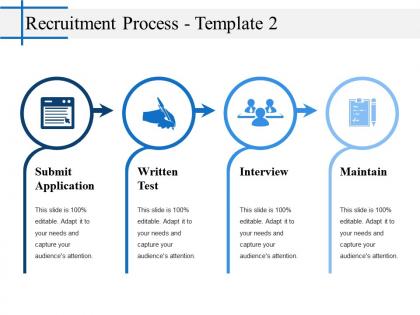
Recruitment process powerpoint slide backgrounds




Try Before you Buy Download Free Sample Product
 Impress Your
Audience
 100%
Editable
 Save Hours
of Time


Advocate better cohesion with our Recruitment Process Powerpoint Slide Backgrounds. Guide folks on how to increase cooperation.
People who downloaded this PowerPoint presentation also viewed the following :
Recruitment process powerpoint slide backgrounds with all 5 slides:
It doesn't have to be complex to be beautiful. That's why our Recruitment Process Powerpoint Slide Backgrounds are simply beautiful but sophisticated.


FAQs for Recruitment process
Key elements include job requirements and qualifications, candidate sourcing strategies, screening and interview phases, assessment criteria, and decision-making timelines. These components streamline hiring workflows by establishing clear expectations, standardizing evaluation processes, and ensuring consistent communication across HR teams, ultimately delivering faster candidate placements and improved hiring quality for growing organizations.
Background design enhances recruitment presentation effectiveness by creating visual hierarchy, reinforcing employer branding, and maintaining audience engagement throughout lengthy hiring discussions. Strategic use of professional color schemes, subtle patterns, and brand-consistent elements helps HR teams deliver more compelling candidate experiences, streamline complex information flow, and ultimately strengthen their competitive positioning in attracting top talent.
Professional blues and greens convey trust and growth, while neutral grays with accent colors maintain focus on content without overwhelming candidates. These color schemes enhance readability during presentations, create calming environments for sensitive hiring discussions, and project organizational professionalism, with many HR departments finding that consistent, subdued palettes ultimately improve candidate engagement and decision-making processes.
Different industries' recruitment processes influence slide design through sector-specific terminology, compliance requirements, visual hierarchies, and candidate journey mapping. Healthcare recruitment slides emphasize certification tracking and regulatory compliance, while tech companies focus on skills assessments and cultural fit presentations, with financial services prioritizing security clearances and risk management workflows, ultimately delivering industry-relevant communication that resonates with specialized stakeholders.
**INPUT**: What types of visuals are most impactful for showcasing recruitment strategies? **OUTPUT**: Impactful recruitment strategy visuals include process flowcharts, candidate journey maps, funnel diagrams, organizational charts, and timeline infographics. These visual elements streamline complex hiring workflows, demonstrate talent acquisition pipelines, and showcase employer branding initiatives, with many HR departments finding that well-designed presentations enhance stakeholder buy-in and accelerate strategic recruitment decisions. [Word count: 54 words]
Infographics can be incorporated into recruitment PowerPoint slides through visual timelines showing application stages, statistical charts displaying company growth metrics, process flowcharts illustrating candidate journey steps, and comparison graphics highlighting benefits packages. These visual elements streamline complex recruitment information, enhance candidate engagement during presentations, and help HR teams communicate company culture, role expectations, and organizational values more effectively than traditional text-heavy slides.
Common mistakes include using overly busy patterns that distract from content, choosing colors that clash with text readability, incorporating irrelevant imagery that doesn't align with professional recruitment themes, and selecting low-resolution backgrounds that appear pixelated when projected. These design missteps can undermine your presentation's credibility and message clarity, with many HR professionals finding that clean, professional backgrounds with subtle corporate elements ultimately enhance audience engagement and reinforce organizational brand standards.
**INPUT**: How can you tailor your presentation background to resonate with your target audience? **OUTPUT**: You can tailor presentation backgrounds by analyzing audience demographics, industry preferences, cultural context, and professional expectations to select appropriate colors, imagery, and design elements. For recruitment presentations, corporate audiences respond well to clean, professional layouts with brand-aligned colors, while startup environments may prefer modern, dynamic backgrounds that reflect innovation and growth potential. [Word count: 54 words]
Typography in recruitment presentations establishes visual hierarchy, enhances readability, and reinforces company branding through consistent font choices, appropriate sizing, and strategic emphasis techniques. Well-chosen typography streamlines information delivery by guiding candidate attention, creating professional credibility, and ensuring accessibility across diverse audiences, ultimately delivering clearer communication and stronger employer brand impression throughout the hiring process.
Animation and transitions enhance recruitment storytelling by creating visual flow between candidate journey stages, emphasizing key value propositions, and maintaining audience engagement through dynamic content reveals. These elements help HR teams seamlessly guide viewers through company culture highlights, career progression paths, and benefits packages, while strategic transitions between slides mirror the natural recruitment funnel, ultimately delivering more memorable presentations that strengthen employer branding.
Current trends in recruitment process presentations include mobile-optimized designs, interactive candidate journey maps, diversity and inclusion visual frameworks, AI-powered screening flowcharts, and remote hiring process templates. These design approaches streamline talent acquisition by enhancing candidate experience, improving stakeholder communication, and accelerating decision-making timelines, with many HR departments finding that visually compelling presentations ultimately deliver faster hiring cycles and stronger employer branding.
Cultural differences significantly affect recruitment slide design through color symbolism, visual hierarchy preferences, communication styles, imagery choices, and text density expectations. While Western cultures often favor minimalist designs with direct messaging, many Asian and Middle Eastern cultures prefer detailed information and formal presentations, with companies like Unilever and Microsoft adapting their global recruitment materials to reflect local cultural values, ultimately enhancing candidate engagement.
**INPUT**: What are the advantages of using templates for recruitment presentation backgrounds? **OUTPUT**: Templates for recruitment presentation backgrounds deliver professional consistency, time efficiency, brand alignment, visual appeal, and cost-effectiveness across hiring processes. These design solutions streamline presentation creation by providing structured layouts, cohesive branding elements, and polished aesthetics, with many HR departments finding that standardized templates enhance candidate experiences while reducing preparation time, ultimately delivering more impactful recruitment communications.
Creating a cohesive recruitment presentation involves using consistent color schemes, typography, and slide layouts throughout, along with standardized headers, bullet points, and spacing elements. These design principles streamline candidate evaluation processes by ensuring clear information hierarchy, professional brand representation, and seamless navigation between hiring stages, ultimately delivering enhanced stakeholder confidence and more efficient recruitment workflows.
**INPUT**: What software tools are best for designing custom PowerPoint backgrounds for recruitment purposes? **OUTPUT**: Top design software for recruitment PowerPoint backgrounds include Adobe Photoshop, Canva, Figma, Adobe Illustrator, and PowerPoint's built-in design tools. These platforms streamline background creation by offering HR-specific templates, brand customization options, and professional color schemes, with many recruitment agencies finding that custom backgrounds enhance candidate presentations, strengthen employer branding, and ultimately deliver more engaging interview experiences.
-
Great quality slides in rapid time.
-
Perfect template with attractive color combination.