

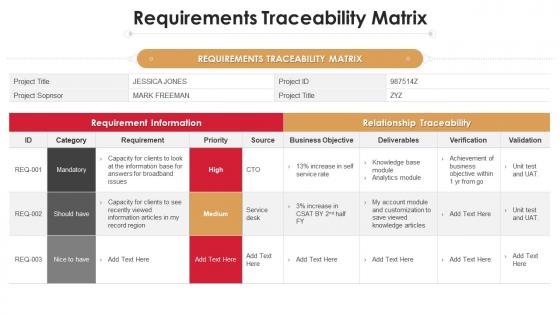
Requirements traceability matrix project analysis templates bundle ppt elements




Try Before you Buy Download Free Sample Product
 Impress Your
 Audience
 100%
100% Editable
 Save Hours
 of Time


Our Requirements Traceability Matrix Project Analysis Templates Bundle Ppt Elements are topically designed to provide an attractive backdrop to any subject. Use them to look like a presentation pro.
People who downloaded this PowerPoint presentation also viewed the following :
Requirements traceability matrix project analysis templates bundle ppt elements with all 6 slides:
Use our Requirements Traceability Matrix Project Analysis Templates Bundle Ppt Elements to effectively help you save your valuable time. They are readymade to fit into any presentation structure.





FAQs for Requirements traceability matrix project analysis templates
So an RTM is this document that tracks your requirements through the whole project - connects them to design stuff, test cases, all that. Honestly, it's like having a map for your requirements. You'll want one because it catches scope creep before it gets crazy. Nothing falls through the cracks, and when requirements change (they always do), you can see exactly what gets hit. Super helpful when your boss asks "wait, why are we building this?" Build it early and actually keep it updated. I know, I know - another thing to maintain, but trust me on this one.
Make a spreadsheet with requirements as rows and project phases as columns - design docs, test cases, code, whatever. Give everything unique IDs because "that login thing" becomes a nightmare when you're juggling 200+ items. I learned this the hard way lol. Map requirements to deliverables using those IDs so you can trace forward and backward. The key is keeping it updated constantly - dead RTMs are worthless. Honestly, just use whatever tool your team won't abandon after two weeks. Could be Excel, could be some fancy requirements tool.
So for your RTM, start with unique IDs for each requirement - trust me, you'll thank yourself later. Include the actual requirement descriptions and link them back to source docs like user stories. Test cases that verify each one are obviously crucial. Status tracking is huge too (approved, in dev, tested, whatever). Oh and honestly? Priority levels save your butt when deadlines get crazy. Don't skip the traceability links showing how requirements connect to design docs and code. The whole point is following that thread from business need to actual working software. Keep it simple at first, then add what your team actually uses.
So an RTM maps out how your requirements connect to everything else - test cases, design docs, code, the whole thing. When stakeholders want changes (and they always do), you can see exactly what'll get hit instead of playing guessing games. Honestly, it's a lifesaver when someone drops the "just one tiny change" bomb on you. You can trace the impact and actually show them why their "simple" request isn't so simple. Plus it helps you fight scope creep with real data. Just don't let it get stale - update it as you go or it becomes useless pretty fast.
Keep your RTM updated in real-time when requirements shift - seriously, don't let it turn into one of those dead documents everyone ignores. I'd set up review cycles with stakeholders, maybe weekly or every other week depending how fast you're moving. Track both directions of traceability and make sure someone actually owns the updates (this part gets messy if nobody's responsible). Collaborative tools help so your whole team can jump in. Oh, and I've definitely seen RTMs become those "check the box" spreadsheets that nobody looks at again. Treat it like it's alive and growing with your project instead.
Honestly, RTMs are lifesavers for getting everyone on the same page. Developers, testers, business folks - they can all look at it and actually understand what you're building. No more of those painful meetings where people are just talking past each other (ugh, the worst). It shows clear links between your business requirements, design stuff, and test cases. You'll spot gaps and scope creep way earlier. Oh, and definitely bring it to stakeholder reviews - saves so much back-and-forth when someone inevitably asks "wait, why are we doing this again?"
For smaller stuff, Excel or Google Sheets honestly work fine - I'm still using Excel half the time because why overcomplicate things? Bigger projects though, you'll want something like Jira with traceability add-ons, Azure DevOps, or IBM DOORS if you're feeling fancy. There's also specialized tools like ReqSuite and Modern Requirements that handle RTMs pretty well. Already using TestRail or qTest? Most ALM tools have traceability built right in. My advice? Start with whatever your team's already comfortable with. Adding another tool just creates more headaches if your current setup can do the job.
So basically, an RTM shows regulators exactly how you mapped every requirement to your actual system and tests. When auditors show up (and they will), you can prove everything was implemented and verified properly. Trust me, this thing is a lifesaver during those nightmare audit weeks. You'll spot coverage gaps before they turn into violations, which is huge. The documentation proves your team didn't just wing it - actually followed procedures. Oh, and keep it updated constantly so you're not scrambling last minute. Nothing worse than explaining missing pieces to regulators who aren't in a chatty mood.
Honestly? Most people either overcomplicate them right away or just never update the damn thing. I've watched entire teams get stuck because they tried mapping every tiny requirement from day one - total nightmare. Start with your big, critical stuff first. You can always add details later. Oh, and seriously avoid spreadsheets for tracking this. People promise they'll update them but... yeah right. Find something that actually connects to whatever tools you're already using. That way updates happen without anyone having to remember. Simple beats comprehensive every time, at least when you're starting out.
So basically, an RTM maps your requirements to test cases - super handy for seeing what you've actually tested vs what you haven't. Gaps become obvious fast. When tests fail, you know exactly which requirements are affected. During verification, it shows how your design meets each requirement. For validation, you can prove the final product does what everyone wanted (or doesn't, which honestly happens more than we'd like). Just keep updating it as you go. Trust me, future you will thank present you when someone asks "did we test X?" and you actually have an answer.
Look, RTM metrics are basically your early warning system for project disasters. Track your coverage percentages so you don't miss requirements. Monitor how often things change - that's your scope creep detector right there. Test execution rates? That tells you if quality's actually happening or just wishful thinking. Honestly, the traceability data becomes like a health dashboard for your whole project. Super useful when stakeholders want changes because you can show them exactly what breaks downstream. I'd say pull weekly reports to get your baselines, then watch those trends. You'll spot bottlenecks way before they actually hit you.
So traditional waterfall RTMs are like this massive formal document that you're constantly updating - tracks every single requirement from start to finish. Pretty time-consuming honestly. Agile flips that completely. You're working with user stories and acceptance criteria instead of giant spreadsheets (thank god). Your project management tools handle most of the traceability work during sprints. Main difference? Waterfall RTMs are documentation nightmares. Agile keeps it light - just enough tracking so your team stays on the same page without drowning in paperwork between iterations.
Add priority columns to your RTM - MoSCoW works great (Must/Should/Could/Won't) or just go High/Medium/Low. MoSCoW's my favorite because it forces those brutal "do we really need this?" conversations. Connect each requirement's priority to business value and regulatory stuff. Your priorities will definitely shift though, so update them regularly. What felt super urgent last month? Probably not so much anymore. Oh, and tie your priority levels straight to testing phases - high-priority requirements get tested first and most thoroughly.
So RTM basically shows you who needs to work on what and when stuff depends on other stuff. You'll see exactly what skills each requirement needs, which makes sprint planning way less of a headache. Think of it as your "who does what" roadmap - honestly a lifesaver when you're dealing with multiple features at once. The scheduling part is clutch because it highlights dependencies, so you know what can happen at the same time vs what has to wait. I'd start by mapping your current requirements to spot any resource gaps before your next planning meeting.
Look, skipping the Requirements Traceability Matrix is honestly a mistake I see all the time. You can't tell if you're actually building what was asked for. Testing becomes this messy guessing game since there's no clear link between requirements and test cases. When stakeholders inevitably ask for changes (and they will), good luck figuring out what breaks. Compliance audits? Total nightmare without proper documentation. Even a basic spreadsheet beats nothing - I learned this the hard way on my last project. Trust me, put something together now before things get crazy.
-
Unique research projects to present in meeting.
-
Wonderful templates design to use in business meetings.