

Result Reporting Powerpoint Ppt Template Bundles




Try Before you Buy Download Free Sample Product
 Impress Your
 Audience
 100%
100% Editable
 Save Hours
 of Time


Our Result Reporting Powerpoint Ppt Template Bundles are topically designed to provide an attractive backdrop to any subject. Use them to look like a presentation pro.
People who downloaded this PowerPoint presentation also viewed the following :
Result Reporting Powerpoint Ppt Template Bundles with all 22 slides:
Use our Result Reporting Powerpoint Ppt Template Bundles to effectively help you save your valuable time. They are readymade to fit into any presentation structure.
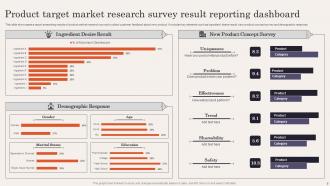
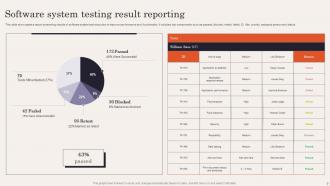
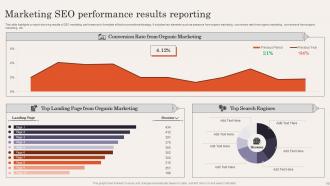
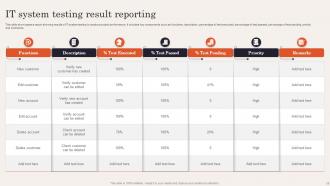





FAQs for Result Reporting Powerpoint
Start with an exec summary - people want the bottom line upfront. Then hit your key findings with actual data backing them up. Walk through your methods quickly (don't bore them), show results with charts because nobody wants to read paragraphs of numbers. Be honest about limitations too. The real trick? Tell a story instead of just throwing stats at people. Each slide should answer "so what?" or you'll lose them to their phones. Oh, and always end with concrete next steps - that's what they're really there for anyway. Make it flow like you're explaining something interesting, not reciting a textbook.
Honestly, visuals are a game-changer because our brains just process images way faster than text. Like, who wants to stare at paragraphs of data trying to figure out what's actually happening? Start with simple bar charts or line graphs - they work great for most stuff. Heat maps are cool too if you've got complex data to show. Your audience will actually remember what you presented instead of glazing over halfway through. I learned this the hard way after watching people's eyes glaze over during a presentation last year. Charts and graphs help people spot trends instantly without having to decode your spreadsheet.
Put your main findings right at the top - nobody has time to hunt for the point. Then go methodology, results, analysis, recommendations. Use bullet points and headings so people can skim (trust me, they will). Charts and graphs are your friend for data - way better than walls of text. Here's the thing though: don't just dump numbers on them. Explain what it actually means for the business. Oh, and end with real action items, not some wishy-washy "we should consider exploring options" nonsense. You'll be glad you did when your boss asks what to do next.
Yeah, so every industry does reporting completely differently depending on what they actually care about. Healthcare is obsessed with patient outcomes and staying compliant. Tech companies? They're tracking every click and how fast their apps load. Finance people live and breathe risk assessments - honestly makes sense given how regulated they are. Manufacturing cares about efficiency and quality control, while retail focuses on sales numbers and customer data. The trick is figuring out who you're reporting to and what decisions they're making with your data. Then just match your format to what matters to them instead of using some generic template.
Dude, audience analysis is literally make-or-break for presentations. I once completely face-planted presenting to executives because I went way too deep into methodology when they just wanted the quick wins. Now I always figure out who I'm talking to first. Are they C-suite folks who need the summary in 30 seconds? Technical people who'll grill you on methods? Your whole approach changes - the language you use, how detailed you get, even which charts you show. Honestly, some audiences hate pie charts (weird but true). Before prepping anything, I ask myself what these specific people actually care about and how they like getting info.
Okay so basically, data storytelling is like turning your boring spreadsheet into something people actually want to listen to. You know how everyone's eyes glaze over when you start throwing numbers around? This fixes that. Build it like a story - what happened, why should anyone care, what's next. Way more engaging than just dumping data on people. I always figure out my main point first, then find the numbers that back it up. Honestly, it's the difference between getting blank stares and having people actually remember what you said later. Your stakeholders will thank you.
Don't dump everything on them at once - data overload kills presentations. Put your big findings right up front instead of making people dig for them. Skip the cherry-picking thing too, because honestly? People always notice when you're hiding the messy stuff, and then they stop trusting you. Make your charts actually readable (seriously, why do people use fonts you need a magnifying glass for?). Cut the jargon unless you're talking to other data nerds. Oh, and start each section by explaining why they should care before you get into the weeds.
Dude, interactive dashboards are total game-changers for boring reports. Let people click around and explore the data themselves instead of just reading static stuff. Real-time charts that auto-update are pretty slick too. Actually, video reports work way better than you'd think - something about seeing a person explain the numbers just clicks with people. Tableau and Power BI are solid options, though even basic survey tools with conditional logic can work. Oh, and clickable visualizations where users drill down? Chef's kiss. Just try one interactive thing in your next report and you'll see what I mean.
Honestly, just be straight up about what you found - even if it's not what people wanted to hear. Don't mess with the data or hide problems with your study. I've watched colleagues totally wreck their credibility doing that stuff. Be upfront about your methods, sample sizes, conflicts of interest, all that. Sometimes you gotta admit your study just wasn't strong enough to prove anything (which sucks but whatever). If your results could hurt certain groups or get twisted, call that out. Before presenting anything, ask yourself: am I being completely honest right now?
Start collecting feedback right after each report - like within a week or so. I learned this the hard way by skipping it and always regretting it later! Make a quick template asking about clarity, what they actually want to see, format stuff. Then use their input. Maybe they hate long paragraphs and want more charts, who knows. Keep notes on what people say repeatedly so you can catch trends. The trick is making feedback super easy to give and then obviously changing things based on what they tell you. People notice when you don't act on their suggestions, trust me.
So basically, qualitative is the "why" stuff - patterns, themes, all that narrative description. Quantitative? Pure numbers and stats. Like, quantitative tells you 65% of users clicked that button, but qualitative explains what made them click it or how frustrated they got trying to find it in the first place. Honestly, reports that only use one approach kinda suck because numbers alone don't mean much without context. I always try to mix both - throw some user quotes or observations in with your data. Makes way more sense that way.
Okay so first thing - always double-check your raw data against the original sources. Then go through your analysis step by step to catch any math errors (trust me, they're easier to make than you think). Having someone else look it over is clutch because you get blind to your own mistakes after staring at numbers for hours. I'd also document your assumptions up front so people know what they're actually looking at. Cross-reference with previous reports if you can. Really though, the key is building in checkpoints throughout the whole process instead of just hoping everything's right at the end.
Start with your big findings first - nobody cares about methodology details. Visuals are your friend here. Dashboards, charts, whatever makes the patterns jump out immediately. Honestly, the executive summary approach works best. Give them the headlines upfront, then dump all your detailed analysis in an appendix for the data nerds who actually want to dig deeper. What really matters though? Translate everything into business impact. What decisions can they make with this info? Always end with clear next steps - don't leave them hanging wondering what to do next.
Honestly, culture plays a huge role in how people read your results. Germans expect direct feedback that would totally offend someone in Japan - same data, completely different reactions. The numbers are what they are, but the way you frame them? That's where culture kicks in. Think about whether your audience values individual wins or team success, how they handle criticism, their relationship with authority. I learned this the hard way once! Get someone from that culture to look at your report first. Saves you from looking clueless later.
Honestly, real-time dashboards are where it's at now - nobody wants to wait for monthly reports anymore. Interactive charts beat boring spreadsheets every time (seriously, who has time to dig through rows of data?). Most companies are pushing self-service analytics so people can grab their own reports instead of bugging IT constantly. Mobile formats aren't optional either since we're all glued to our phones. Oh, and visual storytelling is huge right now. I'd start by looking at your current reports and figuring out which ones you could make live first.
-
Great combination of visuals and information. Glad I purchased your subscription.
-
Helpful product design for delivering presentation.