

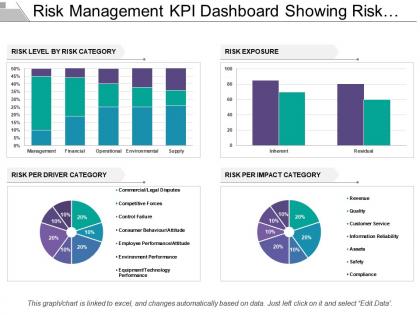
Risk Management Kpi Dashboard Showing Risk Level Exposure And Impact




Try Before you Buy Download Free Sample Product
 Impress Your
 Audience
 100%
100% Editable
 Save Hours
 of Time


Rise above the banal with our Risk Management Kpi Dashboard Showing Risk Level Exposure And Impact Category. Project the inherent classiness of your thoughts.
People who downloaded this PowerPoint presentation also viewed the following :
Risk Management Kpi Dashboard Showing Risk Level Exposure And Impact with all 6 slides:
Our PT&s are the sinews of your lecture. Give them the muscle of your vibrant thoughts.
FAQs for Risk Management Kpi Dashboard Showing Risk Level
Start with your biggest risks and build from there. You want real-time metrics, trend analysis, and visual indicators that scream "deal with this now." Heat maps are clutch for seeing patterns. Don't forget incident tracking and compliance updates - boring but necessary. Honestly, most dashboards look great but are useless for actual decisions. Make sure yours has drill-down options so you can dig deeper when something's off. Automated alerts save your butt when thresholds get breached. Oh, and track mitigation progress with clear ownership. Nobody wants to play hot potato with risk management.
Honestly, these dashboards are game-changers because you can finally see what's actually happening with risks instead of guessing. You'll catch problems before they blow up and figure out which ones are real threats vs just drama. The visual stuff makes it way easier to show your boss why you need budget for certain things. Everyone stays on the same page about priorities too, which - trust me - saves so many pointless arguments in meetings. My advice? Pick your 5 biggest headaches and start tracking those. Don't overcomplicate it at first.
Look at four main things: how much risk you're facing, how often stuff goes wrong, whether your fixes are working, and if you're taking on more risk than you want. Heat maps are super helpful - they show which departments have the most issues and execs love those visuals. Don't just track the big disasters that already happened. Near-misses are way more useful since they give you a heads up. Also watch how fast new risks pop up versus how quickly you're actually dealing with them - that gap can get ugly fast. Start simple with these basics, then add more detailed stuff once everyone gets used to reading the dashboard.
Heat maps are a game changer - you'll instantly see those red danger zones versus safe areas. Charts show trends over time too, which is super helpful. Honestly, our brains just work better with visuals than endless rows of data (I mean, who wants to stare at spreadsheets all day?). Color coding and gauges make critical stuff pop out immediately. The best part? Non-technical people can actually jump into discussions when they see what's going on instead of glazing over. Interactive dashboards are clutch because you can click deeper into specific problems. Way more effective than traditional reports.
Look, real-time data is what separates a useful risk dashboard from fancy wallpaper. Markets can tank in minutes, cyber attacks happen fast - you need fresh info to actually respond. Yesterday's numbers are like checking your rearview mirror while driving (helpful for context, useless for avoiding that truck merging into you). Static data just shows you problems after they've already hit. Your refresh rate should match how quickly your risks move. Honestly, I've seen too many companies get burned because their "dashboard" was basically a museum exhibit of last week's threats.
So you basically want to zero in on whatever regulatory stuff and risks actually hit your industry hard. Healthcare folks obsess over patient safety and HIPAA. Financial services? Credit risk and capital ratios all day. Manufacturing gets crazy about supply chain issues - which honestly makes sense after the whole COVID mess. Figure out what your executives are actually losing sleep over, then map those worries to your KPIs. I'd start simple: pick your top 5 industry risks and build everything around those. Don't overthink it.
Don't jam too many metrics on one screen - people get overwhelmed and miss the important stuff. Generic KPIs are useless if they don't match what your company actually cares about. Those red/yellow/green lights seem easy but honestly, risk is way more nuanced than that. Your CEO needs different info than your analysts do, so think about who's actually using this thing. Making everything clickable is a trap - too many options and people freeze up. I'd start with maybe 5-7 metrics that actually help you make decisions. Build from there once you see what people really use.
Dude, user feedback is everything for dashboards. Like, you can think your design is genius, but if users can't find the alerts they need during a crisis, you've failed. I've watched so many sleek dashboards get completely ignored because they didn't match how people actually work. Your users will tell you straight up if something's confusing or if they need charts instead of tables. Set up monthly calls with your heavy users - they're the ones dealing with this stuff daily. They'll catch problems you'd never think of. Don't skip this step or you'll build something pretty but useless.
Honestly, I'd go with Tableau, Power BI, or Qlik for visualizing risk data - they're solid for that complex stuff. Python with Plotly or Dash is awesome if your team's technical (I've been loving Dash lately). Power BI's risk management templates are actually way better than I expected, which was a nice surprise. Main thing is making sure your data feeds in smoothly without tons of manual BS. Start small with whatever tool you already have lying around, then build from there. See what people actually use before going crazy with features.
Dude, AI can catch risk patterns you'd totally miss otherwise. It chews through tons of data instantly and flags weird stuff before it becomes a problem. The coolest part? Machine learning actually gets better over time - learns from old data to predict what's coming next. I've seen some of these predictive models work and honestly, it's pretty wild. You get instant alerts when things go sideways, plus you can run those "what happens if..." scenarios on the fly. I'd start by figuring out where your biggest data lives, then see what AI tools can hook into whatever dashboard setup you're already running.
So basically these dashboards translate all the corporate speak between departments. Finance loves their spreadsheets, operations talks processes - but everyone gets charts and visuals they can actually understand. The cool part is seeing how stuff connects in real-time, like when IT problems mess up your customer service wait times. You can set alerts so people know when risks hit their turf. Honestly though, I'd start small - figure out which risks actually cross departments first (some don't really matter). Then build your views around those specific ones. Way easier than trying to boil the ocean from day one.
So basically you take all your old incident data and look for patterns - like when stuff usually goes wrong, how bad it gets, what causes it. Kind of like predicting the weather but for business problems, if that makes sense. Your dashboard can spot things like seasonal trends or warning signs that keep popping up. The cool part is setting up alerts based on those historical patterns, so instead of scrambling after something bad happens, you actually get a heads up. Way better than playing catch-up all the time.
Honestly, I'd go with weekly at minimum but daily if your job's pretty intense. Automate the data feeds though - manually typing everything in is where you'll mess up. Monthly check-ins on your risk categories are smart too, plus ditch the old stuff so it doesn't look like a hoarder's spreadsheet. The routine thing is huge. I block out 30 minutes every Monday morning to scan through everything and catch weird patterns. Might sound boring but it's saved me more times than I can count.
Your stakeholders basically control everything - what risks matter, how to show them, what actions make sense. Executives want the big picture. Project managers need nitty-gritty details. Compliance folks obsess over regulatory stuff. Most dashboard projects fail here because they build pretty things nobody uses (learned this the hard way). Interview each group upfront to understand their workflows. Map out who actually uses risk data and how they make decisions. Then design for their real needs, not what looks fancy. Trust me, function beats form every time.
So I'd focus on three key things: how fast your team spots and tackles risks, whether departments are actually using the dashboard, and how well your predictions match reality. That last one's a pain to track but totally worth it. Quick wins matter too - are you catching stuff earlier than before? Honestly, prediction accuracy can make you look like a genius or... well, not so much. Set up quarterly check-ins to review these numbers and tweak things. Otherwise you're just hoarding data instead of actually getting better at managing risks.
-
Excellent products for quick understanding.
-
Editable templates with innovative design and color combination.