

Risk Management Plan Ppt Design




Try Before you Buy Download Free Sample Product
 Impress Your
 Audience
 100%
100% Editable
 Save Hours
 of Time


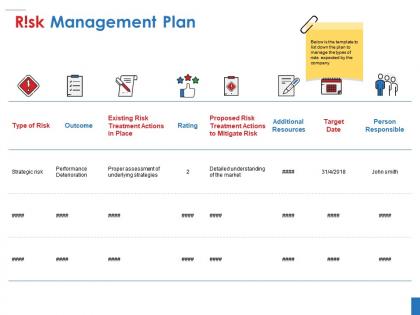
Risk Management Plan Ppt Design is a tailormade virtual tool for project managers across all industry verticals. Our business risk management PowerPoint template features an easy-to-follow tabular format. You can neatly consolidate cost risks, schedule risks, performance risks, strategic risks, operational risks, legal risks, and governance risks. This comprehensive project risk management PPT layout also helps you in representing the intensity of such risks. Demonstrate risk mitigation methods and techniques through our well-structured PowerPoint slide. Using our visually-balanced PPT template you can represent critical details like target date and persons accountable for hazard management. Our designers have included unique vector icons and complementing colors to make your operational risk management PowerPoint gripping. The text arrangement is portioned into tidy and distinct sections. Chunking of information promotes prolonged information retention. Also, it assists in sidestepping data cluttering as it comprises information quality. So, press the download icon to begin personalizing instantly. Improve economic conditions with our Risk Management Plan Ppt Design. Increase the amount of entrepreneurial activity.
People who downloaded this PowerPoint presentation also viewed the following :
Risk Management Plan Ppt Design with all 5 slides:
Establish the desired impression at the first instance with our Risk Management Plan Ppt Design. Acquire an intangible advantage.


FAQs for Risk Management
Focus on five main things: figure out what could go wrong, assess how likely/bad each risk would be, plan your responses, assign owners, and set up monitoring. Honestly, that last part trips up most people - they write these elaborate plans then never look at them again. Build in quarterly check-ins or specific triggers that make you actually revisit it. Don't do the "everyone owns it" thing because that's code for nobody does. Give each risk category to a specific person. Oh, and tackle your worst-case scenarios first, then work down the list.
Honestly, brainstorming with your team is clutch - they catch stuff you'll totally miss. Look back at similar projects too, because the same issues always come up (it's kinda wild how predictable it gets). SWOT analysis works if you're into that structured approach. Get your stakeholders involved since they see different angles. Oh, and don't just do this once at the start. Risks change as the project moves along, so maybe do monthly check-ins? I learned that the hard way on my last big project when everything shifted halfway through.
So basically, risk assessment is like the starting point for everything else. You gotta figure out what could actually blow up in your face and how likely that is to happen. Score each risk on probability and impact - that's your priority list right there. Without doing this first, you're just throwing darts blindfolded at solutions that might not even matter. It's honestly like emergency room triage but for your project. List everything that could go sideways, rank them by how bad they'd be, then boom - you've got your game plan for what to tackle first.
So basically you want a 5x5 grid - likelihood on one side, impact on the other. Most people do likelihood across the top and impact going down, but whatever works for you. Color code it green/yellow/red for low/medium/high risk. The tricky part is defining what "likely" actually means so everyone's on the same page - learned that one the hard way. Plot your risks and tackle the red ones first. Oh, and some folks flip the axes around but honestly as long as you stick with whatever you pick, you're good.
So you've got four main options here. **Avoidance** is just changing your plan to dodge the risk completely. **Mitigation** reduces either how likely it is or how bad it hits - think buffer time or backup vendors. With **transfer**, you push the risk onto someone else through insurance or contracts. **Acceptance** is basically shrugging and saying "we'll deal with it" - works for small stuff that won't kill your project. Most people I know mix and match these instead of going all-in on one. Figure out which risks are your biggest headaches first, then pick whatever won't break your budget.
So basically you've gotta tailor your risk plan to whatever industry you're in. Healthcare is all about protecting patient data and staying HIPAA compliant. Manufacturing? More worried about machines breaking down and supply chain mess. Construction deals with safety issues and weather screwing up timelines - completely different stuff. Figure out your top 5 risk categories first, then build your responses around those specific problems. The basic structure is the same everywhere, but honestly the details change like crazy between industries. Check what other companies in your space are doing or see if your industry association has guidelines. That's usually a decent place to start.
Honestly, the biggest thing is matching your message to who you're talking to. Executives just want to know how it'll hit the bottom line, but your project teams need the nitty-gritty details. I'm a huge fan of simple dashboards over those monster reports that sit in everyone's inbox unread. Don't wait for disasters to communicate either - set up regular check-ins. Be straight about what could happen and when, plus your backup plans. Oh, and make it go both ways! Ask people what's actually worrying them. You'll be surprised how much better your communication gets when you know what they're losing sleep over.
So regulatory stuff is basically your starting point - you can't ignore those minimums. First thing is figuring out which regs actually apply to your industry (there's usually more than you think, ugh). Then build your whole risk framework around meeting those requirements. The regulations will tell you how to identify and assess risks, plus what kind of monitoring you need to do. Honestly, they're kind of helpful once you get past the initial overwhelm - gives you a clear roadmap. Just grab the main regulatory documents for your sector and treat them like your blueprint.
Honestly, just start with a spreadsheet template - way easier than you'd think. For bigger teams, Monday or Asana have decent risk modules built in. Microsoft Project's pretty solid if you need something beefier but don't want to go full enterprise mode. Speaking of enterprise, there's GRC platforms like Resolver if you've got the budget (spoiler: they're pricey). Smartsheet's a nice middle ground too. My take? Don't overthink the software choice right away. Map out your actual process first, then you'll know what features matter. Most people jump straight to fancy tools and regret it later.
Look, risk response strategies are basically what turn your risk management from a useless "worry list" into actual action. You've got four main options: avoid the risk completely, hand it off to someone else, reduce its impact, or just accept it if fighting it costs more than it's worth. The trick is figuring out which approach fits each risk based on what your project can handle. I'd start by ranking your biggest risks first - those are the ones that'll bite you if you ignore them. Then match each one with the response that makes the most sense. Without this step, you're just documenting problems instead of solving them.
Honestly, I'd say quarterly reviews are the bare minimum. Tech and healthcare move crazy fast though, so monthly might be smarter for those industries. Don't just stick to the schedule either – if there's a major milestone, regulatory shake-up, or something goes sideways, review it right then. I learned this the hard way once. The whole point is keeping it fresh, not letting it collect dust for a year. Short bursts work better than marathon sessions anyway. Set those reminders and actually use them.
Aviation's got this down to a science - they map out every possible thing that could go wrong and have backup plans for literally everything. Weather, engine issues, you name it. Banks do something similar with their risk frameworks, constantly tweaking things based on whatever's happening in the markets. I mean, these guys are paranoid in the best way possible. Financial institutions especially document everything super thoroughly. You could probably steal a lot of their processes for your own risk plan. Both industries treat it like their lives depend on it, which... well, sometimes they do.
You need both types of metrics - the stuff that predicts problems and the actual outcomes. Track things like training completion rates and near-miss reports (honestly, near-misses are your best friend because they show people are speaking up before disasters hit). Then watch your real results: incident rates, losses, compliance issues. Short sentences work. Mix in longer reviews where you compare what risks you're willing to take versus what you're actually facing. Oh, and survey people regularly - are they feeling more confident making risk calls? That tells you a lot about whether your whole system is actually working or just looks good on paper.
You'll want solid analytical skills to spot and size up risks properly. Communication is huge too - getting stakeholders on board can be tricky. Learn the technical stuff like Monte Carlo analysis and risk matrices. Seriously, I've watched too many PMs just wing it and crash hard later. Facilitation skills matter since you'll run tons of risk meetings (honestly gets exhausting sometimes). Data analysis helps when tracking metrics and spotting trends. My take? Get PMI-RMP certification first, then cut your teeth on smaller projects before jumping into anything massive.
Look, risk management totally messes with your budget and timeline - but in a good way. You gotta build in cushions from the start. Extra cash for when things go sideways, buffer days for delays. I know it feels like you're just throwing money around for no reason. But trust me, it beats panicking when everything hits the fan later. Figure out your worst 3-5 scenarios and actually price them in. Yeah, it makes your initial estimates look chunky, but that's realistic project planning. Way better than crossing your fingers and hoping nothing breaks.
-
Understandable and informative presentation.
-
Thanks for all your great templates they have saved me lots of time and accelerate my presentations. Great product, keep them up!