

Sales activity dashboard snapshot ppt samples




Try Before you Buy Download Free Sample Product
 Impress Your
 Audience
 100%
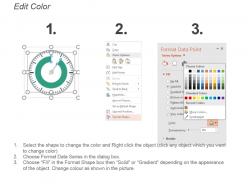
100% Editable
 Save Hours
 of Time


This is the only time when the saying 'no pain no gain' doesn't holds true. Visually convincing Sales Activity Dashboard Snapshot Ppt Samples that everyone would love.
People who downloaded this PowerPoint presentation also viewed the following :
Content of this Powerpoint Presentation
Description:
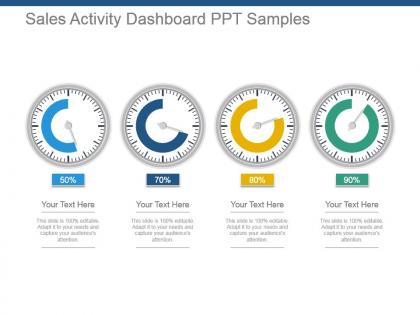
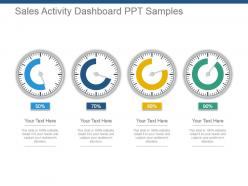
The image shows a PowerPoint slide titled "Sales Activity Dashboard PPT Samples". It features four gauge charts, also known as speedometer charts, each representing a percentage completion or achievement level: 50%, 70%, 80%, and 90%. The gauges are color-coded—blue for 50%, darker blue for 70%, yellow for 80%, and green for 90%—likely indicating progress levels or targets met. Below each gauge is a placeholder for text, suggesting that details can be added to explain the context of each metric. The slide header states that it is "100% editable," implying that the slide can be customized for different presentations.
Use Cases:
Here are seven specific industries that can benefit from using such slides:
1. Retail:
Use: Tracking sales targets
Presenter: Sales managers
Audience: Sales teams and store managers
2. Real Estate:
Use: Monitoring property sales progress
Presenter: Real estate brokers
Audience: Sales agents and realty company executives
3. Automotive:
Use: Measuring dealership sales performance
Presenter: Dealership owners
Audience: Sales staff and corporate management
4. Banking:
Use: Displaying financial product sales
Presenter: Branch managers
Audience: Bank employees and regional managers
5. Technology:
Use: Visualizing software or service subscription goals
Presenter: Tech company sales leads
Audience: Sales department and stakeholders
6. Pharmaceuticals:
Use: Charting medication sales figures
Presenter: Pharmaceutical sales directors
Audience: Sales reps and marketing team
7. Telecommunications:
Use: Representing service plan sales achievements
Presenter: Sales and marketing heads
Audience: Corporate salesforce and marketing departments
Sales activity dashboard snapshot ppt samples with all 5 slides:
Create new skills with our Sales Activity Dashboard Snapshot Ppt Samples. Blaze new trails with your thoughts.
FAQs for Sales activity dashboard
Key metrics include calls made, emails sent, meetings scheduled, pipeline velocity, conversion rates, deal size averages, and activity-to-outcome ratios. These indicators streamline performance monitoring by revealing productivity patterns, identifying bottlenecks, and highlighting successful behaviors, with many sales organizations finding that comprehensive activity tracking ultimately delivers improved forecasting accuracy and enhanced team accountability.
A sales activity dashboard helps identify top-performing sales representatives by tracking key metrics like conversion rates, revenue generated, call volumes, deal closure times, and client acquisition numbers across the entire team. Through real-time data visualization, sales managers can quickly compare individual performance, recognize high achievers, and identify best practices that can be scaled across the organization, ultimately enhancing overall team productivity.
Data visualization transforms complex sales metrics into intuitive charts, graphs, heat maps, and trend lines that enable instant comprehension and faster decision-making. Through visual elements like pipeline funnels and performance comparisons, sales teams can quickly identify bottlenecks, track quota progress, and spot emerging opportunities, ultimately delivering enhanced productivity and more strategic resource allocation across growing organizations.
Sales data should be updated in real-time or hourly to maintain accuracy and relevance, with critical metrics like lead conversions, pipeline changes, and deal closures requiring immediate updates. Many organizations find that automated integration with CRM systems enables continuous data synchronization, ultimately delivering current insights that enhance decision-making and accelerate sales performance across teams.
Integrating sales activity dashboards with CRM software delivers enhanced data visibility, streamlined workflow management, automated reporting capabilities, improved lead tracking, and real-time performance analytics. This strategic combination enables sales teams to accelerate deal closures, optimize resource allocation, and enhance customer relationship management, with many organizations finding that integrated systems reduce administrative tasks while significantly improving sales forecasting accuracy.
Predictive analytics enhances sales activity dashboards by forecasting future sales trends, identifying high-potential leads, and predicting customer churn risks through advanced algorithms and historical data analysis. These insights enable sales teams to prioritize prospects more strategically, allocate resources efficiently, and proactively address retention opportunities, ultimately delivering improved conversion rates and revenue growth.
Effective sales activity dashboards utilize bar charts for performance comparisons, line graphs for trend analysis, pie charts for territory distribution, funnel visualizations for pipeline stages, and heat maps for activity intensity. These visual representations streamline data interpretation by highlighting key metrics, identifying bottlenecks, and revealing patterns, with many sales organizations finding that combining multiple chart types enhances decision-making speed and accuracy.
Sales teams can customize dashboards by configuring KPI widgets, adjusting time periods, creating role-based views, setting personalized alerts, and integrating relevant data sources. These customization features enable teams to track territory-specific metrics, monitor individual versus team performance, and focus on pipeline stages most critical to their objectives, ultimately delivering targeted insights that drive strategic decision-making and revenue growth.
Organizations should avoid cluttering dashboards with excessive metrics, using misleading visualizations, neglecting mobile optimization, failing to align KPIs with sales objectives, and implementing poor data integration across systems. These pitfalls often result in decision paralysis, reduced user adoption, and inaccurate insights, with many sales teams finding that streamlined, strategically-focused dashboards ultimately deliver better performance outcomes and higher engagement rates.
Real-time data transforms sales decision-making by enabling immediate adjustments to strategies, identifying emerging opportunities, and addressing performance gaps instantly rather than waiting for monthly reports. Through live dashboards and automated alerts, sales managers can reallocate resources, coach underperforming representatives, and capitalize on trending leads, ultimately delivering faster response times and improved conversion rates.
A sales activity dashboard facilitates team communication by providing shared visibility into pipeline status, individual performance metrics, territory coverage, and goal progress in real-time. This centralized transparency enables sales managers to identify support needs quickly, team members to collaborate on opportunities seamlessly, and entire teams to align strategies around common objectives, ultimately delivering improved coordination and accelerated deal closure rates.
Sales activity dashboards track daily operational metrics like calls made, emails sent, meetings scheduled, and pipeline activities, while sales performance dashboards focus on outcomes such as revenue, conversion rates, and quota attainment. These complementary tools enable sales managers to monitor both leading indicators and results, with many organizations finding that combining activity tracking with performance analysis delivers better forecasting accuracy and helps identify which behaviors drive the strongest revenue outcomes.
Mobile accessibility for sales activity dashboards should prioritize responsive design, touch-friendly navigation, offline data synchronization, simplified visual layouts, and voice-to-text functionality for quick updates. These features enable field sales teams to access real-time performance metrics, update client interactions seamlessly, and maintain productivity while traveling, with many organizations finding that mobile-optimized dashboards increase sales team efficiency by streamlining data entry and accelerating decision-making processes.
Sales leaders can leverage historical data by analyzing past performance patterns, seasonal trends, customer behavior cycles, and conversion rates to identify predictive indicators for future outcomes. Through advanced analytics and trend visualization, dashboards enable leaders to anticipate market shifts, allocate resources strategically, and set realistic targets, ultimately delivering more accurate forecasts and competitive advantage.
User feedback plays a crucial role in identifying usability gaps, feature requirements, and performance bottlenecks that may not be apparent during initial dashboard development. Through regular feedback collection, sales teams can highlight specific metrics they need, navigation improvements, and reporting customizations that enhance their daily workflows, with many organizations finding that user-driven iterations significantly improve adoption rates and ultimately deliver more actionable insights for revenue growth.
-
Design layout is very impressive.
-
Attractive design and informative presentation.