

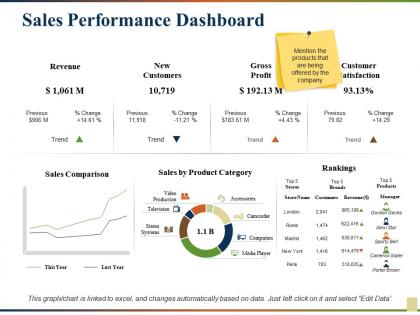
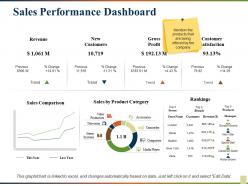
Sales performance dashboard





Try Before you Buy Download Free Sample Product
 Impress Your
 Audience
 100%
100% Editable
 Save Hours
 of Time


Our Sales Performance Dashboard deliver better connectivity at cheaper cost. They enable you to benefit from the cloud.
People who downloaded this PowerPoint presentation also viewed the following :
Sales performance dashboard with all 5 slides:
Folks agree you are definitely clever due to due Sales Performance Dashboard. You will come across as ingenious.

FAQs for
Key sales metrics should include revenue growth, conversion rates, lead generation volume, average deal size, sales cycle length, and individual rep performance against quotas. These metrics enable sales managers to identify bottlenecks, optimize resource allocation, and enhance team productivity, with many organizations finding that comprehensive dashboards ultimately deliver improved forecasting accuracy and accelerated revenue growth.
Sales dashboards should be updated in real-time or daily to maintain data relevance, with weekly summaries for trend analysis and monthly strategic reviews. Many organizations find that automated, hourly updates enable sales teams to respond quickly to leads, track performance metrics, and adjust strategies immediately, ultimately delivering faster decision-making and improved revenue outcomes.
**INPUT**: What visualization techniques are most effective for displaying sales data in a dashboard format? **OUTPUT**: Effective sales dashboard visualizations include bar charts for comparative performance, line graphs for trend analysis, heat maps for territory insights, gauge charts for quota tracking, and funnel diagrams for pipeline stages. These techniques enhance decision-making by providing instant performance visibility, identifying growth opportunities, and streamlining sales management processes, with many organizations finding that visual data representation accelerates strategic responses and improves team accountability. **Word count: 60 words**
Sales dashboards can be customized by tailoring metrics, visualization depth, and access levels to each role's specific responsibilities and decision-making needs. Sales reps focus on individual performance metrics and pipeline activities, managers monitor team performance and forecasting data, while executives view high-level revenue trends and strategic KPIs, ultimately enabling role-specific insights that enhance productivity and strategic alignment.
**INPUT**: What tools and software are recommended for creating and maintaining an effective sales dashboard? **OUTPUT**: Recommended sales dashboard tools include Tableau, Power BI, HubSpot, Salesforce Analytics, and Google Data Studio, each offering unique visualization and integration capabilities. These platforms streamline data analysis by automating report generation, centralizing customer information, and providing real-time performance insights, with many sales organizations finding that strategic dashboard implementation ultimately delivers enhanced forecasting accuracy and improved team productivity. [Word count: 60 words]
Integrating real-time data into sales dashboards involves connecting CRM systems, marketing automation platforms, financial databases, and customer interaction tools through APIs and data pipelines. This integration enables sales managers to monitor live lead conversions, track pipeline velocity, and identify emerging opportunities instantly, while sales teams can adjust strategies dynamically, ultimately delivering faster response times and improved revenue outcomes.
Common pitfalls include overwhelming users with excessive metrics, poor data visualization choices, lack of real-time updates, ignoring mobile responsiveness, and failing to align with sales team workflows. These design mistakes ultimately reduce dashboard adoption and effectiveness, with many organizations finding that streamlined, role-specific dashboards with clear visual hierarchy deliver better user engagement and more actionable insights.
Sales dashboards help identify trends and forecast future sales by visualizing historical data patterns, seasonal fluctuations, customer behavior metrics, pipeline velocity, and conversion rates across different periods. Through advanced analytics and predictive modeling, sales teams can spot emerging opportunities, anticipate market shifts, and make data-driven forecasts, ultimately enabling more accurate revenue planning and strategic resource allocation.
Automation enhances sales dashboard efficiency by streamlining data collection, eliminating manual entry errors, and providing real-time performance updates across multiple channels. Through automated reporting and predictive analytics, sales teams accelerate decision-making, optimize resource allocation, and identify high-value opportunities faster, ultimately delivering improved conversion rates and competitive advantage.
User feedback plays a crucial role in identifying usability gaps, feature requests, and performance bottlenecks that may not be apparent to dashboard designers. Through regular surveys, usage analytics, and direct input sessions, sales teams can highlight which metrics need better visualization, which workflows feel cumbersome, and which insights drive actual decision-making, ultimately ensuring the dashboard evolves to maximize adoption and sales effectiveness.
Sales dashboards facilitate collaboration by providing centralized, real-time visibility into team performance, individual metrics, shared goals, and pipeline status. Through automated updates and transparent data sharing, teams can coordinate efforts more effectively, identify support opportunities, celebrate wins collectively, and align strategies, with many organizations finding that unified dashboards eliminate silos while fostering accountability and teamwork.
Sales dashboard data accuracy requires implementing automated data validation rules, establishing regular data auditing schedules, creating standardized data entry protocols, maintaining clean CRM integration, and setting up real-time error alerts. These practices streamline reporting by eliminating manual errors, ensuring consistent data formatting, and enabling immediate correction of discrepancies, with many sales organizations finding that automated validation ultimately delivers more reliable forecasting and strategic decision-making capabilities.
Mobile access to sales dashboards significantly enhances productivity by enabling real-time data access, faster decision-making, improved client interactions, and seamless territory management. Sales teams can instantly update opportunities, access customer insights during meetings, and respond to market changes immediately, with many organizations finding that mobile-enabled representatives close deals 25% faster while delivering more personalized customer experiences.
**INPUT**: What are the best practices for presenting a sales dashboard to stakeholders and executives? **OUTPUT**: Best practices include focusing on key metrics aligned with strategic goals, using clear visualizations with minimal clutter, providing context through historical comparisons, and structuring presentations around actionable insights rather than raw data. Successful executives increasingly emphasize storytelling with data, highlighting performance trends, forecasting implications, and specific recommendations, ultimately enabling stakeholders to make informed decisions quickly while demonstrating clear ROI and competitive positioning. *[Word count: 60]*
Cultural differences influence sales dashboard design through varying data visualization preferences, communication styles, and decision-making approaches across regions. While Western teams often favor direct numerical displays and individual performance metrics, Asian markets may emphasize collective achievements and hierarchical data presentation, with European teams typically preferring detailed analytical breakdowns, ultimately requiring culturally adaptive dashboard frameworks that enhance global collaboration and strategic alignment.
-
Excellent design and quick turnaround.
-
Informative presentations that are easily editable.