

Sap Analytics Cloud Project Journey Of Sap Analytics Cloud




Try Before you Buy Download Free Sample Product
 Impress Your
 Audience
 100%
100% Editable
 Save Hours
 of Time


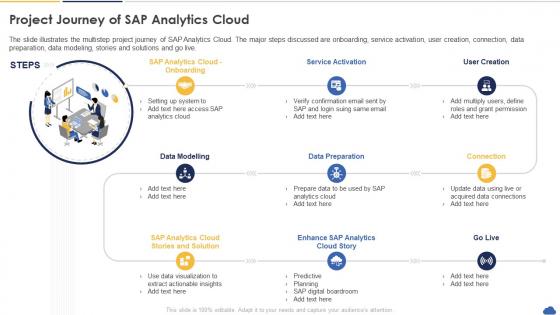
The slide illustrates the multistep project journey of SAP Analytics Cloud. The major steps discussed are onboarding, service activation, user creation, connection, data preparation, data modeling, stories and solutions and go live.
People who downloaded this PowerPoint presentation also viewed the following :
Sap Analytics Cloud Project Journey Of Sap Analytics Cloud with all 6 slides:
Use our Sap Analytics Cloud Project Journey Of Sap Analytics Cloud to effectively help you save your valuable time. They are readymade to fit into any presentation structure.





FAQs for Sap Analytics Cloud Project Journey Of
So SAP Analytics Cloud is pretty cool because it does planning, analytics, AND predictive stuff all in one place - most tools make you bounce around between different apps which is annoying. Real-time connection to SAP systems is obvious, but it plays nice with non-SAP data too. The collaboration features are actually solid, your team can work on models together live. But honestly? The embedded ML that auto-finds insights you'd probably miss is what makes it stand out. If you're already using SAP, definitely check it out. The data integration alone will save you so much time.
SAP Analytics Cloud's predictive stuff is actually pretty solid for forecasting and spotting risks early. Way less painful than those old statistical programs we used to struggle with - you don't need to be a coding wizard anymore. Sales forecasting, customer churn, demand planning... it handles most of what you'd want to predict using data you already have. The ML side automatically finds patterns and recommends which models work best. Honestly, I'd just pick one problem your team's dealing with and start there. Once you see it working, you'll probably find tons of other uses for it.
Data integration is SAC's backbone - you're pulling scattered sources into one spot for real analysis. Honestly, I've watched so many projects crash because of sloppy data connections! Without good integration, you get stuck with silos that feed you incomplete or totally contradictory insights. Your analytics accuracy depends completely on integration quality. Crappy connections = unreliable dashboards = questionable decisions. SAC has tons of connectors and import options though. Map out your data sources first, then figure out which connections will actually move the needle for your analysis.
Hit "Create" then "Story" in SAC's main menu first. Pick your data source - could be a model, dataset, whatever you're working with. Then just drag charts and tables onto the canvas like you're building a dashboard. Honestly it's super similar to PowerPoint but for data (which is actually pretty nice). You can add multiple pages and mess with the styling to make it look decent. Filters are easy to apply too. Oh and definitely preview before you send it to anyone - I've learned that the hard way when formatting gets wonky.
So SAP Analytics Cloud does real-time data viz pretty well actually. You can hook it up directly to your source systems - HANA, S/4HANA, whatever cloud databases you're using. Your dashboards will update automatically when the data changes. Refresh intervals are flexible, like every few minutes up to hourly. There's even a streaming feature for when you need truly real-time stuff. Just heads up though - the more you refresh, the more it'll bog down your system. You'll want to find that balance between getting fresh data and not killing performance. Honestly depends on what you're trying to accomplish.
Yeah, SAP Analytics Cloud's pretty solid security-wise. They encrypt everything - data moving around and stored data. Role-based access controls let you control who sees what (which is honestly a lifesaver). It's got all the compliance stuff too - SOC 2, GDPR, the whole nine yards. Single sign-on works great, plus multi-factor authentication if you want extra protection. Oh, and there's data masking for sensitive info and audit logs to track everything. My advice? Start by cleaning up your user permissions first - people tend to accumulate way more access than they actually need over time.
So SAC has some solid automation options that'll save you tons of time. Data Actions can handle your scheduled refreshes and data transformations automatically. For getting reports to people, set up scheduled publications - they'll email stakeholders without you lifting a finger. The Calendar feature works great for recurring stuff too. Honestly, Analytics Designer is where things get interesting - you can build custom apps with automated workflows. REST APIs are there if you need to connect with other systems, though that gets more technical. I'd start by listing out whatever manual tasks are eating up your day, then see which tools fit best. You'll probably be shocked how much time you get back.
So SAC is actually great for team stuff - everyone can jump into the same live data at once. No more of those nightmare email threads where everyone's got different Excel versions, thank god. You can literally comment right on charts and tag people for feedback. The story feature is cool too, builds interactive presentations that update automatically with new data. Your team can mess around with different scenarios together and see what happens instantly. Honestly though, just grab your team leads and do a quick demo. The collaboration bits make way more sense when you actually see them working.
Yeah SAC's mobile app is actually pretty good - works on both iPhone and Android. Your dashboards automatically resize for phone screens so everything stays readable. You can still do all the usual stuff like drilling down and filtering data. Push notifications for alerts are clutch too, honestly they've bailed me out when something went wrong after hours. Oh and it caches content so you can view stuff offline if your connection sucks. One thing though - definitely check how your complex dashboards look on mobile first. Some of the busier visualizations get weird and cramped on smaller screens.
SAC's super easy to use - just drag and drop stuff to build dashboards. No coding needed. The best part? It automatically fits whatever screen you're on, which saves me so much hassle during presentations. You can tweak charts with a few clicks, and there's this smart feature that suggests visualizations based on your data (though sometimes it's a bit off). Your team can comment right on dashboards too. Oh, and definitely check out their story templates first - they're honestly the best way to see what you can actually do with it.
Data prep is where you'll make or break your SAC analysis, honestly. Most people skip this part and wonder why their dashboards look terrible. You've got to clean and structure everything first - SAC's tools are actually pretty decent for transforming and blending data from different sources. Map out what you're working with before diving in. Then standardize formats and deal with missing values. The drag-and-drop interface makes it way less painful than it sounds. Trust me, spending time here upfront saves you from building visualizations that nobody will believe later.
So SAC is super adaptable - companies just tweak it for whatever industry they're in. Retail folks use it for inventory forecasting and customer stuff. Manufacturing is all about supply chain and production planning. Financial services? They're obsessed with risk analysis and compliance reporting (honestly makes sense given all the regulations). Healthcare tracks patient outcomes but wow, the compliance requirements are brutal there. Oh and manufacturers really love the predictive maintenance features - saves them tons when equipment doesn't randomly break. You don't have to rebuild your whole workflow either. Just check out the industry templates first before doing anything custom.
Honestly, get your data governance sorted from the start - I learned this the hard way. Set up security groups and define your data sources early on. Having standardized dashboard templates is a game changer so people aren't building everything from scratch. Your IT folks need to nail the tenant setup and connection protocols too. Oh, and don't skip training! Roll it out to power users first, then let them teach others. Definitely start with a small pilot group instead of going company-wide immediately. Document as you go or you'll regret it later when scaling up.
Honestly, SAP Analytics Cloud is pretty solid for KPI tracking. It connects to your data sources in real-time, so dashboards update automatically - saves you from doing manual updates constantly. The alert feature is clutch though - set thresholds and it'll ping you when numbers go wonky. Plus you can drill down from overview metrics to see what's actually causing changes, which is great when your boss asks "why did sales drop?" My advice? Don't overcomplicate it at first. Pick your top 3-5 KPIs, build a basic dashboard around those, then expand later.
The biggest things happening with SAC right now? AI and machine learning are automating everything. Real-time streaming analytics too. You can already see it with their predictive stuff, but soon you'll literally just ask questions in normal English and get answers. Pretty cool honestly. Edge computing is making dashboards way smarter without needing a PhD in data science. The whole space is moving crazy fast - I swear every few months there's something new. You should definitely check out SAP's roadmap updates and maybe mess around with their AI features before everyone else catches on.
-
I really liked their customized design services. I got my desired template made by their expert team. Thank You!
-
Every time I ask for something out-of-the-box from them and they never fail in delivering that. No words for their excellence!