

Sap Analytics Cloud Sap Analytics Cloud Dashboard For Hr Department




Try Before you Buy Download Free Sample Product
 Impress Your
 Audience
 100%
100% Editable
 Save Hours
 of Time


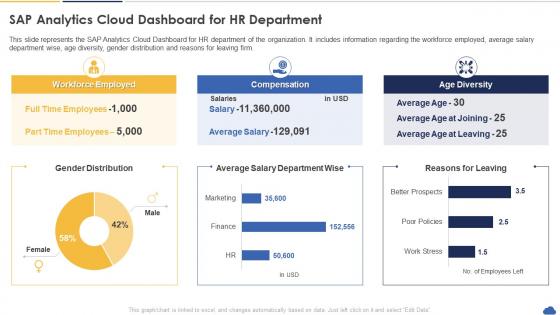
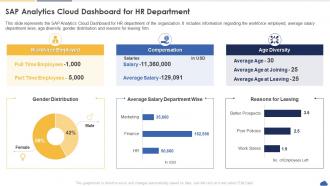
This slide represents the SAP Analytics Cloud Dashboard for HR department of the organization. It includes information regarding the workforce employed, average salary department wise, age diversity, gender distribution and reasons for leaving firm.
People who downloaded this PowerPoint presentation also viewed the following :
Sap Analytics Cloud Sap Analytics Cloud Dashboard For Hr Department with all 7 slides:
Use our Sap Analytics Cloud Sap Analytics Cloud Dashboard For Hr Department to effectively help you save your valuable time. They are readymade to fit into any presentation structure.






FAQs for Sap Analytics Cloud Sap Analytics Cloud Dashboard
So SAP Analytics Cloud's main thing is it mashes together BI, planning, AND predictive stuff in one place. Most tools make you bounce between different platforms which is annoying. Obviously it connects great with SAP systems, but it actually plays nice with non-SAP data too. The planning features are way better than your typical BI tool that just spits out reports. It handles cloud and on-premise data without the usual headaches - I've seen people struggle with that combo on other platforms. If you're already using SAP stuff it's kind of obvious, but honestly? Even if you're not, having everything unified beats managing separate tools.
SAC's Smart Predict feature is actually pretty slick for building ML models right in your planning workflows. No data science degree required, which is nice. You can forecast sales, spot customer churn risks, optimize inventory - basically use whatever data you already have. The what-if scenarios are where it gets fun though. Play around with different variables, see how they mess with your outcomes, then throw it all into dashboards your team can actually understand. Honestly, I'd just pick one thing like sales forecasting to start with. Once people see it working, they'll want more.
Look, SAC is only as good as the data you feed it. You can hook it up to SAP systems, cloud databases, Excel files, third-party apps - pretty much everything. That's where the magic happens because you're not stuck looking at just one piece of the puzzle anymore. More connections = better insights across your whole setup. Without decent data connectivity, SAC is just another dashboard that looks nice but doesn't tell you much. I'd start by figuring out which data sources matter most to your analysis, then connect those first. Oh, and don't try to connect everything at once - that's a recipe for chaos.
So SAP Analytics Cloud basically fixes that whole data silo mess by letting teams share dashboards and reports in real-time. You can comment directly on charts, tag people, have actual conversations right there - which is way better than endless email chains, honestly. Multiple departments can work on planning stuff at the same time without breaking anything. The permissions setup lets you control who sees what data while still getting everyone to collaborate. Oh, and start with shared workspaces for your main projects. Game changer for how teams actually work together instead of just... existing in parallel.
So SAC pulls financial data in real-time, which honestly beats waiting around for those monthly reports. You can set up dashboards that sync with your ERP automatically. The predictive stuff is pretty neat - catches trends before they bite you. Your whole FP&A team can work on models together without the usual version chaos (thank god). Complex calculations? No problem, and you won't need IT breathing down your neck every time you want changes. Oh, and their financial planning templates are solid for getting started fast. Way better than building from scratch.
So first thing - set up role-based access controls and data-level security to control who sees what. Get single sign-on working through your identity provider, plus encryption for data in transit and at rest. Don't forget the governance stuff either - you'll need data lineage tracking and approval workflows for sensitive datasets. The security model honestly feels like a lot at first (took me forever to wrap my head around it), but it's solid once you figure it out. I'd start by mapping your current data access needs, then configure SAC's security layers to match how your org is structured.
Keep your dashboards simple - stick to 3-5 key metrics per page so people don't get lost. Colors and fonts should match throughout (sounds obvious but you'd be surprised). Most important stuff goes at the top where everyone can see it right away. Honestly, I've seen way too many dashboards that look like someone threw every chart type at the wall. Don't be that person! Make sure it works on phones too since everyone checks these on mobile now. Add filters that your users actually care about - not just random stuff. Test it with real people first. They'll spot problems you totally missed. Start basic, then build from there.
So SAP Analytics Cloud plays really well with other SAP stuff - S/4HANA, SuccessFactors, all that. Native connectors make it pretty straightforward. Third-party systems? You can use REST APIs or OData feeds, though honestly the file upload option works fine if you're not getting fancy. Live connections are solid once you figure them out. Non-SAP integrations might need middleware like Data Intelligence, but that's not a huge deal. Oh, and definitely check their connector library first - saves you from reinventing the wheel if something's already built.
Honestly, start with data compression - that's where you'll see the biggest wins right away. Live connections beat importing everything, trust me on that one. Date filters are clutch too because who actually needs a decade of daily data sitting there? Use hierarchies and restricted measures so you're not processing everything at once. Oh, and make sure your source systems have proper indexing set up. For the really complex stuff, blended models work pretty well. I probably should've mentioned this earlier, but smart filtering overall will save you tons of headaches.
ML totally changes how you use SAC - it automates all that manual digging you'd normally do. Predictive analytics helps forecast trends, and there's this anomaly detection thing that catches weird patterns. Plus it finds hidden connections in your data you'd never spot otherwise. The natural language explanations are kinda hit-or-miss though, sometimes they sound super robotic. But honestly? The automated data prep feature alone is worth it - saves me hours. If you're just starting out, go with the predictive models first. They're way more straightforward than I expected.
So SAP Analytics Cloud is basically cloud-only - no on-premise option. It runs on SAP's infrastructure spread across different regions (AWS, Azure, Google Cloud, etc). The main thing you'll need to decide is which data center region to pick. This matters for compliance stuff and how fast it runs for your users. Once you choose, your data stays put in that region. You can still connect to your local systems through live data connections or just import what you need. Honestly, I'd go with whatever region is closest to where most of your team is located.
Oh nice! SAC has way more customization than most people realize. First thing I'd do is bookmark your go-to filter combos - seriously saves so much clicking around every day. Colors and chart formatting are totally changeable too, which is clutch if you're picky about how things look. Custom calculated measures are there if you need them, plus you can mess with story layouts and hide table columns you don't care about. Honestly the personalization stuff is pretty solid once you actually explore it. Different saved views of the same data are super handy too.
Honestly, data integration is gonna be your worst nightmare - legacy systems are a pain and nothing wants to connect properly. Performance gets weird with big datasets too. Your users will hate the change (people always do), so you'll need decent training or they'll just complain constantly. The dashboard builder has a steep learning curve, which is annoying but whatever. I'd definitely start small - pick a pilot project with clean data that's actually manageable. Build some wins first, then move to the messy complicated stuff once everyone's not panicking about it.
So SAC connects directly to your databases - SAP HANA, BW, whatever you're using - and pulls live data instead of waiting for those annoying overnight batch jobs. Dashboards update automatically when the underlying data changes, which executives love because they're always seeing current numbers. It handles streaming IoT data too if that's your thing. Stories and reports refresh instantly while people are looking at them. One heads up though - definitely set up those live connections right from day one. Trust me, switching from import models later is such a headache. Also test your connection speeds early so you don't get surprised.
Dude, SAP Analytics Cloud is pretty much your one-stop shop for getting everyone in the company actually using data to make decisions. Real-time analytics, predictive stuff, dashboards where people can collaborate - it beats having like 5 different tools that don't talk to each other. What's cool is you're not just looking backwards at what already happened, you're figuring out what to do next. Oh and here's the best part - regular teams can dive into the data themselves instead of bugging IT every time they need something. Makes the whole digital transformation thing way less painful honestly.
-
“You have the structure in place that are easy to explore new opportunities.I will be recommending your services to other people.”
-
Much better than the original! Thanks for the quick turnaround.