


Scrum Agile Playbook Powerpoint Presentation Slides





Try Before you Buy Download Free Sample Product
 Impress Your
 Audience
 100%
100% Editable
 Save Hours
 of Time


Agile playbook enables development teams to manage software development life cycle and current state assessment. It ensures teams and stakeholders align with goals associated with the pilot project. Here is an efficiently designed Scrum Agile Playbook covering best practices for deploying agile. The template covers an agile overview in terms of fundamental principles of the agile manifesto, critical phases in the agile product development lifecycle, and agile project management workflow. The agile development strategies include agile framework and practices through scrum and Kanban. Essential components of agile such as product vision board, work prioritization, agile sprints, user story, etc. are presented over the deck. Agile project events such as release planning, iteration planning, and valuable meetings associated with agile project management are captured. Agile progress tracking is managed through a software development timeline roadmap, schedule planning, work breakdown structure, and overall progress tracking. The playbook covers information about the agile team along with key people involved. The cost estimation analysis is done by managing the agile project budget. The agile project progress is tracked through dashboards. Download it now.
People who downloaded this PowerPoint presentation also viewed the following :
Content of this Powerpoint Presentation
Slide 1: This slide introduces Scrum Agile Playbook. State your company name and begin.
Slide 2: This slide states Agenda of the presentation.
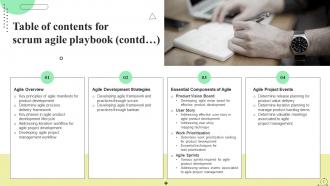
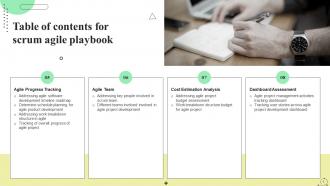
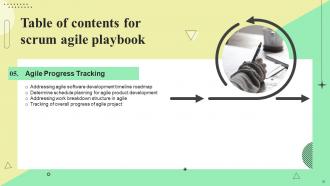
Slide 3: This slide shows Table of Content for the presentation.
Slide 4: This is another slide continuing Table of Content for the presentation.
Slide 5: This slide highlights title for topics that are to be covered next in the template.
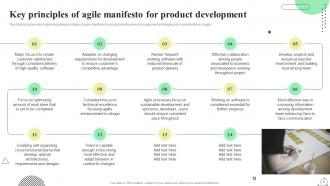
Slide 6: This slide shows Key Principles of Agile Manifesto for Product Development.
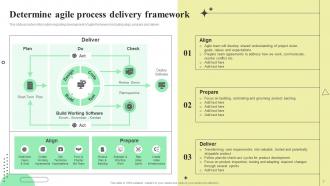
Slide 7: This slide presents Determine Agile Process Delivery Framework.
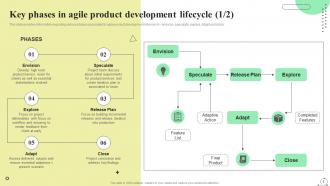
Slide 8: This slide displays Key Phases in Agile Product Development Lifecycle.
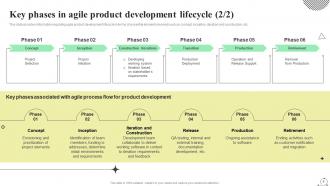
Slide 9: This is another slide continuing Key Phases in Agile Product Development Lifecycle.
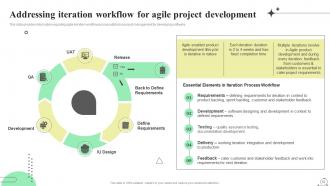
Slide 10: This slide represents Addressing Iteration Workflow for Agile Project Development.
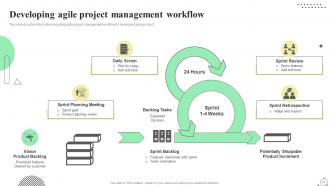
Slide 11: This slide showcases Developing Agile Project Management Workflow.
Slide 12: This slide highlights title for topics that are to be covered next in the template.
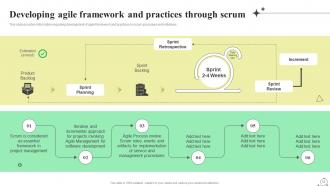
Slide 13: This slide shows Developing Agile Framework and Practices through Scrum.
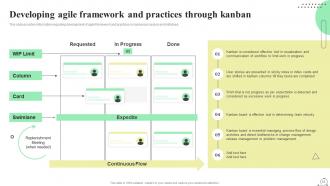
Slide 14: This slide presents Developing Agile Framework and Practices through Kanban.
Slide 15: This slide highlights title for topics that are to be covered next in the template.
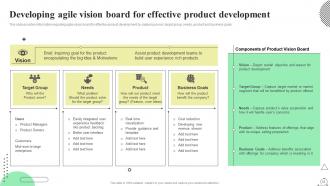
Slide 16: This slide displays Developing Agile Vision Board for Effective Product Development.
Slide 17: This slide highlights title for topics that are to be covered next in the template.
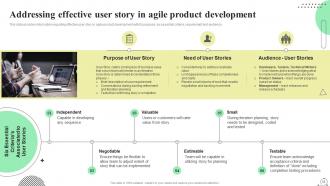
Slide 18: This slide represents Addressing Effective User Story in Agile Product Development.
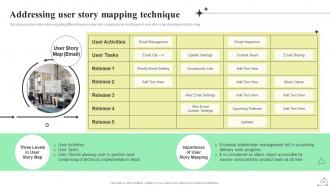
Slide 19: This slide provides information regarding different levels in user story mapping in terms of levels of user story.
Slide 20: This slide highlights title for topics that are to be covered next in the template.
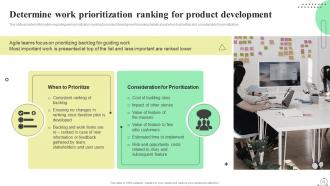
Slide 21: This slide represents Determine Work Prioritization Ranking for Product Development.
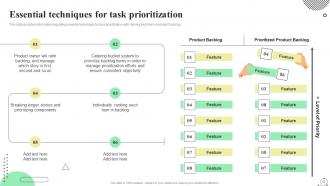
Slide 22: This slide provides information regarding essential techniques for task prioritization.
Slide 23: This slide highlights title for topics that are to be covered next in the template.
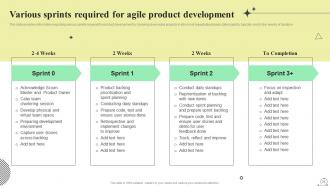
Slide 24: This slide showcases Various Sprints Required for Agile Product Development.
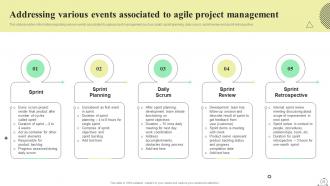
Slide 25: This slide shows Addressing Various Events Associated to Agile Project Management.
Slide 26: This slide highlights title for topics that are to be covered next in the template.
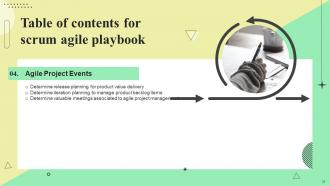
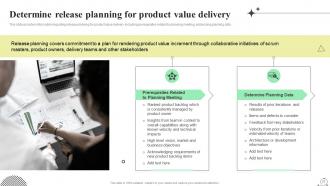
Slide 27: This slide presents Determine Release Planning for Product Value Delivery.
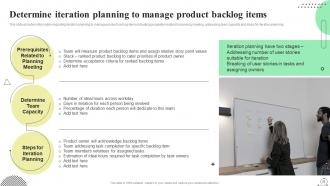
Slide 28: This slide displays Determine Iteration Planning to Manage Product Backlog Items.
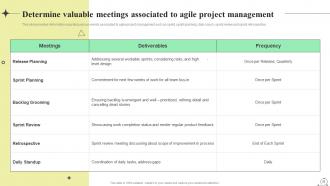
Slide 29: This slide represents Determine Valuable Meetings Associated to Agile Project Management.
Slide 30: This slide highlights title for topics that are to be covered next in the template.
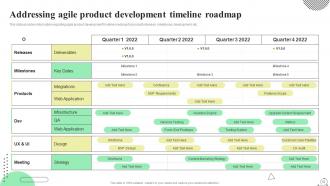
Slide 31: This slide showcases Addressing Agile Product Development Timeline Roadmap.
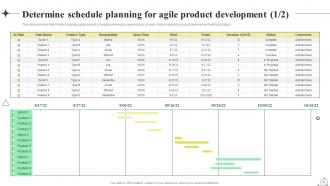
Slide 32: This slide shows Determine Schedule Planning for Agile Product Development.
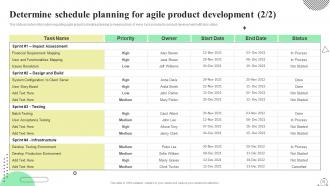
Slide 33: This is another slide continuing Determine Schedule Planning for Agile Product Development.
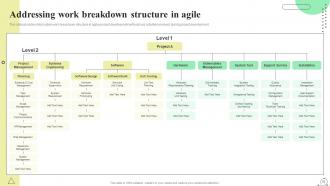
Slide 34: This slide presents Addressing Work Breakdown Structure in Agile.
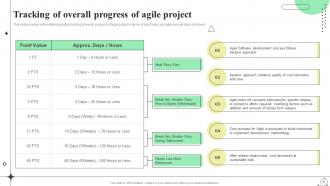
Slide 35: This slide displays Tracking of Overall Progress of Agile Project.
Slide 36: This slide highlights title for topics that are to be covered next in the template.
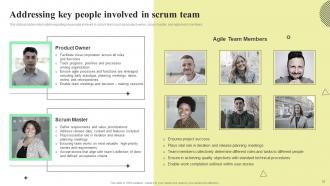
Slide 37: This slide presents Addressing Key People Involved in Scrum Team.
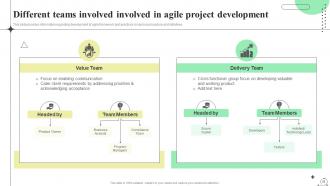
Slide 38: This slide represents Different Teams Involved Involved in Agile Project Development.
Slide 39: This slide highlights title for topics that are to be covered next in the template.
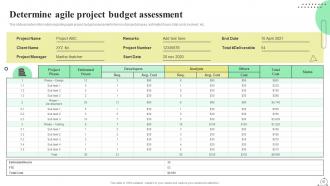
Slide 40: This slide showcases Determine Agile Project Budget Assessment.
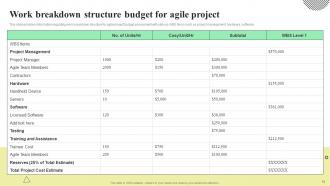
Slide 41: This slide shows Work Breakdown Structure Budget for Agile Project.
Slide 42: This slide highlights title for topics that are to be covered next in the template.
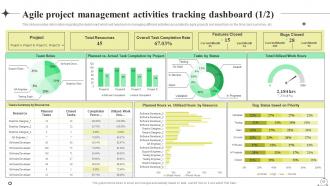
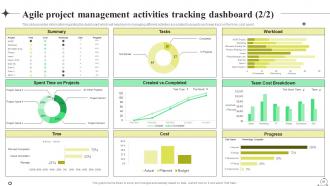
Slide 43: This slide presents Agile Project Management Activities Tracking Dashboard.
Slide 44: This is another slide continuing Agile Project Management Activities Tracking Dashboard.
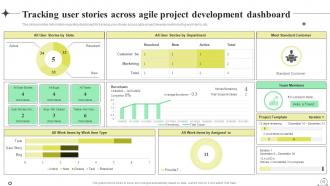
Slide 45: This slide displays Tracking User Stories across Agile Project Development Dashboard.
Slide 46: This slide contains all the icons used in this presentation.
Slide 47: This slide is titled as Additional Slides for moving forward.
Slide 48: This is Our Mission slide with related imagery and text.
Slide 49: This is About Us slide to show company specifications etc.
Slide 50: This is Our Team slide with names and designation.
Slide 51: This is a Timeline slide. Show data related to time intervals here.
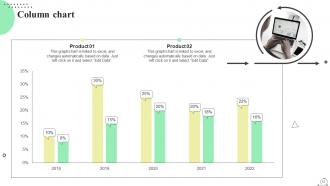
Slide 52: This slide displays Column chart with two products comparison.
Slide 53: This slide shows SWOT describing- Strength, Weakness, Opportunity, and Threat.
Slide 54: This slide contains Puzzle with related icons and text.
Slide 55: This slide depicts Venn diagram with text boxes.
Slide 56: This is a Thank You slide with address, contact numbers and email address.
Scrum Agile Playbook Powerpoint Presentation Slides with all 61 slides:
Use our Scrum Agile Playbook Powerpoint Presentation Slides to effectively help you save your valuable time. They are readymade to fit into any presentation structure.










FAQs for Scrum Agile Playbook
So Scrum has these four main values - people over processes, working software over tons of docs, collaborating with customers instead of just contracts, and being flexible rather than rigid with plans. Honestly, most offices have these plastered on walls but don't actually live by them. The day-to-day stuff involves sprints, teams that organize themselves, and those retrospective meetings where you figure out what went wrong. Your team should talk face-to-face when possible and ship working pieces regularly. Oh, and treat changing requirements as good things, not headaches. Maybe start with daily standups first - they're simple but really help with communication.
Grab all the stakeholders first and collect user stories, then sit down with your Product Owner to rank everything by business value. Trust me, this is where it gets chaotic - everyone thinks their feature is the most important! Start with what gives users the biggest bang for their buck. MoSCoW method works great (Must have, Should have, etc.) or try story mapping if you're visual like me. Don't forget technical dependencies though - your dev team will hate you otherwise. Weekly refinement sessions are clutch for keeping things current since priorities shift constantly.
Okay so there are three main roles you'll need: Product Owner, Scrum Master, and Development Team. Your Product Owner is basically the customer's voice - they manage the backlog and decide what gets built. Scrum Master keeps everything moving, removes roadblocks, and runs the ceremonies (more like a coach than a boss). Development Team does the actual building and they're supposed to be cross-functional and self-organizing. Getting the wrong people in these spots will absolutely tank your sprints, trust me. Oh and define who does what upfront or you'll have people stepping on each other's toes constantly.
So Sprint Planning is basically when your team sits down and figures out what you're gonna tackle next sprint. You break down user stories, set your sprint goal, all that good stuff. Sprint Review happens after - that's when you show stakeholders what you actually built. Honestly, Review meetings can drag on sometimes but they're pretty crucial for getting feedback. Planning is more like "okay what are we doing next?" while Review is "here's what we got done." One's forward-looking, the other's about demonstrating your finished work to get input.
Honestly, the 15-minute rule is a lifesaver - stick to those three basic questions and don't let it turn into a problem-solving marathon. Actually standing up works way better than you'd think! Gets people talking faster and cuts the rambling. Oh, and make sure everyone's talking to each other, not just reporting to whoever's running it. Save the deeper discussions for after. I know it's tempting to dive into solutions right there, but you'll regret it when your quick sync turns into an hour-long debate. Same time and place every day helps build the habit. Try rotating who leads it too - keeps things fresh and stops one person from dominating.
Get your whole team together to figure out what "done" actually means - don't let management just hand it down. Hash it out in a room: code review? Testing? Documentation? Staging deployment? Be super specific too. "Properly tested" is garbage, but "passes unit tests + manual QA review" actually works. I've watched teams argue about this stuff for weeks after projects wrap up (such a waste). Post it somewhere everyone can see it. Oh, and bring it up during retros - you'll probably need to tweak it as you go.
Document everything right away - throw it on your Scrum board or wherever everyone can see it. Your Scrum Master should handle this stuff, but honestly? Sometimes the whole team needs to jump in. During standups, timebox those impediment talks or they'll drag on forever. Can't fix it internally? Escalate fast to whoever has the power - don't let it sit there getting worse. Speed matters here. Set up something simple where anyone can flag problems quickly. Oh, and always circle back to check if things actually got resolved. Transparency is your friend on this one.
Think of the Definition of Done as your team's quality checklist - it stops those awkward moments where someone thinks they're finished but you're still waiting on tests and docs. Without one, developers might call it done after coding while everyone else expects deployment too. Honestly, I've seen this cause so many headaches in sprint reviews. Your DoD gets everyone aligned on what "complete" actually means upfront. No more half-finished work slipping through or rushed releases. Just make sure you actually use it during standups and planning - otherwise it's pointless sitting there gathering dust.
Honestly, psychological safety is huge - people need to feel like they can speak up without getting blamed for stuff. I always do a quick vibe check at the start and remind everyone we're talking about processes, not calling out individuals. Try structured formats like Start/Stop/Continue or that sailboat thing (sounds cheesy but it actually works). Definitely time-box everything or you'll waste 30 minutes relitigating something from three sprints ago. The big thing though? End with real action items. Like, who's doing what by when. Otherwise you're just having the same useless meeting every two weeks and nothing changes.
Honestly, most retros are just theater. People go through the motions but nothing changes. Ask questions that actually dig into WHY things went wrong, not just what happened. Then - and this is crucial - actually DO something about it. I can't tell you how many brilliant ideas I've watched die in Slack threads. Mix up your formats so it doesn't get stale. Share your own screwups first so people know it's safe to be real. When someone tries an improvement and it works? Make a big deal about it. Turn those insights into small experiments for next sprint instead of grand plans that never happen.
Honestly, the biggest pain points are usually people hating change and skipping meetings because they think they're pointless. Your Product Owner might disappear when you need them most - which drives everyone crazy. Don't try to be perfect right away. Just nail the basic ceremonies first. Make sure your PO actually shows up and answers questions. Oh, and do those retrospectives religiously so people can vent about what sucks. Here's the thing though - give it at least 2-3 sprints before you panic and change everything. Scrum feels weird at first but it'll start making sense. Trust me on this one.
Look, velocity is basically your team's track record - how many story points you actually finish each sprint. Way better than guessing what you can handle next time. Burn-down charts? They show if you're cruising or crashing during the current sprint by tracking remaining work. Don't check these things obsessively though - you'll make everyone nuts. I learned that the hard way. Check velocity trends across 3-4 sprints to get realistic about capacity. Burn-downs are perfect for standups to catch problems before they snowball. Trust me, catching blockers early beats scrambling at the end.
Dude, you NEED stakeholders involved or your team's just gonna build random stuff. Get them to sprint reviews so they can actually see what you're making. They're the only ones who really know if something's business-ready or not. I've watched teams nail the technical side but completely whiff because nobody checked with stakeholders first - it's painful to watch honestly. Don't just email updates either, that's useless. You want them giving real feedback on your increments and helping figure out what to prioritize next. Otherwise you're flying blind.
Honestly, the biggest thing is avoiding Zoom fatigue - it's real and it kills productivity. Set a hard timer for 15 minutes on daily standups because they'll drag on forever otherwise. Get everyone using Miro or Jira so people can actually move stories around during planning instead of just staring at screens. Cameras on is non-negotiable, even though we all hate it sometimes. For retros, breakout rooms work great - let people talk in small groups first, then come back together. Oh, and always do a quick tech check at the start because there's nothing worse than losing half your meeting to "can you hear me now?"
Jira's the big one everyone uses - handles sprints, backlogs, all that stuff. Azure DevOps is solid if you're already doing Microsoft things. Trello's super simple for kanban boards but kinda basic. Monday.com and Asana sit somewhere in between. Honestly though? I've seen way too many teams spend forever hunting for the "perfect" tool when a whiteboard would work fine. Pick whatever meshes with what you're already using and - this is key - something everyone will actually bother using. No point getting fancy software if half your team ignores it.
-
Excellent products for quick understanding.
-
Content of slide is easy to understand and edit.