


SD WAN Model Powerpoint Presentation Slides





Try Before you Buy Download Free Sample Product
 Impress Your
Audience
 100%
Editable
 Save Hours
of Time


Grab our expertly crafted SD-WAN Model PowerPoint presentation. It gives a brief idea about the SASE security model, including its architecture, working, framework components, use cases, implementation process, and comparison of SASE with different technologies. Our SASE Security deck covers the importance of the SASE model, its role in digital workspace, generic and identity-centric architecture, characteristics, working, and problems with traditional network security models. In addition, it contains the SASE framework components, including Software Defined Wide Area Network SD-WAN, Secure Web Gateway SWG, Zero Trust Network Access ZTNA, Cloud Access Security Broker CASB, and Firewall as a Service FWaaS. Also, our SASE architecture PPT includes the comparison of SASE technology with other technologies such as SD-WAN, SWGs, and UTM. It also consists of an implementation budget and training program. It further caters to a timeline and roadmap to implement the SASE network security model in an organization. Moreover, our SASE Network Security module caters to a performance-tracking dashboard. Lastly, it comprises the use cases of Secure Access Service Edge in different domains. Get instant access.
People who downloaded this PowerPoint presentation also viewed the following :
Content of this Powerpoint Presentation
Slide 1: This slide introduces SD-WAN Model. Commence by stating Your Company Name.
Slide 2: This slide depicts the Agenda of the presentation.
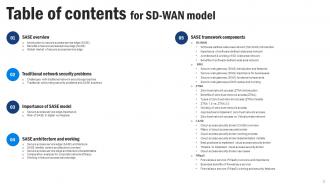
Slide 3: This slide includes the Table of contents.
Slide 4: This slide continues the Table of contents.
Slide 5: This slide highlights the Title for the Topics to be covered further.
Slide 6: This slide represents the introduction of SASE cloud security technology.
Slide 7: This slide outlines the key benefits of secure access service edge.
Slide 8: This slide depicts the global market size of the SASE market by components such as platforms and services.
Slide 9: This slide showcases the Heading for the Contents to be discussed next.
Slide 10: This slide describes the challenges with traditional network security approaches.
Slide 11: This slide presents the traditional networking security problems and how SASE model can overcome those problems.
Slide 12: This slide depicts the Title for the Ideas to be covered further.
Slide 13: This slide represents the importance of secure access service edge.
Slide 14: This slide represents the role of secure access service edge in a digital workspace.
Slide 15: This slide depicts the Heading for the Ideas to be discussed next.
Slide 16: This slide represents the SASE architecture overview and its goals.
Slide 17: This slide outlines the overview of the centric architecture of the secure access service edge.
Slide 18: This slide presents the architectural characteristics of a secure access service edge.
Slide 19: This slide depicts the comparison between SASE and other approaches for corporate network efficacy.
Slide 20: This slide reveals the working of the secure access service edge model.
Slide 21: This slide shows the Title for the Contents to be covered in the upcoming template.
Slide 22: This slide represents the overview of SD-WAN components of secure access service access.
Slide 23: This slide talks about the need for SD-WAN by comparing traditional WAN with SD-WAN.
Slide 24: This slide presents the architecture and working of a software-defined wide area network.
Slide 25: This slide outlines the various advantages of the software-defined wide-area network to businesses.
Slide 26: This slide depicts the Heading for the Topics to be discussed further.
Slide 27: This slide describes the overview and features of the secure gateway.
Slide 28: This slide outlines the importance of secure web gateways to businesses.
Slide 29: This slide depicts the functional components of a secure web gateway, including their impact.
Slide 30: This slide shows the methods to setup the secure web gateways and their working.
Slide 31: This slide displays the Title for the Topics to be covered next.
Slide 32: This slide reveals the overview of zero trust network access, including its architecture.
Slide 33: This slide represents the benefits of zero trust network access, a component of SASE technology.
Slide 34: This slide describes the various types of zero-trust network access models.
Slide 35: This slide displays the comparison between zero trust network access versions 1.0 and 2.0.
Slide 36: This slide outlines the working of zero trust network access.
Slide 37: This slide depicts the two primary approaches to implementing zero-trust network access for organizations.
Slide 38: This slide describes the difference between zero trust network access and a virtual private network.
Slide 39: This slide includes the Heading for the Contents to be discussed further.
Slide 40: This slide outlines the overview and benefits of cloud access security broker.
Slide 41: This slide represents the four major pillars of cloud access security broker.
Slide 42: This slide outlines the working process of a cloud access security broker.
Slide 43: This slide talks about the implementation models of cloud access security broker.
Slide 44: This slide states the best practices for implementing a cloud access security broker within an organization.
Slide 45: This slide outlines the timeline to implement a cloud access security broker in a SASE model.
Slide 46: This slide represents the use cases of cloud access security broker.
Slide 47: This slide displyas the Title for the Ideas to be covered next.
Slide 48: This slide portrays the overview and importance of firewall as a service.
Slide 49: This slide illustrates the advantages of firewall as a service to businesses.
Slide 50: This slide describes the working and security features of the firewall as a service.
Slide 51: This slide shows the Heading for the Ideas to be discussed further.
Slide 52: This slide compares secure access service edge and software-defined wide area network.
Slide 54: This slide includes the Title for the Contents to be covered in the upcoming template.
Slide 55: This slide represents the best practices to evaluate secure access service edge solutions.
Slide 56: This slide contains the Heading for the Topics to be discussed further.
Slide 57: This slide outlines the steps to implement a secure service edge in a business.
Slide 58: This slide represents the challenges and solutions for implementing a secure access service edge in an organization.
Slide 59: This slide outlines the critical drivers for secure access service edge adoption.
Slide 60: This slide depicts the Title for the Topics to be covered next.
Slide 61: This slide showcases the budget calculation for implementing a secure access service edge model in an organization.
Slide 62: This slide represents the training program for the secure access service edge model.
Slide 62: This slide reveals the Heading for the Contents to be discussed further.
Slide 64: This slide outlines the timeline to implement secure access service edge in an organization.
Slide 65: This slide displays the Title for the Ideas to be covered in teh upcoming template.
Slide 66: This slide depicts the roadmap to implementing secure access service edge in an organization.
Slide 67: This slide presents the Heading for the Ideas to be discussed further.
Slide 68: This slide demonstrates the performance tracking dashboard for secure access service edge.
Slide 69: This slide shows the Title for the Contents to be covered next.
Slide 70: This slide represents the use cases of secure access service edge within an organization.
Slide 71: This is the Icons slide containing all the Icons used in the plan.
Slide 72: This slide is used for depicting some Additional information.
Slide 73: This slide reveals the Checklist to implement Secure Access Service Edge.
Slide 74: This slide displays the All SASE capabilities integrated in single architecture.
Slide 75: This is Our team slide. State your team-related information here.
Slide 76: This slide showcases the SWOT analysis.
Slide 77: This is our Venn diagram slide.
Slide 78: This is the Idea generation slide for encouraging fresh ideas.
Slide 79: This is the Quotes slide for motivation.
Slide 80: This is the Thank You slide for acknowledgement.
SD WAN Model Powerpoint Presentation Slides with all 88 slides:
Use our SD WAN Model Powerpoint Presentation Slides to effectively help you save your valuable time. They are readymade to fit into any presentation structure.








FAQs for SD WAN Model
Honestly, SD-WAN is pretty solid - three big reasons why. Performance gets way better since it automatically routes traffic through the best paths for each app. Your users will actually notice the difference. Cost savings are huge too - you can dump those crazy expensive MPLS lines for regular broadband and still get decent quality. I mean, the money you save usually pays for the whole thing anyway. Management becomes dead simple with everything controlled from one dashboard instead of touching every single router. Oh, and new sites? Hours instead of weeks to get running. If you've got multiple locations, it's definitely worth checking out.
So basically, SD-WAN is smart about routing your traffic across multiple connections instead of cramming everything through one expensive MPLS line. Your video calls automatically grab the best path while random stuff uses whatever's cheapest. Pretty clever, honestly. Traditional setups are just static - you configure once and pray it works. But SD-WAN constantly picks the optimal route based on what each app actually needs. Plus you get built-in backup when something inevitably breaks. Way better than crossing your fingers and hoping that single connection doesn't crap out on you.
So SD-WAN actually has pretty decent security built in these days. Everything gets encrypted end-to-end, plus you get firewalls and intrusion prevention baked right in. Most use IPsec tunneling (yeah, more tech jargon but whatever). The cool part is they can detect threats in real-time and automatically route around sketchy network paths. Way better than the old days when security was just slapped on afterward. Definitely ask about their encryption standards though - and whether they do zero-trust stuff. That's becoming huge now.
Okay so SD-WAN basically creates one big unified network that connects your branch offices, remote workers, and cloud apps under one management system. Way better than juggling a bunch of slow VPN connections that constantly drop out. Your remote people get fast, consistent access to everything they need no matter where they're working from - which honestly is huge these days. The routing automatically picks the best path for traffic, and IT can monitor everything from one central spot instead of going crazy trying to manage different systems. I'd say start by figuring out what's currently driving you nuts with connectivity and see how SD-WAN could fix those headaches.
Honestly, the big win is ditching those crazy expensive MPLS lines for regular broadband. SD-WAN lets you route most traffic over cheap internet connections instead. Managing everything from one central dashboard is pretty sweet too - way less driving out to fix stuff at remote offices. Each site needs fewer boxes since SD-WAN gear does multiple jobs at once. I mean, the cloud management alone saves our IT team tons of headaches. Worth running the numbers on your current MPLS costs versus what broadband would cost you. That's usually where people go "holy crap, look at this difference."
Dude, if you're using tons of cloud apps, SD-WAN is a game changer. Your traffic gets smart routing straight to AWS, Office 365, whatever - no more forcing everything through some central bottleneck that makes everything crawl. When one connection craps out, it instantly switches to another. Critical apps get priority too, so your video calls won't turn into a slideshow when Karen downloads her "urgent" 2GB files. Honestly, the difference is night and day. Worth it if you're sick of hearing people whine about slow performance all the time.
Dude, SD-WAN basically takes all your internet connections - broadband, MPLS, cellular, whatever - and gets them working together instead of sitting there doing nothing. It watches how each link is performing and moves traffic around automatically based on what you've set up as priorities. Your MPLS getting hammered? No problem, it'll dump the non-critical stuff onto broadband while keeping your important apps on the good connection. You can even load balance across multiple connections for the same app, which is pretty cool. Honestly though, first thing I'd do is look at your current usage reports. That'll show you exactly where you're bleeding bandwidth - those spots are where SD-WAN usually pays for itself.
Honestly, change management's gonna be your biggest headache. Your team will hate learning new tools if they're comfortable with the old WAN setup. Integration's a nightmare too - connecting existing apps and security stuff to the new architecture sucks. Oh, and you'll have zero visibility during the transition since you're basically running two networks at once (which is as fun as it sounds). Vendor lock-in's another trap if you pick the wrong provider. Just do a pilot at one site first. Trust me on this - work out all the problems before you go big.
Basically SD-WAN looks at your network traffic in real-time and picks the smartest route for each app. So instead of everything going through one connection, it might send your video calls over MPLS but route regular web browsing through broadband - whatever works best at that moment. Your cloud apps will load way faster and you won't get those annoying video freezes anymore. It automatically switches paths if one gets slow too, which is pretty slick. Honestly made a huge difference when we rolled it out at our satellite offices. I'd start by checking which apps are driving you crazy performance-wise right now.
MPLS gives you rock-solid reliability with those guaranteed SLAs since it's a private network. SD-WAN runs over public internet so it's less predictable. Speed used to go to MPLS hands down, but SD-WAN has caught up big time - actually beats it for cloud stuff because of direct routing. The catch? SD-WAN makes up for reliability gaps by bouncing between multiple connections when one craps out. Honestly, I'd test SD-WAN with your real traffic first. You might be surprised how well it performs compared to what you're expecting.
Dude, SD-WAN is like having a smart traffic cop for your multi-cloud setup. It automatically picks the best route whether you're using AWS, Azure, or Google Cloud. Instead of managing a million different dashboards (ugh), you get one central view of everything. Bandwidth adjusts based on what your apps actually need, plus it switches over instantly if one provider craps out. The cool part? You're optimizing performance AND costs across all clouds at once. I'd start by figuring out your current traffic patterns first - that's where you'll see the biggest wins anyway.
Track your basics first - latency, packet loss, throughput on those WAN links. Response times for critical stuff like VoIP matter more than you'd think. Obviously measure cost savings vs the old MPLS (that's probably why you made the switch anyway, right?). Uptime stats are crucial, plus how fast failover happens when links crap out. Oh, and don't overlook operational stuff - deployment time for new sites and whether your team's still drowning in manual configs. That last part honestly tells you if the solution's actually working.
So SD-WAN is actually pretty sweet for disaster recovery. When your main connection craps out, it automatically switches to backup links without you having to panic and fix everything manually. You can set it up so your most critical apps get priority during outages too. The management dashboard lets you quickly redirect traffic or spin up temporary sites from one place - honestly way better than the old days of calling your ISP and waiting on hold forever. Just make sure you test the failover stuff regularly and set up multiple connection types beforehand. Trust me, you don't want to figure this out during an actual emergency.
First thing - do a network assessment so you know what traffic you're actually dealing with. Get centralized policy management set up right away because retrofitting that stuff later is honestly such a pain. Make sure VoIP and video calls get priority through QoS settings. You'll definitely want backup connectivity too, just in case. Build security in from the start with encryption and hook it into whatever security tools you're already using. Oh, and monitor everything! Set those baseline metrics before you go live so you can actually tell if things are working better.
Three main things to nail down: encryption, network segmentation, and compliance stuff. Your SD-WAN provider needs end-to-end encryption with AES-256 standards. Network segmentation is huge - isolate your sensitive data flows because most companies screw this up by lumping everything together. Also, pick vendors with the right certifications for whatever you need (HIPAA, PCI-DSS, whatever). They should give you detailed audit logs too. Oh, and create your compliance checklist first before you even start shopping around. Makes the whole vendor evaluation way smoother when you can just ask for proof upfront.
-
Great quality product.
-
Informative and engaging! I really like the design and quality of the slides.