


Security Automation In Information Technology Powerpoint Presentation Slides





Try Before you Buy Download Free Sample Product
 Impress Your
 Audience
 100%
100% Editable
 Save Hours
 of Time


Security automation is the process of detecting and preventing cyber threats. With the use of automation technology, the tasks are executed with a reduced human assistance in order to integrate security procedures, applications, and infrastructure. Check out our professionally designed Security Automation in Information Technology PowerPoint presentation. At first, it covers the ineffective security system and its impact on the organization. The PPT also mentions the current state of security level, with security automation architecture and the importance of security automation in business. Additionally, Our Cybersecurity Automation deck mentions the ideal criteria for security automation, including automation tasks, domain security controls, a security process that cant be automated, and the right time to add automation to security. Moreover, this IT Security Automation module includes the security automation stages, security orchestration automation, extended detection, enterprise network IT security automation, security automation integration tools, and unified platform integration. At last, it covers security automation tools, measures security automation success rate, and security automation dashboards. Download this 100 percent editable presentation and get access to our highly researched and skillfully designed product.
People who downloaded this PowerPoint presentation also viewed the following :
Content of this Powerpoint Presentation
Slide 1: This slide introduces Security Automation in information technology. State your company name and begin.
Slide 2: This slide states Agenda of the presentation.
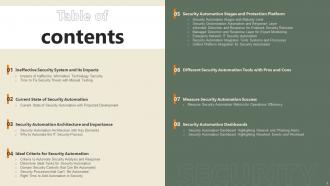
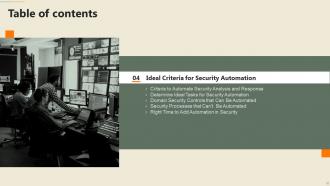
Slide 3: This slide shows Table of Content for the presentation.
Slide 4: This slide highlights title for topics that are to be covered next in the template.
Slide 5: This slide presents Impacts of ineffective information technology security.
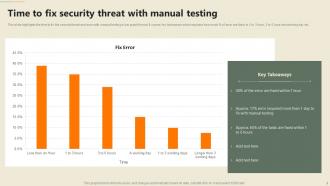
Slide 6: This slide displays Time to fix security threat with manual testing.
Slide 7: This slide highlights title for topics that are to be covered next in the template.
Slide 8: This slide represents Current state of security automation with projected development.
Slide 9: This slide highlights title for topics that are to be covered next in the template.
Slide 10: This slide showcases Security automation architecture with key elements.
Slide 11: This slide shows Why to automate the IT security process.
Slide 12: This slide highlights title for topics that are to be covered next in the template.
Slide 13: This slide presents Criteria to automate security analysis and response.
Slide 14: This slide displays Determine ideal tasks for security automation.
Slide 15: This slide represents Domain security controls that can be automated.
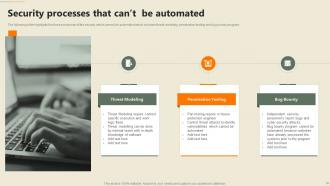
Slide 16: This slide showcases Security processes that can’t be automated.
Slide 17: This slide shows Right time to add automation in security.
Slide 18: This slide highlights title for topics that are to be covered next in the template.
Slide 19: This slide presents Security automation stages with maturity level.
Slide 20: This slide displays Security orchestration automation and response layer.
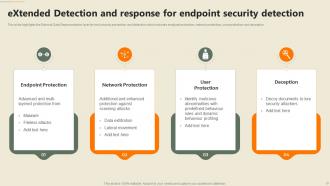
Slide 21: This slide represents Additional and enhanced protection against scanning attacks.
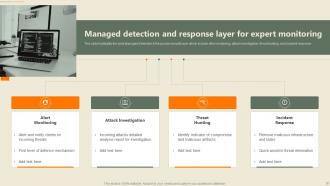
Slide 22: This slide showcases Managed detection and response layer for expert monitoring.
Slide 23: This slide shows Enterprise network IT security automation.
Slide 24: This slide presents Security automation integrates tools systems and processes.
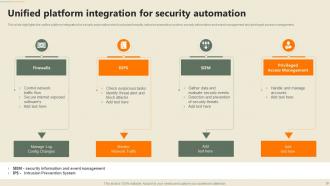
Slide 25: This slide displays Unified platform integration for security automation.
Slide 26: This slide highlights title for topics that are to be covered next in the template.
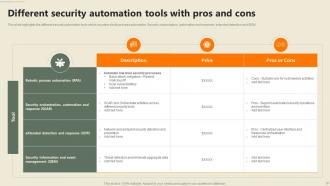
Slide 27: This slide represents Different security automation tools with pros and cons.
Slide 28: This slide highlights title for topics that are to be covered next in the template.
Slide 29: This slide showcases Measure security automation metrics for operations efficiency.
Slide 30: This slide highlights title for topics that are to be covered next in the template.
Slide 31: This slide shows Security automation dashboard highlighting network and phishing alerts.
Slide 32: This slide presents Security automation dashboard highlighting resolved events and workload.
Slide 33: This slide contains all the icons used in this presentation.
Slide 34: This slide is titled as Additional Slides for moving forward.
Slide 35: This slide describes Line chart with two products comparison.
Slide 36: This slide showcases Magnifying Glass to highlight information, specifications etc
Slide 37: This is Our Team slide with names and designation.
Slide 38: This is a Quotes slide to convey message, beliefs etc.
Slide 39: This is Our Target slide. State your targets here.
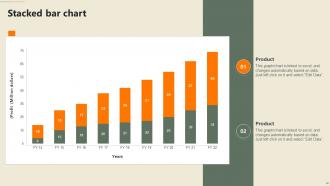
Slide 40: This slide represents Stacked Bar chart with two products comparison.
Slide 41: This is an Idea Generation slide to state a new idea or highlight information, specifications etc.
Slide 42: This is a Thank You slide with address, contact numbers and email address.
Security Automation In Information Technology Powerpoint Presentation Slides with all 47 slides:
Use our Security Automation In Information Technology Powerpoint Presentation Slides to effectively help you save your valuable time. They are readymade to fit into any presentation structure.


























FAQs for Security Automation In Information Technology
Honestly, it's a game-changer for three main reasons. First, automation is crazy fast - handles stuff like threat detection and incident response in seconds instead of hours. Your team stops making those little human errors on repetitive tasks too. But here's the real win: your analysts can finally ditch the boring alert triage work and focus on actual investigations and strategic stuff. Oh, and compliance checks basically run themselves. My advice? Pick whatever manual process eats up most of your time and automate that first. You'll wonder why you waited so long.
Dude, security automation is a game changer - cuts response time from hours down to like minutes. Your system handles all the boring repetitive tasks automatically while you're doing other stuff. When threats pop up, it immediately starts gathering logs, correlating alerts, doing initial investigations. Honestly, it's kind of wild how fast it works. Compromised systems get isolated, malicious IPs blocked, containment starts before you even realize something's wrong. I'd definitely start with playbooks for your most common incidents first. You'll see those response times just tank in the best way possible.
Honestly? Integration's gonna be your biggest pain point. Nothing talks to each other like it should, so expect double the time just connecting systems. Your security folks will probably hate it too - they think you're trying to automate them out of jobs. Alert fatigue becomes real quick when every little thing triggers notifications and actual threats get lost in the noise. Oh, and team buy-in is crucial or you're dead in the water. Start with something small that shows clear wins. Make it obvious you're helping them work better, not replacing them entirely.
So machine learning flips your security from just reacting to stuff to actually predicting it. Pretty cool how it learns from data patterns and catches threats before they blow up. Zero-day attacks? It'll spot those weird anomalies that your regular rule-based systems totally miss. The noise filtering is honestly impressive - algorithms keep getting better at cutting false alarms while nabbing real threats. I'd start with ML for log analysis and watching user behavior. Those two usually give you the most payoff right away.
Think of security automation like having a guard who actually pays attention 24/7. It watches your network traffic and user behavior, catching threats way faster than your team ever could manually. When it spots something sketchy, it'll automatically block bad IP addresses or quarantine infected files before things get messy. The learning aspect is pretty neat too - it gets smarter about new threats over time. Honestly, just start with automated alerts for failed logins and you'll wonder why you didn't do this sooner.
Honestly, just bake the compliance stuff right into your automation from the start. Pick whatever framework you're dealing with - SOC 2, GDPR, whatever - and map your automated rules directly to those requirements. The documentation part is huge though, auditors are obsessed with paper trails so make sure everything gets logged properly. I'd set up automatic reporting to generate all that compliance evidence you'll need later. Also throw in some alerts for when things go off the rails. Start small though - pick one framework and just automate the boring, repetitive tasks first. Way easier than trying to do everything at once.
Start with solid logging and alerts - that's everything. Our SIEM once went nuts flagging normal admin stuff as threats, which was... fun. Monitor how well your rules work, track false positives, watch performance. Review automation rules regularly and keep threat intel feeds fresh. Oh, and test incident response playbooks every quarter. Manual overrides are a must - document those procedures because automation breaks at the worst times. Short version: treat your security automation like you would any mission-critical system. It needs regular maintenance or it'll bite you later.
Honestly, automation is a lifesaver for cutting down mistakes. You know how you're more likely to screw something up when you're doing the same boring task for the hundredth time? Well, automated systems don't have that problem - they'll configure firewall rules the exact same way every time, even at 2AM when your brain's basically mush. The cool thing is it forces you to actually write down your processes instead of just winging it. No more "wait, how did we handle this last time?" Start with whatever manual stuff you do most often that could really mess things up if done wrong.
Track speed and accuracy first - how fast are incidents getting caught and fixed vs doing it manually? False positives matter too because constant bogus alerts will drive everyone nuts. Set up dashboards for detection times, response speeds, and incident trends. Honestly, the baseline data before automation is crucial or you'll have no clue if it's actually working. Also watch what your security team does with the extra time. Are they doing better stuff like threat hunting instead of boring routine work? That's where the real value shows up for leadership.
Look, the biggest myth is that automation will just replace your whole security team. Not happening. You'll still need actual people for the tricky stuff - incident response, weird edge cases, making judgment calls. Also, don't fall for the "set it and forget it" trap. That's honestly how you drown in false alerts or miss actual threats. These tools need constant babysitting and tweaking. Oh, and automation isn't just for massive companies with endless budgets. Start with basic free tools and build from there based on what you actually need, not what sounds cool.
Honestly, automation is a game-changer for security. Your defenses get way faster and more consistent - no more "oops forgot to patch that server" disasters. It's monitoring stuff 24/7 while you sleep, catching threats that would normally slip by. Your team can actually focus on the tricky problems instead of chasing down every single alert manually. The consistency part is probably what I love most about it. Start with the boring repetitive stuff first - patch management, basic incident response. Then build from there. Trust me, once you automate those tedious tasks you'll wonder why you waited so long.
Start with a SIEM like Splunk or Elastic for log analysis. SOAR tools (Phantom, Demisto) handle incident response workflows really well. APIs are clutch - they make everything connect without headaches. Ansible or Terraform for config management too, though I honestly forget about those sometimes. Threat intel feeds from Recorded Future or ThreatConnect are solid choices. The whole stack gets crazy overwhelming though. Focus on API connectivity between your current security tools first. That's where you'll actually see results fast instead of just burning budget on shiny new toys.
Honestly, automation is a game changer for vuln management. It'll scan your systems 24/7, rank threats by actual risk, and can even auto-patch the scary stuff. No more manually poking around every server (thank god). The tools cross-check new vulns against what you actually have running. Workflows handle the boring parts - tickets get created, assigned to whoever needs them, progress gets tracked. Best part? You're catching critical issues way faster. Your team can focus on the bigger picture stuff instead of drowning in busywork. Though you'll still need coffee for those late night incident calls.
So first thing - map out where your automated stuff needs to hand things over to actual humans. Dashboards are your friend here, but make sure everything's in one place because juggling multiple tools is honestly the worst. Your team needs to actually understand what the automation does (sounds obvious but you'd be surprised). Write up some playbooks that spell out escalation triggers and what info gets passed along. Oh and those handoff points I mentioned? That's where you'll either nail this or it'll fall apart. Train everyone on picking up where the bots leave off.
So basically, incident response frameworks are like your automation's game plan when everything goes sideways. Map each phase to automated stuff—prep, detection, containment, the whole deal. SOAR platforms rock at this since they handle the entire workflow automatically. Here's the thing though: you gotta nail down those runbooks first (super tedious but whatever). Then just convert your manual steps into triggers and actions. Oh, and definitely start with the repetitive garbage tasks—honestly, you'll thank yourself later when you're not doing the same mind-numbing response stuff during real incidents.
-
The way SlideTeam professionals work is exceptional. Thanks for being so helpful!
-
Happy to found you SlideTeam. You guys are value for money. Amazing slides.