

Service Desk Dashboard For Monitoring It Using Help Desk Management Advanced Support Services




Try Before you Buy Download Free Sample Product
 Impress Your
 Audience
 100%
100% Editable
 Save Hours
 of Time


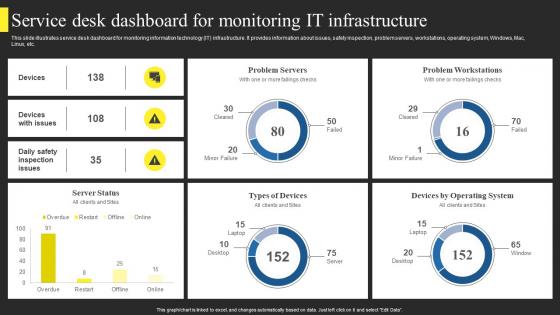
This slide illustrates service desk dashboard for monitoring information technology IT infrastructure. It provides information about issues, safety inspection, problem servers, workstations, operating system, Windows, Mac, Linux, etc.
People who downloaded this PowerPoint presentation also viewed the following :
Service Desk Dashboard For Monitoring It Using Help Desk Management Advanced Support Services with all 7 slides:
Use our Service Desk Dashboard For Monitoring It Using Help Desk Management Advanced Support Services to effectively help you save your valuable time. They are readymade to fit into any presentation structure.





FAQs for Service Desk Dashboard For Monitoring It Using Help Desk Management
Start with the big four: first call resolution, average resolution time, customer satisfaction, and ticket volume trends. Those will show you what's really happening. Agent utilization and escalation rates are super telling too - seriously, escalation percentages can reveal so much about training gaps you didn't know existed. Don't forget SLA compliance, especially with external clients breathing down your neck. Honestly though, begin with these basics before getting fancy with niche metrics. You can always layer on more specific stuff once you see what patterns emerge from your data.
Dude, real-time dashboards are a game changer. You'll catch problems instantly instead of Monday's ugly surprise reports. Watch ticket volumes spike or response times crawl - honestly gets a bit addictive seeing those numbers move. But here's the thing: you can actually DO something about it right away. Redistribute work, escalate before things explode, spot training gaps when weird patterns show up. It flips you from reactive to proactive mode. Oh, and set up alerts for your key numbers so it's working even when you're in meetings or whatever.
Honestly, if your team can't quickly find what they need on the dashboard, it's basically worthless. Make sure navigation feels intuitive and organize info by priority - not just randomly thrown together. I've watched too many teams struggle with dashboards that look cool but are a nightmare to actually use. Agents need to spot urgent tickets fast, track progress, and grab common tools without digging through a million menus. Reduce those clicks! Here's what actually works: shadow your team for a whole day first. See how they really work, then build around that. Way better than guessing what they need.
Oh man, automation is a game changer for service desks. It handles all the boring stuff - ticket routing, status updates, escalations when things get urgent. Your dashboard starts pulling data from everywhere automatically, so you're not constantly updating spreadsheets or whatever. Pretty nice not having to babysit everything 24/7. When SLAs are about to get missed, it'll ping you. Keywords help it sort tickets to the right teams too. Honestly, the best part is your dashboard actually becomes useful for catching problems early instead of just showing you what went wrong yesterday.
First thing - get your data formats consistent and pick one source of truth for each metric. Otherwise you'll go crazy with conflicting numbers everywhere. APIs are your friend here instead of manual exports (seriously, updating spreadsheets daily is soul-crushing). Automate your refresh schedules based on when you actually need reports. Build in error alerts so broken connections don't surprise you later. Document everything - sounds boring but you'll thank yourself when troubleshooting at 9pm. Oh, and start simple! Don't try to integrate everything at once or you'll create a mess that's impossible to debug.
So basically, service desk dashboards show you ticket data visually over time - super helpful for catching patterns. You'll notice which problems keep coming back, when people submit the most requests, stuff like that. Honestly the trend analysis is pretty sweet once you get the hang of it. Filter by dates, departments, whatever you need to dig deeper. Watch for spikes in certain areas or keywords that show up a lot in descriptions. I'd set up weekly reports so you're not always reacting to problems after they blow up. Way better than constantly firefighting, trust me.
Start with CSAT scores and Net Promoter Scores - those give you the real deal on what customers actually think. First Call Resolution is massive too since nobody wants to get passed around like a hot potato. Response times and how long tickets take to close matter obviously. Track escalation rates and send those closure surveys automatically. Honestly? CSAT and FCR are where I'd put my energy first - they're the best predictors of whether people are actually happy or just being polite. Set up weekly reviews so you catch problems before they blow up. Oh, and ticket escalation rates can tell you if your team's getting overwhelmed.
Bar charts work great for ticket volumes, line graphs for trends over time. Heat maps are perfect for spotting peak hours or problem areas. Honestly, color coding is a game changer - red/yellow/green for SLA status makes issues jump out immediately. Group your related metrics together but don't stuff everything on one screen. Start with high-level KPIs, then let people drill down when they want details. Oh, and pick a color scheme that doesn't hurt your eyes - you'll be staring at this thing all day.
So basically everyone can see what's going on instead of playing phone tag all day. You'll spot who's drowning in tickets and redistribute stuff before it gets crazy. Response times, assignments, workload - it's all right there. Honestly saved my sanity when I started using one. Set alerts for urgent stuff or you'll definitely miss something important. The metrics help keep everyone on the same page about priorities too. Oh and you can catch patterns in recurring issues, which is super helpful for figuring out if there's a bigger problem.
Here's what works for me: Get feedback from people who actually use the thing daily - they'll spot the annoying stuff you miss. Clean design is everything. Don't cram every possible chart and metric on there (seriously, I've seen some disasters). Make sure it works on phones too since half your users probably check it during their commute. Oh, and basic accessibility stuff like decent contrast ratios. Run user tests monthly if you can swing it. Short, painful sessions where you watch people struggle with your buttons - but hey, that's how you figure out what needs fixing.
Focus on widget selection, role-based views, and custom KPI tracking first. Most platforms let you drag-and-drop metrics like ticket volume and SLA performance. Managers obviously need different data than frontline agents - that's where role-based dashboards come in handy. You can set up custom alerts, color-coding, plus integrate other tools you're already using. Filtering is super useful for drilling into specific timeframes or ticket types. Honestly, the customization options can get overwhelming fast. Start by figuring out what each role needs daily, then build out from there.
Honestly, looking at your historical data is a game-changer for planning ahead. Pull like 6-12 months worth and you'll start seeing patterns you never noticed day-to-day. Seasonal staffing spikes, services that always break down, recurring problems that keep eating your time. It's way better than just guessing what'll happen next quarter. Plus, when you need to ask for more budget or staff, having actual data makes your case so much stronger. I'd focus on the biggest pain points first - that's where you'll get the most bang for your buck fixing things.
Honestly, traditional reporting is such a pain. You're stuck waiting for those slow static reports that are already outdated by the time you get them. Can't drill down when something looks off either - just sit there staring at numbers like an idiot. Dashboards actually show real-time data from your service desk, so you can spot trends right away and make quick decisions. Way better than digging through multiple systems manually. Those weekly Excel dumps everyone loves so much? Total time waster. Push for dashboards if you can.
Honestly, leaderboards work really well for this stuff - track ticket resolution times, satisfaction scores, first-call rates. Teams get weirdly competitive over badges and points (I've watched grown adults argue over who hit their milestone first lol). Progress bars showing team goals are solid too, plus those little celebration pop-ups when someone crushes a target. Real-time team challenges keep things interesting. Just don't gamify random metrics that don't actually matter - pick one or two things that'll push the behaviors you want. Start small and see what clicks with your team.
Start with role-based access controls - that's your biggest vulnerability right there. Agents should only see their assigned tickets, managers get broader access but still can't peek at sensitive customer stuff. Data breaches happen way more than companies admit, honestly. Get SSO running if you can, encrypt everything (data moving around AND stored data), plus audit logs so you know who's been snooping. Oh and mask PII in those ticket previews - learned that one the hard way. Set session timeouts and do security reviews regularly. Access controls first though, that's where most places mess up.
-
The content is very helpful from business point of view.
-
The templates are handy and I can personalize them as per my needs. Glad to be your subscriber!