

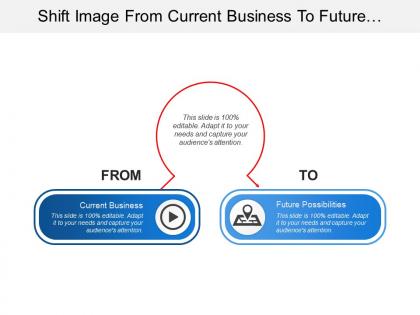
Shift image from current business to future possibilities





Try Before you Buy Download Free Sample Product
 Impress Your
 Audience
 100%
100% Editable
 Save Hours
 of Time


Light the fuse with our Shift Image From Current Business To Future Possibilities. Your team will surely burst into action.
People who downloaded this PowerPoint presentation also viewed the following :
Shift image from current business to future possibilities with all 5 slides:
Generate a definitive influence with our Shift Image From Current Business To Future Possibilities. Bring about a change of attitude.
FAQs for Shift image from current business
Dude, presentations are about to get wild. AR will let you throw 3D models right into your meeting room - no more boring flat slides. Remote people appearing as holograms? That's happening sooner than you think. AI's already getting pretty good at building presentations from messy notes and translating stuff in real time, which honestly saves so much headache. Voice controls and gesture stuff will make everything way more interactive too. The brain-computer thing still feels like Star Trek to me, but who knows? My take: mess around with AR filters and AI tools now before everyone else catches on.
Dude, VR literally drops your audience INTO your story instead of making them stare at boring slides. Walk clients through buildings that don't even exist yet. Let them mess around with your actual product. I saw someone lose their mind being "inside" a data chart once - honestly hilarious but also genius. The whole point is making weird abstract stuff feel real and stick in their heads. People stop being lazy watchers and actually participate. Just don't go crazy right away though. Start with basic 360° stuff first, then get fancy later.
Honestly, data viz is just a way to stop drowning in spreadsheets. You know how you'll stare at rows of numbers and your eyes glaze over? Charts fix that. Bar graphs work great for comparing stuff, line charts show trends over time. Heat maps are solid for intensity across different categories - though I probably overuse those. The trick is figuring out what story you're trying to tell first. Like, what's the one insight you want people to walk away with? Then pick whatever visual makes that point smack you in the face obvious.
Oh totally! Remote work changed everything about slide design. Bigger fonts are a must now - nobody's squinting at laptop screens anymore. I've been using way more contrast too since everyone's on different monitors with varying brightness. Interactive stuff is huge because keeping people engaged on Zoom calls is honestly brutal. The modular thing is smart - breaking slides into chunks you can drop in Slack saves so much time. Also, ditch those old corporate templates. They look terrible on small screens and scream 2019. Test everything on a 13-inch laptop first!
Honestly, audiences are way more demanding now - they want polls, live Q&As, content that actually responds to what they're saying. Remote presentations aren't going anywhere either (which is kind of a relief tbh). People expect bite-sized stuff they can check on their phones later. Shorter attention spans mean you can't just drone on for 20 minutes straight anymore. Real stories beat corporate fluff every time. Interactive tools should be baked into your whole presentation, not just some awkward "any questions?" at the end. Start playing around with this stuff now.
Honestly, AI handles all the annoying parts of making decks now. It'll auto-generate layouts and suggest colors that don't look terrible together. You can even feed it an outline and get a decent first draft back. The resize feature is clutch - no more reformatting the same presentation five times for different screens. What's really cool is some tools learn your company's brand stuff and keep everything consistent. I've been messing around with Gamma and Beautiful.AI lately. Way better than spending hours moving text boxes around when you could focus on actually making your story compelling.
Dude, sustainability's about to flip presentations on their head. Companies are ditching print budgets hard - mine went totally paperless last quarter, which was honestly kind of annoying at first. But audiences actually want eco-friendly stuff now. You'll be doing way more digital presentations, VR demos, cloud sharing instead of handouts. Interactive formats are huge. My advice? Start building your digital toolkit now and get comfy with collaborative platforms. Don't wait on this one - being ahead of the curve will seriously pay off when everyone else is scrambling to catch up.
Honestly, do your homework on who's gonna be in the room first. Different cultures have totally different communication styles - some love jumping into discussions while others prefer staying quiet. Skip the idioms and pop culture refs since they don't always translate. Eye contact is tricky too... what feels confident to you might seem aggressive to someone else. I'd grab a few people beforehand and just ask what works best for them. Oh, and definitely budget extra time for questions! Multi-language materials are clutch if you can swing it. The key is just being genuinely respectful of differences.
Honestly, you've gotta get good at reading rooms instantly and switching up your style mid-presentation. Digital stuff is massive now - you're dealing with people across time zones, some on Zoom, others in person. It's messy but that's reality. The cookie-cutter presentation approach? Totally dead. Focus on storytelling that works across different cultures, and actually engage people instead of just talking at them. Oh, and those awkward pauses everyone hates? They're actually perfect for seeing if people are tuned in. Practice with different groups now - the presenters crushing it are the ones connecting with each part of their audience somehow.
Dude, forget emailing presentation files back and forth - that's torture. Now your whole team can work on the same deck at once. Writers fix copy while designers mess with layouts, and you can literally see their cursors moving around (which is weirdly cool). Google Slides, Figma, Canva Teams - they all do this now. No more "which version are we using?" panic attacks. Everything happens in real-time, so projects move way faster. Honestly, once you try it you'll wonder how anyone got anything done before. Set up sharing permissions on your next big presentation and see what I mean.
Dude, interactive presentations are game-changers! You can boost engagement by like 70% just by getting people involved instead of making them stare at boring slides. Polls work great. So do quick Q&As or discussion breaks. People remember way more when they're actually doing something - beats zoning out any day. Honestly, I think most presenters are just scared to try it. Start simple though. Throw in a poll or two, see how it feels. You can always add fancier stuff later once you're not freaking out about the tech failing on you.
Honestly, neuroscience is going to completely change how we do presentations. There's already solid research showing less text and more visuals actually work better - something about cognitive load theory. The crazy part? We'll probably get real-time biometric feedback on audiences soon. Like, you'll literally know when people check out mentally. That means no more guessing about timing or pacing. You can structure everything around how brains actually absorb info. My advice? Start testing shorter segments now and throw in more interactive stuff. Even simple polls work. The data's there - we just need to use it instead of doing the same boring slideshow format from 2005.
Honestly? Stick to what you actually know and care about - that stuff doesn't change overnight. When something new pops up, just share your real reaction instead of faking expertise. People actually prefer presenters who admit they're figuring things out too. Ask questions WITH your audience rather than acting like you have all the answers. Stay curious about new developments instead of getting defensive about old knowledge. Oh, and definitely let your personality come through - fake enthusiasm is so obvious it hurts. I'd start each talk by mentioning what's genuinely got you excited or worried lately.
Getting feedback on your templates is a game-changer, trust me. Ask your audience specific stuff after each presentation - did the flow work? Could you spot the key points easily? Were you lost at any point? I've watched so many people struggle with gorgeous templates that just don't function well (which is honestly frustrating to see). You'll start noticing patterns in what confuses people vs. what clicks. Then you can fix the layout, tweak how info's organized, dump anything that's distracting. Each version gets better and more persuasive. Try surveying your next three audiences - you'll be shocked what you learn about what actually works.
Okay so first things first - just tell people when you've used AI to make stuff. Sounds obvious but people forget this all the time. Don't pass off AI insights as your own brilliant ideas either, that's sketchy. Check for weird biases too, especially if you're talking about anything remotely sensitive. The tricky part? Making sure you're not accidentally feeding confidential data into these tools. But honestly, the biggest mistake I see is people letting AI do ALL their thinking. It should help your message, not BE your message. And please fact-check whatever it spits out - AI can be confidently wrong about basically anything.
-
Top Quality presentations that are easily editable.
-
Best Representation of topics, really appreciable.