

Shipping And Logistics Tracking Dashboard With Shipping And Transport Logistics Management




Try Before you Buy Download Free Sample Product
 Impress Your
 Audience
 100%
100% Editable
 Save Hours
 of Time


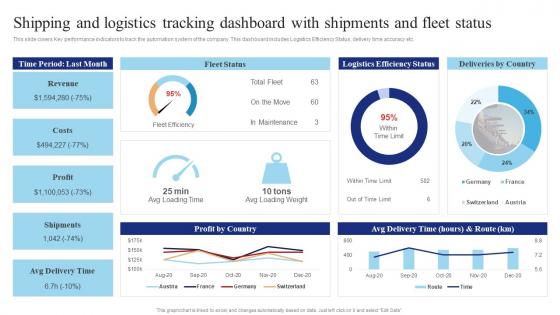
This slide covers Key performance indicators to track the automation system of the company. This dashboard includes Logistics Efficiency Status, delivery time accuracy etc.
People who downloaded this PowerPoint presentation also viewed the following :
Shipping And Logistics Tracking Dashboard With Shipping And Transport Logistics Management with all 7 slides:
Use our Shipping And Logistics Tracking Dashboard With Shipping And Transport Logistics Management to effectively help you save your valuable time. They are readymade to fit into any presentation structure.





FAQs for Shipping And Logistics Tracking Dashboard With Shipping And
Track your on-time delivery rates and shipping costs per unit first - those are the big ones. Transit times matter too, obviously. Don't forget inventory turnover and order accuracy because dealing with pissed off customers over wrong orders is the worst. Carrier performance metrics are solid to include, plus warehouse stuff like pick/pack times. Damage rates too. Customer satisfaction scores are gold if you can swing getting those data points. Honestly, I'd start simple with these basics. You can always pile on more detailed metrics once everyone's used to actually checking the dashboard regularly.
So a shipping dashboard is basically your control center for tracking everything - shipments, carrier performance, inventory levels across all locations. You can spot delays before they blow up into real problems. Honestly, it feels like having superpowers sometimes when you can instantly answer "where's my order?" instead of digging through five different systems like usual. The best part? You'll catch bottlenecks early and make smarter decisions about which carriers to use. My advice - figure out where you're most blind right now and build your dashboard around fixing those headaches first.
Honestly, I'd go with line charts for tracking delivery times over time - they're clutch for spotting trends. Bar charts work well when you're comparing different carriers or routes. Heat maps are where it gets interesting though - they'll show you geographic delivery patterns and problem areas jump out immediately. I'm probably biased but they're my go-to for logistics stuff. Gauge charts are solid for KPIs like on-time rates, and if you want to see cost vs speed relationships, scatter plots do the trick. Oh, and definitely start with your most critical metrics first, then build from there.
Dude, real-time tracking is a total game changer for logistics. Your dashboard goes from being this boring static thing to actually showing you what's happening right now. No more guessing where stuff is - you'll see exact locations, any delays, arrival times, the works. Honestly, it's wild how we used to operate blind like that. You can jump ahead of problems, let customers know what's up before they get mad, reroute things when traffic hits. My buddy started with just their most important shipments first (smart move), then rolled it out everywhere once they got the hang of it. Way less stressful than playing the waiting game.
Honestly, predictive analytics is like having a heads up for everything that could go wrong. You feed it your historical data and it spots patterns - like when demand usually spikes or which routes get jammed up. Super helpful for staying ahead of problems instead of scrambling to fix them after. The delivery predictions are probably your best bet to start with since you'll see results fast. It'll flag stuff like potential fleet maintenance issues too, which saves you from those annoying last-minute breakdowns. Way better than just crossing your fingers and hoping everything works out.
So basically a dashboard gives you all your shipping data in one place - way better than drowning in Excel hell. You can see processing times, how your carriers are doing, delivery delays, the whole thing. What you want to do is look for patterns. Like maybe your warehouse always gets backed up on Fridays (honestly happens more than you'd think). Or certain shipping routes are just slow. Set up some alerts so when numbers get wonky, you know right away. Beats finding out about problems after customers start complaining.
Start with the big three carriers - FedEx, UPS, DHL - for tracking and rates. Your WMS and ERP need to talk to each other or you'll go crazy manually syncing everything. Email and SMS APIs are clutch for keeping customers updated automatically. Weather data is weirdly important too since storms wreck delivery schedules. BI tools help you make sense of all the data later. IoT sensors are cool for warehouse stuff but honestly that's more of a luxury. I'd nail down carriers and your core systems first, then add the fancy features once you're not pulling your hair out.
Honestly, dashboards are a lifesaver for this stuff. Everyone can see the same delivery updates, inventory numbers, and delays in real-time instead of constantly texting "hey where's my order?" Your warehouse team, carriers, and customers all have the same info. No more email chains that go nowhere. You'll catch problems way earlier too - like if a shipment's running late, you can tell customers before they start calling. I'd give your main people dashboard access first and see how much easier coordination gets. Trust me, it cuts down on so much back-and-forth nonsense.
Dude, shipping data is honestly way more sensitive than people think - you've got addresses, tracking info, delivery schedules, all that stuff. Role-based access is huge so random team members can't see everything. Definitely do two-factor auth for logins. Encrypt everything coming and going, plus whatever you're storing. Trust me, logistics data breaches are absolutely brutal for your reputation. Audit logs help track who's looking at what. Oh and mask data for people who don't really need full access. Basically treat it like you would financial data and you'll be good.
Honestly, I'd start with surveys and user interviews - but the real gold is watching people actually use your dashboard. Their behavior will shock you compared to what they say they do. Find out which metrics they're obsessing over and what's buried where they can't find it. Your power users are gonna be your best friends here since they'll catch workflow problems way faster. Oh, and definitely test a beta version with key people first before you unleash changes on everyone. Trust me on that one. Focus on fixing the stuff that annoys people most - those quick wins build momentum.
Dude, mobile access for logistics dashboards is absolutely critical. Your drivers and warehouse teams need to see real-time data on their phones when stuff goes wrong. Can't have people scrambling to find a computer during delivery emergencies - that's just asking for trouble. Touch controls have to work smoothly on small screens too. Honestly, I've seen companies struggle because their dashboards only worked on desktops. It's like trying to run operations blindfolded. Quick decisions happen when people can pull up data instantly, wherever they are.
Honestly, just talk to each team first - that's where the magic happens. Freight folks obsess over route optimization and fuel costs. E-commerce teams? They live and breathe delivery tracking and order volumes. Manufacturing wants inventory turnover stats and supplier performance front and center. Don't even bother with those generic dashboard templates - they're pretty much useless. Sit down with each department (maybe grab coffee) and figure out their top 5-7 metrics they actually check daily. Build around their real pain points, not what some template thinks they should care about.
Honestly, the worst thing you can do is dump every possible metric on one dashboard. Users just get overwhelmed and miss what actually matters. Focus on the stuff that drives real decisions - delivery times, where shipments are, cost per mile. Skip the vanity metrics for now. Make sure it works on mobile too since drivers and warehouse people are always moving around. Oh, and don't get caught up in the "real-time everything" hype if your systems can't handle it smoothly. Updates every few minutes work fine. Start simple with your main KPIs, then add more once people get used to it.
Honestly, dashboards are game-changers for logistics stuff. You get real-time views of everything – carrier performance, delivery times, cost trends, bottlenecks. No more digging through endless spreadsheets or waiting for those weekly reports that are already outdated. When something's going wrong, you'll catch it before it becomes a major headache. Need to switch carriers or reroute shipments? The data's right there. I'd probably start with your top 3-5 KPIs first though – don't try to track everything at once or you'll just overwhelm yourself.
The whole AI/predictive analytics thing is going to be huge - like, your system will actually spot delays before they hit. Real-time route optimization too. IoT sensors are already everywhere tracking temps, engine health, you name it. The data overload is honestly kind of crazy when you think about it. Blockchain might finally solve those supply chain transparency headaches we're always dealing with. AR/VR could let you virtually tour warehouses which sounds pretty cool. Whatever you're planning dashboard-wise, I'd wait if you can - what's coming in the next few years will make today's tools look ancient.
-
SlideTeam just saved my project! Thank you so much. The variety of templates helped me showcase multiple perspectives easily.
-
Impressive templates. Designing a presentation is fun now!