

Smartsheet Investor Funding Elevator Pitch Deck Ppt Template





Try Before you Buy Download Free Sample Product
 Impress Your
Audience
 100%
Editable
 Save Hours
of Time


Smartsheet is a cloud based work management company that empowers, collaborates, makes better decisions, and implements innovations in business operations. Check out our meticulously crafted PowerPoint Presentation titled, Smartsheet Investor Funding Elevator Pitch Deck which outlines the problems suffered by customers such as waste of time, lack of efficiency, and increased business costs. Additionally, our Investor Deck covers the solutions provided such as streamlining business operations, increasing business efficiency, and saving costs. Furthermore, the Investor Presentation includes company details such as introduction, key facts, products, and services offered USP, and major milestones achieved. It also covers business and revenue models, competitors, market potential, financial performance, etc. Lastly, the Startup Presentation contains investment ask, fund allocation, funding history, core team, exit strategy, and shareholding pattern. Get access now.
People who downloaded this PowerPoint presentation also viewed the following :
Content of this Powerpoint Presentation
Slide 1: This slide introduces Smartsheet Investor Funding Elevator Pitch Deck. State Your Company Name and begin.
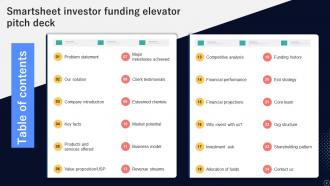
Slide 2: This slide shows a Table of Contents for the presentation.
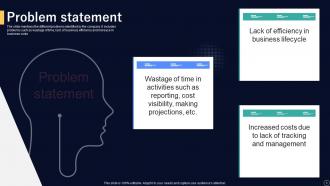
Slide 3: This slide mentions the different problems identified by the company.
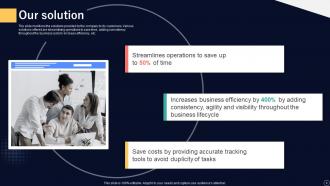
Slide 4: This slide entails the solutions provided by the company to its customers.
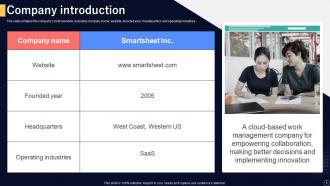
Slide 5: This slide contains the company’s brief overview, including company name, website, founded year, headquarters and operating industries.
Slide 6: This slide puts the key statistic related to the company including the founded year, number of employees, etc.
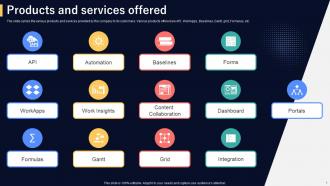
Slide 7: This slide carries the various products and services provided by the company to its customers.
Slide 8: This slide illustrates the unique value proposition of the company to highlight the excellent services provided to the customers.
Slide 9: This slide highlights the various wards and recognition of the company.
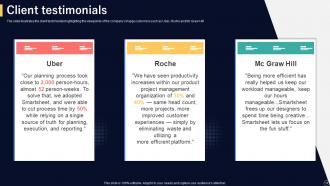
Slide 10: This slide elaborates the client testimonials highlighting the viewpoints of the company’s happy customers such as Uber, Roche and Mc Graw Hill.
Slide 11: This slide conveys the esteemed clients of the company such as Lego, P&G, Alaska Airlines, Pfizer, etc.
Slide 12: This slide represents the market potential of the company in the cloud management market highlighting the TAM, SOM and SAM.
Slide 13: This slide represents the business model canvas highlighting the key partners, key activities, value propositions, customer segments, revenue streams, cost structure, customer relationships, channels, etc.
Slide 14: This slide mentions the main source of revenue for the company such as subscription revenue and professional services revenue.
Slide 15: This slide depicts the comparative analysis of different business competitors including monday.com and Wrike.
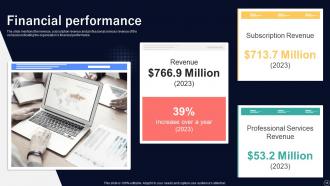
Slide 16: This slide mentions the revenue, subscription revenue and professional services revenue of the company indicating the organization’s financial performance.
Slide 17: This slide outlines the financial projections of the company containing the estimated increase in business revenue by the end of F.Y 2027.
Slide 18: This slide represents the reasons to invest in the company.
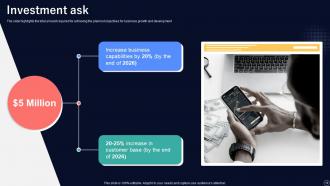
Slide 19: This slide highlights the total amount required for achieving the planned objectives for business growth and development.
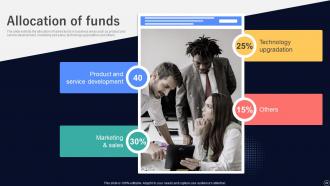
Slide 20: This slide exhibits the allocation of raised funds in business areas.
Slide 21: This slide channelises the investment funding history of the company highlighting details.
Slide 22: This slide carries the exit strategy of a company in case of failure.
Slide 23: This slide puts the core team members such as the CEO, Chief Financial Officer, Chief Revenue Officer, etc.
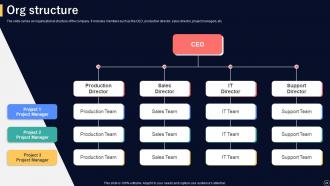
Slide 24: This slide carries an organizational structure of the company.
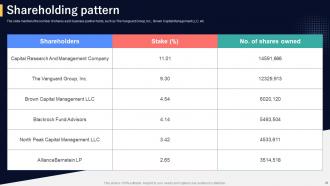
Slide 25: This slide includes the number of shares each business partner holds, such as The Vanguard Group, Inc., Brown Capital Management LLC, etc.
Slide 26: This is a Contact Us slide. Add your Email Address, Contact, Social Media Handles, and Address.
Slide 27: This slide shows all the icons included in the presentation.
Slide 28: This slide is titled Additional Slides for moving forward.
Slide 29: This slide is a Timeline slide. Show data related to time intervals here.
Slide 30: This slide shows Post-It Notes. Post your important notes here.
Slide 31: This slide depicts a Venn diagram with text boxes.
Slide 32: This slide is a financial slide. Show your finance-related stuff here.
Slide 33: This slide contains a Puzzle with related icons and text.
Slide 34: This slide displays Mind Map with related imagery.
Slide 35: This slide shows SWOT describing- Strength, Weakness, Opportunity, and Threat.
Slide 36: This slide presents a Roadmap with additional text boxes.
Slide 37: This slide is an Idea Generation slide to state a new idea or highlight information, specifications, etc.
Slide 38: This slide is a thank-you slide with address, contact numbers, and email address.
Smartsheet Investor Funding Elevator Pitch Deck Ppt Template with all 46 slides:
Use our Smartsheet Investor Funding Elevator Pitch Deck Ppt Template to effectively help you save your valuable time. They are readymade to fit into any presentation structure.





















FAQs for Smartsheet Investor Funding Elevator Pitch
Smartsheet's key features include automated workflows, real-time collaboration dashboards, advanced reporting capabilities, seamless integrations with enterprise systems, and flexible grid-to-Gantt view transitions. These capabilities streamline project oversight by combining spreadsheet familiarity with robust project tracking, dynamic resource allocation, and cross-departmental visibility, ultimately delivering enhanced operational efficiency and strategic project alignment across organizations.
Smartsheet enhances team collaboration through real-time updates, centralized document sharing, automated notifications, and integrated communication tools that keep everyone aligned on project progress. By providing transparent task visibility, streamlined approval workflows, and mobile accessibility, teams can coordinate more effectively across departments and locations, ultimately reducing miscommunication while accelerating project delivery timelines.
Effective Smartsheet template utilization includes standardizing data fields, customizing automation workflows, establishing clear naming conventions, implementing consistent permission structures, and regularly updating template libraries. These practices streamline project management by reducing setup time, ensuring data consistency, and enhancing team collaboration, with many organizations finding that standardized templates accelerate project deployment while maintaining quality control across departments.
Smartsheet integrates with over 100 tools including Microsoft Office, Google Workspace, Salesforce, Slack, and Adobe Creative Cloud through native connectors, APIs, and third-party platforms like Zapier. These integrations streamline workflows by eliminating data silos, automating task updates across platforms, and centralizing project information, ultimately delivering enhanced productivity and seamless collaboration for teams managing complex projects.
Industries with complex project workflows benefit most from Smartsheet, including construction, healthcare, financial services, manufacturing, marketing agencies, and IT departments. These sectors leverage Smartsheet's collaborative features, automated workflows, and real-time reporting to streamline resource allocation, enhance cross-team communication, and deliver faster project completion, with many organizations finding significant improvements in operational efficiency and client satisfaction.
Users can customize Smartsheet through custom columns, automated workflows, conditional formatting, personalized dashboards, and tailored templates for specific project types. These customization features enable teams to streamline project tracking, enhance collaboration across departments, and deliver improved visibility into project progress, with many organizations finding that tailored configurations significantly boost operational efficiency.
Automation in Smartsheet eliminates manual tasks through triggered actions, conditional formatting, automated notifications, approval workflows, and data synchronization across connected systems. These features streamline operations by reducing human error, accelerating project timelines, and ensuring consistent processes, with many organizations finding that automated workflows deliver faster decision-making and enhanced operational efficiency.
Organizations can measure project success in Smartsheet through automated dashboards, real-time progress tracking, milestone completion rates, budget variance reports, and resource utilization metrics. These integrated analytics enable project managers to identify bottlenecks early, optimize resource allocation, and demonstrate ROI to stakeholders, ultimately delivering improved project outcomes and strategic visibility across portfolios.
Common Smartsheet challenges include understanding sheet structures, managing permissions, creating effective formulas, setting up automation workflows, and integrating with existing systems. These obstacles can be overcome through Smartsheet's comprehensive training resources, starting with simple projects before scaling complexity, leveraging pre-built templates, and utilizing their customer support community, with many organizations finding that structured onboarding significantly accelerates user adoption.
Smartsheet supports remote work by providing centralized project dashboards, real-time collaboration tools, automated workflow notifications, and cloud-based accessibility across devices. Through integrated communication features and shared workspaces, distributed teams streamline coordination, maintain project visibility, and enhance productivity, with many organizations finding that remote collaboration becomes as efficient as in-person teamwork, ultimately delivering seamless operations.
Smartsheet's security features include enterprise-grade encryption, multi-factor authentication, role-based access controls, data loss prevention, and compliance certifications like SOC 2 and GDPR. These comprehensive protections enable organizations to safeguard project data through granular permission settings, automated backup systems, and audit trails, with many enterprises finding that this layered approach delivers both regulatory compliance and operational confidence.
Organizations utilize Smartsheet for reporting and analytics through automated dashboard creation, real-time data visualization, customizable reports, cross-sheet formulas, and integrated metrics tracking. These capabilities streamline project oversight by consolidating data from multiple sources, enabling stakeholders to monitor KPIs, track progress against deadlines, and make data-driven decisions, ultimately delivering enhanced operational transparency and improved resource allocation across teams.
Smartsheet case studies include NASA streamlining mission planning workflows, Cisco managing complex product launches across teams, and M&T Bank automating loan processing procedures. These implementations demonstrate how organizations achieve 40-60% faster project completion, enhanced cross-departmental collaboration, and improved resource allocation, with many enterprises finding that centralized project visibility ultimately delivers significant operational efficiency gains.
Educational institutions can leverage Smartsheet for academic project management by tracking research timelines, coordinating curriculum development, managing faculty workloads, and monitoring student thesis progress through automated workflows and collaborative dashboards. Universities and colleges find that these capabilities streamline administrative processes, enhance cross-departmental communication, and improve project visibility, ultimately delivering more efficient resource allocation and better academic outcomes.
Experts recommend leveraging automation workflows, creating standardized templates, utilizing conditional formatting for visual prioritization, establishing clear naming conventions, and integrating with complementary tools like Microsoft Teams or Slack. These strategies streamline project management by reducing manual tasks, enhancing team collaboration, and improving data visibility, with many organizations finding that strategic Smartsheet optimization delivers faster project delivery and enhanced operational efficiency.
-
Commendable slides with attractive designs. Extremely pleased with the fact that they are easy to modify. Great work!
-
Their designing team is so expert in making tailored templates. They craft the exact thing I have in my mind…..really happy.