

Social Media Brief Powerpoint Ppt Template Bundles




Try Before you Buy Download Free Sample Product
 Impress Your
 Audience
 100%
100% Editable
 Save Hours
 of Time


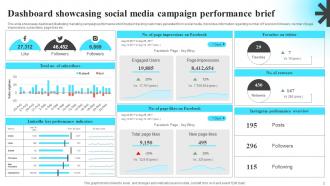
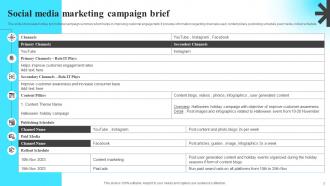
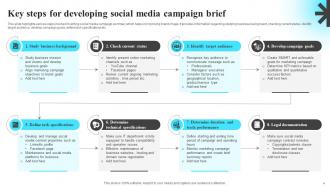
Introducing our Social Media Brief PowerPoint PPT presentation, an essential resource for businesses embarking on successful social media marketing campaigns. Uncover the power of a well crafted Performance Brief, guiding your team to set clear objectives and KPIs for your social media initiatives. Explore the Social Media Design Brief, ensuring your creative team aligns their efforts with your marketing goals, resulting in impactful and visually engaging content. Navigate the Campaign Performance Brief, analyzing key metrics and insights to optimize your social media strategies and achieve better results. With visually compelling slides and expert insights, this PPT equips you to develop effective social media campaigns that drive engagement and conversions. Get this presentation now and revolutionize your social media marketing approach.
People who downloaded this PowerPoint presentation also viewed the following :
Social Media Brief Powerpoint Ppt Template Bundles with all 25 slides:
Use our Social Media Brief Powerpoint Ppt Template Bundles to effectively help you save your valuable time. They are readymade to fit into any presentation structure.







FAQs for Social Media Brief Powerpoint
Start with who you're targeting and what you want to achieve - that's your base. Then add your content strategy, posting schedule for each platform, and the metrics you'll track. Budget breakdown is crucial if you're doing paid ads (leadership always asks about money first, trust me). Throw in some competitor analysis and creative mockups to make it visual. ROI projections are key, but honestly, I'd include a risks section too - shows you're not just winging it. Keep slides clean and data-heavy where it makes sense. End with timeline and next steps so everyone knows what happens after.
Honestly, visuals are a game-changer for social media presentations. They keep people awake and actually help them remember your points later. Obviously charts work great for metrics, but screenshots of real posts hit different - way more authentic than boring bullet points. Oh, and user-generated content is pure gold if you've got it. We're literally talking about social platforms here, so make it look social! Your brand colors should tie everything together. Just don't throw in random graphics for decoration. Every image needs to earn its spot by supporting what you're saying.
Honestly, just stick to 2-3 colors max or it'll look like a rainbow exploded. Use your main brand color for the important stuff - CTAs, headlines, whatever. Then sprinkle in accent colors here and there. Two fonts tops. I'm serious about this one because I've seen people use like 5 different fonts and it's just... why? Pick one for headers, another for body text. Both need to work on mobile since that's where everyone's scrolling anyway. Oh, and make a little cheat sheet with your hex codes and font names. Trust me, you'll thank yourself later when you're not hunting through old posts trying to remember what shade of blue you used.
Honestly, go with charts that actually tell a story - engagement line graphs, demographic pie charts, that kind of thing. Screenshots from your dashboard tools look super legit and data-heavy. Heat maps are killer for showing peak times or where your audience is geographically (I'm obsessed with those lately). Don't jam everything onto one slide though. Stick to 2-3 key metrics max or people's eyes glaze over. Match your brand colors obviously. Oh, and always include your time period! Nothing worse than presenting data and having someone ask "wait, is this from last month or...?"
Honestly, just keep it simple. Line charts are perfect for tracking engagement trends over time. Bar charts work best when you're comparing different platforms or individual posts. Heat maps are super useful for figuring out when your audience is actually online - that one's been a game changer for me. I'd throw in some big number callouts for major wins like follower milestones. Skip pie charts unless you absolutely have to use them (everyone does demographics pie charts and they're kinda boring). Don't make people squint at tiny text though.
Honestly, think of it like telling a story - start with a hook (problem or question), build some tension in the middle, then hit them with your solution at the end. It's basically like a good Instagram story arc, which is kinda funny when you think about it. Use real people in your examples - actual customers or team members make everything way more relatable than random stats. Before/after shots work great too. Oh, and try opening with "Imagine if..." instead of jumping straight into boring data. Trust me, you'll hook people so much faster that way.
Keep it to 8-12 slides tops. People's attention spans are shot these days - I swear mine gets worse every year. One main point per slide with tons of visuals works best. Hit the problem, your strategy, maybe 2-3 key tactics, the metrics that actually matter, and wrap with next steps. Nobody wants to sit through long intros or background stuff anyway. Going over 12 slides? You're cramming too much in there. Either split it into separate presentations or just cut the fluff. Stick to what they absolutely need to know.
Oh this is actually pretty easy! Screenshots of real reviews or posts work best - just ask permission first. I like doing a whole "What Our Community Says" section, or you can sprinkle UGC throughout your slides to back up your points. Before/after photos are gold if you have them. Video testimonials too if that works. Honestly, the biggest thing is making sure it doesn't look like you just grabbed random stuff from the internet. Always credit people and maybe blur usernames for privacy. It's way more convincing than stock photos, that's for sure.
Honestly, audience segmentation is what makes or breaks your whole social media pitch. It decides which platforms you'll focus on, your content strategy, everything. You can't just wing it and hope for the best (though random posts do sometimes go viral, don't they?). Breaking down your audience by demographics and interests gives stakeholders real reasons for why you're targeting certain groups. Makes you look like you actually know what you're doing. Your presentation becomes way more convincing. Lead each section with the specific audience segment you're going after.
Honestly, modular design is your best friend here. Start with generic shapes and text boxes that anyone can swap out for their own stuff - logos, colors, fonts, whatever. I always throw a "brand kit" slide at the front because it saves me from annoying back-and-forth emails later. Stick to simple grid layouts and standard aspect ratios so nothing breaks when people inevitably mess with the content. Oh, and definitely include little notes right in the template telling people what they should customize vs. what to leave alone. Trust me on that one - people will change EVERYTHING if you don't guide them.
Ugh, the worst thing you can do is jam a wall of text on every slide. People's eyes just glaze over immediately. Those cheesy stock photos make everything look so generic too - you know the ones I mean? And please don't use neon green on purple or whatever, my retinas can't handle it lol. Make your fonts big enough for mobile since half your audience is probably checking it on their phone anyway. Those overused icons are everywhere now. Mix up your slide layouts a bit so it doesn't feel like the same thing over and over.
Honestly, visuals are everything for case studies on social media. Lead with your best result upfront - people scroll fast and won't stick around otherwise. Break everything into bite-sized chunks using carousels or threads instead of dumping it all at once. Problem-solution-result format works great, but make it scannable with bullet points and bold text for your key numbers. Before/after shots and data charts perform really well too. Oh, and don't forget a CTA at the end directing people to your full case study. Complex stuff just needs to be digestible, you know?
Dude, start with clickable buttons and polls - those are super easy wins. Quizzes get people hooked too. I'm obsessed with the poll feature honestly, it gets everyone participating instead of just scrolling past. Animated transitions look clean between slides. You could throw in some hover effects or interactive charts if you're feeling fancy. Oh, and hyperlinks are clutch for jumping between sections. Don't go crazy though - like 2-3 elements max or it'll look messy. Videos work great too but they can be tricky with file sizes sometimes.
Big fonts are your best friend here - seriously, go bigger than you think you need. Keep text super minimal since nobody wants to read paragraphs on their phone. I always test stuff on my own device first, walking around like an idiot to see if I can actually read it. High-contrast images work way better, and anything clickable needs to be thumb-sized or people will get frustrated. Oh, and load times matter more on mobile. Trust me, I've sat through way too many presentations where you're squinting at tiny text the whole time.
Okay so definitely go heavy on visuals and real-time stuff. Screenshots of actual user posts work way better than boring charts, trust me. Add sections for platform metrics, trending hashtags, competitor analysis - you know the drill. I always do a "what's blowing up right now" slide because honestly trends die so fast it's ridiculous. Oh and build in spots for live demos during your pitch. The whole thing needs to be super flexible though since you'll probably be swapping examples every week. Maybe add some placeholder slides for new platform features too since they're always rolling out random updates.
-
Use of icon with content is very relateable, informative and appealing.
-
Their professional templates are very impressive, even my manager was curious about the source. I am very grateful.