

Software Comparison Powerpoint Ppt Template Bundles




Try Before you Buy Download Free Sample Product
 Impress Your
 Audience
 100%
100% Editable
 Save Hours
 of Time


Our Software Comparison Powerpoint Ppt Template Bundles are topically designed to provide an attractive backdrop to any subject. Use them to look like a presentation pro.
People who downloaded this PowerPoint presentation also viewed the following :
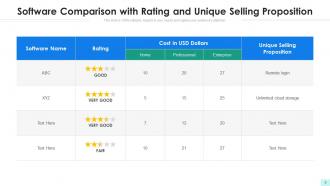
Software Comparison Powerpoint Ppt Template Bundles with all 10 slides:
Use our Software Comparison Powerpoint Ppt Template Bundles to effectively help you save your valuable time. They are readymade to fit into any presentation structure.






FAQs for Software Comparison Powerpoint
A software comparison template should include feature specifications, pricing structures, integration capabilities, user interface assessments, security protocols, and scalability options. These elements enable organizations to systematically evaluate solutions across multiple dimensions, with many businesses finding that structured comparisons streamline vendor selection, reduce implementation risks, and ultimately deliver better technology investments aligned with strategic objectives.
Visual elements enhance software comparison clarity by incorporating charts, graphs, icons, color coding, and side-by-side layouts that simplify complex technical information. These design components streamline decision-making processes by highlighting key differentiators, feature gaps, and cost comparisons, with many organizations finding that visual presentations accelerate stakeholder buy-in and reduce evaluation time significantly.
Common pitfalls include focusing solely on features without considering user needs, lacking clear evaluation criteria, presenting biased information, and failing to test software adequately. These oversights undermine comparison credibility by creating incomplete assessments, misleading stakeholders, and resulting in poor software selection decisions, with many organizations finding that structured evaluation frameworks and objective criteria ultimately deliver more accurate comparisons and better outcomes.
User reviews can be effectively integrated into software comparisons through standardized rating systems, verified user testimonials, feature-specific feedback sections, and aggregated satisfaction scores across different user segments. These elements enhance credibility by providing real-world insights from actual users, while helping potential buyers understand practical applications, implementation challenges, and performance outcomes, ultimately delivering more informed decision-making and reducing purchase risks.
Software evaluation methodologies include weighted scoring matrices, cost-benefit analysis, feature comparison frameworks, stakeholder assessment models, and pilot testing protocols. These approaches streamline selection by evaluating functionality, scalability, integration capabilities, and total cost of ownership, with many organizations finding that combining multiple methodologies delivers more comprehensive insights and ultimately reduces implementation risks while ensuring strategic alignment.
Case studies can be integrated into software comparison templates through real-world implementation examples, success metrics, user testimonials, ROI demonstrations, and specific use-case scenarios for each solution. These elements provide concrete evidence of software performance across different industries, with many organizations finding that actual customer experiences and measurable outcomes significantly enhance decision-making credibility and strategic software selection processes.
Bar charts, line graphs, radar charts, heat maps, and scatter plots work best for comparing software performance metrics. These visualizations enable organizations to track response times, resource usage, and user satisfaction across multiple platforms, with many IT teams finding that combining multiple chart types delivers comprehensive insights for strategic decision-making.
Pricing models can be compared effectively by including subscription tiers, one-time costs, usage-based fees, implementation expenses, and hidden charges in standardized comparison categories. Through side-by-side cost breakdowns, organizations can evaluate total ownership costs, scalability implications, and ROI projections, with many businesses finding that comprehensive pricing analysis reveals long-term value beyond initial costs.
Customer support significantly influences software decisions through response times, availability, training resources, documentation quality, and escalation processes. When evaluating enterprise solutions, organizations often find that superior support reduces implementation costs, minimizes downtime, and accelerates user adoption, ultimately delivering competitive advantage through seamless operations and enhanced productivity.
Ensuring objectivity when comparing software solutions requires establishing clear evaluation criteria, standardized scoring metrics, consistent testing environments, and diverse stakeholder input from multiple departments. Through structured comparison templates, organizations can minimize bias by focusing on quantitative performance data, feature compatibility assessments, and total cost analysis, ultimately delivering transparent decision-making processes that support strategic technology investments.
An ideal software comparison presentation should include executive summary, evaluation criteria, feature-by-feature analysis, cost breakdown, implementation timelines, and final recommendations. This structure enables stakeholders to assess solutions systematically, comparing functionality, scalability, and integration capabilities, while ultimately delivering clear insights that streamline decision-making and ensure optimal software selection for organizational needs.
**INPUT**: How can you make a software comparison template accessible for non-technical audiences? **OUTPUT**: Making software comparison templates accessible involves using plain language descriptions, visual icons instead of technical jargon, benefit-focused criteria rather than feature lists, and clear scoring systems with simple ratings. These approaches streamline decision-making by translating complex specifications into business outcomes, with many organizations finding that accessible templates accelerate software selection processes while ensuring stakeholder alignment. [Word count: 58 words]
Industry trends reveal shifting user preferences, emerging technologies, competitive positioning strategies, and market demands that shape software evaluation criteria. By analyzing patterns across sectors like healthcare adopting cloud-based solutions or financial services prioritizing security features, organizations can create more relevant comparisons that align with current market directions, ultimately delivering strategic insights that enhance decision-making processes.
Software comparisons should be updated every 6-12 months, or immediately when major feature releases, pricing changes, or new competitors emerge in the market. With technology evolving rapidly, organizations that maintain current comparisons enable better decision-making, avoid outdated assessments, and ensure strategic software investments align with business needs, ultimately delivering competitive advantage through informed technology choices.
Software comparison citation best practices include listing version numbers, evaluation dates, pricing sources, third-party review platforms, and vendor documentation with URLs. These elements enhance credibility by providing transparent methodology, enabling audience verification, and demonstrating thorough research, with many organizations finding that proper attribution strengthens decision-making processes while building stakeholder confidence in recommendations.
-
Commendable slides with attractive designs. Extremely pleased with the fact that they are easy to modify. Great work!