


Software development best practice tools components of computer aided software engineering case tools




Try Before you Buy Download Free Sample Product
 Impress Your
 Audience
 100%
100% Editable
 Save Hours
 of Time


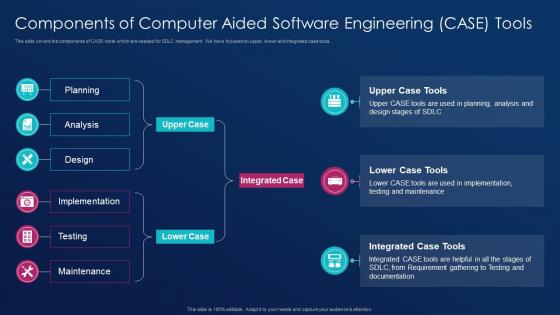
This slide covers the components of CASE tools which are needed for SDLC management. We have focused on upper, lower and integrated case tools.
People who downloaded this PowerPoint presentation also viewed the following :
Software development best practice tools components of computer aided software engineering case tools with all 6 slides:
Use our Software Development Best Practice Tools Components Of Computer Aided Software Engineering Case Tools to effectively help you save your valuable time. They are readymade to fit into any presentation structure.





FAQs for Software development best practice tools components of computer aided software
**INPUT**: What are the key features to look for in a modern software development environment? **OUTPUT**: Key features include integrated version control, automated testing frameworks, continuous integration pipelines, collaborative code review systems, and cloud-based deployment tools. These capabilities streamline development workflows by reducing manual errors, accelerating release cycles, and enhancing team collaboration, with many organizations finding that comprehensive environments ultimately deliver faster time-to-market and improved software quality.
Collaboration tools enhance software engineering productivity by streamlining communication, centralizing project management, enabling real-time code sharing, and automating workflow processes. Through platforms like Slack, Jira, and Git repositories, development teams accelerate feature delivery, minimize debugging time, and improve code quality, with many organizations finding that integrated collaboration environments ultimately deliver faster release cycles and enhanced project transparency.
Version control manages code changes, tracks revisions, enables collaboration, maintains project history, and facilitates branching and merging across development teams. Git dominates the landscape alongside platforms like GitHub, GitLab, and Bitbucket, with many organizations finding that these tools streamline development workflows, reduce conflicts, and ultimately enhance team productivity while maintaining code integrity.
IDEs offer comprehensive development ecosystems with debugging, version control, project management, and automated testing capabilities, while text editors provide lightweight, customizable coding environments with faster startup times. Many development teams find that IDEs streamline complex projects through integrated workflows and intelligent code assistance, whereas text editors excel for quick edits and resource-constrained environments, ultimately delivering efficiency based on project scope.
Automated testing tools deliver faster bug detection, consistent test execution, reduced manual effort, comprehensive code coverage, and continuous integration capabilities. These technologies streamline quality assurance by identifying defects early in development cycles, minimizing human error, and enabling frequent releases, with many software teams finding that automated testing ultimately reduces costs while accelerating delivery timelines.
Project management tools facilitate agile development by enabling sprint planning, backlog management, real-time collaboration, and continuous tracking of deliverables. These platforms streamline workflows through automated task assignments, progress visualization, and integrated communication channels, with many software teams finding that tools like Jira and Azure DevOps ultimately enhance velocity, transparency, and iterative delivery cycles.
Modern debugging tools include integrated debuggers like Visual Studio Code's debugger, GDB for C/C++, Chrome DevTools for web development, profilers like Valgrind, and logging frameworks such as Log4j. These tools streamline development by enabling real-time code inspection, memory leak detection, and performance optimization, with many software teams finding that strategic tool combinations significantly reduce debugging time while enhancing code quality and delivery speed.
Software engineering tools support CI/CD by automating code integration, testing, and deployment processes, enabling faster release cycles and reducing manual errors. Through platforms like Jenkins, GitLab, and Docker, development teams streamline build automation, quality assurance, and production deployments, while maintaining code stability, ultimately delivering faster time-to-market and enhanced software reliability.
Developers should prioritize authentication controls, code vulnerability scanning, secure data encryption, access management, and compliance reporting when selecting software engineering tools. These security features work together by protecting sensitive code repositories, automating threat detection, and ensuring regulatory compliance, with many development teams finding that integrated security tools streamline workflows while significantly reducing breach risks.
Documentation tools streamline the software development lifecycle by centralizing knowledge management, automating API documentation generation, and maintaining version-controlled technical specifications throughout project evolution. These platforms enable development teams to reduce onboarding time, minimize knowledge silos, and accelerate debugging processes, with many organizations finding that comprehensive documentation ultimately delivers faster feature releases and improved code maintainability.
Software engineering tools track metrics including code commit frequency, pull request review times, bug detection rates, deployment frequency, and mean time to recovery. These metrics enhance team productivity by identifying bottlenecks, streamlining development workflows, and optimizing resource allocation, with many organizations finding that comprehensive tracking ultimately delivers faster release cycles and improved software quality.
Cloud-based development environments streamline software engineering processes by eliminating local setup complexities, enabling instant collaboration across distributed teams, and providing consistent configurations for all developers. These platforms accelerate onboarding, reduce infrastructure costs, and enhance productivity through seamless integration with CI/CD pipelines, ultimately delivering faster deployment cycles and improved team efficiency.
Emerging trends include AI-powered code generation, cloud-native development platforms, low-code/no-code solutions, automated testing frameworks, and DevSecOps integration tools. These technologies streamline development cycles, enhance collaboration, and minimize manual processes, with many organizations finding that strategic adoption delivers faster deployment, improved code quality, and significant competitive advantage in increasingly dynamic markets.
UX tools integrate with software engineering practices through design systems, prototyping platforms, user feedback analytics, and collaborative workflows that bridge design and development teams. These tools streamline handoffs by providing shared component libraries, automated design specifications, and real-time user insights, with many development teams finding that integrated UX tools reduce iteration cycles and ultimately deliver more user-centered products.
Programming language selection depends on project requirements, team expertise, performance needs, ecosystem compatibility, and maintenance considerations. These factors work strategically with software engineering tools, with many development teams finding that languages like Python excel in data science environments, Java dominates enterprise applications, and JavaScript streamlines web development, ultimately delivering faster deployment cycles and enhanced productivity.
-
Really like the color and design of the presentation.
-
Easily Understandable slides.