

Software Test Case To Check Login Functionality Ppt Powerpoint Presentation File Icon




Try Before you Buy Download Free Sample Product
 Impress Your
 Audience
 100%
100% Editable
 Save Hours
 of Time


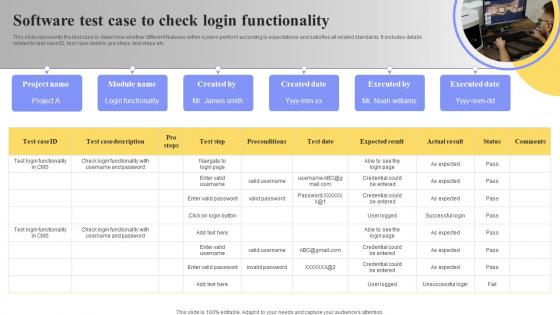
This slide represents the test case to determine whether different features within system perform according to expectations and satisfies all related standards. It includes details related to test case ID, test case details, pre steps, test steps etc.
People who downloaded this PowerPoint presentation also viewed the following :
Software Test Case To Check Login Functionality Ppt Powerpoint Presentation File Icon with all 6 slides:
Use our Software Test Case To Check Login Functionality Ppt Powerpoint Presentation File Icon to effectively help you save your valuable time. They are readymade to fit into any presentation structure.






FAQs for Software Test Case To Check Login Functionality Ppt Powerpoint
Key components include test case ID, clear test objective, detailed preconditions, comprehensive test steps, expected results, and post-conditions for cleanup. These elements streamline testing processes by ensuring consistent execution, accurate result validation, and thorough coverage of login scenarios, with many development teams finding that structured approaches ultimately deliver faster debugging, reduced defects, and enhanced user authentication experiences.
Login page security requires implementing input validation, parameterized queries, output encoding, CSRF tokens, and secure session management to prevent SQL injection and XSS attacks. Through comprehensive testing frameworks, organizations validate these protections by simulating malicious inputs, testing authentication workflows, and verifying data sanitization, ultimately delivering robust user authentication and maintaining customer trust in increasingly digital business environments.
**INPUT**: What user roles should be considered when testing the login functionality (e.g., admin, user, guest)? **OUTPUT**: Login functionality testing should encompass administrators, standard users, guests, super admins, and role-specific users like managers or moderators. These diverse user roles enable comprehensive validation by testing permission levels, access restrictions, and security protocols, with many organizations finding that role-based testing ultimately delivers enhanced system security and streamlined user experiences.
Acceptable performance metrics for login functionality include response time under 2 seconds, 99.9% availability, concurrent user capacity limits, database query optimization thresholds, and error rate boundaries below 0.1%. These benchmarks enable organizations to maintain seamless user experiences during peak traffic periods, with many financial services and e-commerce platforms finding that proactive performance monitoring ultimately delivers competitive advantage and customer retention.
Best practices for handling login failure scenarios include implementing progressive delays after failed attempts, clear error messaging without revealing security details, automatic account lockouts with time-based or admin-managed unlocks, and comprehensive audit logging. These security measures streamline user experience while protecting against brute force attacks, with many financial institutions and healthcare organizations finding that strategic lockout policies significantly reduce unauthorized access attempts while maintaining operational efficiency.
Testing third-party authentication integration involves validating OAuth flows, token exchanges, user attribute mapping, session management, and error handling scenarios. Through automated API testing and mock services, organizations can verify successful logins, token refresh mechanisms, and security compliance, while testing fallback procedures and user experience continuity, ultimately ensuring seamless authentication across platforms.
**INPUT**: What strategies can be employed to validate the usability of the login interface across different devices and screen sizes? **OUTPUT**: Usability validation strategies include responsive design testing, cross-device compatibility checks, touch target optimization, accessibility compliance verification, and user experience flow analysis across multiple screen resolutions. These approaches streamline testing by ensuring consistent functionality on smartphones, tablets, and desktops, while maintaining intuitive navigation and visual clarity, ultimately delivering seamless user experiences and reducing support costs across diverse device ecosystems.
**INPUT**: How do we ensure compliance with accessibility standards (e.g., WCAG) in the login functionality? **OUTPUT**: Ensuring WCAG compliance in login functionality involves implementing proper semantic markup, keyboard navigation support, screen reader compatibility, sufficient color contrast ratios, and clear error messaging patterns. Through strategic accessibility testing and inclusive design practices, organizations streamline user experiences across diverse abilities while meeting regulatory requirements, ultimately delivering broader market reach and enhanced user satisfaction.
Session management implications for login testing include validating session creation, timeout configurations, concurrent session handling, session hijacking prevention, and proper logout procedures. Through automated testing frameworks, organizations can verify timeout intervals across different user roles, test session persistence during network interruptions, and ensure secure session termination, ultimately delivering enhanced security protocols and improved user experience consistency.
Testing multiple authentication methods requires systematic validation of each pathway including biometric sensors, SMS/email verification, authenticator apps, and fallback mechanisms. Organizations should verify security protocols, user experience flows, and integration points across devices, with financial services and healthcare sectors finding that comprehensive multi-method testing significantly reduces security vulnerabilities while enhancing user accessibility and operational confidence.
Automated testing tools for login functionality include Selenium WebDriver, Cypress, Playwright, TestComplete, and Katalon Studio, which handle credential validation, session management, and security protocols. These tools integrate seamlessly with CI/CD pipelines through Jenkins, GitLab, or Azure DevOps, enabling continuous testing that catches authentication vulnerabilities early, reduces manual testing overhead, and ultimately delivers faster deployment cycles with enhanced security assurance.
Negative testing enhances login robustness by deliberately inputting invalid credentials, testing boundary conditions, simulating network failures, and attempting SQL injection attacks. These rigorous testing approaches help developers identify vulnerabilities, strengthen error handling mechanisms, and improve user experience, with many financial institutions and e-commerce platforms finding that comprehensive negative testing significantly reduces security breaches and system failures.
**INPUT**: What logging and audit trial considerations should be implemented in the login functionality testing? **OUTPUT**: Login functionality testing should implement comprehensive logging for authentication attempts, session management, password changes, account lockouts, and security violations. These audit trails enable organizations to track user behavior, detect suspicious activities, and ensure regulatory compliance, with many financial services and healthcare institutions finding that detailed login logs streamline forensic investigations while enhancing overall security posture. [Word count: 58 words]
Balancing security and user experience in login testing involves implementing multi-layered authentication, progressive security measures, and user-friendly error messaging while testing password complexity requirements, session timeouts, and account lockout policies. Through strategic testing approaches, organizations can validate secure authentication flows, streamline user interactions, and minimize friction, with many financial services and healthcare institutions finding that well-tested systems ultimately deliver robust protection without compromising accessibility.
**INPUT**: What documentation should be created for test cases related to login functionality for future reference and compliance? **OUTPUT**: Login functionality test case documentation should include detailed test scenarios, expected results, validation criteria, security requirements, and compliance mapping to regulatory standards. These comprehensive records enable quality assurance teams to maintain consistency, streamline audit processes, and ensure regulatory adherence, with many organizations finding that structured documentation accelerates troubleshooting while delivering enhanced security compliance.
-
Extremely professional slides with attractive designs. I especially appreciate how easily they can be modified and come in different colors, shapes, and sizes!
-
No second thoughts when I’m looking for excellent templates. SlideTeam is definitely my go-to website for well-designed slides.