

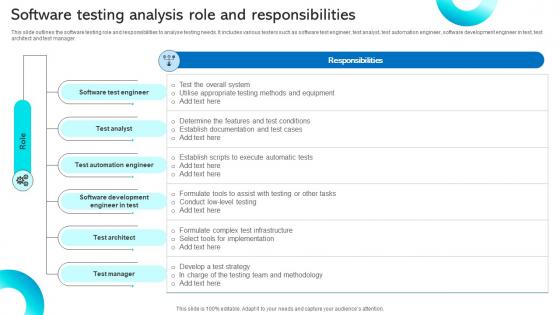
Software Testing Analysis Role And Responsibilities




Try Before you Buy Download Free Sample Product
 Impress Your
 Audience
 100%
100% Editable
 Save Hours
 of Time


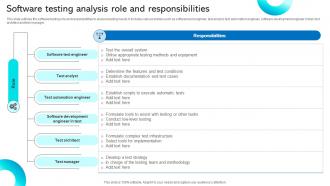
This slide outlines the software testing role and responsibilities to analyse testing needs. It includes various testers such as software test engineer, test analyst, test automation engineer, software development engineer in test, test architect and test manager.
People who downloaded this PowerPoint presentation also viewed the following :
Software Testing Analysis Role And Responsibilities with all 9 slides:
Use our Software Testing Analysis Role And Responsibilities to effectively help you save your valuable time. They are readymade to fit into any presentation structure.








FAQs for Software Testing Analysis
So basically you're trying to catch bugs before your users find them - trust me, that's way better than dealing with pissed off customers later. Testing makes sure your software actually does what it's supposed to do. You'll spot performance issues, security holes, and weird usability stuff early when it's not crazy expensive to fix. Honestly, the best approach is weaving testing into your whole development process instead of just cramming it in at the end. It's like... why wait until you've built the entire house to check if the foundation is solid, you know? Plus stakeholders love seeing that you're not just winging it.
Automated testing is great for the boring stuff - regression tests, core flows, anything repetitive. Runs all night without complaining. Manual testing though? That's where you catch the weird edge cases and UX issues that would slip right past a script. Honestly, manual gets pretty tedious when you're clicking through the same flows over and over (been there). The trick is combining them smartly. Automate what you can, then spend your manual time on exploratory work and new features where you actually need human judgment. Way better use of your sanity.
I'd focus on the basics first - defect detection rate, test coverage, and how many bugs slip into production. Those tell you if you're actually catching stuff that matters. For efficiency, track test execution time and automation rate. Cycle time's huge too - nobody wants testing to be the bottleneck holding up releases. But honestly? Don't go crazy with metrics. Leadership usually cares about different things than what your team thinks is important (learned that the hard way). Pick maybe 3-4 KPIs and stick with them consistently. Coverage numbers look impressive in reports, but escaped defects are what really hurt. Start simple and add more metrics later if needed.
Honestly, you gotta write tests while you're coding, not after - that's the biggest game changer. Set up CI so tests run automatically with every commit. Your pipeline should fail fast when stuff breaks. I mean, it feels like extra work at first but you'll thank yourself later. Get your testers involved in sprint planning right from the start, and make testing part of your definition of done. The whole point is catching bugs early when they're easy to fix instead of panicking at sprint end. Way less stressful that way.
So there's unit testing - that's just testing individual functions. Integration testing checks if different parts play nice together. End-to-end tests run through complete user workflows, which honestly can be a pain to set up but they're worth it. You've also got performance testing for when things get slow, security testing to catch vulnerabilities, and regression testing - oh man, regression tests have saved me so many times when I accidentally broke something. Acceptance testing is where stakeholders make sure you actually built what they wanted. Start with unit tests though, they're quick and catch the obvious stuff early.
So regression testing is like your full system checkup - making sure nothing broke after you added new stuff. Smoke testing? That's just "does this thing even boot up" - super basic checks to see if it's worth your time testing more. Sanity testing falls somewhere in the middle, honestly - you're checking specific parts after small tweaks. Picture it this way: smoke is "can I actually log in?" Sanity asks "is this particular feature working now?" Regression goes "wait, does ALL my old stuff still work?" I'd run smoke tests first every time, then sanity for targeted fixes, and save regression for before big releases.
Dude, CI/CD is a game changer for testing. Your code gets tested automatically every single commit - no more waiting around. Unit tests, integration tests, all of it just runs. Bugs get caught super early before they turn into nightmares. The constant feedback loop is honestly addictive once you get used to it. Plus it kinda forces you to write decent tests since they're always running. Oh and you're deploying to prod-like environments way more often, which catches the weird edge cases. Just start with basic unit tests and build from there!
Write your test cases like you're leaving instructions for someone else to follow - super clear titles, what needs to be set up first, exact steps, and what should happen. I learned this the hard way after writing vague garbage that confused everyone lol. Cover the happy path stuff (things working correctly) plus the scenarios where things should break gracefully. One thing per test case works way better than cramming everything together. Oh, and definitely have someone else look them over before you call it done - fresh eyes catch the weirdest oversights.
Hit the scary stuff first - login, payment flows, anything that makes money or lets people in. Those break and everyone loses their minds. Complex logic areas and whatever's been buggy lately should be next on your list. New code changes? Test those hard. High-traffic features get regression testing. Edge cases can wait unless they're security holes - those will bite you later. Make a quick spreadsheet ranking everything by "how screwed are we if this fails" vs "how likely is it to break." Trust me, you'll need receipts when your PM asks why you didn't test their pet feature.
Metrics are like having actual data to back up your gut feelings about testing quality. Track stuff like defect density, test coverage, pass/fail rates - helps you spot which areas are constantly breaking. I used to think they were total busywork until I realized how much easier it made arguing for more time before releases. Plus stakeholders love seeing concrete proof that quality's getting better (or worse, unfortunately). Coverage reports especially help you find those sketchy modules everyone avoids testing. Honestly just pick 2-3 that actually matter to your team and start there.
So UAT is basically when real users finally get their hands on your software - and trust me, they'll find stuff your team completely missed. I'm talking usability disasters, broken workflows, missing features that seemed obvious to everyone else. It's pretty brutal honestly. But here's the thing - catching this stuff early saves you from way bigger headaches later. Bad UAT feedback can mean delays, redesigns, or users just straight up hating your product. My advice? Don't treat UAT like some box to check at the end. Plan for it when you're still figuring out requirements.
Cloud testing can be a real pain tbh. Network lag makes your tests randomly fail, which is super annoying. You're basically at the mercy of their infrastructure too - can't control much. Third-party services love going down right when you need them most. Security gets weird since everything's shared resources now. Costs will sneak up on you if you leave test environments running (learned that one the hard way). Build in retry logic for flaky tests and always have backup plans. Cloud services will mess up eventually - it's just a question of when.
Dude, shift-left testing is honestly such a lifesaver. Catching bugs early means way less headache later - and it's so much cheaper to fix stuff upfront. Your developers start thinking about quality while they're actually coding, which is huge. We've seen production issues drop like crazy once teams get into this rhythm. Release cycles speed up too since you're not constantly putting out fires. Oh, and fewer late-night emergency calls, which your ops team will thank you for. Start small with unit tests and code reviews right at the beginning of dev work.
Honestly, ditch Selenium - Playwright and Cypress are so much better for web testing these days. For unit tests, Jest's great if you're doing JavaScript, Pytest for Python. API testing? Postman collections or REST Assured both work well. You'll probably want Docker for consistent environments and either GitHub Actions or Jenkins for CI/CD stuff. Oh, and seriously - pick one tool first that matches what you're already using. I've seen too many teams try to implement everything at once and just get overwhelmed. Start small, get comfortable with it, then add more tools later.
Dude, exploratory testing is basically poking around your app like an actual user would - no script, just curiosity. Your automated tests are great for the obvious stuff, but they won't catch those bizarre edge cases or annoying UX problems you never thought of. Think of it like following a recipe vs just messing around in the kitchen (both work, obviously). I usually throw some exploration time into each sprint to check new features, or go on a bug hunt after big releases. Honestly, even setting aside like 20% of your testing time for random exploration pays off.
-
Their designing team is so expert in making tailored templates. They craft the exact thing I have in my mind…..really happy.
-
I am a big fan of their newsletters because that is how I found my perfect requirement at the time of urgency. Thank God, I kept opening those.