

Sop invoice processing ppt powerpoint presentation outline format ideas cpb




Try Before you Buy Download Free Sample Product
 Impress Your
 Audience
 100%
100% Editable
 Save Hours
 of Time


Our SOP Invoice Processing Ppt Powerpoint Presentation Outline Format Ideas Cpb are topically designed to provide an attractive backdrop to any subject. Use them to look like a presentation pro.
People who downloaded this PowerPoint presentation also viewed the following :
Content of this Powerpoint Presentation
Description:
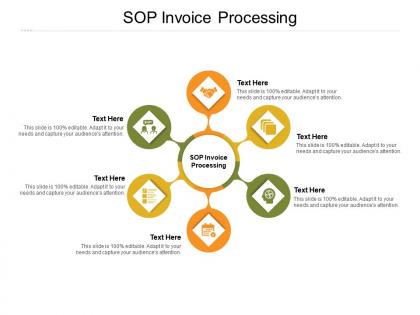
The PowerPoint slide titled "SOP Invoice Processing" presents a hexagonal-shaped flow chart with a central hexagon labeled "SOP Invoice Processing" and surrounded by five connected hexagons. Each surrounding hexagon contains an icon and a placeholder for text, suggesting that each step of the Standard Operating Procedure (SOP) for processing invoices can be detailed here. The icons indicate different stages of the process, such as document handling, payment, verification, etc. This layout is designed to clearly define and explain the sequential steps in invoice processing within an organization.
Use Cases:
This slide can be employed in multiple industries to streamline and communicate their invoice processing procedures. Here are seven industries that could use this slide:
1. Manufacturing:
Use: Detailing the steps for processing supplier invoices.
Presenter: Accounts Payable Manager.
Audience: Finance department staff.
2. Retail:
Use: Explaining the invoice handling process for merchandise.
Presenter: Finance Controller.
Audience: Store managers, accounting team.
3. Healthcare:
Use: Outlining the procedure for medical billing and invoicing.
Presenter: Billing Department Head.
Audience: Billing staff, administrative team.
4. Consulting:
Use: Describing the workflow of client invoicing.
Presenter: Senior Consultant or Finance Analyst.
Audience: Consulting staff, project managers.
5. Construction:
Use: Demonstrating the payment process for contractors and suppliers.
Presenter: Project Accountant.
Audience: Project management team, suppliers.
6. Information Technology:
Use: Presenting the invoicing SOP for software licensing and service contracts.
Presenter: IT Finance Manager.
Audience: IT support team, contract managers.
7. Logistics and Transportation:
Use: Detailing the accounts receivable process from freight billing.
Presenter: Logistics Coordinator.
Audience: Accounts team, logistics managers.
Sop invoice processing ppt powerpoint presentation outline format ideas cpb with all 2 slides:
Use our SOP Invoice Processing Ppt Powerpoint Presentation Outline Format Ideas Cpb to effectively help you save your valuable time. They are readymade to fit into any presentation structure.

FAQs for Sop invoice processing ppt powerpoint presentation outline
Honestly, you really need an SOP for invoice processing. Trust me on this one. Without it, your team will handle invoices totally differently and you'll get payment delays, approval nightmares, and angry vendors blowing up your phone. An SOP shows exactly who does what and when - plus what to do when things go sideways (which they will). It's also great for audits since you can actually prove your processes work. Oh, and compliance becomes way less stressful. If you don't have one yet, seriously start documenting your workflow tomorrow. Future you will thank me.
SOPs are game-changers for invoice processing, trust me. You get consistent workflows that cut out all the guesswork and random errors. Everyone follows the same steps - approval limits, standard data fields, vendor checks - so mistakes get caught early. Training new hires becomes a breeze since it's all written down (which honestly saves so much headache later). The real win? Departments stop playing email tag about "what happens next" and handoffs get smoother. You'll process invoices faster and avoid those annoying duplicate payments or missed discounts. Oh, and definitely map out your current mess of a process first, then spot where things usually go wrong.
So start by mapping out what you're already doing, then write it down step by step. Cover the basics - invoice receipt, vendor verification, approval workflows with dollar limits, payment timelines. Document who handles what at each stage (trust me, you don't want invoices stuck because someone's on vacation and nobody knows whose job it is). Include your exception process for when stuff goes wrong - disputed amounts, missing POs, whatever. Also add what documentation you need and where everything gets filed. Make it detailed enough that a new person could follow along without bugging you every five minutes. That's really the whole point.
Honestly, tech is a game-changer here because it removes the whole "did someone remember to do X" problem. Set up workflows that force approval chains and require the right data fields - OCR pulls info automatically so there's no human error in data entry. Audit trails track everything, which is clutch when you're trying to figure out what happened three months ago. Automated checks catch mismatches between invoices and POs that people might miss. Configure exception alerts so weird stuff gets flagged immediately. I'd start by writing down your current process, then find software that can basically enforce those same steps.
Dude, you're gonna hate life without an SOP for invoices. Everyone handles stuff differently, so you get weird approval flows and missed deadlines. Data entry mistakes happen constantly - there's no checklist so people just wing it. Nobody knows whose job is what, which drives me crazy honestly. Duplicate payments? Yeah, those sneak through all the time. And good luck with audits when every person does their own thing. I'd start by writing down what you're actually doing now, then figure out where everything's falling apart.
So it really depends on your company size. Small biz? Keep it super simple - one approval level for invoices over $500, track everything in a spreadsheet. Medium companies need like 2-3 approval tiers plus some automation (seriously, manual processing becomes a nightmare once you're doing 100+ invoices monthly). Big enterprises obviously need the full multi-level workflows, automated matching, segregated duties - all that compliance stuff. The trick is matching your process complexity to what you actually handle volume-wise. Don't overcomplicate things early on. Start lean, then add layers when you're drowning without them.
Training your team is huge - otherwise that SOP just collects dust. Everyone needs to know the actual steps, who approves what, and which systems to use. I've watched companies blow this part completely then act shocked when invoices are still chaos. Cover the technical stuff but also explain the "why" behind each step. People follow processes better when they get the reasoning, you know? Set up practice sessions where they can mess around with it, and honestly those quick reference cards are lifesavers for daily use.
Set up dollar thresholds first - like under $500 just needs your department head, but over $5K goes to finance too. Auto-routing based on vendor and amount is a game changer, trust me. No more forwarding emails back and forth like it's 2005. Give everyone mobile access so approvals don't sit there when people are traveling. We learned that one the hard way. Keep SLAs realistic - 48 hours works. Send those auto-reminders because people forget. Your finance team will actually love you for speeding things up.
Track your cycle time first - that's receipt to payment timing. Error rates matter too, plus what each invoice costs you to process. Exception handling is actually huge though - if you're constantly putting out fires, your SOP sucks. Monitor how well people follow the process you built. Vendor satisfaction scores are gold if you can swing it, because pissed off suppliers usually mean your workflow's broken somewhere. Oh, and definitely set baselines for everything first. Review monthly to catch trends and see where you need fixes.
Honestly, I'd check it every six months instead of annually - stuff changes way too fast these days. Your AP team will definitely appreciate it. Watch for obvious signs you need updates sooner though. New software rollouts, regulatory changes, or when you keep seeing the same processing mistakes over and over. Processing times dragging? That's another red flag. Oh, and actually put someone in charge of the reviews with a real calendar reminder. Otherwise it just becomes one of those things that never happens because everyone assumes someone else will handle it. Vendor complaints are also a pretty clear signal your process needs work.
Okay so three main things to watch out for. Always double-check vendor info and PO numbers first - seriously, this saves so much drama later. Then route everything through the right approval people based on how much money we're talking about. Document all your decisions in the system too, especially weird cases. Honestly the approval chain part trips people up the most. Just stay consistent with your process every time and you'll be fine. Set phone reminders if that helps. Oh and definitely ping finance right away if something looks sketchy.
Honestly, multi-level approvals are your best friend here - especially for bigger invoices. Always double-check vendor info against your approved list first. Can't tell you how many times I've seen fake invoices with names like "Amazom" instead of "Amazon" slip through. Match those purchase orders to invoices religiously, and don't process anything without backup docs. Oh, and train your team on red flags - duplicate invoice numbers are dead giveaways. Regular audits help too. The whole point is making it way more annoying for fraudsters than legit vendors.
Get everyone together first - AP, procurement, receiving, maybe legal too. Map out how each team does things now and find those handoff points where stuff always breaks down. Shared docs are clutch so people can actually see what's happening. Set up regular check-ins because catching problems early beats scrambling later. Oh, and cross-train a couple people - trust me on this one. When Sarah from AP calls in sick, you don't want invoices piling up like crazy. Clear ownership at each step helps too. Escalation paths matter when things get stuck.
Honestly, I'd check out MindBridge, Yooz, or Bill.com first - they're made for invoice stuff and handle the whole process. If you're already on SAP or NetSuite, those work too, but might be way more than you need. For simpler setups, even Monday.com or Asana can do approvals and task tracking. The trick is finding something that doesn't make your team want to scream, you know? Map out what you're doing now, then find software that actually fits instead of forcing everyone to change how they work. Trust me, fighting your own system gets old fast.
Set up monthly check-ins with your AP team - they're living with this stuff every day. Maybe do a simple feedback form or just grab coffee and ask what's annoying them. Honestly, the best fixes I've seen happen when someone goes "wait, why are we even doing this step?" Test their ideas on a few invoices first before changing the official docs. People actually follow procedures way better when they helped build them. Oh, and write down everything they tell you - you'll forget the good suggestions otherwise. Those casual conversations end up being goldmines for process improvements.
No Reviews