

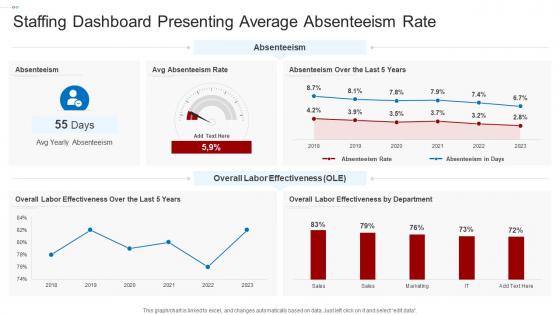
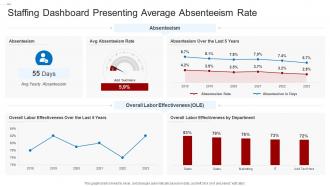
Staffing Dashboard Presenting Average Absenteeism Rate




Try Before you Buy Download Free Sample Product
 Impress Your
 Audience
 100%
100% Editable
 Save Hours
 of Time


Our Staffing Dashboard Presenting Average Absenteeism Rate are topically designed to provide an attractive backdrop to any subject. Use them to look like a presentation pro.
People who downloaded this PowerPoint presentation also viewed the following :
Staffing Dashboard Presenting Average Absenteeism Rate with all 7 slides:
Use our Staffing Dashboard Presenting Average Absenteeism Rate to effectively help you save your valuable time. They are readymade to fit into any presentation structure.





FAQs for Staffing Dashboard Presenting
Essential staffing dashboard metrics include employee utilization rates, billable hours tracking, project allocation percentages, skill availability mapping, and capacity forecasting indicators. These metrics enable organizations to optimize resource allocation, identify staffing gaps, and enhance project delivery timelines, with many consulting firms and professional services companies finding that comprehensive workforce visibility ultimately delivers improved profitability and strategic planning capabilities.
Real-time data visualization enhances staffing decisions by providing instant insights into candidate pipeline metrics, time-to-hire analytics, recruiter performance indicators, and budget allocation patterns. These dashboards enable HR teams to identify bottlenecks quickly, adjust sourcing strategies dynamically, and optimize resource deployment, with many organizations finding that visual analytics reduce hiring cycles by 30-40% while improving candidate quality.
Integrating a staffing dashboard with existing HR management software delivers streamlined data flow, enhanced analytics capabilities, automated reporting processes, and unified employee lifecycle management. This strategic combination enables HR teams to reduce manual data entry, accelerate hiring decisions, and improve workforce planning accuracy, ultimately delivering operational efficiency and better strategic decision-making across organizations.
A staffing dashboard helps identify talent gaps by visualizing current workforce composition, skill inventories, department-specific headcounts, upcoming retirements, and projected business needs in real-time analytics. Through automated tracking and predictive modeling, organizations streamline succession planning, accelerate strategic hiring decisions, and optimize resource allocation across departments, ultimately delivering proactive talent management and sustained competitive advantage.
Predictive analytics in staffing dashboards forecasts future workforce needs, identifies potential turnover risks, predicts peak demand periods, and optimizes resource allocation across departments. Through machine learning algorithms, organizations streamline recruitment processes, reduce hiring costs, and enhance employee retention strategies, with many companies finding that predictive insights ultimately deliver more efficient staffing decisions and improved operational performance.
A staffing dashboard can be customized through role-based access controls, department-specific KPIs, tailored data filters, personalized reporting templates, and configurable visualization widgets. Different departments like HR, finance, and operations can leverage customized views focusing on their priorities—recruitment metrics, budget allocation, or workforce capacity—while maintaining centralized data consistency, ultimately delivering targeted insights that enhance departmental decision-making and operational efficiency.
Best practices for designing intuitive staffing dashboards include clear visual hierarchy, real-time data integration, customizable widgets, role-based access controls, and mobile responsiveness. These design principles enhance operational efficiency by streamlining workforce visibility, reducing decision-making time, and enabling quick resource adjustments, with many HR departments finding that well-designed dashboards ultimately deliver faster staffing responses and improved organizational agility.
Staffing dashboards facilitate better communication by centralizing candidate information, interview schedules, hiring progress, and team feedback in real-time accessible formats. Through shared visibility into recruitment metrics, application statuses, and decision timelines, HR teams and hiring managers streamline coordination, reduce email chains, and accelerate hiring decisions, ultimately delivering faster placements and enhanced collaborative efficiency.
A comprehensive staffing dashboard should aggregate data from HRIS systems, payroll platforms, time tracking software, recruitment databases, and performance management tools. These integrated sources enable organizations to monitor headcount trends, analyze compensation costs, track productivity metrics, and forecast hiring needs, with many companies finding that centralized workforce analytics significantly streamline resource planning and enhance strategic decision-making capabilities.
Mobile accessibility of staffing dashboards revolutionizes workforce management by enabling real-time scheduling adjustments, instant staff communication, and immediate access to performance metrics from any location. Through smartphone and tablet integration, managers can respond to staffing emergencies, approve shift changes, and monitor team productivity while traveling, ultimately delivering faster decision-making and enhanced operational flexibility.
Staffing dashboards support diversity and inclusion initiatives by tracking demographic metrics across recruitment stages, monitoring bias patterns in hiring decisions, and measuring progress against diversity targets through real-time analytics. These tools enable HR teams to identify bottlenecks in diverse candidate pipelines, benchmark performance across departments, and implement data-driven strategies that enhance inclusive recruitment practices while demonstrating measurable organizational commitment.
Common pitfalls include inadequate data integration, poor user adoption due to complex interfaces, insufficient training programs, unrealistic expectations about immediate results, and lack of executive buy-in. Organizations often underestimate the time required for accurate data collection and system customization, with many companies finding that rushing implementation without proper stakeholder alignment ultimately delays meaningful workforce insights and strategic decision-making capabilities.
Historical staffing data enables organizations to identify seasonal patterns, skill gaps, and turnover trends, informing strategic workforce planning through predictive analytics and performance metrics. By analyzing past hiring cycles, retention rates, and departmental growth patterns, companies can optimize recruitment timelines, budget allocation, and talent acquisition strategies, ultimately reducing costs and improving employee satisfaction.
Essential security measures include multi-factor authentication, role-based access controls, end-to-end data encryption, regular security audits, and secure backup protocols. These safeguards streamline compliance while protecting candidate data, employee records, and payroll information, with many HR departments finding that comprehensive security frameworks ultimately enhance operational efficiency and build stronger client trust.
User feedback improves staffing dashboards through interface refinements, enhanced data visualization, customized reporting features, and streamlined workflow integration. Organizations like hospitals and consulting firms regularly collect input from HR managers, department heads, and recruiters, enabling iterative improvements that reduce manual processes, accelerate hiring decisions, and ultimately deliver more intuitive tools for strategic workforce planning.
-
The Designed Graphic are very professional and classic.
-
“Superb. What a great finding. Thankful for SlideTeam. We were paying people to make slides which went all in vain. We are so happy to have found you.”