

Step by step approach powerpoint presentation slides




Try Before you Buy Download Free Sample Product
 Impress Your
 Audience
 100%
100% Editable
 Save Hours
 of Time


Prepare short and long-term strategies to achieve Step By Step Approach PowerPoint Presentation Slides. The presentation allows you to analyze the current situation of your company. Utilize our content-ready integrated theories PPT slide deck to showcase the reasons for introducing logical incrementalism in the company. The company can conduct a strategic gap analysis by considering the focus areas, current, and future state action plans. Highlight the steps required for a logical incremental approach by using the organization theory PPT slideshow. Explain the bottom-up approach to implement the logical strategy by using Quinn’s incrementalism PPT visuals. Discuss how logical incrementalism can help your company to grow by using our readily available PPT slide designs. The presentation also discusses business performance measuring metrics after a logical incremental approach. Thus, help your company reach the goal within the desired time frame by downloading a logical incrementalism PPT slideshow.
People who downloaded this PowerPoint presentation also viewed the following :
Content of this Powerpoint Presentation
Slide 1: This slide introduces Step by Step Approach. State your Company name and begin.
Slide 2: This slide displays Objectives for Logical Incrementalism
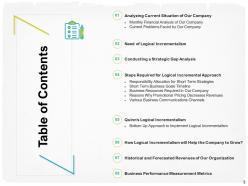
Slide 3: This slide displays Table of Content
Slide 4: This slide displays Table of Content of the presentation.
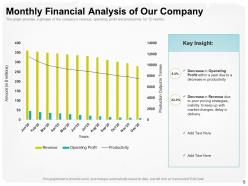
Slide 5: The graph provides a glimpse of the company’s revenue, operating profit and productivity for 12 months.
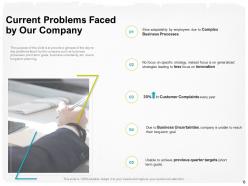
Slide 6: The purpose of this slide is to provide a glimpse of the day-to-day problems faced by the company such as business processes.
Slide 7: This slide displays Table of Content containing- Need of Logical Incrementalism
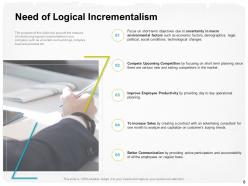
Slide 8: The purpose of this slide is to provide the reasons of introducing logical incrementalism in our company such as uncertain
Slide 9: This slide displays Table of Content containing- Conducting a Strategic Gap Analysis
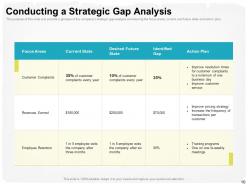
Slide 10: The purpose of this slide is to provide a glimpse of the company’s strategic gap analysis considering the focus areas, current and
Slide 11: This slide displays Table of Content
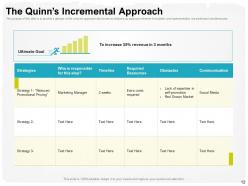
Slide 12: This slide shows The Quinn’s Incremental Approach
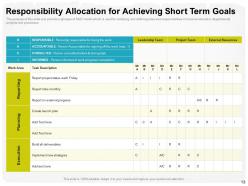
Slide 13: The purpose of this slide is to provide a glimpse of RACI model which is used for clarifying and defining roles and responsibilities in
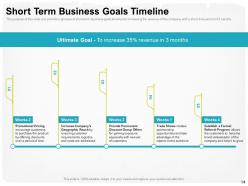
Slide 14: The purpose of this slide is to provide a glimpse of short term business goals timeline for increasing the revenue of the company with
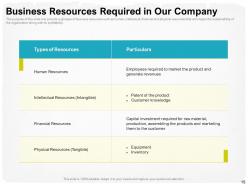
Slide 15: The purpose of this slide is to provide a glimpse of business resources such as human, intellectual, financial and physical resources
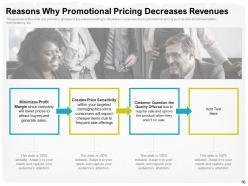
Slide 16: The purpose of this slide is to provide a glimpse of the reasons leading to decrease in revenues due to
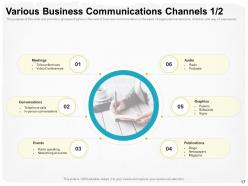
Slide 17: The purpose of this slide is to provide a glimpse of various channels of business communication on the basis of organizational structure, direction and way of expression.
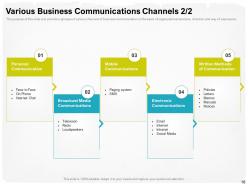
Slide 18: The purpose of this slide is to provide a glimpse of various channels of business communication on the basis of organizational
Slide 19: This slide displays Table of Content
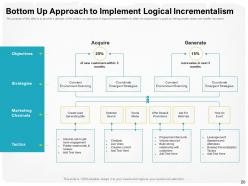
Slide 20: The purpose of this slide is to provide a glimpse of the bottom up approach of logical incrementalism to attain an organization’s goals
Slide 21: This slide displays Table of Content.
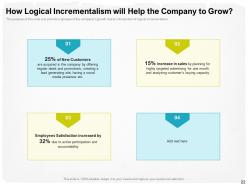
Slide 22: The purpose of this slide is to provide a glimpse of the company’s growth due to introduction of logical incrementalism.
Slide 23: This slide displays Table of Content
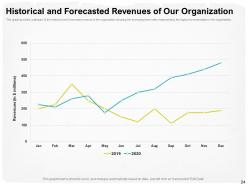
Slide 24: This graph provides a glimpse of the historical and forecasted revenue of the organization showing the increasing trend after
Slide 25: This slide displays Table of content.
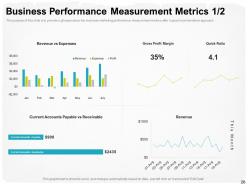
Slide 26: The purpose of this slide is to provide a glimpse about the business marketing performance measurement metrics after logical
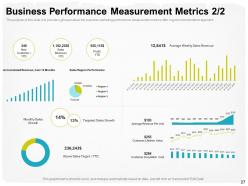
Slide 27: The purpose of this slide is to provide a glimpse about the business marketing performance measurement metrics after logical
Slide 28: This is Step by Step Approach Icons Slide.
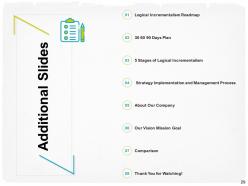
Slide 29: This slide is titled as Additional Slides for moving forward.
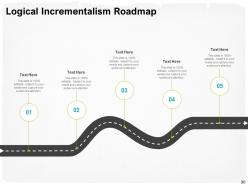
Slide 30: This slide displays Logical Incrementalism Roadmap.
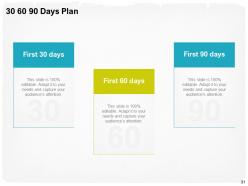
Slide 31: This slide shows 30 60 90 Days Plan
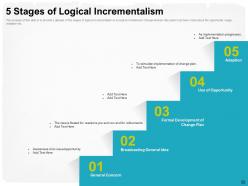
Slide 32: The purpose of this slide is to provide a glimpse of the stages of logical incrementalism to accept and implement change wherein discussion has been made about the opportunity usage, adaption etc.
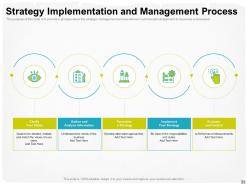
Slide 33: The purpose of this slide is to provide a glimpse about the strategic management process wherein a philosophical approach to business is discussed.
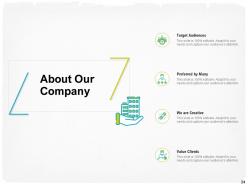
Slide 34: This is About Us slide to showcase Company specifications.
Slide 35: This slide displays Mission, Vision and Goals.
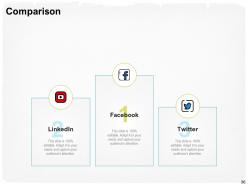
Slide 36: This is Comparison slide.
Slide 37: This is Thank you slide with Contact details.
Step by step approach powerpoint presentation slides with all 37 slides:
Use our Step By Step Approach Powerpoint Presentation Slides to effectively help you save your valuable time. They are readymade to fit into any presentation structure.


FAQs for Step by step approach
Effective PowerPoint presentation slides include clear headlines, concise bullet points, relevant visuals, consistent formatting, and strategic white space to enhance readability. These elements work together by maintaining audience attention, reinforcing key messages, and ensuring professional credibility, with many organizations finding that well-structured slides significantly improve stakeholder engagement and decision-making outcomes.
Choose a color scheme by considering your audience, message tone, and brand guidelines, selecting 2-3 primary colors with complementary accents that ensure readability and visual hierarchy. Start with your company's brand colors if applicable, then use tools like Adobe Color or PowerPoint's built-in themes, ensuring sufficient contrast between text and backgrounds while maintaining consistency across all slides to create professional, engaging presentations.
Effective PowerPoint typography involves selecting readable fonts like Arial or Calibri, maintaining consistent font sizes with headings at 24-44 points and body text at 18-24 points, using high contrast combinations, and limiting fonts to two maximum. These practices enhance audience comprehension by improving readability, creating visual hierarchy, and reducing cognitive load, with many presenters finding that strategic typography choices significantly increase message retention and professional credibility.
Incorporate visuals through strategic placement of high-quality images, infographics, charts, and icons that directly support your key messages, while using consistent color schemes and white space for visual clarity. These elements enhance comprehension by breaking up text-heavy content, reinforcing concepts through visual storytelling, and maintaining attention spans, with many presenters finding that audiences retain information significantly better when visual and textual elements work together seamlessly.
The ideal amount of text per PowerPoint slide is typically 6-8 lines with no more than 6-8 words per line, following the "6x6 rule" for maximum readability and audience engagement. This approach ensures your audience can quickly absorb key points while maintaining focus on your verbal presentation, with many professional speakers finding that minimal text enhances comprehension and retention.
Structure your PowerPoint for maximum impact by starting with a compelling opening hook, clearly stating your objective, organizing content into 3-5 main points with supporting evidence, and ending with a strong call-to-action. This approach streamlines audience engagement through logical flow, strategic storytelling, and focused messaging, with many presenters finding that consistent visual design and strategic slide transitions ultimately deliver clearer communication and stronger business outcomes.
Common PowerPoint pitfalls include overloading slides with text, using inconsistent design elements, relying on distracting animations, choosing poor color contrasts, and cramming too much content per slide. These mistakes undermine message clarity and audience engagement, with many presenters finding that streamlined designs, consistent formatting, and focused content deliver significantly better outcomes and stronger audience retention.
Use subtle animations like fade-ins and gentle slide transitions to guide audience attention to key points, while avoiding flashy effects that distract from your message. Strategic animation timing helps reveal information progressively, keeping viewers engaged, with many presenters finding that simple entrance effects and consistent transition styles enhance comprehension while maintaining professional credibility.
Best practices for citing sources in PowerPoint include using consistent citation styles, placing references on relevant slides, creating a dedicated references slide, and incorporating hyperlinks for digital sources. These approaches enhance credibility by ensuring transparency, enabling audience verification, and demonstrating thorough research, with many organizations finding that proper citations strengthen presenter authority while protecting against plagiarism concerns.
Tailor your PowerPoint presentation by adjusting content complexity, visual design, messaging focus, language formality, and supporting data based on audience expertise and interests. For executives, emphasize strategic outcomes and ROI with minimal technical details, while technical teams require detailed processes and specifications, ultimately ensuring your message resonates and drives desired actions.
**INPUT**: What tools or resources can help in designing professional-looking presentation templates? **OUTPUT**: Professional presentation template design tools include Adobe Creative Suite, Canva, PowerPoint's built-in Designer, Figma, and specialized platforms like Beautiful.AI and Gamma. These resources streamline template creation by offering advanced design capabilities, brand-consistent layouts, and automated formatting features, with many organizations finding that strategic template investments ultimately deliver faster presentation development, enhanced visual consistency, and stronger professional credibility across all business communications.
**INPUT**: How can I rehearse and refine my PowerPoint delivery to improve audience engagement? **OUTPUT**: Rehearse by practicing with colleagues, recording yourself to identify pacing issues, timing each slide transition, and refining your vocal delivery and gestures. This strategic combination enhances audience connection through smoother transitions, confident delivery, and interactive elements, with many presenters finding that regular practice sessions ultimately deliver more engaging presentations and stronger business outcomes.
Strategies include using consistent design templates, creating logical slide sequences, implementing clear section dividers, maintaining uniform fonts and colors, and establishing slide numbering systems. These organizational approaches streamline presentation flow by reducing visual distractions, enhancing audience comprehension, and ensuring professional consistency, with many presenters finding that structured layouts ultimately deliver stronger audience engagement and clearer message retention.
To integrate multimedia, use PowerPoint's Insert tab to embed videos from files or online sources, add audio clips, and incorporate interactive elements like hyperlinks or animations. These multimedia components enhance audience engagement and retention by creating dynamic, multi-sensory experiences, with many presenters finding that strategic video placement and background audio significantly improve message delivery and professional impact.
**INPUT**: What are the advantages of using a PowerPoint presentation template over starting from scratch? **OUTPUT**: PowerPoint templates offer significant time savings, professional design consistency, streamlined content organization, and enhanced visual appeal compared to building presentations from scratch. These pre-designed frameworks enable faster project completion, maintain brand coherence across teams, and deliver polished results, with many organizations finding that templates ultimately improve presentation quality while reducing design costs and development time.
-
Very unique, user-friendly presentation interface.
-
Great product with highly impressive and engaging designs.
-
Great quality slides in rapid time.
-
Easy to edit slides with easy to understand instructions.
-
Awesome use of colors and designs in product templates.
-
Enough space for editing and adding your own content.