

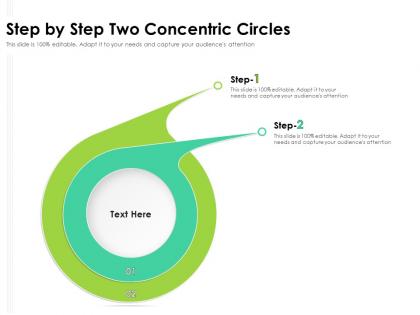
Step by step two concentric circles




Try Before you Buy Download Free Sample Product
 Impress Your
 Audience
 100%
100% Editable
 Save Hours
 of Time


Our Step By Step Two Concentric Circles are topically designed to provide an attractive backdrop to any subject. Use them to look like a presentation pro.
People who downloaded this PowerPoint presentation also viewed the following :
Step by step two concentric circles with all 2 slides:
Use our Step By Step Two Concentric Circles to effectively help you save your valuable time. They are readymade to fit into any presentation structure.
FAQs for Step by step
So basically, concentric circles all have the same center but different sizes - that's what makes them concentric. Picture those ripples when you drop a rock in water, they're perfectly nested inside each other. Regular circles can cross over each other or be totally separate, but these ones don't. Any line you draw from the center hits all the circles at different distances you can actually predict. The area between rings? Super easy math since they form these perfect ring shapes. Honestly makes polar coordinates way less of a headache. They're clutch for geometric proofs too when you need that symmetry.
Dude, concentric circles are honestly a game-changer for organizing spaces. Look at Paris or Moscow - they've got everything radiating out from the center: residential, commercial, industrial zones all in rings. Works for buildings too. Put your public spaces in the middle, then private areas expand outward. Same logic applies to landscape stuff - plaza in the center, pathways and seating around it. People just get it intuitively when they're walking through. I always sketch my projects this way first now (learned that the hard way). It usually shows you the most natural flow and hierarchy right off the bat.
Honestly, concentric circles work so well because waves naturally spread outward from a source at constant speed. Drop a rock in water - boom, perfect ripples expanding in circles. That's literally how sound, light, and radio waves move through uniform stuff. Works for electric fields around particles too, or gravity fields if you're feeling fancy. The gaps between circles? That shows frequency or field strength. I always think it's wild how nature just... follows clean geometry like that. Next time you need to explain waves to someone, find a puddle and grab a pebble. Way better than drawing on a whiteboard.
Concentric circles are perfect for hierarchical stuff - way better than pie charts IMO. Each ring can show different data layers, like market segments or demographics spreading out from the center. Super useful for nested data too - company departments, age groups within regions, that kind of thing. Just make sure your ring widths and colors actually make sense for the proportions you're showing. I've seen people mess that up and it gets confusing fast. They're honestly underused - next time you've got data that relates hierarchically, give them a shot. Much cleaner look than most alternatives.
So picture concentric circles - your best customers go in the middle, then regular buyers, occasional ones, and prospects on the outside. Works really well for visualizing who's who. The inner circle gets your premium treatment, exclusive deals, that kind of thing. Broader campaigns hit the outer rings. I mean, you obviously don't want to blow your whole budget on people who barely buy from you, right? It's just a smart way to figure out where your marketing dollars should actually go. Way better than treating everyone exactly the same.
Oh man, it's all about Gestalt theory! Your brain automatically groups those rings together instead of seeing separate circles. The proximity and similarity principles are doing their thing. Honestly, there's something almost mesmerizing about concentric circles that messes with how we process visuals. They create this weird tunneling effect because your eye can't decide where to focus - it just gets sucked toward the center. Depth perception gets all confused too, making surfaces look like they're bulging or sinking. Try tweaking the spacing and contrast when you're working with them. Even tiny changes completely shift how people see the movement and depth.
So think of it like ripples in a pond - your business starts with one solid thing in the center, then spreads outward. Your core product or best customers are that inner ring. Then you expand to stuff that's related but not identical. Amazon nailed this - books first, then electronics, now they sell literally everything (including weird stuff I didn't know existed). Each new circle should actually make sense with what you already do well. Don't just jump to random markets because they look profitable. Map out your own circles and you'll see which moves are smart next steps.
Dude, concentric circles are perfect for this! Start with your main idea in the center, then add layers of subtopics around it. Way better than those mind-numbing bullet points everyone uses. The cool thing is students instantly get how everything connects - the visual just makes sense, you know? I always throw different colors on each ring too, makes it pop. Plus honestly? Drawing them out helps ME organize my thoughts better. Work from the inside out and you'll see what I mean. Trust me, kids love anything that doesn't look like a boring textbook page.
Oh man, concentric circles are literally everywhere! Native American medicine wheels, Celtic spirals, Buddhist mandalas - they all use this pattern. Usually represents unity, life cycles, or connecting earthly/spiritual stuff. Aboriginal dot paintings show sacred sites this way, and Islamic art uses them for divine perfection. Even modern logos do it (Target, Olympics). What's wild is how different cultures independently came up with the same symbol. When you're looking at art, pay attention to the spacing between circles - that's where the real meaning hides. Pretty cool how universal it is, right?
Oh man, concentric circles are a game changer for showing proximity stuff in GIS! Buffer zones around points are perfect for this - like mapping noise levels around airports or service areas for hospitals. Multiple rings let you show different impact zones really clearly. I use them all the time for catchment analysis and risk modeling now. The visual side is huge too - makes it way easier to explain your findings to people who don't do GIS. Pro tip: use different colors for each ring to make the distance relationships pop. Seriously changed how I approach spatial analysis.
Dude, concentric circles are everywhere in good UI design for a reason. Think radial menus, loading spinners, those ripple effects when you tap stuff. They automatically pull your eye to the center, which is clutch for highlighting key actions. Honestly, there's something weirdly satisfying about the geometry too - like, our brains just love that pattern. You can use them to show how features relate to each other or create those layered navigation flows where people dive deeper. Oh, and they're great for progressive disclosure. Next time you're designing navigation, sketch some circles and see what happens.
Oh man, once you start noticing these you can't unsee them! Tree rings are the obvious one - each ring shows a year of growth. Drop a rock in water and watch those ripples spread out in perfect circles. Spider webs do it too, though honestly those creep me out a bit. Your own eyes have them with the pupil and iris layers. Scientists actually use tree rings to figure out how old wood is and track climate changes, which is pretty cool. Flowers have them, some bird nests... even certain rocks. It's basically nature's way of showing growth or energy spreading from one spot.
So basically you put your main decision-makers in the center circle, then everyone else fans out depending on how much they're actually involved. Makes it super clear who you need to consult vs who just gets a heads up later. Way less confusing than those org charts where suddenly everyone thinks they're the CEO, you know? Your outer circle people - like subject matter experts - they're still important but don't drag them into every single meeting. Honestly, try mapping out your current teams this way. You'll probably find half the people are sitting in completely the wrong spot.
Dude, concentric circles are everywhere in branding for good reason. Target's bullseye, Audi's rings - they pull your eye straight to the center like a magnet. Something about circles just feels safe and welcoming, you know? The hierarchy thing is brilliant too. People naturally look at the center first, then scan outward. Works perfectly across different sizes - from business cards to billboards. I'm honestly surprised more brands don't use them. If you're brainstorming logos, definitely sketch out some concentric versions. They add instant depth and movement. Might spark something cool you hadn't considered!
Dude, concentric circles are a game changer for presentations! Put your main idea in the center, then layer supporting stuff in the outer rings. Way better than those awful bullet point slides that make everyone's eyes glaze over. They're perfect for showing what matters most vs secondary details. I use them for org charts, product breakdowns - honestly anything with hierarchy works. The circular shape just looks more polished somehow? Plus people actually follow along instead of checking their phones. Trust me, swap out one text-heavy slide with circles and you'll see the difference immediately.
-
Excellent products for quick understanding.
-
Thanks for all your great templates they have saved me lots of time and accelerate my presentations. Great product, keep them up!
-
Very well designed and informative templates.
-
Easy to edit slides with easy to understand instructions.
-
Designs have enough space to add content.