

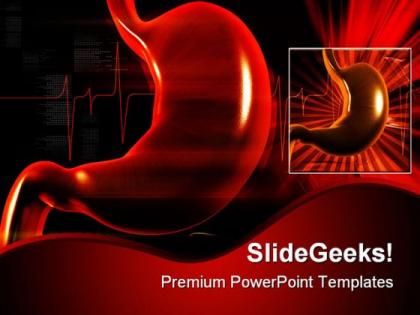
Stomach medical powerpoint backgrounds and templates 0111




Try Before you Buy Download Free Sample Product
 Impress Your
 Audience
 100%
100% Editable
 Save Hours
 of Time


Our Stomach Medical PowerPoint Backgrounds And Templates 0111 will prove worthy instruments for your growth. They will poitively enhance your reputation as a professional.
People who downloaded this PowerPoint presentation also viewed the following :
Stomach medical powerpoint backgrounds and templates 0111 with all 3 slides:
Get up front with our Stomach Medical PowerPoint Backgrounds And Templates 0111. Your thoughts will get th best seat.
FAQs for Stomach medical powerpoint backgrounds
Look for templates with solid anatomical diagrams and digestive system overviews first. Good contrast is huge - trust me, nobody wants to decipher fuzzy endoscopy pics during presentations. You'll need sections for patient cases, treatment protocols, and before/after comparisons. Clean fonts are a must since you're dealing with complex terminology. Blues and greens work way better than boring white backgrounds. Oh, and make sure it follows standard medical presentation flow so you're not fighting the layout. Most decent templates already have symptom breakdown sections built in, which saves time.
Dude, visuals are a total game-changer for stomach stuff. Cross-sections and diagrams show exactly where things go wrong - like ulcer formation or acid reflux - way better than just describing it. I tried explaining gastritis once without pictures and everyone looked completely lost. Before/after comparisons work really well too. Your audience will actually get concepts like IBD when they can see what's happening inside. Honestly, some of these GI disorders are pretty gnarly looking, but that makes the visuals even more effective. Label everything clearly though - otherwise people just stare confused.
Honestly, those pre-made stomach templates are a lifesaver. They've got all the anatomical diagrams done right - way better than anything I could draw myself. The formatting's already clean and professional, so you don't have to mess around making everything look consistent. Takes maybe 10 minutes to customize instead of spending hours building slides from scratch. Medical presentations are tricky because there's so much complex info to organize, but these templates actually get that. Your audience won't be squinting at messy layouts or wondering what they're looking at. Just swap in your text and you're good to go.
For stomach stuff, you definitely want calming colors that won't make people feel worse. Blues and greens are perfect - they scream "clean" and "medical" without being harsh. Stay away from red though, it's way too aggressive and kinda reminds you of... well, blood. Not good when people are already worried about their gut health. Soft grays work well too. I'd skip anything super bright or neon - honestly, those colors can be jarring when someone's reading about digestive issues. The whole vibe should be "trust me, I know what I'm doing" without making anyone more anxious than they already are.
Cross-sectional diagrams are your best bet for stomach stuff - show those muscle layers and blood vessels clearly. Flow charts work amazing for digestive processes. Those 3D cutaway illustrations? Game changer for helping students see how everything connects spatially. I always throw in process diagrams for peristalsis and gastric phases too. Simple bar charts help with pH levels and enzyme activity. Oh, and break complex processes into smaller visual steps - makes it way less overwhelming. Students pick things up so much faster when you don't dump everything on them at once.
Try building your presentation around a patient's story! Pick someone with interesting symptoms and follow their journey through your template slides. Show their diagnostic process using all those anatomical charts you've got. Honestly, audiences eat this stuff up way more than dry medical facts. Your visual templates are perfect for showing before/after treatment results or how a disease progresses. Then use your final slides to reveal what happened to the patient and highlight the key takeaways. Way more engaging than just listing symptoms and treatments, trust me.
Go with peptic ulcers, GERD, gastritis, and gastric cancer - that's your bread and butter right there. Clinicians present these constantly. Gastroparesis is solid too since it's getting more attention lately. Oh, and definitely throw in H. pylori because it ties into like half the other conditions anyway. Just a heads up - some of the stomach imagery can be pretty intense, so maybe preview your slides first depending on your audience. I learned that one the hard way during a lunch presentation once. Make your template modular so you can drop in case studies or new research. That way you're not rebuilding from scratch every time.
Honestly, PowerPoint templates are a game changer for patient education. You can show actual stomach diagrams instead of just describing stuff - way easier for people to get it. I've seen patients have those lightbulb moments when they see what's actually going on inside. The visual breakdown of conditions like GERD or ulcers just clicks better than me rambling about symptoms. You'll retain their attention longer too. Most templates come with simplified medical illustrations that aren't overwhelming. My advice? Start with basic anatomical ones and customize from there. Trust me, it beats drawing terrible sketches on napkins.
You want something with swappable colors and fonts - basically customizable stuff. Editable diagrams are key so you can highlight whatever stomach parts you need. Trust me, getting stuck with rigid graphics is the worst. Multiple layouts help too (title slides, content ones, comparisons, etc). Oh and make sure any medical illustrations are vector files, not pixelated mess that looks terrible when resized. I learned that one the hard way! Bottom line - go for flexibility over something that locks you into one look.
Dude, animations are honestly a lifesaver for medical presentations. Nothing makes people's eyes glaze over faster than dumping a massive wall of text about digestive systems all at once. I learned this the hard way during my first case presentation - yikes. Use subtle stuff to highlight organs or show processes step by step. Gradually revealing bullet points works way better than the big info dump. Just don't go crazy with flashy effects that'll distract from your actual content. Focus on animating pathways or how symptoms progress. Your colleagues will actually pay attention instead of checking their phones.
Keep bullet points short - like 6-7 words max. Dark text on light backgrounds is your friend for readability. I can't tell you how many presentations I've sat through where you literally can't see anything from the back! One concept per slide, seriously. Break down stuff like digestion stages with bullets. Left-align everything instead of centering - way easier to follow. Oh, and test your slides beforehand on the actual projector. Medical diagrams look completely different under those harsh conference room lights, trust me.
I'd do 2-3 slides per case study with a solid before/after setup. Open with patient demographics and symptoms, then drop in your diagnostic images or scope findings using those visual spots in the template. Those stomach cross-sections are honestly clutch for showing exactly what's going on - way better than trying to explain it with text. Keep the writing super minimal and let your visuals carry the story. Oh, and definitely use those timeline elements if you've got multiple visits or treatment phases to show. Makes the whole progression way clearer for people following along.
Dude, seriously - don't mess around with fancy fonts in medical presentations. Arial, Calibri, Helvetica are your friends here. Two font families max or it looks sloppy. Make your text at least 24pt because people in the back can't see tiny letters when you're showing complex stomach stuff. Bold your headings so there's clear hierarchy. I learned this the hard way once when half my audience was squinting at my slides like they needed glasses! Before you present, walk to the back of the room and check if you can actually read everything. Trust me on this one.
So using a stomach template basically makes everything way less chaotic when you're working with a team. Everyone can jump in and edit their parts without messing up the formatting - which honestly saves so much headache. You can split things up by who knows what best, like having the GI people handle pathology while radiology does the imaging stuff. Everything still looks cohesive even with multiple people working on it. Nobody has to waste time figuring out layouts from scratch either. Though I guess the downside is everyone's presentations start looking pretty similar after a while. But yeah, just assign sections and let people focus on actually writing good content instead of design drama.
So for stomach PowerPoint templates, I'd start with SlideModel or PresentationGo - they've got pretty good medical stuff with anatomical diagrams. Free options are hit or miss honestly, but Template.net and Canva's medical section aren't terrible if money's tight. The paid sites like SlideTeam or GraphicRiver cost more but the quality difference is noticeable - way more polished and actually medically accurate. Oh, and definitely make sure you get ones with editable vector graphics. Trust me on that one, you'll want to tweak the stomach illustrations later.
-
Illustrative design with editable content. Exceptional value for money. Highly pleased with the product.
-
Great designs, really helpful.