

Storage Area Network San Comparative Analysis Of Different Raid Levels





Try Before you Buy Download Free Sample Product
 Impress Your
 Audience
 100%
100% Editable
 Save Hours
 of Time


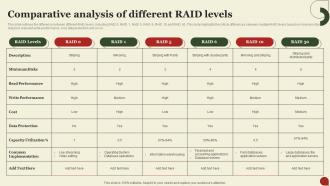
This slide outlines the difference between different RAID levels, including RAID 0, RAID 1, RAID 5, RAID 6, RAID 10 and RAID 50. This slide highlights the critical differences between multiple RAID levels based on minimum disks required, read and write performance, cost, data protection and so on.
People who downloaded this PowerPoint presentation also viewed the following :
Storage Area Network San Comparative Analysis Of Different Raid Levels with all 9 slides:
Use our Storage Area Network San Comparative Analysis Of Different Raid Levels to effectively help you save your valuable time. They are readymade to fit into any presentation structure.








FAQs for Storage Area Network San Comparative Analysis Of
The primary RAID levels used in SANs include RAID 0, RAID 1, RAID 5, RAID 6, and RAID 10, each offering different performance and redundancy characteristics. These configurations enhance enterprise storage by delivering improved data protection, increased throughput, and optimized capacity utilization, with many organizations finding that strategic RAID implementation significantly reduces downtime while maximizing storage efficiency.
RAID 0 enhances SAN performance by striping data across multiple drives without redundancy, significantly increasing read and write speeds through parallel processing and maximizing storage capacity utilization. However, it presents complete data loss risk if any drive fails, making it unsuitable for critical applications, with many organizations finding that combining RAID 0 with robust backup strategies delivers optimal performance while mitigating vulnerability concerns.
RAID 1 in SAN environments delivers complete data redundancy through real-time mirroring, creating identical copies across multiple drives, ensuring zero data loss during drive failures, and enabling continuous operations without downtime. This configuration enhances business continuity by providing instant failover capabilities, faster read performance through load distribution, and simplified disaster recovery processes, ultimately delivering reliable data protection and operational resilience for mission-critical applications.
RAID 5 provides single-disk fault tolerance using distributed parity across all drives, while RAID 6 offers dual-disk fault tolerance through dual parity calculations, enabling recovery from two simultaneous disk failures. RAID 6 delivers enhanced data protection for mission-critical applications in healthcare, financial services, and enterprise environments, though with slightly reduced write performance, ultimately providing superior business continuity.
RAID 10 combines RAID 0's performance benefits with RAID 1's redundancy by striping data across multiple mirrored pairs, delivering both speed enhancement and fault tolerance simultaneously. This strategic combination enables organizations, particularly in financial services and healthcare, to achieve high-performance storage with data protection, ultimately providing faster database operations and seamless failover capabilities.
When selecting a RAID level for a SAN, consider performance requirements, fault tolerance needs, storage capacity efficiency, cost constraints, and application workload patterns. These factors work together to determine optimal configuration, with many organizations finding that balancing read/write performance against redundancy requirements ultimately delivers the most strategic advantage for their specific business operations.
Different RAID levels significantly impact SAN I/O performance through varying read/write speeds, fault tolerance mechanisms, and storage efficiency trade-offs. RAID 0 delivers maximum throughput for sequential operations, while RAID 10 balances performance with redundancy, and RAID 5/6 prioritize capacity over write performance, with many enterprises finding that strategic RAID selection ultimately enhances overall storage infrastructure efficiency.
RAID serves as the foundation of SAN disaster recovery by providing automatic data redundancy, real-time mirroring, and rapid failure recovery capabilities that minimize downtime during hardware failures. Through strategic RAID configurations, organizations enhance their recovery time objectives, maintain business continuity during critical system failures, and ultimately deliver resilient storage infrastructure that protects against data loss across enterprise environments.
RAID level selection in SANs directly impacts both usable storage capacity and operational efficiency through different redundancy and striping approaches. RAID 1 delivers maximum protection but reduces capacity by 50%, while RAID 5 and RAID 6 balance capacity efficiency with fault tolerance, and RAID 10 combines mirroring with striping, ultimately enabling organizations to optimize storage investments based on their specific performance, protection, and cost requirements.
SAN RAID configuration best practices include selecting appropriate RAID levels based on performance requirements, implementing hot spare drives for automatic failover, distributing arrays across multiple controllers, and aligning stripe sizes with application I/O patterns. These strategies enhance data protection by minimizing downtime risks, optimizing throughput for database and virtualization workloads, and ensuring scalable storage performance, with many enterprises finding that proper RAID planning significantly reduces operational costs.
RAID levels interact differently with HDDs and SSDs in SANs, with HDDs benefiting significantly from RAID 5 and 6 for capacity optimization, while SSDs excel with RAID 1 and 10 for performance-critical applications. Organizations increasingly deploy hybrid configurations, leveraging HDD-based RAID for bulk storage and SSD-based RAID for high-IOPS workloads, ultimately delivering balanced cost efficiency and performance optimization across diverse enterprise applications.
RAID levels significantly impact SAN scalability through performance trade-offs, capacity utilization, and expansion complexity, with RAID 0 offering maximum performance but no redundancy, while RAID 6 provides excellent fault tolerance at reduced write speeds. Organizations implementing large-scale SANs typically balance RAID 1+0 for critical applications and RAID 5 for general storage, ultimately enabling strategic resource allocation that supports growing data demands while maintaining operational efficiency.
Monitoring tools enhance RAID management within SANs by providing real-time performance analytics, predictive failure detection, automated alert systems, and comprehensive capacity planning insights. These solutions enable IT administrators to proactively identify disk degradation, optimize storage allocation, and minimize downtime through early intervention, with many enterprises finding that continuous monitoring ultimately delivers improved data availability and reduced operational costs.
Common misconceptions about RAID levels in SAN deployments include believing RAID 5 is always cost-effective, assuming higher RAID numbers mean better performance, thinking RAID eliminates backup needs, and expecting identical performance across all configurations. Many organizations find that RAID 6 often delivers better value than RAID 5 in enterprise environments, while RAID 10 provides superior performance for critical applications, ultimately requiring strategic assessment of workload requirements rather than default selections.
Software-defined storage revolutionizes RAID configurations by enabling dynamic provisioning, automated tiering, and policy-based management across heterogeneous hardware platforms. Through intelligent algorithms, organizations can optimize performance and capacity in real-time, automatically adjusting RAID levels based on workload demands, while reducing administrative overhead and delivering enhanced flexibility for modern data center environments.
-
Graphics are very appealing to eyes.
-
Their templates are super easy to edit and use even for the one like me who is not familiar with PowerPoint. Great customer support.