

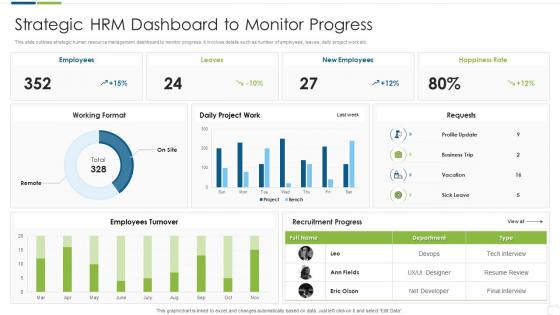
Strategic HRM Dashboard To Monitor Progress




Try Before you Buy Download Free Sample Product
 Impress Your
 Audience
 100%
100% Editable
 Save Hours
 of Time


This slide outlines strategic human resource management dashboard to monitor progress. It involves details such as number of employees, leaves, daily project work etc.
People who downloaded this PowerPoint presentation also viewed the following :
Strategic HRM Dashboard To Monitor Progress with all 7 slides:
Use our Strategic HRM Dashboard To Monitor Progress to effectively help you save your valuable time. They are readymade to fit into any presentation structure.





FAQs for Strategic HRM Dashboard
Focus on what actually matters to your business first. Employee engagement scores and turnover by department are must-haves. Time-to-fill for key roles, training ROI, and cost-per-hire show real impact. Internal mobility rates are huge - seriously underrated metric. Diversity numbers aren't optional anymore, obviously. Performance ratings tie directly to your talent pipeline, so don't skip those. Succession planning coverage too. Honestly, stick to 6-8 KPIs max or you'll overwhelm everyone. Pick stuff your leadership team will actually look at and can do something about. No point tracking metrics that just sit there looking pretty.
Honestly, get yourself a Strategic HRM Dashboard - it's been a total lifesaver for me. Instead of hunting through endless spreadsheets (ugh), you'll have all your workforce data right there in real-time. Turnover patterns, performance issues, talent gaps - you can catch problems early instead of scrambling later. The visual setup makes it super easy to spot what's actually happening and show leadership concrete numbers instead of just "feelings" about how things are going. My advice? Pick your top 3-5 metrics that really move the needle for your business first, then build everything around those.
Think of analytics as what makes your HR dashboard actually work instead of just looking fancy. Without it, you're staring at random numbers that don't mean much - like knowing your car is running but not if you're about to run out of gas (terrible analogy but you get it). The real magic happens when analytics help you spot patterns, predict who's about to quit, and figure out where you're missing key skills. You'll finally see if your HR programs are worth the money you're spending. Honestly, most companies skip this part and wonder why their data feels useless. Start with metrics that tie to real business goals.
Set up your dashboard to pull real-time data from pulse surveys, exit interviews, and engagement scores. Track eNPS, retention rates by department, and survey response rates - low response rates are basically a red flag that people have checked out mentally. Configure alerts when satisfaction drops below your thresholds so you're not just staring at charts wondering what went wrong. Break down engagement by team, tenure, and role in automated reports. That way you'll actually know where to focus instead of throwing solutions at the wall. Oh, and honestly? The response rate metric alone tells you more about morale than most managers realize.
Okay so first figure out your top 5 metrics you actually care about - that's half the battle right there. Then find something with drag-and-drop customization because nobody has time to code a basic headcount report. Real-time syncing with your current HR systems is clutch, plus you'll want mobile access since these things always come up mid-meeting. Role-based permissions are pretty essential too - managers shouldn't see everyone's data. Oh and automated alerts save your butt when turnover spikes. Pre-built templates help tons if you're tracking standard stuff like engagement scores.
Honestly, most modern HRIS systems already have connectors for the big players - Tableau, Power BI, Qlik. APIs and ETL processes are your best bet for syncing everything up. Just don't mess up the data field mapping at the start (learned that one the hard way). Automated feeds beat manual exports every time since you won't forget to update stuff. Figure out what metrics you actually need shared first - there's always that one exec who wants everything but uses nothing. Then grab your IT folks and get those data pipelines running. Way easier than you'd think once you get going.
Honestly, the biggest pain is gonna be your data - it's usually a complete mess spread across different systems. Leadership buy-in is another headache. Then you get stuck in endless meetings about which metrics actually matter (spoiler: everyone has opinions). Even if you build something decent, people won't use it if they don't trust the numbers or hate the interface. Start super small though - pick like 3 metrics everyone can agree on, spend time cleaning that data properly, and loop stakeholders into the design early. Way easier than trying to boil the ocean from day one.
Okay so visual design is honestly huge for making your HR dashboard actually work. Color coding saves you - red for problem areas, green when you're hitting targets. Keep layouts clean with lots of white space or people get overwhelmed looking at it. Most execs are just scanning anyway, not deep-diving into every metric, so your icons and charts need to tell the story fast. Consistent fonts matter too. Pick one color palette and stick with it across everything - I learned that the hard way. You want complex HR data to make sense in like 5 seconds.
So basically, an HRM dashboard shows you all your workforce stuff in real-time - turnover, skill gaps, who's next in line for promotions. Pretty useful honestly. You can catch problems before they blow up, like spotting when your best people might quit or if one team is getting bloated with managers. The scenario modeling is clutch for planning headcount and budgets too. I'd start by figuring out what's actually broken with your workforce first, then set up the dashboard to track those specific things. Way better than just guessing what's happening with your people.
Honestly? Monthly updates work for most HRM stuff. Daily makes sense for things like attendance or who's applying for jobs - that changes fast. But don't go crazy updating everything daily or you'll burn out your team. I learned that the hard way at my last job lol. Employee engagement surveys and performance reviews? Those can wait for monthly or quarterly updates since they don't shift much week to week. The trick is staying current enough to make smart decisions without drowning everyone in busywork. Find what works for your team's rhythm.
So operational metrics are your basic day-to-day stuff - time-to-fill positions, training completion rates, employee satisfaction scores. Strategic metrics? Those connect to the bigger picture and show long-term impact on business goals. Think revenue per employee or how retention actually affects your bottom line. Here's the thing though - most dashboards are a mess with too many operational numbers that don't really matter. Executives only care about the strategic ones because they prove whether your people stuff is actually working. I'd stick to maybe 3-5 strategic metrics max that tie directly to what your company's trying to achieve. Less is definitely more here.
Honestly, these HRM dashboards are pretty clutch for diversity stuff. Real-time tracking of representation across teams, pay gaps, recruitment data - all in one spot. Charts make way more sense than endless spreadsheets when you're presenting to execs (they love visuals). You can spot weird patterns fast, like why marketing is always homogeneous or if promotions skew toward certain groups. Set alerts for when numbers drop below targets. Bit overwhelming at first, but super helpful for actually measuring if your D&I programs work instead of just hoping they do.
Honestly, Power BI is probably your safest bet - works with most HR systems and won't cost you a fortune. Tableau and Qlik Sense are solid too if you need heavy-duty analytics. There's also HR-specific stuff like Workday or BambooHR, though I've heard mixed things about BambooHR's reporting lately. Google Data Studio works surprisingly well if your budget's tight. But here's the thing - figure out what data you actually need first. No point getting fancy software if it can't connect to your payroll system, you know? Start there, then pick whatever integrates easiest.
Honestly, HR metrics are like a mirror - they show employees what you really care about, not just what's in your mission statement. Track engagement or turnover? People pay attention. Ignore promotion equity data? They notice that too. But here's where companies mess up: collecting data without doing anything about it. That's worse than not measuring at all because it breeds cynicism fast. I'd say pick one metric that actually matters to your team - maybe something around workload or development opportunities - then be upfront about tracking it. Show them you'll act on what you find, not just file it away.
First thing - strip out all personal info like names and employee IDs. Nobody should be identifiable in that data. Set up role-based access so people only see their level of stuff. Encrypt everything too, both when it's moving around and stored. Honestly, audit trails are a lifesaver - you'll want to track who looked at what. GDPR compliance is obviously non-negotiable if you're dealing with EU data. Oh, and definitely run a privacy assessment before launch. Sounds boring but it catches the weird edge cases you'd never think of. Trust me on that one.
-
“Superb. What a great finding. Thankful for SlideTeam. We were paying people to make slides which went all in vain. We are so happy to have found you.”
-
The visual appeal of the templates is just unparalleled! I was so worried about the design of my presentation but SlideTeam made it all so easy.