

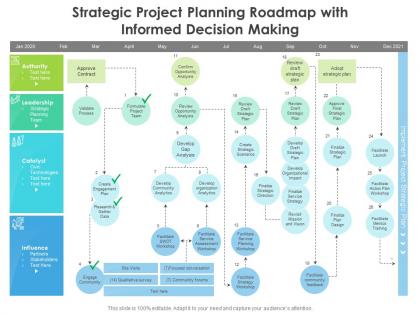
Strategic project planning roadmap with informed decision making




Try Before you Buy Download Free Sample Product
 Impress Your
 Audience
 100%
100% Editable
 Save Hours
 of Time


Our Strategic Project Planning Roadmap With Informed Decision Making are topically designed to provide an attractive backdrop to any subject. Use them to look like a presentation pro.
People who downloaded this PowerPoint presentation also viewed the following :
Strategic project planning roadmap with informed decision making with all 2 slides:
Use our Strategic Project Planning Roadmap With Informed Decision Making to effectively help you save your valuable time. They are readymade to fit into any presentation structure.

FAQs for Strategic project planning roadmap with
So you'll want four main things: scope definition, a timeline with milestones, resource allocation, and risk management. Honestly, nailing down your scope is huge - like what you're actually delivering vs what's off the table. That prevents so many headaches later, trust me. Timeline-wise, build in realistic deadlines and checkpoints where you can pivot if things go sideways. Oh and don't forget mapping out who's doing what and when they're free (people love to double-book themselves). Last thing - think through what could go wrong upfront and have backup plans. These four will put you miles ahead of most projects.
Dude, you absolutely need to get your stakeholders involved right from the start. They know stuff you don't - like weird requirements or budget constraints that'll bite you later. I made this mistake once by not talking to finance early enough and it was a disaster. First thing - figure out who all your stakeholders actually are. Then set up ways to talk to them regularly. Some people prefer meetings, others just want a quick survey. Document what they tell you and show them how their feedback changed your plan. Honestly, people love seeing their input actually mattered. Start with interviews this week to figure out what each group really cares about.
Honestly, start with Asana or Trello - they're super intuitive for tracking tasks and keeping your team on the same page. If you need fancy timeline visuals, Microsoft Project or Smartsheet are solid, but I've seen plenty of successful projects managed with just a good old spreadsheet. Slack keeps the chatter organized (way better than endless email chains). Oh, and definitely get Toggl or similar for time tracking - you'll be shocked how long things actually take vs. your estimates. Google Workspace handles file sharing without the headache. Pick one main tool first though, don't go crazy adding everything at once.
Project scope is basically drawing a line around what you're actually gonna deliver - the specific work, features, and outcomes you're committing to. Without it? You'll get destroyed by scope creep (seriously, it's the worst). Good scope definition keeps everyone focused and helps you estimate time and resources properly. Plus it gives you something solid to measure success against. Oh, and when stakeholders inevitably ask for "just one more tiny thing" - which they always do - you've got backup. Document your deliverables, boundaries, and success criteria right from the start. Trust me on this one.
First thing - make a list of everything that could go wrong. Technical stuff, budget issues, timeline problems, all of it. Give each risk a score for how likely it is and how bad it'd be if it happened. Focus your energy on the worst ones and figure out backup plans now (trust me on this one). Also build in extra time and money from the start - projects always take longer than you think. Set up checkpoints where you can decide if it's worth continuing or if you need to pivot. Oh, and have regular team check-ins so problems don't sneak up on you.
Honestly, break that project down into bite-sized pieces first - way easier to estimate small stuff than one giant blob. Check what similar work took you before as a baseline. Your team knows their own work better than you do, so ask them! I always tack on 20-30% extra time because Murphy's law is real and something always goes sideways. Write down what you're assuming too - when things inevitably shift (and they will), you'll actually know why instead of just panicking. Trust me on the buffer thing, I've learned this the hard way too many times.
Think of budget estimation as your financial GPS - it keeps you from running out of cash mid-project and having to explain that mess to your boss. Break everything into smaller pieces first, then estimate each one. Way easier than guessing one massive number. Always add a buffer though - I learned this the hard way and now do 15-20% because stuff *always* costs more. Talk to anyone who's done similar projects before, they'll save you from stupid mistakes. Oh, and write down what you're assuming so when things change (they will), you can adjust without starting over. Track everything as you go.
Break them down into concrete, measurable wins - like "website design approved" instead of mushy stuff like "design progress." Space them every 2-4 weeks depending on how long your project is. Honestly, don't overthink the tracking tool - just use whatever your team won't ignore. Each milestone needs a real date and clear success criteria. The whole point is making them so specific that nobody can argue whether you actually hit them or not. Natural breakpoints work best, like when you can step back and see if things are actually moving forward.
Oh man, MoSCoW is a lifesaver - just bucket everything into Must have, Should have, Could have, or Won't have. I swear by the Eisenhower Matrix too for sorting urgent vs important stuff. Saves me from always putting out fires, you know? Complex projects though? Try weighted scoring. Rate tasks on impact, effort, deadlines, then calculate priority scores. Honestly the biggest thing is just picking ONE method and not switching halfway through - I learned that the hard way. List everything first, then run it through whatever feels right for your team.
Honestly, just bake in way more time than you think you'll need - like 15-20% extra for each chunk of work. Something always goes sideways, it's basically Murphy's law. I do this thing called rolling wave planning where you map out the immediate stuff in detail but keep the later phases loose so you can shift gears without breaking everything. Check in with people regularly too, maybe weekly? Oh, and definitely set up some kind of change process before you start - otherwise you'll be running around like crazy when someone inevitably wants to add three new features halfway through. Trust me on this one.
Honestly, communication can make or break your project - I've watched so many fall apart because people just assumed everyone was on the same page. Big mistake. Set up your channels right from the start and stick to regular check-ins. Slack or Teams work great for daily stuff, but document the important things somewhere everyone can access. Don't wait for people to ask for updates either. Be upfront about when stakeholders will hear from you and how. Oh, and that whole "communication plan" thing actually works - just map out who needs what info and when. Sounds boring but it'll save your sanity later.
Yeah, cross-functional teams are honestly a pain to plan initially - like trying to get everyone's schedules to align is brutal. Different departments have their own priorities and timelines, so those first meetings drag on forever. But getting all those different viewpoints early on? Total game changer. You'll spot issues before they blow up your whole timeline. Plus when execution starts, decisions happen way faster since everyone's already on board. Oh, and definitely pad your planning phase with extra time - learned that the hard way. Once you actually launch though, things run pretty smooth.
Oh man, scope creep will absolutely destroy you - I learned that one the hard way. Time estimates are brutal too, like why do we always think things'll take half as long as they actually do? Get everyone on the same page before you start or you'll be scrambling later when people have totally different ideas about what you're building. Communication breaks down fast if you don't set up proper channels. Risk planning sounds boring but trust me, hope isn't a strategy. Write everything down and add way more buffer time than feels reasonable.
Honestly, feedback loops are total lifesavers for project planning. Build in regular check-ins with your team, stakeholders, and users during the planning phase—don't wait till the end. Weekly reviews or milestone meetings work great. You'll catch unrealistic deadlines, missing requirements, or resource issues while there's actually time to do something about it. I can't tell you how many projects I've watched crash because everyone stayed quiet until it was way too late. Oh, and keep the sessions structured but not boring—people need to feel comfortable speaking up and suggesting changes. Trust me on this one.
Track these four things: schedule variance (did you actually hit deadlines), budget variance (how off were your cost guesses), scope creep (requirements that kept changing), and stakeholder satisfaction. Don't forget quality stuff - defect rates and rework hours. Most teams totally blow off the post-mortem analysis, which is dumb because that's where you learn the most. Also measure team productivity and resource utilization to see if your planning was even close to realistic. Set up a basic dashboard comparing planned vs actual, then use those insights to get better at estimating next time.
-
Innovative and Colorful designs.
-
Amazing product with appealing content and design.
-
Top Quality presentations that are easily editable.
-
I discovered this website through a google search, the services matched my needs perfectly and the pricing was very reasonable. I was thrilled with the product and the customer service. I will definitely use their slides again for my presentations and recommend them to other colleagues.
-
Presentation Design is very nice, good work with the content as well.