

Supplier strategy tracking and reporting dashboard





Try Before you Buy Download Free Sample Product
 Impress Your
 Audience
 100%
100% Editable
 Save Hours
 of Time


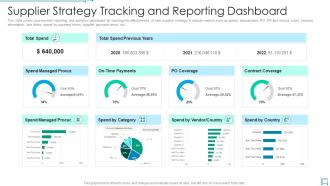
This slide covers procurement reporting and analytics dashboard for tracking the effectiveness of new supplier strategy. It include metrics such as spend, transactions, PO, PR and invoice count, invoices information, due dates, spend by payment terms, supplier payment terms, etc.
People who downloaded this PowerPoint presentation also viewed the following :
Supplier strategy tracking and reporting dashboard with all 7 slides:
Use our Supplier Strategy Tracking And Reporting Dashboard to effectively help you save your valuable time. They are readymade to fit into any presentation structure.





FAQs for Supplier strategy tracking
Start with defect rates and delivery times - those are your bread and butter metrics. Price variance matters too, obviously. Compliance scores might seem boring but trust me, they'll save your ass later when audits come around. I'd throw in supplier responsiveness because nothing's worse than radio silence when you need answers. Lead times and rejection percentages are solid additions. If your company cares about green stuff, add some sustainability tracking. Don't go crazy though - pick like 5-7 metrics that actually solve your biggest headaches with suppliers, then build from there once you've got those dialed in.
Honestly, data viz is a game changer for supplier stuff. Those endless spreadsheet rows? Turn them into charts and you'll actually see what's happening. Red flags pop up immediately when deliveries are late, green trends show quality getting better - way easier than staring at numbers all day. Heat maps are clutch for spotting which suppliers consistently suck across different metrics. Trend lines tell you if things are improving or going downhill. I'd start simple though - just pick your top 3-4 metrics for a basic dashboard. You'll catch problems so much faster it's not even funny.
Honestly, Power BI and Tableau are your best bets if you want something that looks good and handles messy data well. Excel still works great for basic stuff - don't let anyone shame you for it. Your ERP might already have dashboards built in, so check that first before you go crazy researching. Custom builds are tempting but probably way more work than you need. I'd actually start with whatever your company already pays for since learning new software is such a pain. My old boss tried to make us switch to three different tools in one year... nightmare. Stick with what works and what people actually know how to use.
Look, monthly updates are probably your best bet - quarterly formal reviews work great too. Daily tracking sounds cool but you'll burn out fast trying to watch everything constantly. Been there! Most teams I know do monthly data pulls, then dive deeper every quarter to spot trends and actually talk to suppliers who aren't cutting it. Real-time stuff like delivery tracking? Sure, if it's already automated. But honestly, start with whatever you can actually stick to. I've watched so many people build these amazing dashboards that just... sit there unused. Get the basics down first, then you can get fancy later.
Honestly, it's pretty straightforward once you know what to look for. Check their on-time delivery - anything above 95% is solid. Quality scores should be 98% or higher, and they need to stay within 2-3% of contracted prices. The good ones actually communicate before problems hit (such a game changer). Look for low return rates and minimal compliance issues too. Response times matter - they should hit whatever SLA you agreed on. If someone's hitting green across all these metrics for a few quarters straight, definitely invest more time in that relationship. Those suppliers are basically running your operations smoothly while you focus on other fires.
Set up real-time alerts for stuff like delayed shipments, quality problems, or when suppliers hit capacity issues - all right in your dashboard. A risk heat map is clutch here, shows you which suppliers or regions are struggling before it becomes your problem. Trend analysis helps too so you can track if things are getting messier over time. Oh and make sure your data feeds pull automatically from your ERP, supplier portals, maybe some external monitoring tools. Focus on whatever metrics actually move the needle for your business first.
Honestly, getting supplier feedback is game-changing for your metrics. Their input helps you figure out which KPIs actually matter vs just looking good on paper. Like, I've seen so many companies tracking stuff suppliers can't even control - what's the point? When they tell you about delivery issues or capacity problems, you can adjust expectations to be realistic. Do quarterly check-ins on whether your metrics make sense to them. Otherwise you're just creating a report card instead of something that drives real improvements. Trust me, it'll make your dashboard way more useful.
Look, that supplier data is basically like having a cheat sheet for your next deals. You'll start noticing which vendors actually show up when things get crazy busy, and which ones always have some excuse. Honestly, once you dig into it, the patterns are kind of obvious - cost spikes, quality dips, the works. Use that stuff when you're writing RFPs or renewing contracts. Smart buyers pull these reports monthly (or at least they should). It helps you figure out who's worth keeping around and who needs backup options. Makes negotiations way easier too.
Honestly, I'd start with industry benchmarks - see what other companies in your space are hitting for delivery times, quality, and costs. APQC has solid data if you can get access. You can also pit your suppliers against each other, which works surprisingly well. Track stuff like how fast they respond when things go wrong and basic invoice accuracy too. Oh, and don't go crazy with metrics right away. Pick maybe 3-4 to start or you'll drown in data. Once that's running smooth, then add more.
So first thing - set up automated validation rules that catch bad data before it even reaches your dashboard. Range checks, consistency tests, that kind of stuff. Document who owns which metrics too (seriously, you'll thank me later when people aren't pointing fingers). I do monthly spot checks against the original source systems - boring but necessary. Alerts for weird spikes help catch issues fast. Oh and make sure your data suppliers can easily report when something looks off. The whole feedback loop thing actually works. Clean data going in means you can trust what comes out.
Yeah, bad suppliers will totally wreck your business. Delayed shipments mess up your whole production schedule. Quality problems? Your customers start looking elsewhere fast. I've watched companies lose huge clients because one supplier screwed up a major delivery - honestly brutal to see. Plus you're constantly firefighting instead of actually growing your business. Costs go through the roof when you're scrambling for last-minute replacements. Everything gets affected too - inventory's a mess, customer satisfaction tanks. That's why I always tell people to track supplier metrics religiously. Catch the red flags early before they torpedo everything.
So basically it gives you and your suppliers the same scorecard to look at - no more weird quarterly calls where everyone's tiptoeing around problems. You've got all the data right there: delivery times, quality scores, cost savings, whatever matters most. Suppliers can see exactly how they're doing vs what you expect, so they fix stuff before it gets messy. The cool part is setting up automatic alerts when numbers start dropping. Way better than scrambling to deal with issues after they've already blown up. Honestly beats those awkward "so... how do you think things are going?" conversations.
Track delivery performance first - on-time rates tell you everything. Quality stuff like defect rates and returns matter too. Their credit score and payment history? Yeah, don't skip that. Compliance scores and audit findings will absolutely wreck you if you ignore them (learned that the hard way). Communication responsiveness is huge when things go sideways. Honestly, I'd rather work with someone who responds fast than someone with perfect metrics but goes radio silent. Build your dashboard around these basics. Watch trends, not just one-time snapshots - that's where you'll spot trouble brewing.
Honestly, dashboards make this so much easier than scrolling through endless spreadsheets (which I used to hate doing). You can instantly see your best suppliers - the ones hitting deadlines, keeping quality solid, and pricing competitively. Those are your goldmine partners right there. Watch for improvement trends too, or suppliers with skills that complement your other vendors. Sometimes the data surprises you with who's actually performing well versus who you think is. Use all that to figure out who deserves strategic partnerships or bigger contracts. Way more straightforward than the old guesswork approach.
So basically, these dashboards give you solid data to actually push suppliers for better performance. You can spot patterns showing where they're consistently screwing up, then bring those metrics into your conversations with them. The visual stuff works surprisingly well - nobody likes seeing their ranking at the bottom compared to everyone else. Plus you can track if they're actually improving over time and figure out what your top performers are doing right. I'd say the trick is making it collaborative though, not just pointing fingers. Share the data with them and work on fixing things together.
-
Great experience, I would definitely use your services further.
-
Awesomely designed templates, Easy to understand.