

Swimlane Flowchart Powerpoint Ppt Template Bundles





Try Before you Buy Download Free Sample Product
 Impress Your
 Audience
 100%
100% Editable
 Save Hours
 of Time


Our Swimlane Flowchart Powerpoint Ppt Template Bundles are topically designed to provide an attractive backdrop to any subject. Use them to look like a presentation pro.
People who downloaded this PowerPoint presentation also viewed the following :
Swimlane Flowchart Powerpoint Ppt Template Bundles with all 17 slides:
Use our Swimlane Flowchart Powerpoint Ppt Template Bundles to effectively help you save your valuable time. They are readymade to fit into any presentation structure.

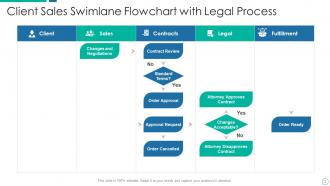
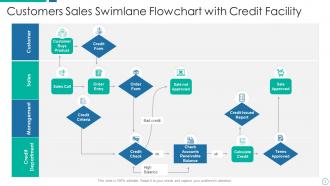
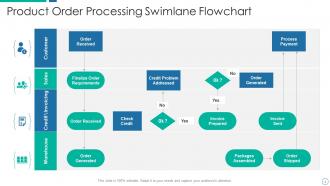
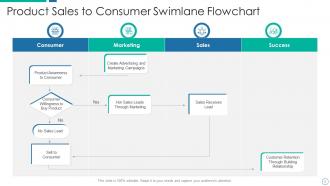
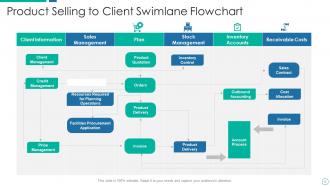
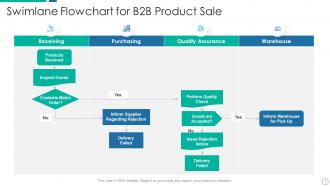
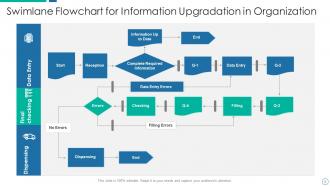
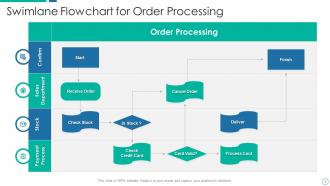






FAQs for Swimlane Flowchart Powerpoint
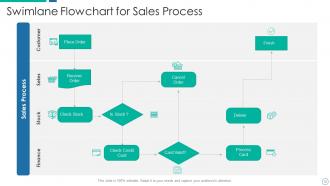
So basically, swimlanes show who does what in your process. Picture a pool - each lane belongs to a different person or team. You draw your flowchart with these lanes (horizontal or vertical) and suddenly it's obvious where one department hands stuff off to another. Honestly, it's a game-changer for spotting where things get stuck or when nobody knows whose turn it is. I use them all the time now because they kill that awkward "um, isn't this your job?" moment. Way better than those messy flowcharts where everything's just floating around randomly.
So regular flowcharts just show the steps in order, right? But swimlane flowcharts actually divide everything into "lanes" - each one shows who's doing what. Think of it like... you know those pool lanes but for work processes lol. Honestly, they're way better when multiple teams are involved. You can instantly see where one department hands stuff off to another, plus it makes bottlenecks super obvious. I used to hate making flowcharts but these actually make sense. Try it next time you're mapping something with different people - you'll see what I mean about how much clearer it gets.
Honestly, swimlane flowcharts are amazing when you've got multiple people or departments handling different parts of a process. Customer onboarding, order fulfillment, approval workflows - anything where tasks get passed between teams. You can actually see where things break down or get stuck, which is super helpful. They're perfect for cleaning up messy processes too. New team members love them because they finally understand how everything connects (I wish more companies used these for onboarding, tbh). I'd start with whatever your most chaotic cross-team process is - you'll probably be shocked at what you discover.
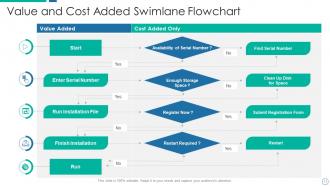
Start by figuring out your roles first - that's honestly the easiest part. Each swim lane should be one person or department, not some weird combo that confuses everyone. Then drop in your process steps using rectangles, decision points with diamonds, and clear start/finish markers. Flow should go left to right with arrows connecting everything. I always make my text short but detailed enough so someone totally new could actually follow it. Trust me, I've seen way too many charts where nobody knows who's supposed to do what because the lanes overlap.
Honestly, swimlane flowcharts are a game-changer for avoiding those "wait, whose job is this?" disasters. Each person gets their own lane, so you can see exactly where work gets passed between teammates. No more confusion about handoffs. The visual layout makes it super obvious when there's a bottleneck too - like when Sarah's always the hold-up because she's swamped (we all know a Sarah). Short story: everyone knows their role AND sees how it connects to the big picture. Definitely worth trying at your next kickoff meeting.
Honestly, just start with Draw.io since it's free and has decent swimlane templates. Lucidchart is probably my top pick though - way better auto-formatting so you're not constantly fixing alignment (that stuff drives me crazy). If your company's already paying for Microsoft stuff, Visio works but feels pretty dated. Miro's cool for team collaboration, same with Figma if you're into that. I'd mess around with Draw.io first to see if it does what you need, then maybe upgrade to Lucidchart later if you want something cleaner.
Yeah, swimlanes are clutch for that kind of stuff! Each team gets their own lane so you can actually see who does what and when. I've used them for some seriously messy processes before - like ones that bounce between IT, finance, and operations. Works great because the handoffs become super obvious. You'll spot bottlenecks way faster too. Only thing is don't create like 8+ lanes or it turns into visual chaos (learned that one the hard way). Start simple with your main teams and build from there. Honestly makes cross-departmental work so much clearer.
Just match your swimlanes to whoever's actually doing the work - each role or department gets one. Don't bother making lanes for people who barely touch the process, that's just visual clutter. Most processes work great with 3-6 lanes. Got 8 or more? Yeah, that's usually a sign you need to split things up or group similar roles together. I learned this the hard way after making some ridiculously crowded flowcharts early on. Each lane should have real activity happening, not just one lonely step floating there. Complex stuff might need more lanes, but honestly, simpler is almost always better for actually getting people to use your flowchart.
Don't cram everything into one lane - it gets messy fast. Make sure each swimlane has a clear owner too. The worst thing? When the flow ping-pongs between lanes for no reason. Drives me crazy when I see that! Your arrows should mostly go left to right and make logical sense. Oh, and those handoffs between departments need to be super obvious or people get lost. I'd say start with a basic version first, then pile on the details once you've got the flow right. Way easier than trying to perfect everything at once.
So basically, look for where work piles up in one lane while others are empty - that's your bottleneck right there. When I did this at my last job, it was crazy obvious once we mapped it out! Time each step if you can, because the slow ones will jump out at you. Also check those handoffs between departments - they're usually where things get stuck for no good reason. The visual really helps. You'll start seeing patterns pretty quick, like when Bob from accounting becomes everyone's favorite chokepoint (sorry Bob). Short version: full lanes = problem areas, empty lanes = wasted capacity.
Honestly, color coding makes swimlanes so much easier to read. Give each department their own color and boom - you can instantly see who's responsible for what. Way better than trying to read those tiny labels everywhere. I usually stick to maybe 4-5 colors tops because more than that gets messy real quick. When you've got complex processes with tons of handoffs between teams, this saves everyone's sanity. Your stakeholders can just follow their color through the whole process without getting lost. It's like having a built-in roadmap that actually works.
Dude, swimlane flowcharts are a game-changer for training new people. They show exactly who handles what at each step - way better than dumping some massive manual on someone's desk. Your new hires can actually see how their role fits with everyone else's. I seriously wish my old boss had used these instead of those boring orientation packets. Walk through it during training, then they've got a visual reference guide. Much easier to follow than reading paragraphs of procedures. Plus people actually remember visual stuff better anyway.
Honestly, I'd set up quarterly reviews - that timing works for most teams. Update it whenever stuff actually changes, not just when you randomly remember it exists lol. Too many of these things just become fancy wall art because nobody maintains them. Give ownership to whoever runs the process daily. Date everything and use version control so you can see what changed. Here's the thing though - talk to people actually doing the work. They'll spot the gaps you totally missed. Treat it like living documentation that evolves, not some one-time project you check off and forget.
Swimlane flowcharts work great in Agile - just map your user stories across different team roles. During sprint planning, they help spot bottlenecks before they bite you. What I really like is how they show cross-functional stuff clearly, like when a story bounces between dev, QA, and the product owner. Update them in retrospectives to keep improving your process. Oh, and definitely make templates for your common story types - saves so much time later. New team members pick up workflows way faster with these visual guides too.
Track your completion times and error rates before you roll out the swimlane chart, then check again monthly. Honestly, the visual setup makes bottlenecks way more obvious than I expected when I first tried this. Time how long stuff sits between handoffs - that's where you'll find your biggest delays. Employee feedback is huge too since they're the ones actually using it. Oh, and don't forget to measure each department's cycle time separately. Resource utilization matters, but I'd focus on the time metrics first since those usually show the clearest improvements. Just make sure you've got solid baseline numbers to compare against.
-
Presentation Design is very nice, good work with the content as well.
-
Great designs, Easily Editable.