

Task Completion Powerpoint PPT Template Bundles




Try Before you Buy Download Free Sample Product
 Impress Your
 Audience
 100%
100% Editable
 Save Hours
 of Time


Our Task Completion Powerpoint PPT Template Bundles are topically designed to provide an attractive backdrop to any subject. Use them to look like a presentation pro.
People who downloaded this PowerPoint presentation also viewed the following :
Task Completion Powerpoint PPT Template Bundles with all 17 slides:
Use our Task Completion Powerpoint PPT Template Bundles to effectively help you save your valuable time. They are readymade to fit into any presentation structure.






FAQs for Task Completion Powerpoint
So for your completion template, start with a title slide and timeline showing all your milestones. Color code everything - green for done, yellow for working on it, red for behind schedule. That part's honestly a lifesaver. Write up what you actually finished vs what you planned (people always mess this up). Don't cram too much on each slide or everyone will tune out. Oh, and add sections for your key numbers, any roadblocks you hit, plus what's coming next. Stakeholder shout-outs and resource breakdown too if you've got space.
Dude, visuals are a game changer for those presentations. Nobody wants to stare at endless bullet points - I literally watch people's eyes glaze over when that happens. Try progress bars or simple checkboxes to show what's finished vs what's still hanging. Timelines work great too. Charts are clutch if you've got metrics or deadlines to share. The trick is picking visuals that actually match your content type, not just random graphics. Honestly, even basic icons beat another text wall. Your audience will thank you for making it easier to follow along.
Honestly, just go with blues and grays - they look professional and won't distract anyone. Green's pretty good too since it screams "we got stuff done!" I'd stay away from bright reds though, makes everything feel like there's some crisis happening. Which is probably not the vibe you want, right? Dark text on white backgrounds is boring but foolproof. Oh, and pick one accent color for your big wins or completed milestones. Keeps things clean without looking like a rainbow exploded on your slides.
Yeah so most industries just change up the words and throw in their own steps. Healthcare adds all those compliance boxes and patient safety stuff. Tech teams focus more on sprints and bug fixes. Construction ones are honestly crazy detailed - they've got safety checks and permits for everything. Marketing agencies switch it up for campaign stages and client approvals. The basic structure doesn't really change though. You just need to customize the status labels and add whatever specific stuff your team actually cares about. I'd start simple and tweak the labels as you go.
Honestly, just make sure it has checkboxes or some kind of progress bar so you can actually see you're getting stuff done. The formatting should be clean - nothing fancy that hurts to look at. I'm obsessed with drag-and-drop features if you can swing it, makes rearranging tasks way easier. Label everything in normal language, not weird business speak. Auto features are super helpful too, like timestamps when you finish things. Keep the layout simple enough that you won't get confused later. Oh, and definitely test it on something small first - you'd be surprised how many "time-saving" systems just create more headaches.
Honestly, visuals are a game changer for project stuff. Instead of drowning people in bullet points, throw in some Gantt charts or progress bars. People can actually *see* how everything connects and where things are getting stuck. I've noticed stakeholders way prefer spotting problems at a glance vs. digging through walls of text - makes sense, right? Your brain just processes visual stories better than paragraphs of deadlines and updates. Even simple timeline graphics work. Trust me, your next status meeting won't be nearly as painful when everyone can follow along without squinting at dense project docs.
Definitely start with an overview slide - shows your objective and where things stand right now. Break your progress into chunks: what's done, what's tricky, what's next. Timeline slides are clutch because people love seeing deadlines laid out visually. One main point per slide, and use bullet points instead of paragraphs (nobody's reading walls of text during meetings, let's be real). Wrap up with what you actually need from them - decisions, feedback, whatever. Oh, and throw in a questions slide at the end so discussion doesn't go completely off the rails.
For milestones, use shapes that really pop - diamonds, stars, whatever catches your eye instead of boring bullet points. I'm obsessed with making mine bright colors because honestly, if people can't spot the big wins quickly, what's the point? Drop them at major project phases where deliverables or big decisions happen. Each one needs the milestone name, target date, and what "done" actually looks like. Keep them measurable so there's zero confusion about whether you hit it or not. Stick to maybe 3-5 max per project - more than that and everything starts feeling like a milestone.
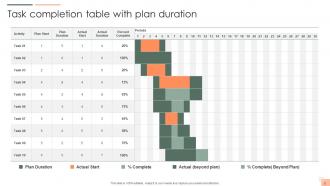
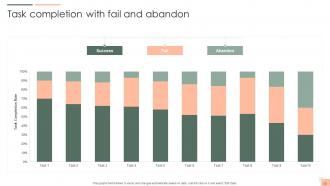
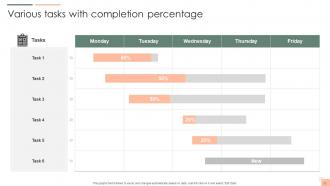
Gantt charts are your best friend for tracking task progress - they show everything at once: timelines, what depends on what, and where you're at. Progress bars work really well too, especially for individual tasks since people get them instantly. You can throw in some pie charts for overall completion, but honestly don't go crazy with those. I'd skip the fancy scatter plots unless you're actually tracking something over time. The key is keeping it simple so people can look at it and immediately know if you're on track or totally screwed.
So I always set up specific slides just for collaboration stuff - like brainstorming sections and spots where people can leave comments without screwing up your actual presentation. Google Slides works great since everyone can jump in at once. Oh, and definitely add a "parking lot" slide for all those random ideas that always pop up in meetings (trust me on this one). Break it into clear sections so people know what they're supposed to update. Makes everything way less chaotic when multiple people are working on it.
Dude, typography makes or breaks those task completion slides. People need to actually READ your instructions, right? I've watched presentations crash because someone thought cursive fonts looked "elegant" - spoiler alert, they didn't. Use consistent heading sizes so people know what's important. Bold the key actions they need to take. Give everything room to breathe with white space. Nobody wants to squint at cramped text when they're trying to follow steps. Honestly, just pick something clean and simple. Your audience will thank you, and way more people will actually complete the tasks.
Honestly, templates just save you from staring at a blank slide forever. They give you that solid challenge → approach → execution → results flow, which is exactly how people want to hear about your work anyway. I mean, your brain already thinks in that structure when you're telling someone about a project. The pre-built framework keeps you focused on the big wins instead of getting stuck on random details that don't matter. Your stakeholders can actually follow along because it feels natural to them. Just don't copy-paste everything - definitely customize it to show off your specific accomplishments and what you learned.
Honestly, the worst thing you can do is jam too much text onto each slide - people's eyes just glaze over. Keep those task updates short and visual. Also, don't just slap your info into whatever template you found without tweaking it first. I've watched people do this and it looks so obviously copy-pasted, which is kind of embarrassing? Update your progress regularly instead of panicking the night before your presentation. Oh, and make sure someone's name is attached to each task with actual deadlines. Treat the whole thing like it's supposed to evolve, not something you fill out once and forget about.
Start with your slide master - seriously, this will save you so much headache later. Lock in your company colors, fonts, and logo spots right from the beginning. I'm always pulling up our brand guidelines while I work on these, honestly can't recommend it enough. Your headers and bullet points should match across everything, plus keep your progress bars consistent too. Oh and set up a few standard layouts for different content types - that way anyone can jump in and add their stuff without breaking the design. Save as a .potx file and you're golden for future projects.
Honestly, just bake the feedback right into your template. Rating scales work great for scoring task difficulty and time estimates. Throw in a "lessons learned" box too - that's usually where people drop the really useful stuff. Dropdown menus are clutch for tracking common issues or wins. For longer projects, those red/yellow/green status indicators that auto-update are pretty slick. But here's the thing - don't go overboard. Start with maybe 2-3 feedback points max, otherwise people won't bother. The whole point is making it feel seamless, not like they're filling out some annoying survey every time.
-
SlideTeam offers so many variations of designs and topics. It’s unbelievable! Easy to create such stunning presentations now.
-
I never had to worry about creating a business presentation from scratch. SlideTeam offered me professional, ready-made, and editable presentations that would have taken ages to design.